Azure-pipelines-tasks: Azure App Service Deployment: Linux preview deployment issue
I am trying to make sense of the deployment task when it comes to deploying a .net Core 1.1 web app to a Azure App Service Linux plan. I have set up the azure web app with the default container settings (built-in)

Now I want to configure the VSTS deployment task and I am stuck here. I have no clue what to put in there. I know this is preview but maybe anyone can give me a hint.

 hoetz
hoetz
All 14 comments
For built in source the deployment to Web App on Linux will be similar to that of an App service. You will have to build the .NET Core app (restore, build, publish commands) and then use the VSTS App service deploy task.
There is one glitch we are trying to fix. Right now we detect if the app is an App service or Web app on Linux and based on that we change the UI of the task. If you are using built in source then switch to an app service in the dropdown (app service name dropdown) and then type or paste the name of web app on linux.

If you plan to use Docker Hub or private registry then follow the steps in the blog. https://blogs.msdn.microsoft.com/visualstudioalm/2017/05/10/use-azure-portal-to-setup-continuous-delivery-for-web-app-on-linux/
 azooinmyluggage
on 19 May 2017
azooinmyluggage
on 19 May 2017
I am still not sure what to type into Registry & Repository. From what I see you have to use containers when doing App Service on Linux so I selected built-in as an image source. When I just type "foobar" into the fields the task starts, the app builds and deploys to the linux web app but nothing happens. I am missing something here and it's got to do with containers :)
At the moment I don't want to use docker or containers at this point, I just want to push the app to azure but the VSTS task forces me to fill in the container registry and repository fields.
hoetz
on 19 May 2017
Built-in Source
When using built-in source the container deployment is done without exposing its complexity to the user.
That is why I said the deployment is done exactly like App service. You will have to build the .NET Core app (restore, build, publish commands) and then use the VSTS App service deploy task. Right now we detect if the app is an App service or Web app on Linux and based on that we change the UI of the task. If you are using built in source then switch to an app service in the dropdown (app service name dropdown) and then type or paste the name of web app on linux.
We will fix the issue in our task shortly.
Docker Hub and Private Container registry.
The UI you see in the VSTS task right now is tailored towards the scenario when your Web App on Linux is configured for Docker Hub or Private Registry source.
The blog link I shared explains how to setup build and release for Web App on Linux by using Docker Hub and Private Container registry.
You can create an Azure Container Registry https://docs.microsoft.com/en-us/azure/container-registry/container-registry-get-started-portal
And then use it with Web App on Linux https://docs.microsoft.com/en-us/azure/app-service-web/app-service-linux-using-custom-docker-image
The values you enter while configuring web on Linux to use Private registry is the value you need to enter in the VSTS task as well.
This is a bit confusing and we are working on fixing this end to end as wel as adding more documentation. If you are still facing issues I will be happy to help by getting in a short call/chat.
azooinmyluggage
on 19 May 2017
Ok, so currently the VSTS tasks does not work with built-in image only with docker hub or private registry, right?
hoetz
on 19 May 2017
So i think the best way is to use the CI option from the azure portal at the moment. It creates a CI release definition in VSTS. I manually created a build definition in VSTS with dotnet restore, build etc. and I think all the pieces are not there yet for simple deployment to the linux app service. I'll keep an eye on this :)
hoetz
on 20 May 2017
The only missing piece is support for built-in source option. The task will support built-in source option shortly.
Is it working end to end for you now?
azooinmyluggage
on 22 May 2017
The task has the capability and there is a UI issue we need to fix. I gave a work around:
_Right now we detect if the app is an App service or Web app on Linux and based on that we change the UI of the task. If you are using built in source then switch to an app service in the dropdown (app service name dropdown) and then type or paste the name of web app on linux._
azooinmyluggage
on 22 May 2017
Closing the issue for now.
azooinmyluggage
on 31 May 2017
This issue should absolutely not be closed. I am having the same drama, and the workaround does not work. Deploying a VSTS package to linux without going the private registry route to Linux app services is a no-go at the moment.
 tylerjwatson
on 25 Jul 2017
tylerjwatson
on 25 Jul 2017
The issue still exists as of December...
 rjstalb
on 5 Dec 2017
rjstalb
on 5 Dec 2017
We ended up migrating off of azure for our entire app stack. It’s a minefield of issues like this and not worth the effort. We now run containers on private infrastructure and it works flawlessly for an eighth of the price.
tylerjwatson
on 5 Dec 2017
Awesome. We are contemplating the same. As for the above, we're temporarily biting the bullet and build/deploying to a windows-hosted service. Would love to hear more about your alt infrastructure... :)
rjstalb
on 6 Dec 2017
@tylerjwatson can you be more specific on the issues you hit? In the case of the Built In source I see it in my account but it is possible there is something wrong in your scale unit or account for this task that we could look into.
 chrispat
on 6 Dec 2017
chrispat
on 6 Dec 2017
@tylerjwatson @rjstalb
Thanks for the feedback, sorry to hear that you are still facing issues.
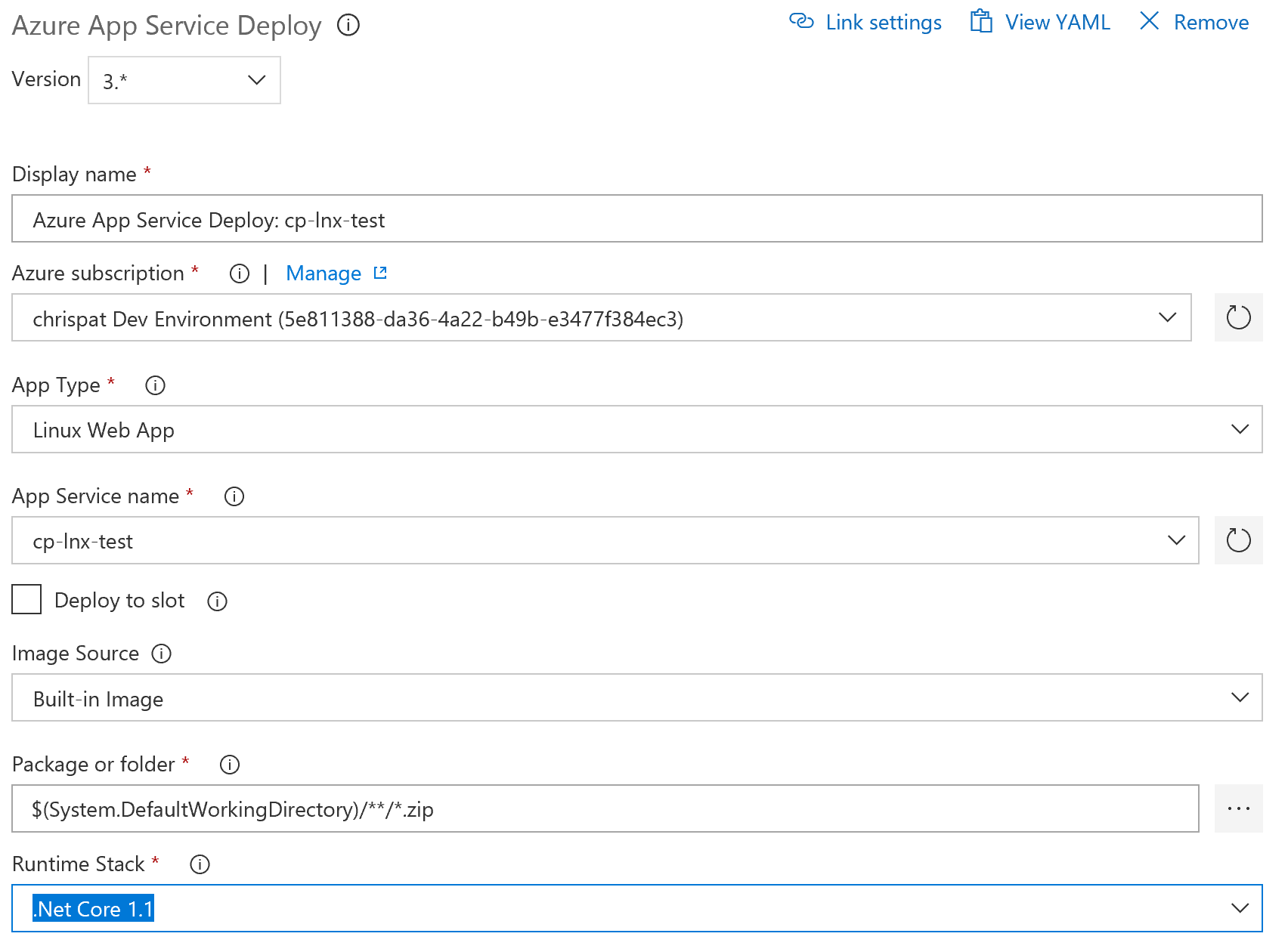
We have fixed the task with support for built-in source support and a cleaner UI. Check the screenshot posted by @chrisrpatterson. Now both options are supported:
- Web App on Linux (built-in source)
- Web App for Containers
I will be happy to help if even the updated task is not resolving your issues. You also mentioned that now you are running containers on private infrastructure. Can you please let me know if you faced issues with Container Registry based deployments as well?
azooinmyluggage
on 6 Dec 2017
Related issues
 montebhoover
·
3Comments
montebhoover
·
3Comments
 pharring
·
3Comments
pharring
·
3Comments
 divyesh-parikh
·
3Comments
divyesh-parikh
·
3Comments
 ThomasBarnekow
·
3Comments
ThomasBarnekow
·
3Comments
 NatMarchand
·
3Comments
NatMarchand
·
3Comments
Most helpful comment
We ended up migrating off of azure for our entire app stack. It’s a minefield of issues like this and not worth the effort. We now run containers on private infrastructure and it works flawlessly for an eighth of the price.