Azure-pipelines-tasks: App Service Publish: An error was encountered when processing operation 'Delete Directory' on 'D:\home\site\wwwroot\App_Data\jobs'.
The Azure App Service Deploy build task (2.*) is failing with the following:
2017-04-25T16:43:52.5663012Z ##[error]Failed to deploy App Service.
2017-04-25T16:43:52.5663012Z ##[debug]System.DefaultWorkingDirectory=C:\agent_work\2\s
2017-04-25T16:43:52.5810320Z ##[error]Error: (4/25/2017 6:43:52 PM) An error occurred when the request was processed on the remote computer.
2017-04-25T16:43:52.5810320Z Error: An error was encountered when processing operation 'Delete Directory' on 'D:\home\site\wwwroot\App_Data\jobs'.
2017-04-25T16:43:52.5810320Z Error: The error code was 0x80070091.
2017-04-25T16:43:52.5810320Z Error: The directory is not empty.
2017-04-25T16:43:52.5810320Z at Microsoft.Web.Deployment.NativeMethods.RaiseIOExceptionFromErrorCode(Win32ErrorCode errorCode, String maybeFullPath)
2017-04-25T16:43:52.5810320Z at Microsoft.Web.Deployment.DirectoryEx.Delete(String path)
2017-04-25T16:43:52.5810320Z at Microsoft.Web.Deployment.DirPathProviderBase.Delete(Boolean whatIf)
2017-04-25T16:43:52.5810320Z Error count: 1.
There is an empty folder 'continuous' in the 'D:\home\site\wwwroot\App_Data\jobs' directory but that's it. I have to manually delete this folder to proceed with deployment, and this isn't the first time this has happened.
Why might this be occurring?
Note: we do not have any web jobs in our deployment.
 davenewza
All 38 comments
@davenewza, thanks for reporting the issue.
Can you please share the whole log for our reference ?
 vincent1173
on 27 Apr 2017
vincent1173
on 27 Apr 2017
2017-04-26T07:58:59.3720008Z Set workingFolder to default: C:\agent\tasks\AzureRmWebAppDeployment\2.1.12
2017-04-26T07:58:59.5594787Z ##[debug]agent.workFolder=C:\agent_work
2017-04-26T07:58:59.5594787Z ##[debug]loading inputs and endpoints
2017-04-26T07:58:59.5594787Z ##[debug]loading ENDPOINT_AUTH_xyz
2017-04-26T07:58:59.5594787Z ##[debug]loading ENDPOINT_AUTH_9E219367-61EE-4FAD-8ADB-10B1F0F41CF4
2017-04-26T07:58:59.5594787Z ##[debug]loading ENDPOINT_AUTH_D6623BD0-FCC9-4C7D-A530-64E919E3A5E3
2017-04-26T07:58:59.5594787Z ##[debug]loading ENDPOINT_AUTH_PARAMETER_xyz_SERVICEPRINCIPALID
2017-04-26T07:58:59.5594787Z ##[debug]loading ENDPOINT_AUTH_PARAMETER_xyz_SERVICEPRINCIPALKEY
2017-04-26T07:58:59.5594787Z ##[debug]loading ENDPOINT_AUTH_PARAMETER_xyz_TENANTID
2017-04-26T07:58:59.5594787Z ##[debug]loading ENDPOINT_AUTH_PARAMETER_9E219367-61EE-4FAD-8ADB-10B1F0F41CF4_ACCESSTOKEN
2017-04-26T07:58:59.5594787Z ##[debug]loading ENDPOINT_AUTH_PARAMETER_D6623BD0-FCC9-4C7D-A530-64E919E3A5E3_CERTIFICATE
2017-04-26T07:58:59.5594787Z ##[debug]loading ENDPOINT_AUTH_PARAMETER_SYSTEMVSSCONNECTION_ACCESSTOKEN
2017-04-26T07:58:59.5594787Z ##[debug]loading ENDPOINT_AUTH_SCHEME_xyz
2017-04-26T07:58:59.5594787Z ##[debug]loading ENDPOINT_AUTH_SCHEME_9E219367-61EE-4FAD-8ADB-10B1F0F41CF4
2017-04-26T07:58:59.5594787Z ##[debug]loading ENDPOINT_AUTH_SCHEME_D6623BD0-FCC9-4C7D-A530-64E919E3A5E3
2017-04-26T07:58:59.5594787Z ##[debug]loading ENDPOINT_AUTH_SCHEME_SYSTEMVSSCONNECTION
2017-04-26T07:58:59.5594787Z ##[debug]loading ENDPOINT_AUTH_SYSTEMVSSCONNECTION
2017-04-26T07:58:59.5594787Z ##[debug]loading INPUT_CONNECTEDSERVICENAME
2017-04-26T07:58:59.5594787Z ##[debug]loading INPUT_DEPLOYTOSLOTFLAG
2017-04-26T07:58:59.5594787Z ##[debug]loading INPUT_EXCLUDEFILESFROMAPPDATAFLAG
2017-04-26T07:58:59.5594787Z ##[debug]loading INPUT_PACKAGE
2017-04-26T07:58:59.5594787Z ##[debug]loading INPUT_REMOVEADDITIONALFILESFLAG
2017-04-26T07:58:59.5594787Z ##[debug]loading INPUT_SETPARAMETERSFILE
2017-04-26T07:58:59.5594787Z ##[debug]loading INPUT_TAKEAPPOFFLINEFLAG
2017-04-26T07:58:59.5594787Z ##[debug]loading INPUT_USEWEBDEPLOY
2017-04-26T07:58:59.5594787Z ##[debug]loading INPUT_WEBAPPNAME
2017-04-26T07:58:59.5594787Z ##[debug]loaded 23
2017-04-26T07:58:59.6376033Z ##[debug]AZURE_HTTP_USER_AGENT=VSTS_xyz_build_67_12861
2017-04-26T07:58:59.8094789Z ##[debug]AZURE_HTTP_USER_AGENT=VSTS_xyz_build_67_12861
2017-04-26T07:58:59.8094789Z ##[debug]check path : C:\agent\tasks\AzureRmWebAppDeployment\2.1.12\task.json
2017-04-26T07:58:59.8094789Z ##[debug]set resource file to: C:\agent\tasks\AzureRmWebAppDeployment\2.1.12\task.json
2017-04-26T07:58:59.8094789Z ##[debug]system.culture=en-US
2017-04-26T07:58:59.8094789Z ##[debug]ConnectedServiceName=xyz
2017-04-26T07:58:59.8094789Z ##[debug]WebAppName=myapplication-dev-webapp
2017-04-26T07:58:59.8094789Z ##[debug]DeployToSlotFlag=false
2017-04-26T07:58:59.8094789Z ##[debug]ResourceGroupName=null
2017-04-26T07:58:59.8094789Z ##[debug]SlotName=null
2017-04-26T07:58:59.8094789Z ##[debug]Package=C:\agent_work\2\a\myapplication.Api.zip
2017-04-26T07:58:59.8251033Z ##[debug]VirtualApplication=null
2017-04-26T07:58:59.8251033Z ##[debug]UseWebDeploy=true
2017-04-26T07:58:59.8251033Z ##[debug]SetParametersFile=C:\agent_work\2\s
2017-04-26T07:58:59.8251033Z ##[debug]RemoveAdditionalFilesFlag=true
2017-04-26T07:58:59.8251033Z ##[debug]ExcludeFilesFromAppDataFlag=false
2017-04-26T07:58:59.8251033Z ##[debug]TakeAppOfflineFlag=false
2017-04-26T07:58:59.8251033Z ##[debug]AdditionalArguments=null
2017-04-26T07:58:59.8251033Z ##[debug]WebAppUri=null
2017-04-26T07:58:59.8251033Z ##[debug]XmlTransformsAndVariableSubstitutions=null
2017-04-26T07:58:59.8251033Z ##[debug]XdtTransformation=null
2017-04-26T07:58:59.8251033Z ##[debug]JSONVariableSubstitutionsFlag=null
2017-04-26T07:58:59.8251033Z ##[debug]JSONVariableSubstitutions=null
2017-04-26T07:58:59.8251033Z ##[debug]VariableSubstitution=null
2017-04-26T07:58:59.8251033Z xyz exists true
2017-04-26T07:58:59.8251033Z ##[debug]xyz exists true
2017-04-26T07:58:59.8251033Z ##[debug]xyz auth param serviceprincipalid = xyz
2017-04-26T07:58:59.8251033Z ##[debug]xyz auth param serviceprincipalkey = *
2017-04-26T07:58:59.8251033Z ##[debug]xyz auth param tenantid = xyz
2017-04-26T07:58:59.8251033Z ##[debug]xyz data subscriptionid = xyz
2017-04-26T07:58:59.8251033Z ##[debug]xyz=https://management.azure.com/
2017-04-26T07:58:59.8251033Z ##[debug]check path : C:\agent_work\2\a\myapplication.Api.zip
2017-04-26T07:58:59.8251033Z ##[debug]Requesting for Auth Token: https://login.windows.net/xyz/oauth2/token/
2017-04-26T07:59:00.0439122Z ##[debug]Requesting AzureRM Web App ID: https://management.azure.com/subscriptions/xyz/resources?$filter=resourceType EQ 'Microsoft.Web/Sites' AND name EQ 'myapplication-dev-webapp'&api-version=2016-07-01
2017-04-26T07:59:00.8248281Z ##[debug]Web App details : /subscriptions/xyz/resourceGroups/myapplication-dev-group/providers/Microsoft.Web/sites/myapplication-dev-webapp
2017-04-26T07:59:00.8248281Z ##[debug]AzureRM Resource Group Name : myapplication-dev-group
2017-04-26T07:59:00.8248281Z ##[debug]Requesting for Auth Token: https://login.windows.net/xyz/oauth2/token/
2017-04-26T07:59:01.0134221Z ##[debug]Requesting AzureRM Publish Profile: https://management.azure.com/subscriptions/xyz/resourceGroups/myapplication-dev-group/providers/Microsoft.Web/sites/myapplication-dev-webapp/publishxml?api-version=2015-08-01
2017-04-26T07:59:02.3230140Z Got connection details for Azure App Service:'myapplication-dev-webapp'
2017-04-26T07:59:02.3386657Z ##[debug]SetParametersFile=C:\agent_work\2\s
2017-04-26T07:59:02.3386657Z ##[debug]Absolute path for pathSegments: C:\agent_work\2\s = C:\agent_work\2\s
2017-04-26T07:59:02.3386657Z ##[debug]build.sourcesDirectory=C:\agent_work\2\s
2017-04-26T07:59:02.3386657Z ##[debug]Absolute path for pathSegments: C:\agent_work\2\s = C:\agent_work\2\s
2017-04-26T07:59:02.3386657Z ##[debug]SetParametersFilepath supplied :false
2017-04-26T07:59:02.4636396Z ##[debug]Is the package an msdeploy package : false
2017-04-26T07:59:02.4636396Z ##[debug]System.DefaultWorkingDirectory=C:\agent_work\2\s
2017-04-26T07:59:02.4636396Z ##[debug]Absolute path for pathSegments: C:\Program Files (x86)\IIS\Microsoft Web Deploy V3\/msdeploy = C:\Program Files (x86)\IIS\Microsoft Web Deploy V3\msdeploy
2017-04-26T07:59:02.4636396Z ##[debug]check path : C:\Program Files (x86)\IIS\Microsoft Web Deploy V3\msdeploy.exe
2017-04-26T07:59:02.4636396Z ##[debug]msdeploy=C:\Program Files (x86)\IIS\Microsoft Web Deploy V3\msdeploy.exe
2017-04-26T07:59:02.4636396Z ##[debug]C:\Program Files (x86)\IIS\Microsoft Web Deploy V3\msdeploy.exe arg: -verb:getParameters -source:package='C:\agent_work\2\a\myapplication.Api.zip'
2017-04-26T07:59:02.4636396Z ##[debug]C:\Program Files (x86)\IIS\Microsoft Web Deploy V3\msdeploy.exe arg: -verb:getParameters -source:package='C:\agent_work\2\a\myapplication.Api.zip'
2017-04-26T07:59:02.4636396Z ##[debug]exec tool: C:\Program Files (x86)\IIS\Microsoft Web Deploy V3\msdeploy.exe
2017-04-26T07:59:02.4636396Z ##[debug]exec tool: C:\Program Files (x86)\IIS\Microsoft Web Deploy V3\msdeploy.exe
2017-04-26T07:59:02.4636396Z ##[debug]Arguments:
2017-04-26T07:59:02.4636396Z ##[debug]Arguments:
2017-04-26T07:59:02.4636396Z ##[debug] -verb:getParameters
2017-04-26T07:59:02.4636396Z ##[debug] -verb:getParameters
2017-04-26T07:59:02.4636396Z ##[debug] -source:package='C:\agent_work\2\a\myapplication.Api.zip'
2017-04-26T07:59:02.4636396Z ##[debug] -source:package='C:\agent_work\2\a\myapplication.Api.zip'
2017-04-26T07:59:02.4636396Z [command]"C:\Program Files (x86)\IIS\Microsoft Web Deploy V3\msdeploy.exe" -verb:getParameters -source:package='C:\agent_work\2\a\myapplication.Api.zip'
2017-04-26T07:59:02.7292660Z
davenewza
on 27 Apr 2017
We have this happening on another web app now.
davenewza
on 28 Apr 2017
@davenewza , We are currently tracking this issue and analyzing the root cause.
As a workaround, Can you please disable 'Remove Additional Files at destination' option ?
vincent1173
on 28 Apr 2017
Will do. Thank you for the update.
davenewza
on 28 Apr 2017
Started to get the same error on a series of VSTS releases as well last week. We noticed that deleting the application insights extension through kudu and adding it back seemed to fix the issue for a single deploy.
 scottmishra
on 3 May 2017
scottmishra
on 3 May 2017
Note that we don't use the Application Insights extension on our web apps (although we do deploy the relevant DLLs with our application binaries)
davenewza
on 4 May 2017
@davenewza , Can you try enabling App Offline feature and rerun the release ?
It would be better , if you can stop the App Service, Deploy your package and start it using Azure App Service Manage Task.
vincent1173
on 19 May 2017
@davenewza any update?
 mvvsubbu
on 23 May 2017
mvvsubbu
on 23 May 2017
Still an issue it seems after adding <SkipExtraFilesOnServer>False</SkipExtraFilesOnServer> in all publishing profiles. Rolling back our implementation of Application Insights integration. Sample msdeploy log file:
Info: Deleting file (iiq-dev-web-deploy-01\App_Data\jobs\continuous\ApplicationInsightsProfiler2\ApplicationInsightsProfiler.exe).
Info: Deleting file (iiq-dev-web-deploy-01\App_Data\jobs\continuous\ApplicationInsightsProfiler2\ApplicationInsightsProfiler.exe.config).
Info: Deleting directory (iiq-dev-web-deploy-01\App_Data\jobs\continuous\ApplicationInsightsProfiler2).
Info: Deleting directory (iiq-dev-web-deploy-01\App_Data\jobs\continuous).
EXEC : error : (5/24/2017 12:08:17 PM) An error occurred when the request was processed on the remote computer. [F:\Jenkins\Workspaces\iiQ - Development\Spark.Deployment\SparkWeb.msbuild]
EXEC : error : An error was encountered when processing operation 'Delete Directory' on 'D:\home\site\wwwroot\App_Data\jobs\continuous'. [F:\Jenkins\Workspaces\iiQ - Development\Spark.Deployment\SparkWeb.msbuild]
EXEC : error : The error code was 0x80070091. [F:\Jenkins\Workspaces\iiQ - Development\Spark.Deployment\SparkWeb.msbuild]
EXEC : error : The directory is not empty. [F:\Jenkins\Workspaces\iiQ - Development\Spark.Deployment\SparkWeb.msbuild]
at Microsoft.Web.Deployment.NativeMethods.RaiseIOExceptionFromErrorCode(Win32ErrorCode errorCode, String maybeFullPath)
at Microsoft.Web.Deployment.DirectoryEx.Delete(String path)
at Microsoft.Web.Deployment.DirPathProviderBase.Delete(Boolean whatIf)
 seanfuture
on 24 May 2017
seanfuture
on 24 May 2017
Just to eliminate no files are getting locked and hence delete is failing, can you try the following options and let us know results.
Approach 1:
Stop staging slot deployment
Deploy to staging slot
Start the staging deployment
Swap the slot
You can achieve using App Service Manage and App Service Deployment tasks together. This is correct way to deploy and it ensures file in use doesn't occur.
Approach 2:
Use App Offline check box of App Service Deployment task. But with this approach as well, we have seen some times file in use occurs. So we recommend Approach 1 to deploy your Apps.
mvvsubbu
on 26 May 2017
@seanfuture
Did you get a chance to try the above suggestion, if yes can update your results.
mvvsubbu
on 30 May 2017
Closing the issue assuming you are unblocked, feel free to re open if the issue persists
mvvsubbu
on 6 Jun 2017
I am running into the same issue, but using msdeploy directly:
2017-08-03T18:15:07.7201598Z  "C:\Program Files\IIS\Microsoft Web Deploy V3\msdeploy.exe" -source:package='d:\a\r1\a\...\drop\....zip' -dest:auto,computerName=""https://....scm.azurewebsites.net/msdeploy.axd"",userName="$...",password="...",authtype="Basic",includeAcls="False" -verb:sync -disableLink:AppPoolExtension -disableLink:ContentExtension -disableLink:CertificateExtension -setParamFile:"d:\a\r1\a\...\drop\....SetParameters.xml" -enableRule:AppOffline
2017-08-03T18:15:08.2161536Z Info: Using ID '...' for connections to the remote server.
2017-08-03T18:15:44.3391342Z Info: Deleting file (...\App_Data\jobs\continuous\ApplicationInsightsProfiler2\ApplicationInsightsProfiler.exe).
2017-08-03T18:15:44.3391342Z Info: Deleting file (...\App_Data\jobs\continuous\ApplicationInsightsProfiler2\ApplicationInsightsProfiler.exe.config).
2017-08-03T18:15:44.3391342Z Info: Deleting file (...\App_Data\jobs\continuous\ApplicationInsightsProfiler2\disable.job).
2017-08-03T18:15:51.7404458Z Info: Deleting directory (...\App_Data\jobs\continuous\ApplicationInsightsProfiler2).
2017-08-03T18:15:51.7404458Z Info: Deleting directory (...\App_Data\jobs\continuous).
2017-08-03T18:15:52.3456877Z Error: (8/3/2017 6:15:51 PM) An error occurred when the request was processed on the remote computer.
2017-08-03T18:15:52.3466880Z Error: An error was encountered when processing operation 'Delete Directory' on 'D:\home\site\wwwroot\App_Data\jobs\continuous'.
2017-08-03T18:15:52.3466880Z Error: The error code was 0x80070091.
2017-08-03T18:15:52.3466880Z Error: The directory is not empty.
2017-08-03T18:15:52.3466880Z
2017-08-03T18:15:52.3466880Z    at Microsoft.Web.Deployment.NativeMethods.RaiseIOExceptionFromErrorCode(Win32ErrorCode errorCode, String maybeFullPath)
2017-08-03T18:15:52.3466880Z    at Microsoft.Web.Deployment.DirectoryEx.Delete(String path)
2017-08-03T18:15:52.3466880Z    at Microsoft.Web.Deployment.DirPathProviderBase.Delete(Boolean whatIf)
I run this powershell script before I deploy:
Stop-AzureWebsiteJob -Name ... -JobName ApplicationInsightsProfiler2
Stop-AzureWebsite -Name ...
This is a new website, no code from myself has been deployed yet (failed on 1st try). I think it is related to the Application Insights extension being installed. And on retry it most of the time fails, but not always. Sometimes it continues.
As you can see I do use "-enableRule:AppOffline". Approach 2 doesn't seem to make any difference for me. Approach 1: This is a deployment for a dev site so we don't have deployment slots available. I assume if we deploy on a deployment slot without the Application Insights Extension being installed it might work, but we don't really want to upgrade the dev environment because of cost.
 eriksteinebach
on 3 Aug 2017
eriksteinebach
on 3 Aug 2017
I started using Approach 1 (stop slot, deploy, start slot, swap), and still get the error occasionally. Stopping the slot does not appear to work all the time in terms of making sure files are not in use. We use Team City and AzureRm via powershell to start, stop and swap the sites.
I can see in my log files that the slot reports being stopped ~7-10 seconds (I wait in my powershell script until it is shown as stopped), and we get the delete error another 10 seconds after that. I just had an occurrence of where 2 deployments in a row failed (so the slot was in the stopped state for 2 minutes before the second deployment attempted to delete the directory.
 asalvo
on 13 Oct 2017
asalvo
on 13 Oct 2017
@asalvo We also have the same issue in VSTS - doing ARM deployment will fail to delete empty App_data\jobs folder on stopped slot for the first run. Second run will work OK.
I describe the same problem at related issue
 akuryan
on 26 Dec 2017
akuryan
on 26 Dec 2017
Having the same issue as @eriksteinebach. It all started when we added the AppInsights extension to our site. Currently, this is happening in our dev environment, and we do not have deployment slots available here.
 jsheetzati
on 8 Jan 2018
jsheetzati
on 8 Jan 2018
facing the same issue since app insights is turned on.
 sandorfr
on 15 Jan 2018
sandorfr
on 15 Jan 2018
I have also started seeing this issue after enabling AppInsights.
My workaround, as this is a dev environment with no deployment slots, is to:
- Stop the App Service,
- Run publish,
- Re-start the App Service.
It's not graceful, but it works.
 NickMOrlando
on 21 Jan 2018
NickMOrlando
on 21 Jan 2018
@sandorfr , @NickMOrlando
As you know, this error occurs when Application Insights Web jobs are in running state during deployment.
You can stop the continuous jobs , deploy and start the jobs using the Azure App Service Manage task.
If there are no webJobs configured except Application Insights, You can enable Exclude files from the App_Data folder to skip deleting the jobs folder.
vincent1173
on 22 Jan 2018
I'm already stopping the slot (that's standard procedure for me) and it does not mitigate the issue.
I also tried Excluding App_Data which did not seem to have any impact either.
Stopping the slot should be enough...
sandorfr
on 22 Jan 2018
@sandorfr , Stopping the App Service stops only the main site (more info here). Since WebJobs and Extensions run on SCM site, they need to be stopped prior deployment. We recommend to stop the continuous jobs before deployment.
Also, Can you please share the debug (set system.debug = true and re-run the release) logs to [email protected] ? Exlude App_Data should have resolved the issue.
vincent1173
on 22 Jan 2018
I'll give it another try in a future release and keep you posted if I still get the issue.
sandorfr
on 23 Jan 2018
Btw, would you consider a PR adding the optional capability to stop and start the webjobs as part of the stop/start slots task?
sandorfr
on 23 Jan 2018
@sandorfr , Stop/Start webJobs are available in Manage task.
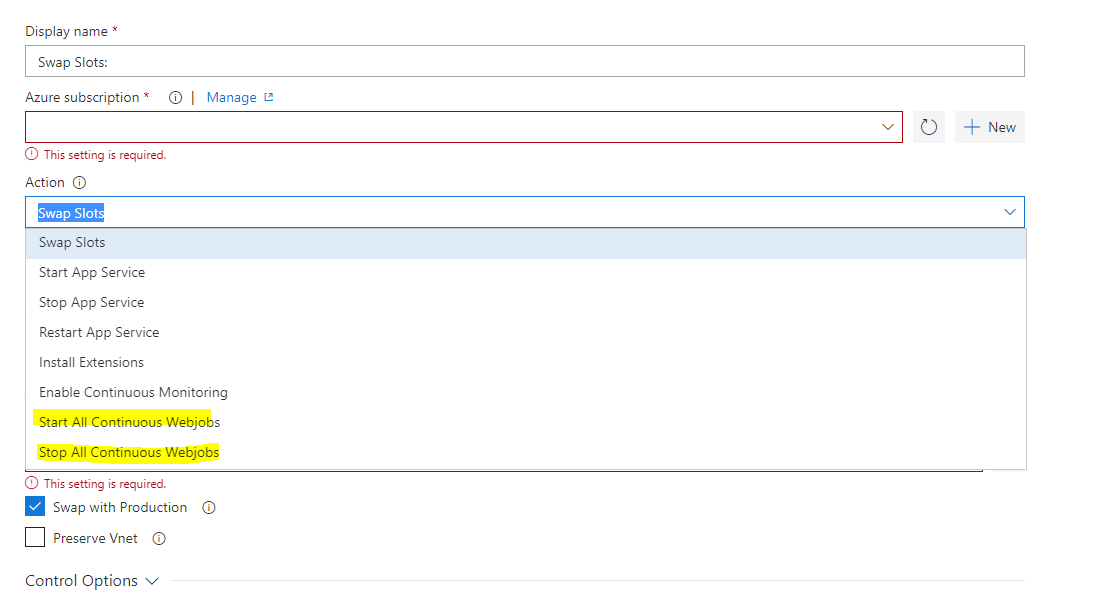
vincent1173
on 23 Jan 2018
You can enable Exclude files from the App_Data folder to skip deleting the jobs folder.
@vincentdass Is there a similar option available for ASP.NET Core? I don't see that option in Publish Settings like I do in ASP.NET Framework
NickMOrlando
on 23 Jan 2018
@vincentdass thanks for pointing at this. I'm a bit annoyed to have to add two more tasks to do what I would have expected to be part of the stop. But no worries I'll see to update our own azure task to include that feature.
sandorfr
on 23 Jan 2018
@NickMOrlando , Can you enable web deploy option in task?
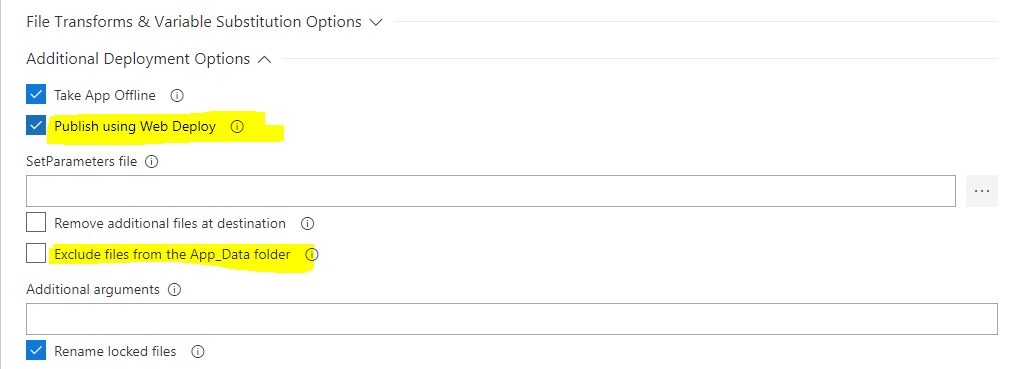
vincent1173
on 24 Jan 2018
I get similar errors while trying to follow the blog on creating http functions and publishing functions to VSTS:
https://blogs.msdn.microsoft.com/appserviceteam/2017/06/01/deploying-visual-studio-2017-function-projects-with-vsts/
Always the same error:
2018-08-20T15:19:01.7725792Z Info: Adding directory (EnergyMonitor1\bin).
2018-08-20T15:19:03.8556935Z ##[error]Failed to deploy web package to App Service.
2018-08-20T15:19:03.8633196Z ##[error]Error: (8/20/2018 3:19:01 PM) An error occurred when the request was processed on the remote computer.
Error: An error was encountered when processing operation 'Create Directory' on 'D:\home\site\wwwroot\bin'.
Error: The error code was 0x800703E6.
Error: Invalid access to memory location.

   at Microsoft.Web.Deployment.NativeMethods.RaiseIOExceptionFromErrorCode(Win32ErrorCode errorCode, String maybeFullPath)
   at Microsoft.Web.Deployment.FileSystemInfoEx.set_Attributes(FileAttributes value)
   at Microsoft.Web.Deployment.DirPathProviderBase.Add(DeploymentObject source, Boolean whatIf)
Error count: 1.

2018-08-20T15:19:03.8636362Z ##[error]Error: C:\Program Files\IIS\Microsoft Web Deploy V3\msdeploy.exe failed with return code: 4294967295
2018-08-20T15:19:05.4157534Z ##[warning]Can\'t find loc string for key: FailedToUpdateApplicationInsightsResource
The defaults should really work out of the box?
 ptr727
on 20 Aug 2018
ptr727
on 20 Aug 2018
@ptr727 , from Azure portal, go to your Function app and check if Application settings has a variable named WEBSITE_RUN_FROM_ZIP
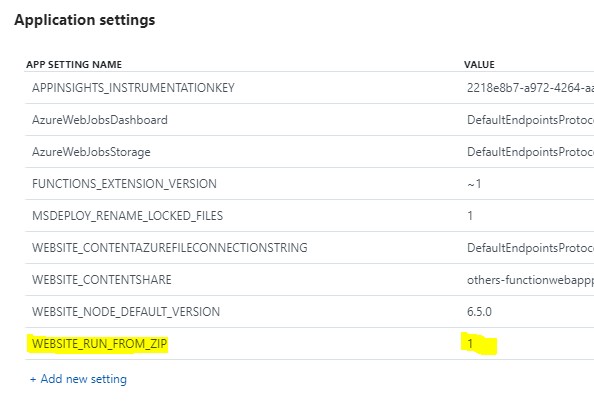
Is this the first time you are deploying to that Function app? if not, please share the latest successful release logs for that app.
vincent1173
on 21 Aug 2018
Hi, yes, run from zip is set.
This is what I did:
- Run Visual Studio 2017 Enterprise Preview.
- Create a new C# cloud Functions v2 Http trigger project.
- No changes required to code, the default template function is fine.
- Build and run locally, ok.
- Create a free Azure account.
- Publish the app from VS2017 to the Azure account, create all new resources, publish as zip.
- VS2017 warns to update functions runtime, ok.
- Test function running in Azure, ok.
- Create free VSTS account.
- Create new project using VSTS Git.
- Add VS2017 project to VSTS.
- Create new pipeline in VSTS.
- Use Azure Web App for ASP.Net no changes required, or ASP.Net Core (.Net Framework) and change path for zip
See: https://www.youtube.com/watch?v=R7UjTj-HjE0
See: https://blogs.msdn.microsoft.com/appserviceteam/2017/06/01/deploying-visual-studio-2017-function-projects-with-vsts/ - Keep only Use Nuget, NuGet Restore, Build Solution, and Azure App Service Deploy steps
- Save and Queue
- Build is fine, publish fails.
I tried using the publish using web deploy settings, fail.
I tried setting exclude files from app_data, fail.
I tried adding adding a stop web jobs step, fail.
1) If VS2017 can publish out of the box with no issues or manual setting changes required, then VSTS should also be able to publish with no fiddling of settings changes required.
2) The msdeploy tool is crashing and then failing, the tool should not crash, even if the step fails.
Any other ideas?
ptr727
on 21 Aug 2018
@ptr727 , sorry for the late response.
Can you please follow the below steps to set up the build and release template?
1) Choose C# Function from Build templates and build your project.
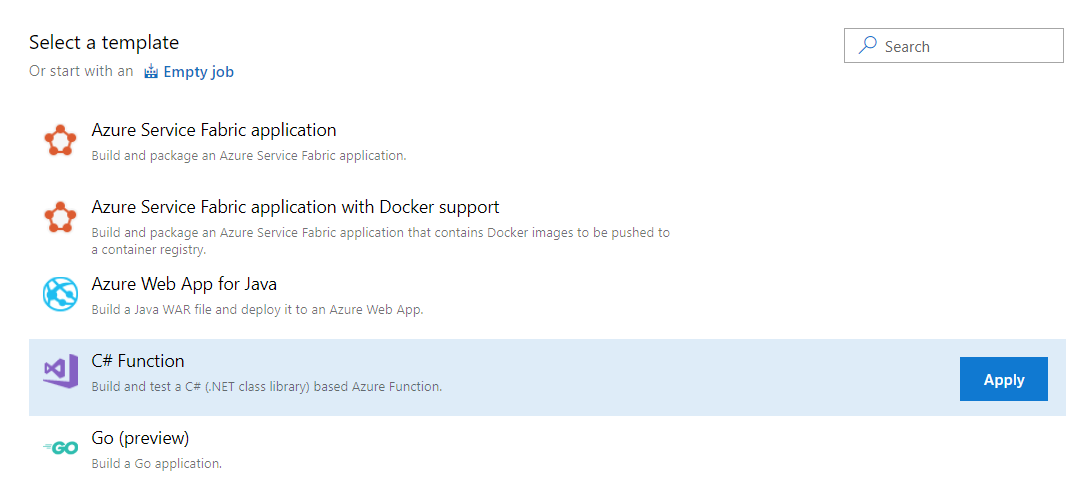
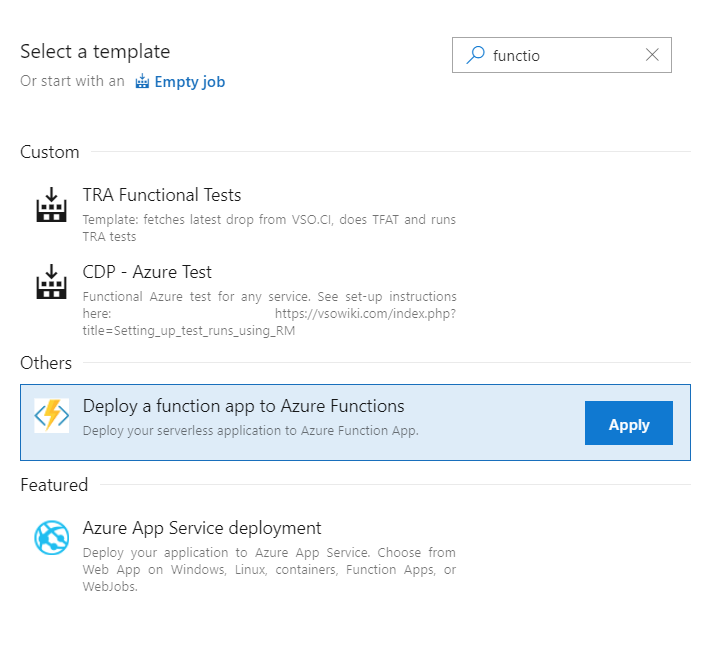
2) Choose Deploy a function app to Azure Functions to deploy your package (Build artifact).
vincent1173
on 10 Oct 2018
I found the "C# Function" build template.
But I cannot find the "Deploy a function app to Azure Functions" in the tasks or in the build templates.
How did you go from the C# Function build to the Deploy a function steps?
ptr727
on 10 Oct 2018
@ptr727 , apologies for the confusion.
Please follow the below steps:
1) Choose C# Function from Build templates and build your project.
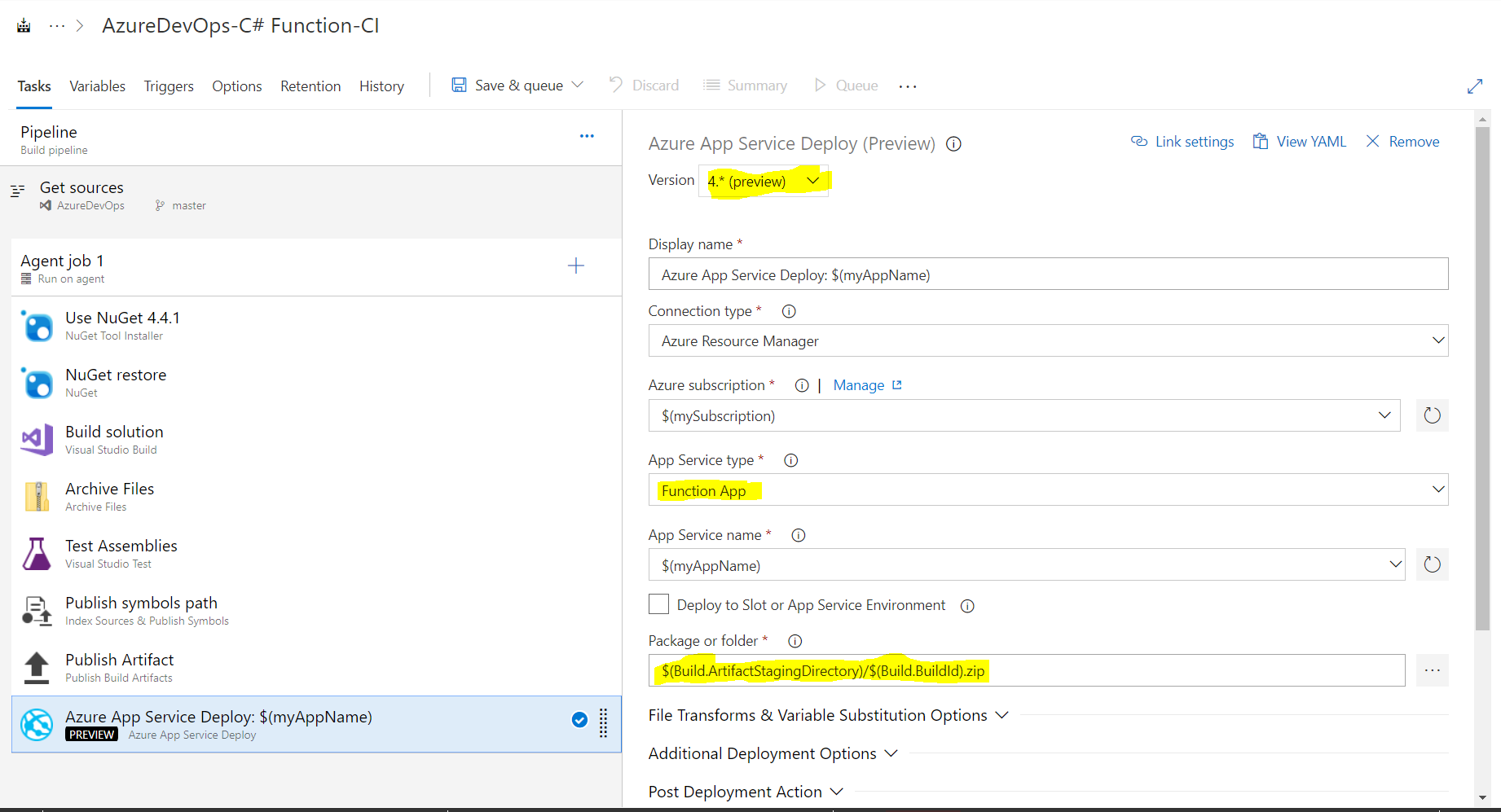
2) Add Azure App Service Deploy task

3) In the task, Change the version from 3.* to 4.*, select your Azure subscription, App Type to Function Apps and package Input as $(Build.ArtifactStagingDirectory)/$(Build.BuildId).zip
4) Save your Build Definition and Queue the build.
vincent1173
on 14 Oct 2018
Great, working, thanks.
ptr727
on 15 Oct 2018
@ptr727 , glad to know it resolved your issue. :)
Closing the issue.
vincent1173
on 15 Oct 2018
Great, working, thanks.
I just had the same issue, which is solved now by moving to version 4. great!
 pmooij
on 22 Oct 2018
pmooij
on 22 Oct 2018
Indeed it got fixed with v4 (in preview).
Just fyi, In my config of that app service it shows: WEBSITE_RUN_FROM_PACKAGE=1. I am not sure if it impacts or not.
 katlimruiz
on 19 Nov 2018
katlimruiz
on 19 Nov 2018
Related issues
 pharring
·
3Comments
pharring
·
3Comments
 HenrikStanley
·
3Comments
HenrikStanley
·
3Comments
 timfish
·
3Comments
timfish
·
3Comments
 TheRealEdwardCullen
·
3Comments
TheRealEdwardCullen
·
3Comments
 yaananth
·
3Comments
yaananth
·
3Comments
Most helpful comment
I am running into the same issue, but using msdeploy directly:
I run this powershell script before I deploy:
This is a new website, no code from myself has been deployed yet (failed on 1st try). I think it is related to the Application Insights extension being installed. And on retry it most of the time fails, but not always. Sometimes it continues.
As you can see I do use "-enableRule:AppOffline". Approach 2 doesn't seem to make any difference for me. Approach 1: This is a deployment for a dev site so we don't have deployment slots available. I assume if we deploy on a deployment slot without the Application Insights Extension being installed it might work, but we don't really want to upgrade the dev environment because of cost.