Azure-pipelines-tasks: Visual Studio version '15.0' not found for VSTS Hosted Build
I upgraded my project to VS2017 and now my build is broken - I modified the code to use some new C# constructs (which seemed like a good idea at the time!)
It looks like, even though I modified my build agent task to use 'VS 2017', it is still using MSBuild 14.0.
Is there something I can do to get working, without resorting to a custom build agent (or reverting my shiny new C# code)?
 benlaan
All 12 comments
This is a very big issue for me, as we are currently starting a new project and want to target netstandard, using the new project templates. Currently we can not implement any CI builds through hosted agents on VSTS. We want to stay away from private agents, as we do not have the resource to maintain them for one, and two, this really should have been implemented and pushed out at the same time VS2017 was launched.
The build task is quite misleading, as you can select VS2017 as the VS build environment, but this is still RC version not RTM.....
Any news on when this will be pushed out to hosted agents, would really like/need to get VS2017 RTM solutions building through CI in VSTS.
 martinfletcher
on 16 Mar 2017
martinfletcher
on 16 Mar 2017
It seems that the build uses the csc.exe from the Microsoft.Net.Compilers nuget package (have just bumped to 2.0.1) to actually build the projects, so all the C#7 features work fine. Not sure if having the wrong VS version matters too much here. I am however getting a lot of tests failing due to missing methods, sadly 2017 isn't an option for tests yet.
 jasond-s
on 17 Mar 2017
jasond-s
on 17 Mar 2017
is there any update on this?
martinfletcher
on 20 Mar 2017
Dupe of #3311
See latest comment in that issue
 bryanmacfarlane
on 20 Mar 2017
bryanmacfarlane
on 20 Mar 2017
The hosted builds are still failing for me with the same error. The linked duplicate issue seems to indicate that the problem was addressed in the build hosts or am I missing something? In my case I'm building a regular non .NET core .csproj file but using newer C# 7 features and getting this error.
 jpierson
on 8 May 2017
jpierson
on 8 May 2017
Also trying MSBuild I see a similar error.
Unable to find MSBuild: Version = 15.0, Architecture = x86. Looking for the latest version.
jpierson
on 8 May 2017
@jpierson - you have to pick the VS2017 queue on your definition. That will get you to a machine that has VS 2017 (msbuild 15.0)
bryanmacfarlane
on 8 May 2017
Ok for others running into the same issue it appears that the trick was to also change the Agent setting under Options for the build definition itself and not just the MSBuild/VSBuild version.

Thanks @bryanmacfarlane, I just saw your comment as I was pasting in my findings.
jpierson
on 8 May 2017
Yeah, we are aware of that problem. Having to "match up" multiple settings is a big problem. We are discussing various options.
bryanmacfarlane
on 8 May 2017
You also have to do the same thing for your unit tests in the VS Test step(s).
 ps2goat
on 10 Oct 2017
ps2goat
on 10 Oct 2017
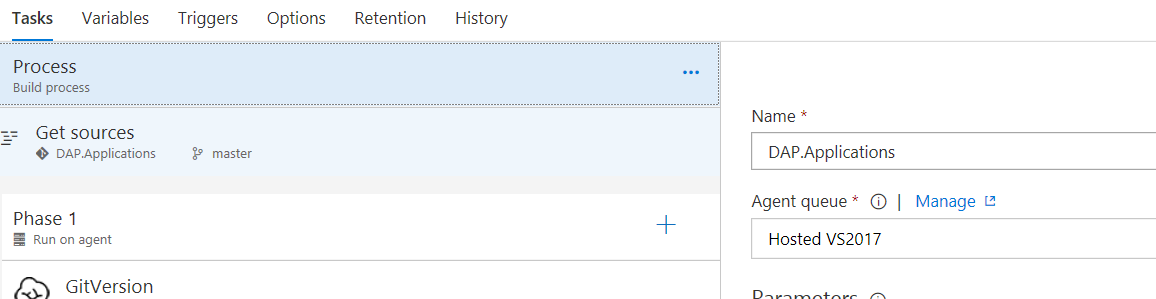
Agents are not available under Options anymore?
 vip32
on 13 Dec 2017
vip32
on 13 Dec 2017
ah, moved to 'Process'
vip32
on 13 Dec 2017
Related issues
 pharring
·
3Comments
pharring
·
3Comments
 richard-ob
·
3Comments
richard-ob
·
3Comments
 MikahB
·
3Comments
MikahB
·
3Comments
 TheRealEdwardCullen
·
3Comments
TheRealEdwardCullen
·
3Comments
 jabbera
·
3Comments
jabbera
·
3Comments
Most helpful comment
This is a very big issue for me, as we are currently starting a new project and want to target netstandard, using the new project templates. Currently we can not implement any CI builds through hosted agents on VSTS. We want to stay away from private agents, as we do not have the resource to maintain them for one, and two, this really should have been implemented and pushed out at the same time VS2017 was launched.
The build task is quite misleading, as you can select VS2017 as the VS build environment, but this is still RC version not RTM.....
Any news on when this will be pushed out to hosted agents, would really like/need to get VS2017 RTM solutions building through CI in VSTS.