Azure-pipelines-tasks: VsTest task fails even when all tests passed
We have a project where VsTest task consistently fails even when all tests passed.
In the log, I see this:
2017-01-22T16:22:52.4050809Z Total tests: 150. Passed: 149. Failed: 0. Skipped: 1.
2017-01-22T16:22:52.4050809Z Test Run Successful.
2017-01-22T16:22:52.4050809Z Test execution time: 17.1337 Minutes
2017-01-22T16:22:52.5342314Z ##[debug]rc:0
2017-01-22T16:22:52.5342314Z ##[debug]success:false
2017-01-22T16:22:52.5342314Z ##[warning]Vstest failed with error. Check logs for failures. There might be failed tests.
2017-01-22T16:22:52.5461701Z ##[error]Error: C:\Program Files (x86)\Microsoft Visual Studio 14.0\Common7\IDE\CommonExtensions\Microsoft\TestWindow\vstest.console.exe failed with return code: 0
When I download and open the .trx file from the build agent and open in Visual Studio, it says that all tests passed (one is skipped, because it is marked using the Ignore attribute which is correct).
The version of VsTest task is 2.0.5 (C:\BuildAgent\tasks\VSTest2.0.5)
We are using the default configuration, no special options.
We have installed both VS 2015 and VS 2017 RC on the build agent.
 tomasherceg
All 18 comments
@tomasherceg Can you please check eventviewer at the time of failure and share what application error is observed there. Thanks.
 vimegh
on 31 Jan 2017
vimegh
on 31 Jan 2017
@vimegh I have looked into both Application and System category in the Event Viewer but there is nothing related to the vstest.console.exe.
tomasherceg
on 31 Jan 2017
@tomasherceg What happens if you run the command directly on the machine from command prompt. do you see any error?
You can run following and check. Does it show any error?
"C:\Program Files (x86)\Microsoft Visual Studio 14.0\Common7\IDE\CommonExtensions\Microsoft\TestWindow\vstest.console.exe" C:\BuildAgent_work\12\s\src\DotVVM.Samples.Tests\bin\ANC_Firefox\net461\DotVVM.Samples.Tests.dll /logger:trx
Also run following, and share the error.txt if nonempty.
"C:\Program Files (x86)\Microsoft Visual Studio 14.0\Common7\IDE\CommonExtensions\Microsoft\TestWindow\vstest.console.exe" C:\BuildAgent_work\12\s\src\DotVVM.Samples.Tests\bin\ANC_Firefox\net461\DotVVM.Samples.Tests.dll /logger:trx 2>error.txt
Thanks.
vimegh
on 1 Feb 2017
I have the same problem.
all tests passed, 2 skipped tests, but agent determines that the build fails.
Using NUnit 3.6.0 and NUnitTestAdapters 3.7.0
It does because Skipped tests generate error messages when running 2>error.text
 DOMZE
on 1 Feb 2017
DOMZE
on 1 Feb 2017
@codito Can you help with this?
 nigurr
on 20 Feb 2017
nigurr
on 20 Feb 2017
Closing this thread as it's been answered here https://github.com/Microsoft/vstest/issues/285#issuecomment-268286300
Further discussion can happen in that thread as it's more related to vstest.console.exe behaviour
nigurr
on 21 Feb 2017
@nigurr Your link does not explain how we can use the vstest task with skipped tests and have the task only fail on failed tests. The PR above by @ChristopherHaws (#3558) could have helped you to achieve this
I have a case where there are no skipped tests but it still marks it as red because vstestconsole.exe returns an exit code of 1.
 bergmeister
on 31 May 2018
bergmeister
on 31 May 2018
@bergmeister I understand your concern, however we can't break this default functionality.
We would be interested to know in which scenario we need to write to error stream and still pass the test?
If it's an error, the test should fail. If it's not an error, then it shouldn't be in error stream. it can be in standard stream.
nigurr
on 1 Jun 2018
@nigurr
I am using the vstest task v2 that uses the Visual Studio Test Platform Installer of version 15.7.2. All tests pass and there are no skipped or inconclusive tests but the task is still marked as red. The tests are using NUnit3. Here is the log (replaced some sensitive information like machine names, fileshares and product info):
2018-06-01T07:25:14.2089314Z ##[section]Starting: VsTest - testAssemblies
2018-06-01T07:25:14.2095887Z ==============================================================================
2018-06-01T07:25:14.2096159Z Task         : Visual Studio Test
2018-06-01T07:25:14.2096684Z Description  : Run unit and functional tests (Selenium, Appium, Coded UI test, etc.) using the Visual Studio Test runner. Test frameworks that have a Visual Studio test adapter such as xUnit, NUnit, Chutzpah, etc. can also be run. Tests can be distributed on multiple agents using this task (version 2).
2018-06-01T07:25:14.2097110Z Version      : 2.5.12
2018-06-01T07:25:14.2097330Z Author       : Microsoft Corporation
2018-06-01T07:25:14.2097615Z Help         : [More Information](https://go.microsoft.com/fwlink/?LinkId=835764)
2018-06-01T07:25:14.2097909Z ==============================================================================
2018-06-01T07:25:15.1285017Z Run the tests locally using vstest.console.exe
2018-06-01T07:25:15.1288060Z ========================================================
2018-06-01T07:25:15.1289080Z Test selector : Test assemblies
2018-06-01T07:25:15.1289617Z Test assemblies : **\*.IntegrationTests.dll
2018-06-01T07:25:15.1290110Z Test filter criteria : null
2018-06-01T07:25:15.1290716Z Search folder : G:\ProductName Integration Test Share\Tests
2018-06-01T07:25:15.1291334Z Run settings file : \\filesharefqdn\Drop$\ProductName\Releases\8554\8890\Tasks\IT.runsettings
2018-06-01T07:25:15.1292025Z Run in parallel : false
2018-06-01T07:25:15.1292485Z Run in isolation : false
2018-06-01T07:25:15.1296667Z Path to custom adapters : null
2018-06-01T07:25:15.1297154Z Other console options : null
2018-06-01T07:25:15.1298281Z Code coverage enabled : false
2018-06-01T07:25:15.1299296Z Rerun failed tests: false
2018-06-01T07:25:16.1996907Z VisualStudio version selected for test execution : toolsInstaller
2018-06-01T07:25:16.3221608Z ========================================================
2018-06-01T07:25:16.8557669Z [command]D:\_Builds\buildagentmachine.01\_tool\VsTest\15.7.2\x64\tools\net451\Common7\IDE\Extensions\TestPlatform\vstest.console.exe @D:\_Builds\buildagentmachine.01\_temp\ee439541-656c-11e8-82c3-95625c763305.txt
2018-06-01T07:25:16.9204325Z Microsoft (R) Test Execution Command Line Tool Version 15.7.2
2018-06-01T07:25:16.9204856Z Copyright (c) Microsoft Corporation.  All rights reserved.
2018-06-01T07:25:16.9260292Z vstest.console.exe
2018-06-01T07:25:16.9261414Z "path/to/testDLL.dlll"
2018-06-01T07:25:16.9272975Z /Settings:"\\serverFQDN\Drop$\ProductName\Releases\8554\8890\Tasks\IT.runsettings"
2018-06-01T07:25:16.9273811Z /logger:"trx"
2018-06-01T07:25:16.9274613Z /TestAdapterPath:"G:\Product Name Integration Test Share\Tests"
2018-06-01T07:25:17.1423229Z Starting test execution, please wait...
2018-06-01T07:25:20.9896664Z Multiple versions of same extension found. Selecting the highest version.
2018-06-01T07:25:20.9897288Z   NUnit3.TestAdapter : 3.10.0.21
2018-06-01T07:25:23.4152009Z NUnit Adapter 3.10.0.21: Test execution started
Running all tests in path/to/testDLL.dll
2018-06-01T07:35:29.0663367Z NUnit3TestExecutor converted 45 of 45 NUnit test cases
.... (test results)
NUnit Adapter 3.10.0.21: Test execution complete
2018-06-01T07:38:07.3388517Z NUnit VS Adapter 2.0.0.0 executing tests is started
2018-06-01T07:38:08.0838379Z Exception NUnit.Core.UnsupportedFrameworkException, Exception thrown executing tests in path/to/testDLL.dll
2018-06-01T07:38:09.6946217Z NUnit VS Adapter 2.0.0.0 executing tests is finished
2018-06-01T07:38:10.0989892Z M
Total tests: 890. Passed: 890. Failed: 0. Skipped: 0.
2018-06-01T07:38:16.0669743Z Test Run Failed.
2018-06-01T07:38:16.0682091Z Test execution time: 12.9580 Minutes
2018-06-01T07:38:16.0926380Z ##[warning]Vstest failed with error. Check logs for failures. There might be failed tests.
2018-06-01T07:38:16.1082348Z ##[error]Error: D:\_Builds\buildmachine.01\_tool\VsTest\15.7.2\x64\tools\net451\Common7\IDE\Extensions\TestPlatform\vstest.console.exe failed with return code: 1
2018-06-01T07:38:16.9141667Z ##[error]VsTest task failed.
P.S. I noticed that this seems to be due to our test runsettings still pointing to an old NUnitv2 test adapter path but the point is that whatever happens, only the test results should be used to mark it red or not. If something unexpected like this happens, you can still mark it as orange to warn about it.
bergmeister
on 1 Jun 2018
Hey @bergmeister did you find a fix or workaround for this issue? Thanks.
 lankaapura
on 30 May 2019
lankaapura
on 30 May 2019
It was a problem of the test adapter throwing due to a misconfiguration, so kind of yes but my point was that the pipeline should be more robust because in my case it was still good enough to run the tests.
bergmeister
on 30 May 2019
@bergmeister thanks! it was a misconfiguration in my case too. My test dll filter was picking up a wrong dll which caused above error.
lankaapura
on 31 May 2019
Hi guys, may I know what exactly was the misconfiguration and how was it fixed? Sorry, I'm pretty new to this and everything works fine on my computer, but it just doesn't build on the server. I have almost the same errors.
 kfry88
on 2 Jun 2019
kfry88
on 2 Jun 2019
I think there can be a multitude of causes, in my case it was that test runsettings were still pointing to an old NUnitv2 test adapter although we were on Nunitv3, which I could find out by reading the logs carefully, which I suggest you to do as well.
bergmeister
on 2 Jun 2019
thx
I am a beginner when it comes to both nunit and azure build. I have never used a runsetting file before and I don’t see one in my projects. Can you give me a pointer or two how to find my runsetting file and what to look for? I don’t have any nunit 2 tests at all in my entire solution.
Sorry. I know my question is off topic, but I tried to google it around and but didn’t have much luck finding a clear cut answer.
kfry88
on 2 Jun 2019
@kfry88 in my case it was I was feeding dll which doesn't have any tests. Double check what you provide to following.
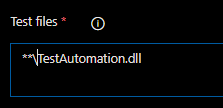
lankaapura
on 3 Jun 2019
My dll was picked up by and executed correctly first.
Then for some reason, the wrong version of Nunit adapter is also triggered and causing VSTest to fail in the end even though all my tests are passed:
2019-06-02T23:20:30.8294344Z NUnit Adapter 3.13.0.0: Test execution complete
2019-06-02T23:20:30.8799670Z NUnit VS Adapter 2.0.0.0 executing tests is started
2019-06-02T23:20:31.2315332Z Exception NUnit.Core.UnsupportedFrameworkException, Exception thrown executing tests in d:\a\1\s\Source\NET\Test\Test.Core.Tests.Unit\bin\Release\Test.Core.Tests.Unit.dll
2019-06-02T23:20:31.2316484Z NUnit VS Adapter 2.0.0.0 executing tests is finished
I guess from my workstation, i am not using VSTEST instead, i am using the nunit adapter to do this, so i am not getting errors.
kfry88
on 3 Jun 2019
Finally, I found the issue. Well mine is a bit unexpected. Some very capable developer decided to check in the bin release folder into source control. The checked in folder contained nunit 2 test adapter. Even though it’s in a totally different folder as my nunit 3 tests, somehow it vstest decides to try and use the version 2 adapter to run my nunit 3 tests. Even though within the same folder, there is nunit 3 test adapter dlls also.
I can finally stop pulling my hair out now. :(
So my final solution was to delete those old bin folders and get on with my life.
kfry88
on 3 Jun 2019
Related issues
 HenrikStanley
·
3Comments
HenrikStanley
·
3Comments
 divyesh-parikh
·
3Comments
divyesh-parikh
·
3Comments
 gregpakes
·
3Comments
gregpakes
·
3Comments
 timfish
·
3Comments
timfish
·
3Comments
 alexszilagyi
·
3Comments
alexszilagyi
·
3Comments
Most helpful comment
@nigurr
I am using the vstest task v2 that uses the
Visual Studio Test Platform Installerof version 15.7.2. All tests pass and there are no skipped or inconclusive tests but the task is still marked as red. The tests are usingNUnit3. Here is the log (replaced some sensitive information like machine names, fileshares and product info):P.S. I noticed that this seems to be due to our test runsettings still pointing to an old NUnitv2 test adapter path but the point is that whatever happens, only the test results should be used to mark it red or not. If something unexpected like this happens, you can still mark it as orange to warn about it.