Azure-pipelines-tasks: Xamarin.Android build error related to proguard
We recently upgraded our xamarin.android project to support android 7.0 and the VSTS build broken with below error, on our local build we can fix the error by upgrade to latest version of proguard( https://sourceforge.net/projects/proguard/files/proguard/), how can we get this fixed with VSTS?
2017-01-04T07:07:36.9634026Z ##[error]CREATEMULTIDEXMAINDEXCLASSLIST(0,0): Error : Can't read [C:\Program Files (x86)\Reference Assemblies\Microsoft\Framework\MonoAndroid\v7.0\mono.android.jar] (Can't process class [android/app/ActivityTracker.class] (Unsupported class version number [52.0] (maximum 51.0, Java 1.7)))
 jzhouw
All 44 comments
Are you using our hosted build image?
Have you tried with a private agent (azure) where you can control the toolsets? I think 7.0 is in the process of getting on the image.
 bryanmacfarlane
on 6 Jan 2017
bryanmacfarlane
on 6 Jan 2017
Android 7 support is available on the hosted build VMs now. But you need to use JDK 8 explicitly in your build process as Xamarin requires JDK 8 but by default Xamarin will use JDK 6 if installed on the build server. Please try setting the JDK version on Xamarin Android task to 8 and see if this helps.

 madhurig
on 6 Jan 2017
madhurig
on 6 Jan 2017
@bryanmacfarlane Yes hosted agent used.
@madhurig the JDK 8 option was already set and we tried both x86 and x64 options, all same results, here the build summary link if you need: https://boundlss.visualstudio.com/Boundlss/_build/index?buildId=635&_a=summary&tab=details
jzhouw
on 9 Jan 2017
@jamesatgithub: It looks like the proguard version is not being updated with Android SDK and has to be installed separately: http://stackoverflow.com/questions/39514518/xamarin-android-proguard-unsupported-class-version-number-52-0.
We don't have ProGuard 5 on the hosted build VMs, so you are seeing this error. We will update in the next rollout, I will post a timeline for the availability here once we have it.
Thanks,
Madhuri
madhurig
on 10 Jan 2017
The Xamarin bug resulting in this error is fixed for Cycle 9 release but is not in the stable channel yet. Replacing ProGuard version in the Android SDK location is a workaround suggested by Xamarin team but we don't want to do that on the hosted build VMs since they are shared machines and we don't know if there will be side-effects of the workaround for native Android users.
We will upgrade to Cycle 9 on hosted build VMs which has the fix once it is stable. Till then the alternate will be to use your own build server.
Thanks,
Madhuri
madhurig
on 27 Jan 2017
Have the build VMs been upgraded to Cycle 9? If not, when is that happening?
 peterfeller68
on 20 Feb 2017
peterfeller68
on 20 Feb 2017
Cycle 9 is not available in the Stable channel yet, it is in Beta: https://releases.xamarin.com/release-candidate-cycle-9-rc6-refresh/. We will update the Hosted build VMs to Cycle 9 after it is available in the Stable channel.
Thanks,
Madhuri
madhurig
on 21 Feb 2017
Hello :)
Any update on this? It's been some days since the Cycle 9 was released and I'm still getting the error
java.io.IOException: Can't read [C:\Program Files (x86)\Reference Assemblies\Microsoft\Framework\MonoAndroid\v7.0\mono.android.jar] (Can't process class [android/app/ActivityTracker.class] (Unsupported class version number [52.0] (maximum 51.0, Java 1.7)))
 GiusepeCasagrande
on 21 Mar 2017
GiusepeCasagrande
on 21 Mar 2017
@GiusepeCasagrande : What Java version are you targeting? Please update your build task to use Java8 and see if helps.
madhurig
on 21 Mar 2017
Hi @madhurig,
Just checked, I'm already using JDK8

GiusepeCasagrande
on 21 Mar 2017
@GiusepeCasagrande : This was marked as fixed in Cycle 9: https://github.com/xamarin/xamarin-android/pull/267, so it should have worked. I will follow up .
madhurig
on 21 Mar 2017
@madhurig I'll give it a few more tries, maybe I'm making something wrong here. But please, let me know if you find something else about it.
And thanks for your help so far :)
GiusepeCasagrande
on 21 Mar 2017
Hello, I am experiencing the same issue as Guisepe.
I have both MultiDex and ProGuard enabled. I tried targeting API 24 and API 25, but I am getting the same issue. I spent the day trying various workaround, but without luck on hosted VSTS machines, although it's building fine on my local machine.
I followed advice to add Proguard folder to my source control and set custom ProGuardJarPath and the ProGuardToolPath. I did that in proguard.cfg (BuildAction is set to ProguardConfiguration like expained in here):
ProGuardJarPath = ..\..\..\Shared\tools\proguard\lib\proguard.jar
ProGuardToolPath = ..\..\..\Shared\tools\proguard\
I am not sure if proguard.cfg is the right place for this lines, but it didn't fix the issue.
I set up my local environment following this blog post. My guess is that hosted machines have something different.

 markolazic88
on 21 Mar 2017
markolazic88
on 21 Mar 2017
@GiusepeCasagrande : My xamarin android project with ProGuard enabled builds without errors on the hosted build VMs. Can you share your debug build logs for further investigation? You can upload here or email me: madhurig at microsoft dot com.
My build definition settings look like this:

Thanks,
Madhuri
madhurig
on 22 Mar 2017
@markolazic88: I checked the blog you linked to. The hosted build VMs don't have all the android build tools versions that the blog lists. We have an update with those in the pipeline but I can't be sure if it will fix your problem since I can't repro it.
If you continue to have the issue after our next update, please open a new issue with your build logs.
madhurig
on 24 Mar 2017
@madhurig Thank you for the info. Could you please share the date when those tools are going to be updated? That info is important for us, as we are still blocked, and we would have to create private build machine if the update is not going to happen any time soon.
markolazic88
on 27 Mar 2017
Adding @thechrisjohnson for timeline on the update.
madhurig
on 27 Mar 2017
@madhurig Hi, I'm experiencing this issue too, I'm targeting Android 7.0 and building with android 7.0, when I build in VSTS, I get the error:
java.io.IOException: Can't read [C:\Program Files (x86)\Reference Assemblies\Microsoft\Framework\MonoAndroid\v7.0\mono.android.jar] (Can't process class [android/app/ActivityTracker.class] (Unsupported class version number [52.0] (maximum 51.0, Java 1.7)))
However, in my build configuration, I have selected Java 1.8:

On my local machine, I fixed this by upgrading to Proguard 5.3, as the others have mentioned above. I note that you said the same was going to happen on VSTS hosts, but now it seems that it has been removed from the milestone, can you suggest when/if this will happen? This is a major dealbreaker for moving into VSTS :(
 jbrailsford
on 26 Apr 2017
jbrailsford
on 26 Apr 2017
@AviateX14: Can you please try the "VS 2017" agent and see if this issue is resolved there?
madhurig
on 26 Apr 2017
@madhurig:This raises a new issue. The build has proguard enabled, proguard will not work with spaces in the path to it's directory (see the following post on the Xamarin forums on my local machine I've set up a symlink to correct this, however in VSTS using the Hosted VS 2017 agent, there is no link, and as such, I get this error:
"C:\a\1\s\HarnessInspections.Android\HarnessInspections.Android.csproj" (PackageForAndroid target) (1) ->
(_CompileToDalvikWithDx target) ->
  PROGUARD : error : C:\Program Files (Access is denied) [C:\a\1\s\HarnessInspections.Android\HarnessInspections.Android.csproj]
    103 Warning(s)
    1 Error(s)
Time Elapsed 00:01:10.05
PROGUARD(0,0): Error : C:\Program Files (Access is denied)
PROGUARD : error : C:\Program Files (Access is denied) [C:\a\1\s\HarnessInspections.Android\HarnessInspections.Android.csproj]
  Picked up JAVA_TOOL_OPTIONS: -Dfile.encoding=UTF8
Disabling Proguard stops the build because there ends up being too many methods defined, so this isn't really an options as I don't want to use multi-dex or have massive APK's.
Note: my build works perfectly fine in Mobile Center.
jbrailsford
on 27 Apr 2017
@AviateX14: MobileCenter builds are run on Mac, so these issues don't apply there. Thanks for the details, we will investigate and provide a solution.
madhurig
on 28 Apr 2017
@madhurig thanks, I look forward to your response.
jbrailsford
on 1 May 2017
I'm facing the same issue as @AviateX14 . Despite setting MSBuild parameters /p:ProGuardToolPath=C:\a\1\s\{projectdir}\proguard\ /p:ProGuardJarPath=C:\a\1\s\{projectdir}\proguard\lib\proguard.jar /p:EnableProguard=true it errors with "Error : C:\Program Files (Access is denied)" ... maybe because it uses proguard config files in the default android sdk proguard folder (which is under program files)
I tried passing /p:ProGuardConfigurationFiles="proguard\proguard-android.txt;obj\Release\proguard\proguard_xamarin.cfg;obj\Release\proguard\proguard_project_references.cfg;obj\Release\proguard\proguard_project_primary.cfg;proguard.cfg" which didn't work either - it still used the standard files
 woellij
on 2 May 2017
woellij
on 2 May 2017
We are following up on the 2 Xamarin bugs with the Xamarin team:
- https://bugzilla.xamarin.com/show_bug.cgi?id=44187
- https://bugzilla.xamarin.com/show_bug.cgi?id=32861
We don't want to apply workarounds for these bugs since they might impact native Android builds. Till we figure out the right solution here, the option will be to setup your own build server and apply the workarounds for Xamarin Android ProGuard builds.
Thanks,
Madhuri
madhurig
on 4 May 2017
While we are continuing to work with Xamarin team on the bugs, I have a workaround that can be applied to build on the Hosted and Hosted VS 2017 VM pools.
Download latest proguard from: https://sourceforge.net/projects/proguard/files/proguard/5.3/ and commit/push to your repository.
In the build definition use "Extract Files" to unzip to a location without spaces, I set it to $(build.sourcesdirectory)

If using "Hosted VS 2017" pool, a symlink needs to be created for the Android SDK location so the path does not have spaces. This is not required for "Hosted" pool. Create a batch script and commit to your repo with this command: _mklink /J C:\AndroidSDK "C:\Program Files (x86)\Androidandroid-sdk"_

If you have MultiDex enabled, Use "Copy Files" task to copy the extracted latest proguard to AndroidSDK directory. Make sure you check the "Overwrite" option in "Advanced" section.

In the Xamarin Android task "MSBuild Options > Additional Arguments", set
(Hosted pool)
/p:ProguardToolPath=$(build.sourcesdirectory)\proguard5.3.3\

(Hosted VS 2017 pool)
/p:AndroidSdkDirectory=C:\AndroidSDK /p:ProguardToolPath=$(build.sourcesdirectory)\proguard5.3.3\
Thanks,
Madhuri
madhurig
on 18 May 2017
Step 3: " Create a batch script"? Does the batch script contain the command
mklink /J C:\AndroidSDK "C:\Program Files (x86)\Androidandroid-sdk" ?
What should I call the batch script? x.bat? what invokes the x.bat script?
 jonathan305
on 19 May 2017
jonathan305
on 19 May 2017
ok i found a build task to execute the batch script.
jonathan305
on 19 May 2017
Progress! Now the build fails with a different error. I checked we are using JDK 8.
Any suggestions on this one?
CREATEMULTIDEXMAINDEXCLASSLIST : error : Can't read [C:\Program Files (x86)\Microsoft Visual Studio2017\Enterprise\Common7\IDE\ReferenceAssemblies\Microsoft\Framework\MonoAndroid\v7.1\mono.android.jar] (Can't process class [android/app/ActivityTracker.class] (Unsupported class version number [52.0] (maximum 51.0, Java 1.7))) [d:a1\s\Ageas.*.App.Droid\Ageas.*.App.Droid.csproj]
jonathan305
on 19 May 2017
@jonathan305: It looks like if multidex is enabled, the /p:ProGuardToolPath is not being used. Looks like replacing the ProGuard version in the AndroidSDK folder is the only way to get this working. I was able to workaround that as well but it is a crazy set of workarounds :(. I updated the workarounds post above, I will communicate back to the Xamarin team.
madhurig
on 19 May 2017
@madhurig: I've tried the workaround you said.
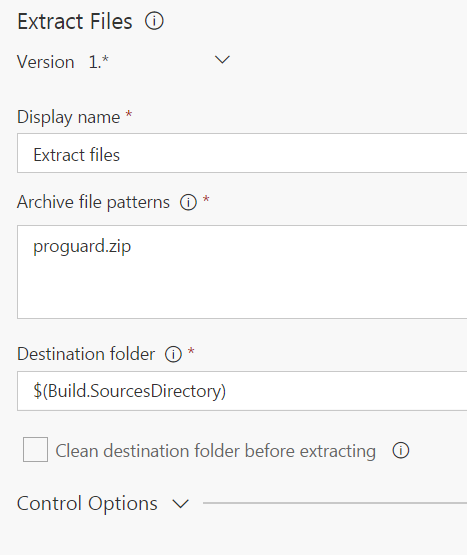
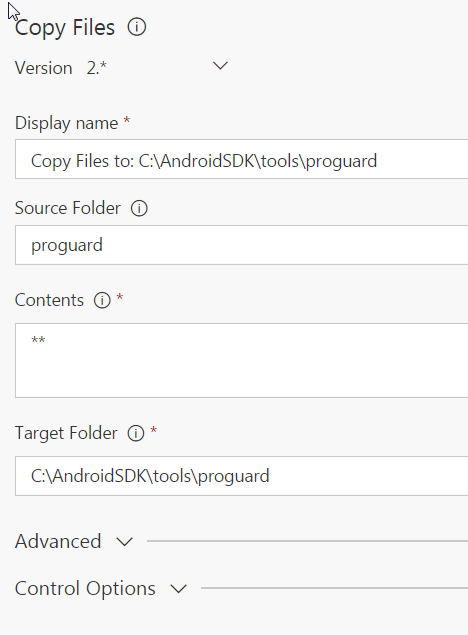
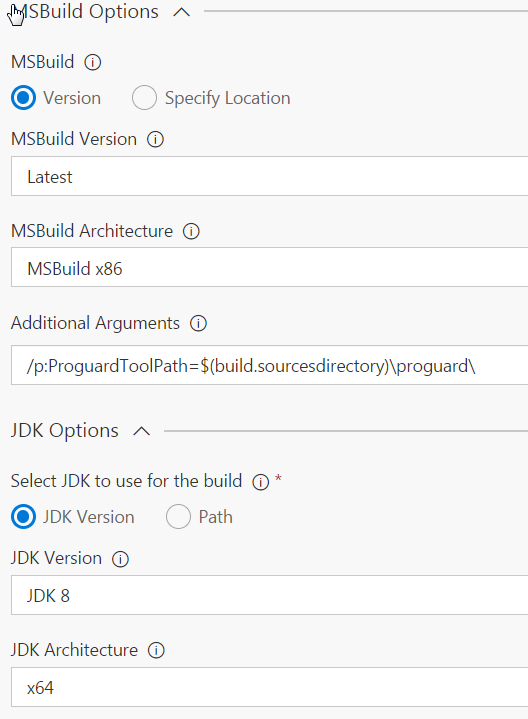
But i have this error : ##[error]C:\Program Files (x86)\MSBuild\Xamarin\Android\Xamarin.Android.Common.targets(2037,3): Error MSB6006: "java.exe" exited with code 1
What i have done in my Android project is to enabled multidex and proguard.
Any news about these Xamarin bugs that this post is talking ?
 dioseb
on 12 Jun 2017
dioseb
on 12 Jun 2017
@smedel: The Xamarin bug fixes are going to be available in the next update of Xamarin as per the update from the Xamarin team. The progress can be tracked on bugzilla too.
Can you share the full log or email it to me at madhurig at microsoft.com?
madhurig
on 12 Jun 2017
@madhurig i just sent you an email.
dioseb
on 13 Jun 2017
@madhurig Can you please update us on the status of this bug?
 ramyzbeidy
on 27 Jun 2017
ramyzbeidy
on 27 Jun 2017
@ramyzbeidy: One of the issues (outdated proguard) is addressed in a newer version of Xamarin but the other one (issue with spaces in the path to AndroidSDK) will be included in a future release. Please try posted workaround if you wish to use the Hosted Build VMs. The alternate is to setup your own build server.
Thanks,
Madhuri
madhurig
on 30 Jun 2017
Hi,
I have setup my build agent on a Mac. I have an Android project with Multidex and proguard enabled.
I have installed JDK 8 and updated proguard to the latest version. Unforunately now I am getting an out of memory errror. I have the Java Heap Size set to 1GB in my Android csproj file.
The error:
error XA5213: java.lang.OutOfMemoryError. Consider increasing the value of $(JavaMaximumHeapSize). Java ran out of memory while executing 'java -Xmx1G -jar
Here is my configuration:
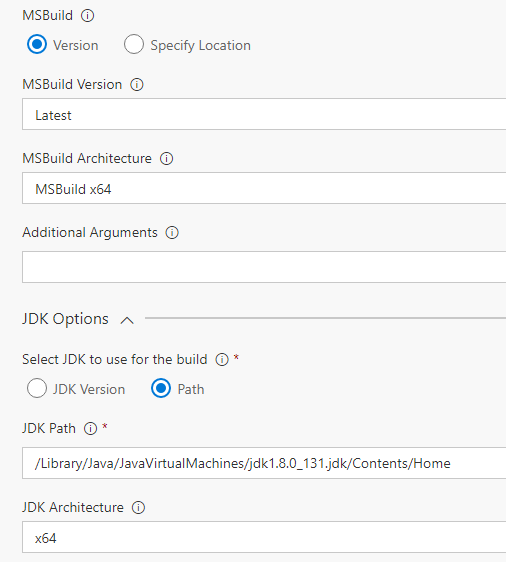
Any help would be greatly appreciated.
 jferlazzo
on 10 Jul 2017
jferlazzo
on 10 Jul 2017
Based on this thread (https://forums.xamarin.com/discussion/2132/java-heap-space-outofmemoryerror-when-binding-a-big-jar), you might have to change the setting in the .csproj in multiple places for different configurations/platforms.
Please try passing /p:JavaMaximumHeapSize=1G in "Msbuild > Additional Arguments" and see if it helps.
Thanks,
Madhuri
madhurig
on 10 Jul 2017
Thanks for the help. In the end I had to increase the Heap Size to 2G to get it working. Strange since it was building on other machines with 1G and I have never had to go higher than that.
It took a while but at least its finally building. Summary of what was done in case anyone has a similar scenario:
- App targeting Android 7.0
- Multidex enabled
- SDK Platform Tools v25+ used
- Increase JavaMaximumHeapSize to 2G (Both Debug and Release Configurations)
- Switch Hosted Agent to my own agent (Mac)
- Install JDK 8
- Download Proguard 5.3.3 files
- Copy the 3 .jar files in the lib directory and place them in the lib directory where the Android SDK is installed
To Build on Mac VSTS Agent:
- Used the following arguments in the Build Step:
- JDK Path: /Library/Java/JavaVirtualMachines/jdk1.8.0_131.jdk/Contents/Home
- JDK Architecture: x64
To Build on Visual Studio Windows machine:
- The Android SDK needs to be moved to a path that does not contain any spaces such as C:\Androidandroid-sdk
- Update the Path inside Visual Studio
jferlazzo
on 11 Jul 2017
Hiya,
I'm currently experiencing the same issue, we are unable to build on both Mac in The Cloud Agents and also hosted VSTS agents.
We've had to revert to running jenkins internally as a build server for the Android portion of our Xamarin project.
Is this likely to be fixed soon?
 jjbrunton
on 18 Aug 2017
jjbrunton
on 18 Aug 2017
We are experiencing the same problem using VSTS Hosted or Hosted 2017, any ETA on a fix?
 YARG
on 26 Aug 2017
YARG
on 26 Aug 2017
@smedel did you ever get this working? I'm now getting the same error as you
2017-08-28T16:02:29.4246673Z ##[error]C:\Program Files (x86)\MSBuild\Xamarin\Android\Xamarin.Android.Common.targets(2037,3): Error MSB6006: "java.exe" exited with code 1.
Hosted with ProGuard and Multi-Dex on
1GB Java Heap Size
Any help would be appreciated.
Thanks in advance,
Stephen
YARG
on 28 Aug 2017
The VMs on Hosted VS2017 queue have been updated with latest Xamarin version which has the fix for the original issue on this thread - Xamarin build fail with ProGuard + multidex when there are spaces in the AndroidSDK folder. So we are closing this issue.
In my offline conversation with @smedel, we found that removing spaces in output paths helped him resolve the issue as well.
I am closing this issue since the original issue is resolved and the thread is getting too long. Please create a new issue if you have other problems.
madhurig
on 28 Aug 2017
@madhurig thanks for the update, awesome timing !! The project now builds if I just have just multidex on, which is fine for our requirements.
FYI, if I have ProGuard + multidex on I get:
C:\Program Files (x86)\Microsoft Visual Studio\2017\Enterprise\MSBuild\Xamarin\Android\Xamarin.Android.Common.targets(1929,3): Error MSB6006: "java.exe" exited with code 1.
Process 'msbuild.exe' exited with code '1'.
Thanks again for all your help. Awesome! 👍
YARG
on 29 Aug 2017
@madhurig same here as @YARG
ramyzbeidy
on 29 Aug 2017
@ramyzbeidy @YARG: Seems like you are seeing another issue. Please open a new issue with details. If you can attach the logs from your build or email them to me (madhurig at microsoft.com), I can investigate.
Thanks,
Madhuri
madhurig
on 29 Aug 2017
Related issues
 MarkIannucci
·
3Comments
MarkIannucci
·
3Comments
 richard-ob
·
3Comments
richard-ob
·
3Comments
 HenrikStanley
·
3Comments
HenrikStanley
·
3Comments
 Mardoxx
·
3Comments
Mardoxx
·
3Comments
 MichaelWhiteCodingForFun
·
3Comments
MichaelWhiteCodingForFun
·
3Comments
Most helpful comment
While we are continuing to work with Xamarin team on the bugs, I have a workaround that can be applied to build on the Hosted and Hosted VS 2017 VM pools.
Download latest proguard from: https://sourceforge.net/projects/proguard/files/proguard/5.3/ and commit/push to your repository.
In the build definition use "Extract Files" to unzip to a location without spaces, I set it to $(build.sourcesdirectory)

If using "Hosted VS 2017" pool, a symlink needs to be created for the Android SDK location so the path does not have spaces. This is not required for "Hosted" pool. Create a batch script and commit to your repo with this command: _mklink /J C:\AndroidSDK "C:\Program Files (x86)\Androidandroid-sdk"_

If you have MultiDex enabled, Use "Copy Files" task to copy the extracted latest proguard to AndroidSDK directory. Make sure you check the "Overwrite" option in "Advanced" section.

In the Xamarin Android task "MSBuild Options > Additional Arguments", set

(Hosted pool)
/p:ProguardToolPath=$(build.sourcesdirectory)\proguard5.3.3\
(Hosted VS 2017 pool)
/p:AndroidSdkDirectory=C:\AndroidSDK /p:ProguardToolPath=$(build.sourcesdirectory)\proguard5.3.3\
Thanks,
Madhuri