Azure-pipelines-agent: Azure Agent cache not restoring cached files
Agent Version and Platform
Version of your agent? 2.177.0 (working version was 2.175.2)
Starting: Initialize job
Agent name: 'Hosted Agent'
Agent machine name: *******
Current agent version: '2.177.0'
Operating System
Ubuntu
18.04.5
LTS
Virtual Environment
Environment: ubuntu-18.04
Version: 20201102.0
Included Software: https://github.com/actions/virtual-environments/blob/ubuntu18/20201102.0/images/linux/Ubuntu1804-README.md
Current image version: '20201102.0'
Agent running as: 'vsts'
Prepare build directory.
Set build variables.
Download all required tasks.
Downloading task: NodeTool (0.176.0)
Downloading task: npmAuthenticate (0.174.0)
Downloading task: Cache (2.0.1)
Downloading task: CmdLine (2.177.3)
Downloading task: PublishPipelineArtifact (1.2.3)
Checking job knob settings.
   Knob: AgentToolsDirectory = /opt/hostedtoolcache Source: ${AGENT_TOOLSDIRECTORY}
   Knob: AgentPerflog = /home/vsts/perflog Source: ${VSTS_AGENT_PERFLOG}
Finished checking job knob settings.
Start tracking orphan processes.
Finishing: Initialize job
Azure DevOps Type and Version
dev.azure.com
If dev.azure.com, what is your organization name?
Need to verify if I can share this as it's work related
What's not working?
We are using the cache to keep our npm packages around, as of yesterday (10th November 2020), around 5pm our cache tasks started failing. The cache task is "successful" (see attached), however the actual files (node_modules) aren't being "restored" (verified with an ls afterwards). This issue happens the majority of runs (95%+) however once in a blue moon the node_modules folder is being correctly restored, even on version 2.177.0.
I tracked the only difference down to having a different Agent Version (2.175.2 on the working build and 2.177.0 with the non working version).

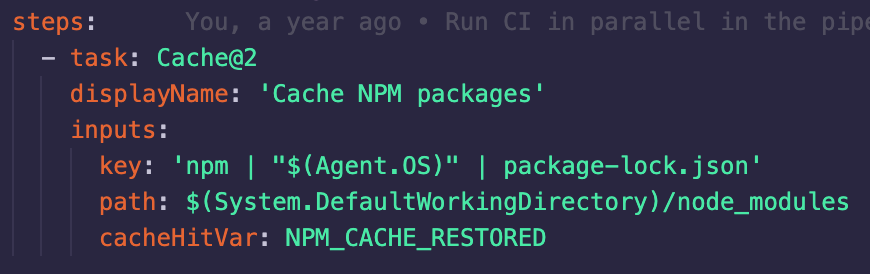
I noticed there was a related change to the cache in this PR that went into the 2.177.0 release https://github.com/microsoft/azure-pipelines-agent/pull/2834
https://github.com/microsoft/azure-pipelines-agent/releases/tag/v2.177.0
I believe there has been either a breaking change or bug introduced and was hoping to get some support.
I can't see a way to revert the microsoft hosted agents versions, so at the moment all of our builds are failing, so even guidance on how to select the agent version myself would be very useful!
Thanks in advance
 pd8
pd8
All 17 comments
I managed to get around this by busting our cache (changing the key ordering), it seems caches generated on 2.175.2 don't get restored properly on 2.177.0, however caches built on 2.177.0 do.
Hopefully this advice will help someone else if they face the same issue.
pd8
on 12 Nov 2020
I was getting the same issues as you yesterday, and managed to fix this too.
I changed path: $(Build.SourcesDirectory)/node_modules/ to path: '$(System.DefaultWorkingDirectory)/node_modules' and invalidated the cache.
However just about as we where to release to prod; it seems they rolled back to 2.175.2 and now it fails again.
Just a heads up.
 BillyBlaze
on 12 Nov 2020
BillyBlaze
on 12 Nov 2020
@pd8 @BillyBlaze Yes, this change is being reverted and the hosted pools were rolled back to 2.175.2 in the meantime. Sorry for the disruption.
 mjroghelia
on 12 Nov 2020
mjroghelia
on 12 Nov 2020
Is there a way to bust the cache without changing the key? Otherwise if we're on conflicting agent versions between 2.175.2 and 2.177.0 the build will fail and we have to change the key to update this. This change then requires being merged into all of our team's branches to take affect and cache properly.
pd8
on 12 Nov 2020
As I was in the same situation; I just made this a variable in my pipeline
key: '$(CacheVersion) | yarn | "$(Agent.OS)" | yarn.lock'
Good idea, thanks! @BillyBlaze
pd8
on 12 Nov 2020
@BillyBlaze how did you populate the CacheVersion variable, and with what?
 GurliGebis
on 16 Nov 2020
GurliGebis
on 16 Nov 2020
You can add it as a variable in your pipeline, then edit it whenever the cache is needing to be busted @GurliGebis
pd8
on 16 Nov 2020
@mjroghelia Do you happen to know whats happening atm? We're seeing our agent pools all on different versions (some 2.177.0, some 2.177.1) and the caches are all incompatible with each-other meaning its a gamble whether we can ever complete a build...
Edit: I've had a look to see if we can get the agent version running, and to include the agent version in the cache key, but can't see a variable for it. That would really help us if it existed, do you know if it does?
pd8
on 16 Nov 2020
@pd8 2.177.0 (the only version with the changed, incompatible Cache behavior) should not be used by the hosted pools at all, but it is being used in a sub-set of cases. I'm investigating with host pool team.
mjroghelia
on 16 Nov 2020
I see, that seems to align with what we're seeing, some hosts using 2.177.0, while others are using 2.177.1, please keep us updated for when the host pools have been successfully set to 2.177.0 as we're having to do significant work currently to even get a single build to pass and are resorting to turning the cache off completely.
EDIT: Interestingly the agent pools in the settings section shows that all our agents are on 2.177.1, however when the jobs are actually being initialised in the logs, they are reporting as 2.177.0.
pd8
on 16 Nov 2020
@pd8 To answer your earlier question, the agent version is available in the Agent.Version variable.
mjroghelia
on 16 Nov 2020
Thanks, I couldn't see that variable in the docs here https://docs.microsoft.com/en-us/azure/devops/pipelines/build/variables?view=azure-devops&tabs=yaml#agent-variables-devops-services, so didn't realise it existed!
pd8
on 16 Nov 2020
I ended up using the AGENT_VERSION environment variable, transform it using powershell, replacing '.' with '-', and then use that as part of the key.
That way, every time a new version of the agent is released, the cache is busted, since pre-release versions are used for hosted agents, I won't be trusting compatibility from version to version.
GurliGebis
on 17 Nov 2020
@pd8 I have a question for you since you have the same setup as I have.
Do you also see the same behavior in your pipeline that if the cache was successfully restored, it ignores the condition and then starts installing dependencies again?
e.g.

BillyBlaze
on 25 Nov 2020
@BillyBlaze
No, we were having so many problems with caching that we actually completely disabled it until it returned to stability.
I havent checked again on any recent agent versions (if there have been any updates released)
pd8
on 26 Nov 2020
Is there any plans on getting this corrected and merged back?
Having multiple directories being restored at the same time would be a time saver.
GurliGebis
on 22 Feb 2021
Related issues
 AceHack
·
3Comments
AceHack
·
3Comments
 tjinjin95
·
3Comments
tjinjin95
·
3Comments
 averelon
·
3Comments
averelon
·
3Comments
 simonvane
·
3Comments
simonvane
·
3Comments
 TLaborde
·
3Comments
TLaborde
·
3Comments