Azure-pipelines-agent: Forced Azure DevOps updates of the azure-pipelines-agent is incompatible with `--once`
Description of the Issue:
We have a requirement for single-use on-premises agents and so we pass the --once flag in order to guarantee that the agents are ‘clean’ new agents. We have recently migrated to Azure DevOps from on-premises TFS 2017.
This is having a very serious impact on our development workflow as described below:
Agents receive a forced push update of the latest azure DevOps pre-release (at a random moment and unnotified)
As the agents are set in
--oncemode, the agent interprets the update as a job and then self-terminates on completion of the update.We have a scheduler internally which will spawn new agents (with a specific version of the agent itself) but these are also forced updated and so the self-termination occurs again and again
Net effect: The forced updates take down our entire pool of agents rendering the CI system totally unusable
Our internal response is as follows:
Scramble to update our internal images with the latest version of the pre-release azure-pipelines-agent (when we notice that no builds are running)
Scramble to redeploy the affected agent pools
This process takes up to 2 hours
Proposed Solutions:
Proposal 1:
I would like to propose that the behaviour of the --once flag is modified, as follows:
The logic of the
--onceagents is modified such that the forced updates of the agents are not treated like normal jobs and are flagged as some sort ofspecial jobThese
special jobsdo not trigger self-termination of the agent and instead trigger a restart of the agentThis exception should only apply to a special case of the forced updates of the azure-pipelines-agent
Proposal 2:
Allow users of Azure DevOps a range of eligible versions of the azure-pipelines-agents
Give users of Azure DevOps a window of time to update their azure-pipeline-agent version (some form of a warning notification would be ideal, similar with code deprecation warnings)
Your feedback and support on this issue would be greatly appreciated.
 giddyelysium13
All 15 comments
@giddyelysium13 - I apologize for the inconvenience this event caused you and your team.
The intended behavior of the agent is that update requests do not count as the one job the agent is supposed to run.
Do you happen to have any of the logs from the agents that updated and then did not wait for a job?
Is it possible there was something about the way the agent was configured that caused the update process to fail?
@alex-peck - Can you verify that we have not introduced a bug into agent with respect to this scenario?
 jtpetty
on 29 Jan 2020
jtpetty
on 29 Jan 2020
@giddyelysium13 - Also, how are you starting up the agent?
jtpetty
on 29 Jan 2020
This is one aspect, of how we start the agent, using the --_once_ command. It will take a bit of time on our end to reproduce the issue, as we need to take our cluster down and spin it back up with the old configuration of agents that are going to be enforceable updated. Is there an email address I can send the logs too as I am not comfortable uploading logs directly here? (it will be late this week/early next week)
try
{
& "${env:vstsAgentExecutablePath}config.cmd"
--url "${env:VSTS_SERVER_URL}"
--token "${env:VSTS_PERSONAL_ACCESS_TOKEN}"
--pool "${env:VSTS_AGENT_POOL_NAME}"
--agent "${vstsAgentName}"
--work "${vstsAgentWorkDir}"
--auth pat
--unattended
--noRestart
& "${env:vstsAgentExecutablePath}\run.cmd" --once
}
finally
{
& "${env:vstsAgentExecutablePath}config.cmd" remove
--token "${env:VSTS_PERSONAL_ACCESS_TOKEN}"
--auth pat
}
giddyelysium13
on 3 Feb 2020
@giddyelysium13 - Ok, I wanted to confirm that you were starting the agent via the run.cmd script. That script is what is supposed to restart the agent if it updates in --once mode. If you were running the Agent.Listener executable directly, that might explain the problem.
You can email at tommy.[email protected] with the logs and I will take a look to see if I can figure out what might be causing this issue.
As a heads up, we published a new agent version on Friday and have begun to roll it out.
jtpetty
on 3 Feb 2020
@jtpetty - Thanks for the heads up and it happened last night after the publishing.
We have got the logs from the latest pre-release and also left the situation in place overnight to see.
Instead, what actually happens is that it repetitively cycles its own update due to failing.
At the same time, the agent does not accept new jobs from the queue.
When we left the agents overnight, they did not self-extinguish. Then in the morning whenever I trigger any build, it seems to trigger the process of downloading the agent and installing it not just on one agent
but on all the agents. As a result, the agent is not available and so the build job is put into the queue rather than actually being put into effect.
The message on the azure dashboard _settings/agentpools is as follows:
Downloading 2.164.7 Agent- ‘Agent will exit shortly, should be back online within 10 seconds’
- Agent disappears for a while
- The agent comes back online in the Idle state but does not accept any jobs
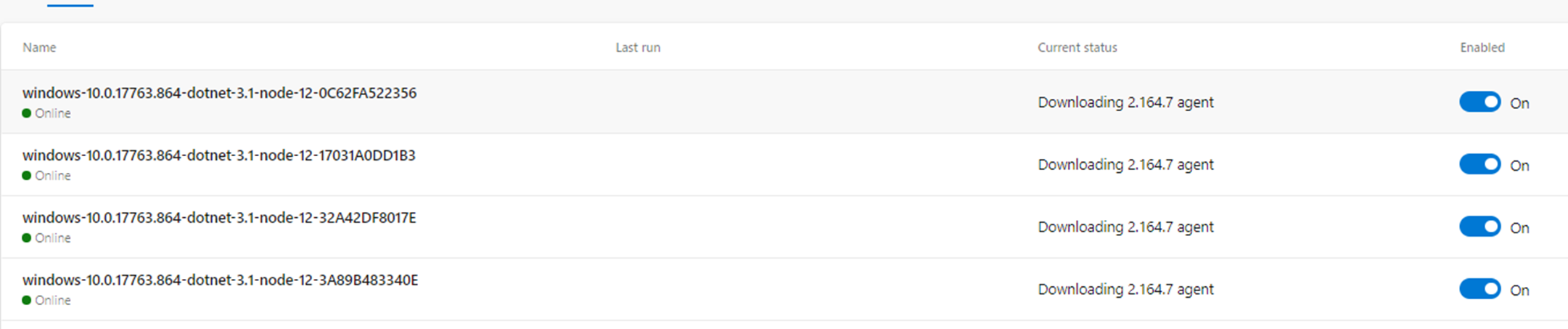


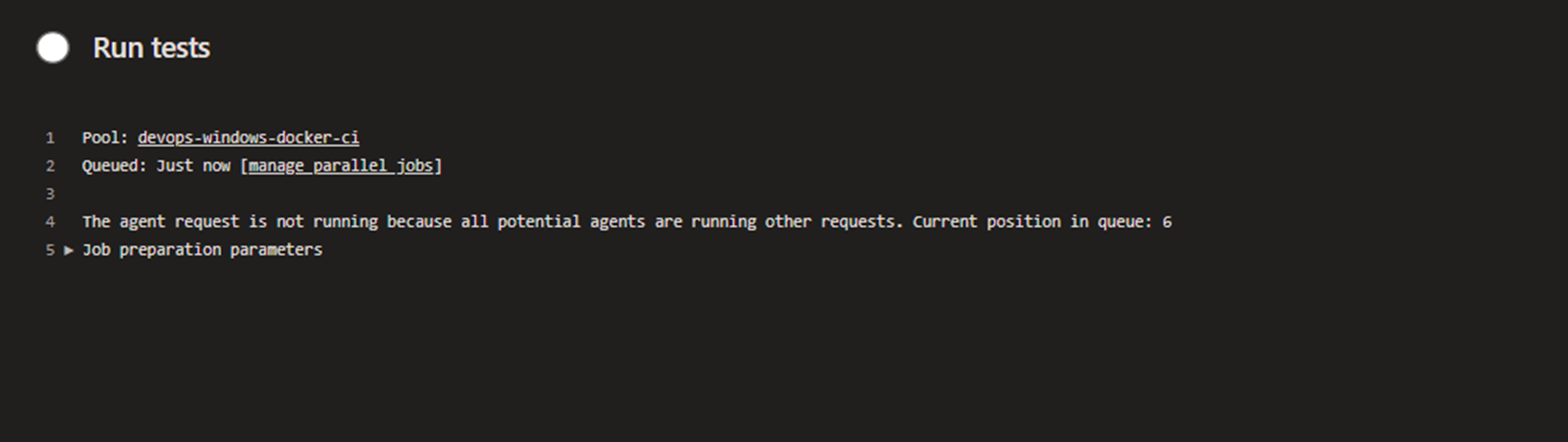

We have taken some time to run a few scenarios and check the logs, etc and here is a summary of what might be happening (not sure):
- Microsoft Azure DevOps launch a new prelease for consumption by the Azure DevOps service
- A job is triggered in the pool of agents
- This triggers all agents in the pool to download the latest prerelease agent (2.164.7)
- The first time the job runs, an error causes the installation of the prerelease to fail with
error move "C:\tools\vsts\bin" "C:\tools\vsts\bin.2.164.6" Access is denied - The agent restarts and is set to idle mode but the agent has actually not been updated due to a failed update
- Another job in the DevOps-docker-windows-ci pool of agents
- This triggers all agents in the pool to download the latest prerelease agent (2.164.7) and attempt to install it again
- On the agent in which the build would have been the job host, somehow (I don’t know how), it seems to succeed to install the agent on that occasion but then go offline and exit immediately.
- On the remaining agents that would not have been the job host, there is no success.
Further to this, while we don’t want to muddy the waters with another issue, I will mention this issue just in case it has a relationship with this one.
Another issue we have identified with azure DevOps (completely independent of this issue) is the following scenario:
- Imagine 5 agents are added to the agent pool
- 8 builds are triggered
- 5 builds run and 3 builds are added to the queue
- Those 3 builds are pre-allocated to one of the build agents – however, these are
--onceagents - Once the 5 builds are completed, the 3 queued builds get stuck completely – Why? Because the Azure DevOps preallocated them to agents that were always going to be removed after running. Also, Azure DevOps does not reschedule the agents to new agents in the pool. But really azure DevOps should do so
I can open a separate issue for this. But I just want to mention it for now. I am sending logs to the email
giddyelysium13
on 4 Feb 2020
@giddyelysium13 - If you could send me the _diag logs and I can dig in and try and figure out what might have happened.
As to the second issue, this is a known issue and we are working to roll out a fix as it requires an update to both the service and the agent.
jtpetty
on 4 Feb 2020
@giddyelysium13 - Thank you for sending me the logs. Your assessment seems to be accurate. From what I can piece together, the first attempt to do the update fails with the "Access is denied" error. The subsequent update request succeeds.
Has this setup worked previously without issue?
I have seen the occasional "Access is denied" issue when attempting to move the bin/ directory on Windows and have an open issue to have this operation retry, but I have not heard of it happening this often.
Is there something about your setup that has some process using the bin/ directory as the working directory?
jtpetty
on 4 Feb 2020
_Has this setup worked previously without issue?_
Not on our docker container agents on Azure DevOps. On our Windows VM’s the azure DevOps forced push updates and restart has completed successfully the first time.
_Is there something about your setup that has some process using the bin/ directory as the working directory?_
No. The relevant parts of the Dockerfile described below:
Relevant parts of Dockerfile
ENV VSTS_AGENT_WORK_DIR='C:\vsts-agent\work'
RUN `
    `
    `
    Write-Host "Setting environment variables ..."; `
    setx /M vstsAgentDestPath 'C:\tools\vsts'; `
    $vstsAgentDownloadUrl = $( `
      'https://vstsagentpackage.azureedge.net/agent/' + `
      ${env:VSTS_AGENT_VERSION} + `
      '/vsts-agent-win-x64-' + `
      ${env:VSTS_AGENT_VERSION} + `
      '.zip' `
    ); `
    setx /M vstsAgentDownloadUrl ${vstsAgentDownloadUrl}; `
    setx /M vstsAgentExecutablePath 'C:\tools\vsts';

RUN Write-Host "Creating vsts agent installation path"; `
    New-Item `
      -ItemType Directory `
      -Path ${env:vstsAgentDestPath} `
      | out-null; `
    Write-Host "Downloading vsts agent ${env:VSTS_AGENT_VERSION} from ${env:vstsAgentDownloadUrl} ..."; `
    [Net.ServicePointManager]::SecurityProtocol = [Net.SecurityProtocolType]::Tls12 ; `
    Invoke-WebRequest `
      -UseBasicParsing `
      -OutFile vstsAgent.zip `
      -Uri ${env:vstsAgentDownloadUrl} `
      | out-null; `
    Write-Host "Extracting the vsts agent ${env:VSTS_AGENT_VERSION} archive ..."; `
    Expand-Archive vstsAgent.zip -DestinationPath ${env:vstsAgentDestPath}; `
    Remove-Item -Force vstsAgent.zip; `
    Write-Host "Adding tf.exe to the PATH ..."; `
    $latestPath = ${env:PATH}; `
    $latestPath += $( ';' + ${env:vstsAgentExecutablePath} + '\externals\vstsom' )
…
WORKDIR ${VSTS_AGENT_WORK_DIR}
Java and another tool are installed also in the directories C:\tools\java and C:\java\<another_tool>. But those tools should not be affecting C:\tools\vsts in any way.
Effective start command for the docker container
VSTS_AGENT_WORK_DIR=C:\vsts-agent\work
HOST_VOLUME_DIR= c:\docker-data\
run --detach --volume $(HOST_VOLUME_DIR):$(VSTS_AGENT_WORK_DIR) `
  --isolation=$(CONTAINER_ISOLATION) `
  --cpus=$(MAX_CPU_PER_CONTAINER) `
  --env VSTS_PERSONAL_ACCESS_TOKEN=$(AZ_PERSONAL_ACCESS_TOKEN)  `
  --env VSTS_AGENT_RUN_ONCE=$(VSTS_AGENT_RUN_ONCE) `
  --env VSTS_AGENT_POOL_NAME=$(VSTS_AGENT_POOL_NAME) `
  --env VSTS_AGENT_BASE_NAME=$(VSTS_AGENT_BASE_NAME) `
  <image_name>
@giddyelysium13 - I think this issue is related to #2475. I am working to get this issue prioritized soon.
jtpetty
on 6 Feb 2020
Just a follow up on this.
I noticed that forced updates do seem to have stopped happening when using an agent which is of a lower version than the latest release a few months ago. @jtpetty Did you change something on your side to fix that?
I noticed that the issue does come back, however, if one uses a pre-release which is greater than the latest release. The outcome is the same, the --once flag means that the agent ends up rendered unusable.
See image below:
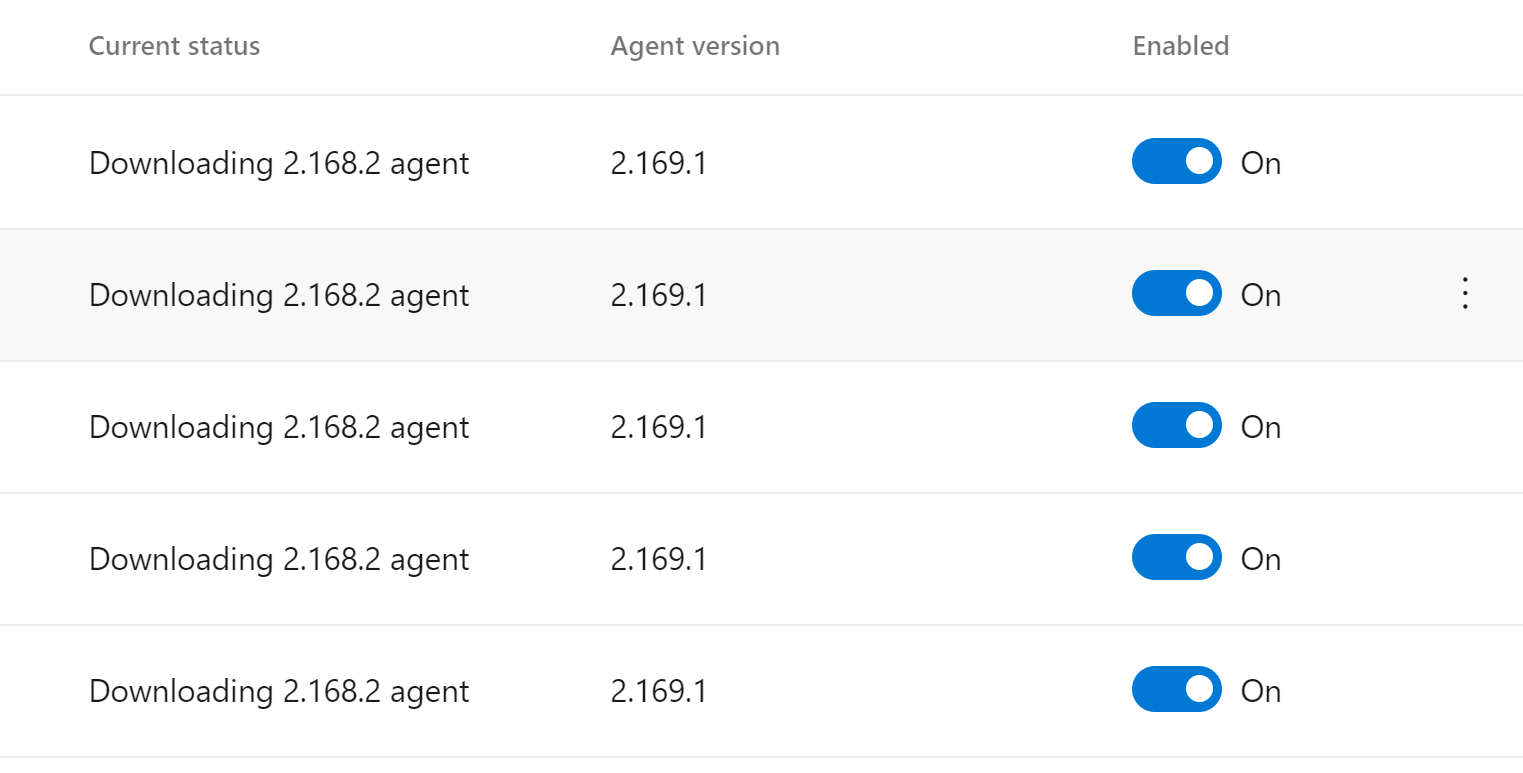
In this case, the latest release is 2.168.2 and the agent is on pre-release 2.169.1. This is not an urgent issue really, I can drop back to the latest release but I do think it is something that shouldn't happen.
 stephenmoloney
on 29 May 2020
stephenmoloney
on 29 May 2020
@stephenmoloney - Yes, this was something we fixed on our side to prevent auto updates of the agent unless you are using certain pipeline features that require a newer version of the agent. I believe the issue you are seeing is a result of some updates that allow us to downgrade an agent if we detect a problem while we are rolling it out. If you are managing your own agent, there is a way to disable that.
@damccorm - Do we have that documented anywhere?
jtpetty
on 29 May 2020
@jtpetty
I believe the issue you are seeing is a result of some updates that allow us to downgrade an agent if we detect a problem while we are rolling it out. If you are managing your own agent, there is a way to disable that.
In this case, the behaviour makes sense. And thanks for removing the forced auto-update unless it is a required feature - that stabilized things for us alot.
stephenmoloney
on 29 May 2020
We don't have it explicitly documented, the downgrade message on the agent does tell you exactly what's happening though - Downgrading agent to a lower version. This is usually due to a rollback of the currently published agent for a bug fix. To disable this behavior, set environment variable AZP_AGENT_DOWNGRADE_DISABLED=true before launching your agent.
Honestly, I'm not sure that I want to document how to use a pre-release or rolled back version of the agent though, its not really a recommended path, and we've stayed away from any docs guiding in that direction before. We're not going to stop you from doing it, but its not really a supported path.
 damccorm
on 29 May 2020
damccorm
on 29 May 2020
@damccorm
This issue will probably constitute sufficient documentation in this case of a forced downgrade for the reasons outlined by the agent logs.
Thanks.
stephenmoloney
on 29 May 2020
This issue has had no activity in 180 days. Please comment if it is not actually stale
![github-actions[bot] picture](https://avatars.githubusercontent.com/in/15368?v=4&s=40) github-actions[bot]
on 25 Nov 2020
github-actions[bot]
on 25 Nov 2020
Related issues
 Silthus
·
41Comments
Silthus
·
41Comments
 bergmeister
·
52Comments
bergmeister
·
52Comments
 jhmoy
·
36Comments
jhmoy
·
36Comments
 toolboc
·
51Comments
toolboc
·
51Comments
 gonzaloluna
·
69Comments
gonzaloluna
·
69Comments