Azure-pipelines-agent: SELinux prevents ./svc.sh install executing.
Agent Version and Platform
Version of your agent?
vsts-agent-rhel.6-x64-2.163.1
OS of the machine running the agent?
Fedora Server 31
Azure DevOps Type and Version
dev.azure.com
If dev.azure.com, what is your organization name? https://dev.azure.com/public_forum
What's not working?
./svc.sh install is not working.
[vsts@mycomputer vsts_agent]$ sudo ./svc.sh install
Creating launch agent in /etc/systemd/system/vsts.agent.foo\x2dltd.bar.mycomputer.service
Run as user: vsts
Run as uid: 1001
gid: 1001
Failed to enable unit: Unit file vsts.agent.foo\x2dltd.bar.mycomputer.service does not exist.
Failed: failed to enable vsts.agent.foo\x2dltd.bar.mycomputer.service
[vsts@mycomputer vsts_agent]$
foo = VSTS organisation name
bar = VSTS agent pool.
I note that the script does create a file in /etc/systemd/system, however, the name is very odd. I susspect Linux doesn't like the ' and \ in the name:
'vsts.agent.Foo\x2dltd.bar.wsvr22.service'

According to your documentation, it should be in the format:
/etc/systemd/system/vsts.agent.{tfs-name}.{agent-name}.service
Agent and Worker's Diagnostic Logs
Haven't got that far.
 arcotek-ltd
All 12 comments
What may be causing the incorrect formatting is the fact that my organisation name contains a hyphen (-).
I have modified your script:
#SVC_NAME=`systemd-escape --path "vsts.agent.Foo.bar.mycomputer.service"`
SVC_NAME="vsts.agent.Foo.bar.mycomputer.service"
Which gives:
[vsts@mycomputer vsts_agent]$ sudo ./svc.sh install
[sudo] password for vsts:
Creating launch agent in /etc/systemd/system/vsts.agent.Foo.bar.mycomputer.service
Run as user: vsts
Run as uid: 1001
gid: 1001
Failed to enable unit: Unit file vsts.agent.Foo.bar.mycomputer.service does not exist.
Failed: failed to enable vsts.agent.Foo.bar.mycomputer.service
[vsts@wsvr22 vsts_agent]$
The file /etc/systemd/system/vsts.agent.Foo.bar.mycomputer.service is created and contains:
[Unit]
Description=Azure Pipelines Agent (Foo.bar.mycomputer)
After=network.target

[Service]
ExecStart=/home/sa-vsts/vsts_agent/runsvc.sh
User=sa-vsts
WorkingDirectory=/home/sa-vsts/vsts_agent
KillMode=process
KillSignal=SIGTERM
TimeoutStopSec=5min

[Install]
WantedBy=multi-user.target
Which looks correct to me.
arcotek-ltd
on 21 Jan 2020
I've narrowed the error Failed to enable unit: Unit file vsts.agent.Foo.bar.mycomputer.service does not exist. down to the line in the install function:
systemctl enable ${SVC_NAME} || failed "failed to enable ${SVC_NAME}"
Listing the "vsts" service, it is reported as "bad":
[vsts@mycomputer vsts_agent]$ systemctl list-unit-files | grep vsts
vsts.agent.Foo.bar.mycomputer.service bad
[vsts@mycomputer vsts_agent]$
I then analyse the file:
[root@mycomputer system]# systemd-analyze verify vsts.agent.Foo.bar.mycomputer.service
/usr/lib/systemd/system/sssd-kcm.socket:7: ListenStream= references a path below legacy directory /var/run/, updating /var/run/.heim_org.h5l.kcm-socket → /run/.heim_org.h5l.kcm-socket; please update the unit file accordingly.
/usr/lib/systemd/system/pcscd.socket:5: ListenStream= references a path below legacy directory /var/run/, updating /var/run/pcscd/pcscd.comm → /run/pcscd/pcscd.comm; please update the unit file accordingly.
/usr/lib/systemd/system/iscsiuio.service:13: PIDFile= references a path below legacy directory /var/run/, updating /var/run/iscsiuio.pid → /run/iscsiuio.pid; please update the unit file accordingly.
/usr/lib/systemd/system/iscsid.service:11: PIDFile= references a path below legacy directory /var/run/, updating /var/run/iscsid.pid → /run/iscsid.pid; please update the unit file accordingly.
/usr/lib/systemd/system/sssd.service:12: PIDFile= references a path below legacy directory /var/run/, updating /var/run/sssd.pid → /run/sssd.pid; please update the unit file accordingly.
Googling around suggests these are just warnings, but I'm a bit stumped at this point. I wonder if the agent needs to be installed in a directory other than /home/vsts/vsts_agent which is what your documentation suggests.
arcotek-ltd
on 21 Jan 2020
I have solved it. It's SELinux causing the problem, which you do not mention in your documentation.
I totally disable SELinux, rebooted and then ran ./svc.sh install. I reenabled SELinux, rebooted and tried to start the service, which, as expected failed.
I have created a policy to allow SELinux to run, even surviving a reboot, however, I don't know if it will allow the service to be installed. These are the steps I took:
- Check "current mode" with:
sestatus - If enforcing, set to permissive mode:
setenforce permissive - Check auditd is running with:
ps -ef | grep auditd. If so: - Get AVC denials with:
audit2allow -a - Create a policy:
audit2allow -l -a -M vsts(This creates two files: vsts.pp and vsts.te). - View the policy:
cat vsts.te - Activate the policy:
semodule -i vsts.pp - Make sure the
vsts agent service is stopped:systemctl stop vsts.agent.Foo.bar.mycomputer.service` - View audit log with:
tail -f /var/log/audi/audit.log(in another SSH session). - Start the service:
systemctl start vsts.agent.Foo.bar.mycomputer.service - Confirm there are no denials in the audit.log. To double-check it will work:
- Stop service:
systemctl stop vsts.agent.Foo.bar.mycomputer.service - Put SELinux into enforcing mode:
setenforce enforcing - Confirm SELinux is enforcing:
sestatus | grep "Current mode" - Start VSTS agent service:
systemctl start vsts.agent.Foo.bar.mycomputer.service - Check the service is running:
systemctl status vsts.agent.Foo.bar.mycomputer.service - Additionally, check in the Azure DevOps portal.
- Finally, reboot and run the checks again.
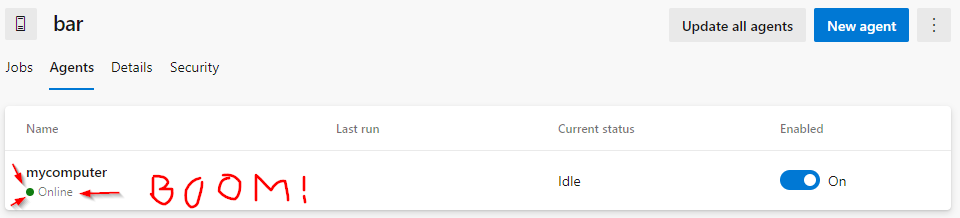
I'd be grateful if any Linux boffins out there care to chip in on whether I have done this correctly.
I will leave this open for @Microsoft to update their scripts to support "real-world" scenarios.
arcotek-ltd
on 21 Jan 2020
I have asked the document authors to add a piece on SELinux in #7010.
arcotek-ltd
on 21 Jan 2020
SELinux also causes access denied errors when trying to run a pipeline. I put SELinux into permissive mode and ran audit2allow -l -a -M vsts_pipeline as per the above steps.
For Google's bots here is the error I was getting when trying to execute the pipeline:
##[error]System.UnauthorizedAccessException: Access to the path '/home/vsts/vsts_agent/_diag/pages' is denied. ---> System.IO.IOException: Permission denied
Here ends my 2 day debugging odyssey. Thanks for documenting your struggle! Helped me out tremendously.
Same story, hyphen in org name, SELinux marking unit file as bad. RHEL 8.
Some stuff I googled for search engine purposes:
"Failed to enable unit: Unit file vsts.agent.ORGNAME.AGENTPOOLNAMEAGENTNAME.service does not exist."
"Failed to stop/start/enable vsts.agent.ORGNAME.AGENTPOOLNAME.AGENTNAME.service: Unit vsts.agent.ORGNAME.AGENTPOOLNAME.AGENTNAME.service not loaded."
 kasper-rutten
on 24 Mar 2020
kasper-rutten
on 24 Mar 2020
It was noted here that users will have to edit /etc/selinux/config to persist changes across reboots. Capturing here for posterity :grin:
 vtbassmatt
on 26 Jun 2020
vtbassmatt
on 26 Jun 2020
This should probably be updated for all versions of Red Hat Enterprise Linux, RHEL, not just RHEL 6.
 FilBot3
on 22 Jul 2020
FilBot3
on 22 Jul 2020
I had also to add the systemd_unit_file_t label for making the service accessible by systemd (on CentOS 8) - see https://unix.stackexchange.com/questions/573760/service-file-exists-but-is-not-found-by-systemd
 machner
on 18 Sep 2020
machner
on 18 Sep 2020
@ghost Is still an actual issue for you?
 EzzhevNikita
on 17 Feb 2021
EzzhevNikita
on 17 Feb 2021
@ghost Is it still an issue for you?
EzzhevNikita
on 9 Mar 2021
@ghost I'm closing this one since there no activity on this ticket for long time. Feel free to reopen it in case issue is still actual for you.
EzzhevNikita
on 12 Mar 2021
Related issues
 A141133
·
80Comments
vtbassmatt
·
39Comments
A141133
·
80Comments
vtbassmatt
·
39Comments
 letmaik
·
35Comments
letmaik
·
35Comments
 JamesNK
·
84Comments
JamesNK
·
84Comments
 erwinkramer
·
50Comments
erwinkramer
·
50Comments
Most helpful comment
I have solved it. It's SELinux causing the problem, which you do not mention in your documentation.
I totally disable SELinux, rebooted and then ran
./svc.sh install. I reenabled SELinux, rebooted and tried to start the service, which, as expected failed.I have created a policy to allow SELinux to run, even surviving a reboot, however, I don't know if it will allow the service to be installed. These are the steps I took:
sestatussetenforce permissiveps -ef | grep auditd. If so:audit2allow -aaudit2allow -l -a -M vsts(This creates two files: vsts.pp and vsts.te).cat vsts.tesemodule -i vsts.ppvsts agent service is stopped:systemctl stop vsts.agent.Foo.bar.mycomputer.service`tail -f /var/log/audi/audit.log(in another SSH session).systemctl start vsts.agent.Foo.bar.mycomputer.servicesystemctl stop vsts.agent.Foo.bar.mycomputer.servicesetenforce enforcingsestatus | grep "Current mode"systemctl start vsts.agent.Foo.bar.mycomputer.servicesystemctl status vsts.agent.Foo.bar.mycomputer.serviceI'd be grateful if any Linux boffins out there care to chip in on whether I have done this correctly.
I will leave this open for @Microsoft to update their scripts to support "real-world" scenarios.