Azure-pipelines-agent: Deployment pool agents: clean up artifact folder after release or on maintenance
Currently build agent pool has an option to configure maintenance task and clean stale working folders - this is of great help keeping build machines under control.
Unfortunately, similar feature is not available for agents in deployment pools. This lead to constantly growing disk consumption - especially in case when many different releases are deployed to the same server.
Is there any plan to include maintenance of deployment agent (preferable) or to setup automated cleaning of release artifacts / folders after deployment? For landscapes with hundreds of deployment agents it would be of great help for Ops teams.
 serhit
All 9 comments
@serhit We already clean up artifacts folders for releases older than 30 days on maintenance job run. Is it not working for you?
 omeshp
on 28 May 2019
omeshp
on 28 May 2019
Unfortunately, 30 days are too long for us - too much releases of feature branches. Is there any way to control the retention period? So that we may set it to shorter period?
serhit
on 28 May 2019
@serhit You can control these settings from the collection level pool settings. Look at this blog
omeshp
on 30 May 2019
@omeshp settings for builds agents is well known and we are using it.
This issue is regarding similar settings we need for deployment group agents.
serhit
on 30 May 2019
@serhit Got it. @chshrikh We already have logic on agent side to handle maintenance settings, but it looks like deployment groups are missing these settings. Can you confirm?
omeshp
on 30 May 2019
We will add it our backlog however it will be a while before we can get to it (~5-6 months). We know this is important for you, currently we are addressing the issues that are affecting broader set of customers. We will continue to monitor this.
As a workaround, you can have a release with scheduled triggers that can periodically clean up the artifact folders on the disk using custom inline script.
 RoopeshNair
on 4 Jun 2019
RoopeshNair
on 4 Jun 2019
Thank you for taking this to backlog - I'm sure it will bring benefits to all customers.
"Good things come to those who wait"
serhit
on 4 Jun 2019
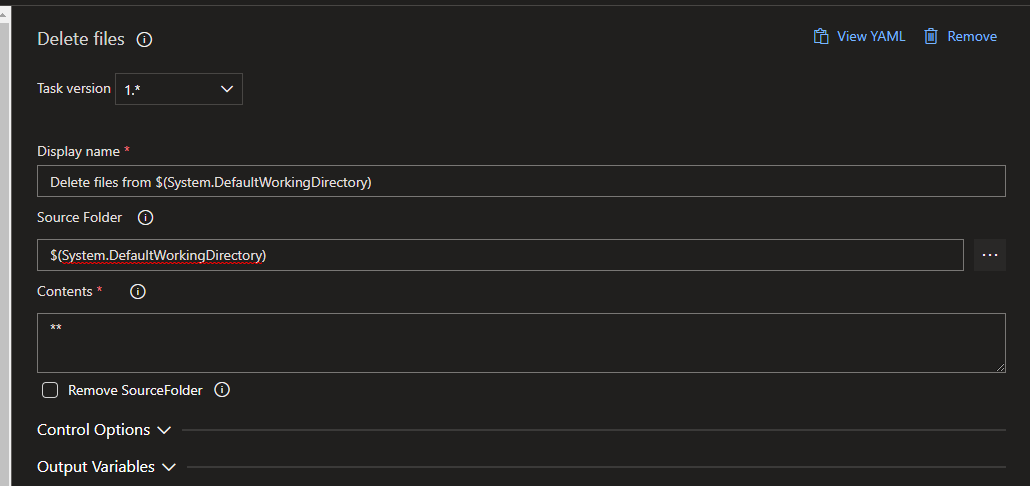
Not sure where this got put onto the backlog as there are no backlog items to fix this issue linked to this github issue. For others reading this, the only way we can fix this issue is to put this as last task in release pipeline:
 xantari
on 24 Aug 2020
xantari
on 24 Aug 2020
@RoopeshNair Hi any update on this ?
 FreshPrinceMayo
on 15 Apr 2021
FreshPrinceMayo
on 15 Apr 2021
Related issues
 riezebosch
·
4Comments
riezebosch
·
4Comments
 simonvane
·
4Comments
simonvane
·
4Comments
 rusergeev
·
4Comments
rusergeev
·
4Comments
 fernisoites
·
4Comments
fernisoites
·
4Comments
 muthurathinam
·
3Comments
muthurathinam
·
3Comments
Most helpful comment
Not sure where this got put onto the backlog as there are no backlog items to fix this issue linked to this github issue. For others reading this, the only way we can fix this issue is to put this as last task in release pipeline:
