Azure-pipelines-agent: Cannot register more than 2 interactive agents to auto-startup on Windows
Agent Version and Platform
Version of your agent? 2.122.1
OS of the machine running the agent? Windows
Azure DevOps Type and Version
TFS 2018 (16.122.27102.1)
What's not working?
(From a Developer Community ticket)
I'm facing issues with the registration for more than two (2) agents running in interactive mode and with auto-start enabled. Multiple interactive agent registrations with auto-start enabled leads into invalid registry auto-start entries. The third registration overrides one of the previously two registered agents. Registry entries have to be manually added/edited to successfully run agents on with auto-start feature.
Expected behavior
- Each registered agent on the same host gets its own auto-start entry within the registry section (Computer\HKEY_CURRENT_USER\Software\Microsoft\Windows\CurrentVersion\Run)
- For example, three registered interactive auto-start agents would result in three unique auto-start registry entries (e.g: VSTSAgent1, VSTSAgent2, VSTSAgent3).
- At startup all agents are automatically started based on their unique registry entries
- Expected Entries:

Actual behavior
Registering Agent A1 (interactive / auto-start):
- Adds key "VSTSAgent" with value "C:\WINDOWS\system32\cmd.exe /D /S /C start "Agent with AutoLogon" "C:\agents\A1\run.cmd" --startuptype autostartup"
Registering Agent A2 after A1 (interactive / auto-start):
- Replaces "VSTSAgent" value with new registered agent A2 and moves A1 entry in new registry entry with key "VSTSAgentBackup_VSTSAgent"
- Value "VSTSAgent" is now set to value "C:\WINDOWS\system32\cmd.exe /D /S /C start "Agent with AutoLogon" "C:\agents\A2\run.cmd" --startuptype autostartup"
- Value "VSTSAgentBackup_VSTSAgent" is now set to value "C:\WINDOWS\system32\cmd.exe /D /S /C start "Agent with AutoLogon" "C:\agents\A1\run.cmd" --startuptype autostartup"
Registering Agent A3 after A1 (interactive / auto-start):
- Replaces "VSTSAgent" value with new registered agent A3
- Moves value from A2 registration to the backup key entry
- A third entry is not created, instead the first registration of A1 is lost and must be manually created to be able to run all 3 Agents at startup.
- Actual entries:

Further information
- Target System: TFS 2018 (16.122.27102.1)
- OS Version: 10.0.16299
- Agent Version: 2.122.1
- Agent Authentication Type: Integrated
- Agent Run as: Interactive with auto-logon
 vtbassmatt
All 8 comments
@vtbassmatt This is by design. We allow only one interactive agent per machine.
Windows client machines don't allow more than 1 interactive user session
 nigurr
on 15 Mar 2019
nigurr
on 15 Mar 2019
@nigurr I have the same issue. I don't need multiple interactive sessions. I need multiple agents (of the same account) in the same session. So I can run 4 Karma UI tests on Edge (since its not headless) in parallel.
Edit: 1 interactive session thing is also not true. Windows client by default allows 1 session. Windows Server allows 2. With registry config, Windows Server will allow 2 sessions of the same user. With RD Services configured, any OS will allow as many sessions as I have configured.
 xenalite
on 20 Mar 2019
xenalite
on 20 Mar 2019
@xenalite Not sure about the source of information. Can you please share the link for the same?
Even with RDP, Windows client machines offer only one interactive session per machine.
Regarding parallel testing of UI tests, it might be correct for this usecase to parallelize tests and run them in same machine, it will cause issues with Windows CodedUI testing. Since your interactions with system can cause issues for other tests.
I suggest you to distribute your tests across multiple machines (agents) and run them in parallel to achieve the efficiency.
nigurr
on 20 Mar 2019
@nigurr We used this registry change to allow multiple sessions per user:
https://www.mytecbits.com/microsoft/windows/multiple-remote-desktop-sessions-for-a-single-user
I disagree with your assessment of how to run UI tests. If I know my UI tests will not conflict with each other - as it's the case for our Karma and Selenium - then I want to run them in parallel on the same machine (and session). Having multiple machines for testing would be wildly cost inefficient as most of the time they do nothing.
I do not use coded UI tests. I use VSTest task to run my selenium tests and npm to run my karma tests.
xenalite
on 20 Mar 2019
@xenalite We appreciate your suggestions, currently we are not enhancing/supporting multiple interactive sessions per machine.
Help us by contributing to open source.
nigurr
on 22 Mar 2019
@nigurr That's OK. I got my case to work by editing the registry entries for the auto logon user.
Simply added all agents to auto start:
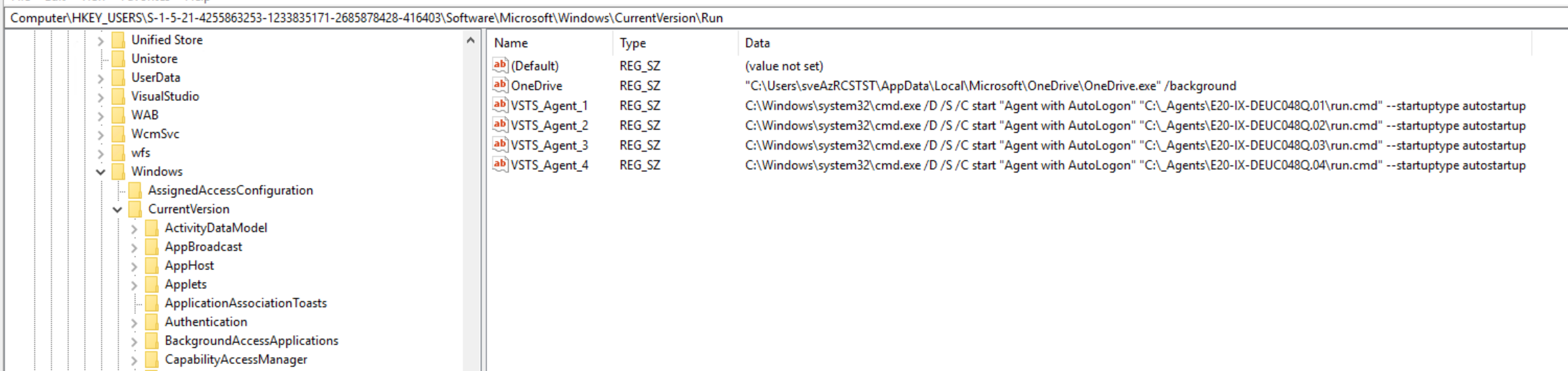
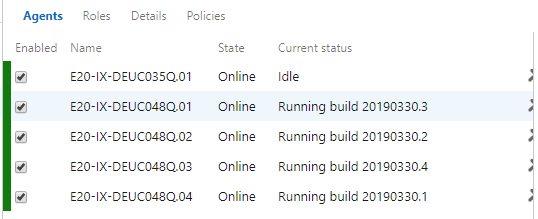
I was then able to run 4 builds in parallel on the same interactive session.
xenalite
on 30 Mar 2019
This was an interesting read and made me realized that the number of sessions, for the one single user configured for all interactive agents, on the remote server, might be the issue for me.
So I made a different user on the system for each agent; that seems to fix it for me. Now I do not have multiple sessions running on one user account.
 WizX20
on 22 Aug 2019
WizX20
on 22 Aug 2019
This issue has had no activity in 180 days. Please comment if it is not actually stale
![github-actions[bot] picture](https://avatars.githubusercontent.com/in/15368?v=4&s=40) github-actions[bot]
on 18 Feb 2020
github-actions[bot]
on 18 Feb 2020
Related issues
 gonzaloluna
·
69Comments
gonzaloluna
·
69Comments
 ChristophLindemann
·
41Comments
ChristophLindemann
·
41Comments
 bbusacker
·
49Comments
bbusacker
·
49Comments
 robinhultman
·
35Comments
robinhultman
·
35Comments
 erwinkramer
·
50Comments
erwinkramer
·
50Comments
Most helpful comment
@nigurr That's OK. I got my case to work by editing the registry entries for the auto logon user.

Simply added all agents to auto start:
I was then able to run 4 builds in parallel on the same interactive session.
