Azure-pipelines-agent: Github-Repository-Resource Service Connection Issue
Have you tried trouble shooting?
Yes
VSTS Type and Version
VisualStudio.com
Account Name
http://jeremytcd.visualstudio.com
What's not working?
I'm having a service connection issue when attempting to use a Github repository as a resource. I am aware of the advisory Troubleshoot Azure Resource Manager service connections and I've read through all of the information on repository resources and service connections I could find (article 1, article 2, article 3). I could not resolve my issue, so I created reproduction repositories:
IssueReproduction.RepositoryResource.Template
This repository has a single file, template.yml, with the following contents:
jobs:
- job: Test
  pool:
    vmImage: 'vs2017-win2016'
  steps:
  - script: echo success
IssueReproduction.RepositoryResource.Consumer
This repository has a single file, consumer.yml, with the following contents:
resources:
  repositories:
  - repository: templates
    type: github
    name: JeremyTCD/IssueReproduction.RepositoryResource.Template
    endpoint: https://github.com/JeremyTCD/IssueReproduction.RepositoryResource.Template.git

jobs:
- template: template.yml@templates
It adds the template repository as a resource using the method documented here and uses template.yml.
Pipeline
After creating those repositories, I created a pipline - IssueReproduction.RepositoryResource.Consumer-CI.
Note, initially, consumer.yml had no endpoint option, as per the documentation. Without it, I got these
errors:
Repository templates requires an endpoint

Parameter name: endpoint,Unable to cast object of type 'Microsoft.TeamFoundation.DistributedTask.Pipelines.Yaml.Templates.JobsTemplateReference' to type 'Microsoft.TeamFoundation.DistributedTask.Pipelines.Yaml.Templates.Job'.
The documentation might need updating with regard to endpoint being required.
With the endpoint, I get these errors:
Repository templates references endpoint https://github.com/JeremyTCD/IssueReproduction.RepositoryResource.Template.git which does not exist or is not authorized for use

Unable to cast object of type 'Microsoft.TeamFoundation.DistributedTask.Pipelines.Yaml.Templates.JobsTemplateReference' to type 'Microsoft.TeamFoundation.DistributedTask.Pipelines.Yaml.Templates.Job'.
Here is an example build result: result.
What I've tried
I noticed that tasks accept service connection options, like azureSubscription. The documentation does not specify any equivalent for repositories. I tried random stuff like githubSubscription but nothing worked.
Some Github issues, such as this one suggested stuff like adding variables and switching branches. These seem to apply more for when .ymls are changed after their initial loading. I tried them anyway and nothing worked.
I've checked my pipeline's service connections. Since the root repository is also on Github, Get Sources already has a valid service connection to Github. I'm not sure if this connection is used for all jobs. Regardless, I could not find any way to add a service connection "for the entire pipline".
 JeremyTCD
All 5 comments
@JeremyTCD https://github.com/Microsoft/azure-pipelines-yaml is the new repository for all yaml related question moving forward.
you need to create a github endpoint like this:

resources:
  repositories:
  - repository: templates
    type: github
    name: JeremyTCD/IssueReproduction.RepositoryResource.Template
    endpoint: <name you give when create the endpoint>

jobs:
- template: template.yml@templates
 TingluoHuang
on 23 Oct 2018
TingluoHuang
on 23 Oct 2018
@TingluoHuang Thanks for the quick response!
https://github.com/Microsoft/azure-pipelines-yaml is the new repository for all yaml related question moving forward.
Okay, would be helpful if this was noted in the ReadMe for this repository.
The fix worked, though the documentation here needs to be fixed:
resources:
  repositories:
  - repository: string  # identifier (no spaces allowed)
    type: enum  # see below
    name: string  # repository name (format depends on `type`)
    ref: string  # ref name to use, defaults to 'refs/heads/master'
    endpoint: string  # endpoint for a GitHub repository
I've opened a separate issue in the docs repository, will update it.
JeremyTCD
on 23 Oct 2018
Also this documentation should be updated accordingly: https://docs.microsoft.com/en-us/azure/devops/pipelines/process/templates?view=azure-devops#using-other-repositories
 martinm82
on 14 Mar 2019
martinm82
on 14 Mar 2019
Hi @TingluoHuang
What is happening, what is wrong? I have referenced this variables in all ways that i know 😞
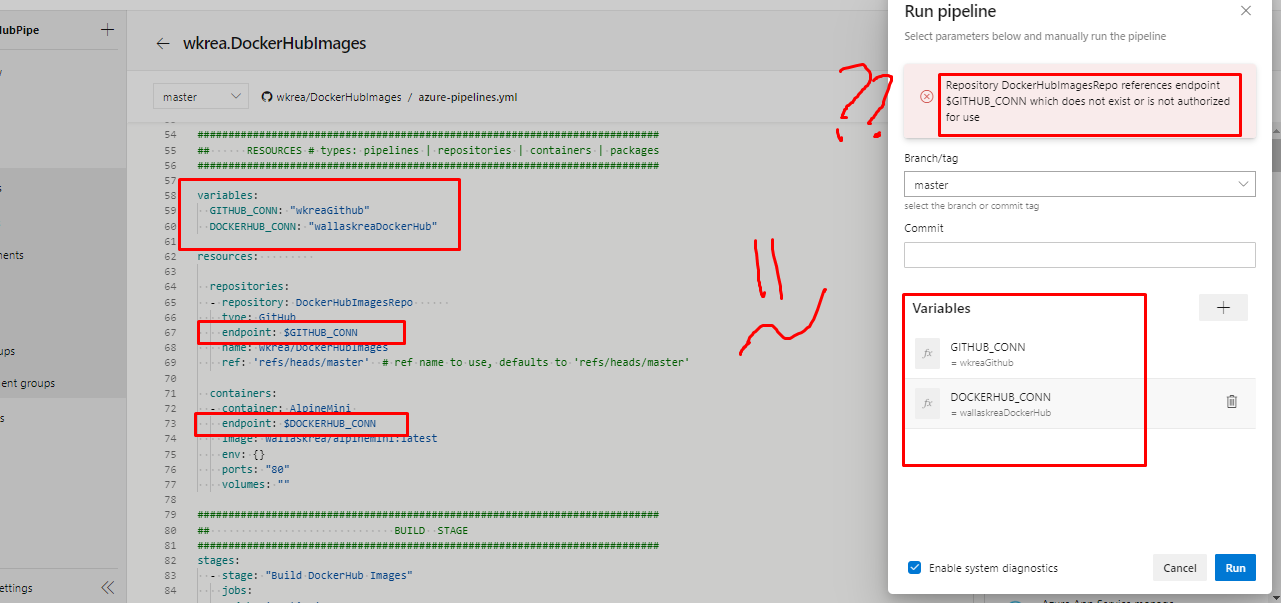
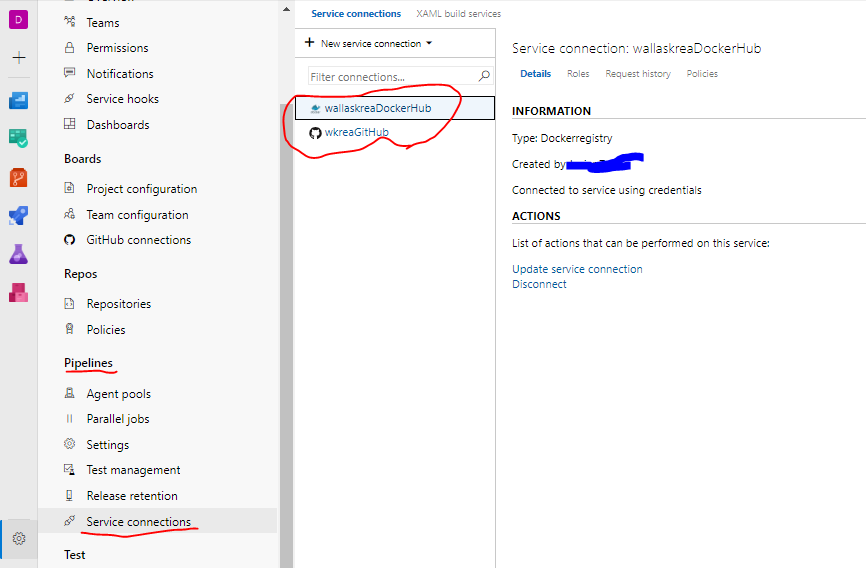
Any help its appreciated :+1:
 wkrea
on 2 Nov 2019
wkrea
on 2 Nov 2019
@wkrea I think you need to reference your variables in the template like this: $(varname) (notice the parenthesis)
 bdelsaz
on 6 Mar 2020
bdelsaz
on 6 Mar 2020
Related issues
 rusergeev
·
48Comments
rusergeev
·
48Comments
 gonzaloluna
·
69Comments
gonzaloluna
·
69Comments
 robinhultman
·
35Comments
robinhultman
·
35Comments
 A141133
·
80Comments
A141133
·
80Comments
 bbusacker
·
49Comments
bbusacker
·
49Comments
Most helpful comment
Also this documentation should be updated accordingly: https://docs.microsoft.com/en-us/azure/devops/pipelines/process/templates?view=azure-devops#using-other-repositories