Azure-pipelines-agent: [YAML] Support for variables is inconsistent in template expressions
Trying to use system variables inside a template expression in a reusable step generates syntax errors in some cases but works in others. I cannot see any differences between the syntax being used.
Have you tried trouble shooting?
Tried variations and the request keeps failing
Agent Version and Platform
Version of your agent? 2.102.0/2.100.1/...
OS of the machine running the agent? Windows
VSTS Type and Version
VisualStudio.com or On-Prem TFS? VSTS
If VisualStudio.com, what is your account name? http://fsmb.visualstudio.com
What's not working?
When trying to queue a build I get the following error - Unrecognized value: '$'. Located at position 40 within expression: coalesce(parameters.testAdapterFolder, $(System.DefaultWorkingDirectory)). For more help, refer to https://go.microsoft.com/fwlink/?linkid=842996
The template in question.
parameters:
   searchFolder: ''

steps:
- task: VSTest@2
  displayName: Test Assemblies
  inputs:
     testSelector: testAssemblies
     searchFolder: '${{ coalesce(parameters.searchFolder, $(System.DefaultWorkingDirectory)) }}'
But in another template used by the same build I don't get any errors and it executes properly.
parameters:
   sourceFolder: ''

steps:
- task: DeleteFiles@1
  displayName: Delete package solutions
  inputs:
     sourceFolder: '${{ coalesce(parameters.sourceFolder, $(Build.SourcesDirectory)) }}\packages'
     contents: '**/*.sln'
Changing variables doesn't have any impact. Changing the $() reference to simply '''' works. Changing to variables[''System.DefaultWorkingDirectory''] changes the error to
Unexpected null value,vstest-standard.yml (Line: 27, Col: 32): Unexpected null value
 CoolDadTx
All 17 comments
Changing to variables[''System.DefaultWorkingDirectory''] changes the error it looks like you used two single quotes. variables['System.DefaultWorkingDirectory']
Also, template expressions currently cannot be embedded within a string. We do want to support ${{ }} within a string - it's on the backlog. The workaround is `${{ format('{0}\packages', coalesce(parameters.sourceFolder, '$(Build.SourcesDirectory)') }}
The docs for templates also needs to be improved, to help with these problems.
 ericsciple
on 10 Aug 2018
ericsciple
on 10 Aug 2018
"it looks like you used two single quotes."
That was a typo. I used single quotes and it doesn't work.
Here's what I want:
steps:
-task: VSTest@2
inputs:
searchFolder: '${{ coalesce(parameters.searchFolder, variables['System.DefaultWorkingDirectory']) }}'
No variation of quotes, no quotes or anything else worked. I tried the regular approach of $(System.DefaultWorkingDirectory) and get error as well. But in a different template, this works.
steps:
- task: DeleteFiles@1
inputs:
sourceFolder: '${{ coalesce(parameters.sourceFolder, $(Build.SourcesDirectory)) }}\packages'
Notice here I'm using the $() syntax and I'm not using format but it works every time. Yet another template I have this and it doesn't work.
steps:
- task: CopyFiles@2
inputs:
SourceFolder: ${{ coalesce(parameters.sourceFolder, $(System.DefaultWorkingDirectory)) }}
To clarify in the last example, if you put single quotes around the value then you get a syntax error.
steps:
- task: CopyFiles@2
inputs:
SourceFolder: '${{ coalesce(parameters.sourceFolder, $(System.DefaultWorkingDirectory)) }}'
try this:
steps:
-task: VSTest@2
inputs:
searchFolder: "${{ coalesce(parameters.searchFolder, variables['System.DefaultWorkingDirectory']) }}"
"Also, template expressions currently cannot be embedded within a string."
Your recommended workaround doesn't work either. It gives a parsing error.
(Line: 26, Col: 33, Idx: 765) - (Line: 26, Col: 33, Idx: 765): While parsing a block mapping, did not find expected key.
I noticed in your code that you are missing a closing paren for the format call. The closing paren you have goes with the coalesce so you need another for the format call. Adding that in doesn't change anything.
CoolDadTx
on 10 Aug 2018
"try this:"
Error: Unexpected null value
Note that I tried a different variable, just in case, and it gives the same error. For testing purposes here's the entire template I created.
parameters:
searchFolder: ''
testAdapterFolder: ''
enableUITests: false
enableCodeCoverage: true
platform: 'Release'
configuration: 'any cpu'
steps:
- task: VSTest@2
displayName: Test Assemblies
inputs:
testSelector: testAssemblies
testAssemblyVer2: |
**\tests.*.dll
**\*.tests.dll
**\*test*.dll
!**\obj\**
!**\*TestAdapter.dll
!**\FSMB.Apollo.UnitTesting.dll
!**\*TestPlatform*.dll
#searchFolder: "${{ coalesce(parameters.searchFolder, variables['System.DefaultWorkingDirectory']) }}"
searchFolder: "${{ coalesce(parameters.searchFolder, variables['Build.ArtifactStagingDirectory']) }}"
#searchFolder: '${{parameters.searchFolder}}'
#searchFolder: '${{ format('{0}\packages', coalesce(parameters.searchFolder, '$(System.DefaultWorkingDirectory)') }}'
vstestLocationMethod: version
vsTestVersion: latest
#pathtoCustomTestAdapters: '${{ coalesce(parameters.testAdapterFolder, variables[''System.DefaultWorkingDirectory'']) }}'
pathtoCustomTestAdapters: '${{parameters.testAdapterFolder}}'
platform: '${{parameters.platform}}'
configuration: '${{parameters.configuration}}'
runInParallel: true
uiTests: ${{ coalesce(parameters.enableUITests, 'false') }}
codeCoverageEnabled: ${{ coalesce(parameters.enableCodeCoverage, 'true') }}
distributionBatchType: basedOnTestCases
batchingBasedOnAgentsOption: autoBatchSize
And here's the test build I'm trying to use it in (elided).
queue:
name: Hosted VS2017
demands:
- msbuild
- visualstudio
- vstest
variables:
BuildConfiguration: Release
BuildPlatform: any cpu
SolutionFiles: '**/*.sln'
steps:
- template: steps/vstest-standard.yml@templates
parameters:
platform: '$(BuildPlatform)'
configuration: '$(BuildConfiguration)'
# HACK: working around variable issues in template expressions
#searchFolder: '$(System.DefaultWorkingDirectory)'
pathtoCustomTestAdapters: '$(System.DefaultWorkingDirectory)'
Sorry, I forgot system.defaultworkingdirectory is defined only on the agent side. All of the template expansion stuff happens on the server when the pipeline is initialized.
The following example will coalesce with the string value, which contains a macro (and macros are delay-expanded)
steps:
-task: VSTest@2
 inputs:
    searchFolder: "${{ coalesce(parameters.searchFolder, '$(System.DefaultWorkingDirectory)') }}"
That is working for the test scenario I gave. I try in the other templates where I had the same issue to see if it works for them as well.
I think the two things that are resolving this is the use of double quotes and the info about the timing in which the expression/variables are evaluated. Is this documented somewhere?
CoolDadTx
on 10 Aug 2018
It is briefly touched on in the template docs. We need to improve the templates docs. Also we need to improve variables documentation in general to better explain when variables/expressions are evaluated.
@vtbassmatt fyi
ericsciple
on 10 Aug 2018
We have created a new repository for all YAML related issues, please move the current issue to there.
https://github.com/Microsoft/azure-pipelines-yaml
 TingluoHuang
on 5 Oct 2018
TingluoHuang
on 5 Oct 2018
@vtbassmatt fyi. here is a good example where I think intellisense is the answer. docs can only help so much.
ericsciple
on 5 Oct 2018
Hi everyone. I'm still have troubles with clarifying what quotes where to use and how expressions and variables work in templates. It is nonsense, it just like playing blindly in lottery. I have no chance to know when and in witch order all these tricks parsed. Using yaml is awful, terrible part of my life. This is so hard not userfriendly!
 VerdonTrigance
on 14 Feb 2020
VerdonTrigance
on 14 Feb 2020
Hopefully this helps some.
 vtbassmatt
on 14 Feb 2020
vtbassmatt
on 14 Feb 2020
I hate to bring this back to life, but I think it's better than another issue.
How would you perform concatenation as well?
Something like this will work:
artifactDirectory: "${{ coalesce(environment.artifactDirectory, parameters.artifactDirectory, '$(Build.ArtifactStagingDirectory)') }}"
But if you add a string in there, it breaks:
artifactDirectory: "${{ coalesce(environment.artifactDirectory, parameters.artifactDirectory, 'artifacts-$(Build.ArtifactStagingDirectory)') }}"
and interpolates into artifacts-
 CrowderKroger
on 14 Aug 2020
CrowderKroger
on 14 Aug 2020
@CrowderKroger that's surprising, adding a literal string before the $(variable) shouldn't change anything, and for me it doesn't:
Pipeline
parameters:
- name: foo
  type: string
  default: ''
pool: { vmImage: ubuntu-latest }
steps:
- checkout: none
- script: echo ${{ coalesce(parameters.foo, '$(Build.SourcesDirectory)') }}
  displayName: no literal
- script: echo ${{ coalesce(parameters.foo, 'lit-$(Build.SourcesDirectory)') }}
  displayName: with literal
Result
Starting: no literal
==============================================================================
Task         : Command line
Description  : Run a command line script using Bash on Linux and macOS and cmd.exe on Windows
Version      : 2.164.2
Author       : Microsoft Corporation
Help         : https://docs.microsoft.com/azure/devops/pipelines/tasks/utility/command-line
==============================================================================
Generating script.
Script contents:
echo /home/vsts/work/1/s
========================== Starting Command Output ===========================
/bin/bash --noprofile --norc /home/vsts/work/_temp/7d59fd04-2796-4535-8baf-21c6dc3086d6.sh
/home/vsts/work/1/s

Finishing: no literal

Starting: with literal
==============================================================================
Task         : Command line
Description  : Run a command line script using Bash on Linux and macOS and cmd.exe on Windows
Version      : 2.164.2
Author       : Microsoft Corporation
Help         : https://docs.microsoft.com/azure/devops/pipelines/tasks/utility/command-line
==============================================================================
Generating script.
Script contents:
echo lit-/home/vsts/work/1/s
========================== Starting Command Output ===========================
/bin/bash --noprofile --norc /home/vsts/work/_temp/d6eac61d-88a2-435a-89b7-001970890472.sh
lit-/home/vsts/work/1/s

Finishing: with literal
I don't understand why Azure team still doesn't produce variables and expressions timeline like it was with ASP.NET controls many years ago:
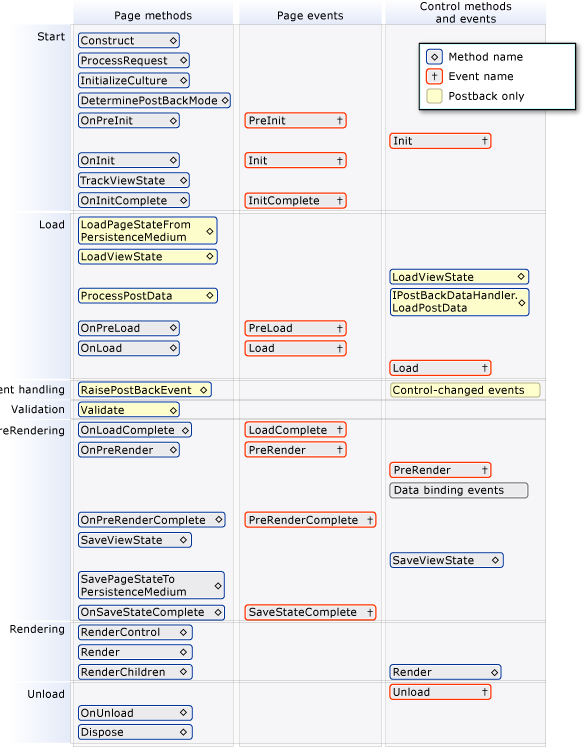
It would be great and easy way to clarify this process.
VerdonTrigance
on 17 Aug 2020
@VerdonTrigance that's a nice summary, we'll see if we can do something graphical like that. For now though, we have some of the same info in text form: https://docs.microsoft.com/azure/devops/pipelines/process/runs
vtbassmatt
on 17 Aug 2020
Related issues
 gregpakes
·
43Comments
gregpakes
·
43Comments
 rusergeev
·
48Comments
rusergeev
·
48Comments
 erwinkramer
·
50Comments
erwinkramer
·
50Comments
 KelvinJin
·
54Comments
KelvinJin
·
54Comments
 bergmeister
·
52Comments
bergmeister
·
52Comments
Most helpful comment
Sorry, I forgot system.defaultworkingdirectory is defined only on the agent side. All of the template expansion stuff happens on the server when the pipeline is initialized.
The following example will coalesce with the string value, which contains a macro (and macros are delay-expanded)