Azure-pipelines-agent: Revision not incrementing if updating build number through build.updatebuildnumber
Agent Version and Platform
Version of your agent? 2.131.0
OS of the machine running the agent:
Windows
VSTS Type and Version
VisualStudio.com
account name:
http://dev-fg.visualstudio.com
What's not working?
It seems like I'm not the first one to encounter this issue so I cite the original post that was created in vsts-tasks repository: https://github.com/Microsoft/vsts-tasks/issues/3289
In order to distinguish between official releases (from our master branch) and private releases from feature branches, I'm trying to update a build number depending on the source branch of the build. To achieve this, I have the build number configured as $(Date:yy).$(Date:MMdd).[BuildType]$(Rev:rrr). Inside a task in the build definition I then replace [BuildType] with either 1 or 2 depending on whether the source branch is 'refs/heads/master', by using the following powershell command:
Write-Host "##vso[build.updatebuildnumber]$BuildNumber"
The problem is that the revision $(Rev:rrr) doesn't seem to get incremented build-over-build. I assume this is because this should only update if nothing else in the build number has changed.
Am I taking the wrong approach to achieve my goal of having a different build number format depending on the source branch? Or is there anything else I could do to ensure the revision gets updated?
We are currently using the BuildNumber format: $(date:yyyyMMdd)-$(rev:rr) which gets updated through the command build.updatebuildnumber and the current version of the lib or app gets added resulting in: 3.1.3-$(date:yyyyMMdd)-$(rev:rr) also debug gets added if it is a debug build.
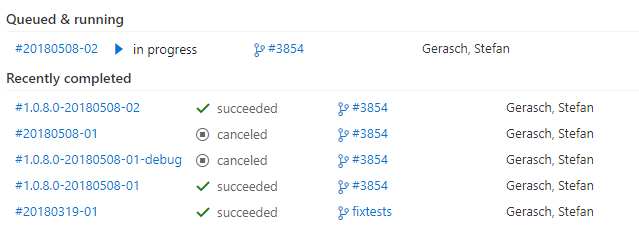
In this image you can see that it increments the revision if the build number was not changed (in this case I canceled the build before the number got updated) and if the build number is updated it does not increment the revision
Agent and Worker's Diagnostic Logs
Worker Log:
Worker_20180508-124027-utc.log
Agent Log:
[2018-05-08 12:40:26Z INFO RSAEncryptedFileKeyManager] Loading RSA key parameters from file C:\Tools\agent\.credentials_rsaparams
[2018-05-08 12:40:26Z INFO MessageListener] Message '146' received from session '672b6797-f7c1-4fe1-a5a1-2c6313fd9363'.
[2018-05-08 12:40:26Z INFO JobDispatcher] Job request dc1fd210-f39c-51a6-aa2f-eb7faea9ac76 received.
[2018-05-08 12:40:26Z INFO JobDispatcher] Job request dc1fd210-f39c-51a6-aa2f-eb7faea9ac76 processed succeed.
[2018-05-08 12:40:26Z INFO Terminal] WRITE LINE: 2018-05-08 12:40:26Z: Running job: Build (Release)
[2018-05-08 12:40:26Z INFO JobDispatcher] Start renew job request 6408 for job dc1fd210-f39c-51a6-aa2f-eb7faea9ac76.
[2018-05-08 12:40:26Z INFO JobDispatcher] Successfully renew job request 6408, job is valid till 08/05/2018 12:45:26
[2018-05-08 12:40:26Z INFO HostContext] Well known directory 'Bin': 'C:\Tools\agent\bin'
[2018-05-08 12:40:26Z INFO ProcessInvoker] Starting process:
[2018-05-08 12:40:26Z INFO ProcessInvoker]   File name: 'C:\Tools\agent\bin\Agent.Worker.exe'
[2018-05-08 12:40:26Z INFO ProcessInvoker]   Arguments: 'spawnclient 2456 4088'
[2018-05-08 12:40:26Z INFO ProcessInvoker]   Working directory: 'C:\Tools\agent\bin'
[2018-05-08 12:40:26Z INFO ProcessInvoker]   Require exit code zero: 'False'
[2018-05-08 12:40:26Z INFO ProcessInvoker]   Encoding web name:  ; code page: ''
[2018-05-08 12:40:26Z INFO ProcessInvoker]   Force kill process on cancellation: 'True'
[2018-05-08 12:40:26Z INFO ProcessInvoker] Process started with process id 8616, waiting for process exit.
[2018-05-08 12:40:26Z INFO JobDispatcher] Send job request message to worker for job dc1fd210-f39c-51a6-aa2f-eb7faea9ac76.
[2018-05-08 12:40:28Z INFO JobNotification] Entering JobStarted Notification
[2018-05-08 12:41:26Z INFO JobDispatcher] Successfully renew job request 6408, job is valid till 08/05/2018 12:46:26
[2018-05-08 12:42:26Z INFO JobDispatcher] Successfully renew job request 6408, job is valid till 08/05/2018 12:47:26
[2018-05-08 12:43:26Z INFO JobDispatcher] Successfully renew job request 6408, job is valid till 08/05/2018 12:48:26
If you need any more information please let me know.
Greetings
Gary
 DerGary
All 19 comments
Hi Gary,
The build number override command ends up resetting the $(rev) counter as a side-effect. Unfortunately, the only real solution today is to not mix the two. We have a new feature that will hit in an upcoming release that works the same way that $(rev) does, but without any reliance on the $(BuildNumber) variable.
 moswald
on 10 May 2018
moswald
on 10 May 2018
Hi moswald,
I don't think it is resetting it, in the screenshot I posted you can see that the currently running build has revision 2 and the last completed build also had revision 2 and changed the build number so it was not reset but just not incremented.
Is there a timeline for this new feature? As a workaround I think we could use the buildid which should be a unique id that gets incremented on each build. I will test this.
DerGary
on 11 May 2018
It was just checked into master yesterday. It should be rolling out in the coming weeks, barring any blocking bugs.
moswald
on 11 May 2018
Is important where the $(Rev) is placed. It will only increment to make everything before and including the rev unique, not what's behind it.
Xyz_1.0.REV
- Xyz_1.0.1
- Xyz_1.0.2
Xyz_1.0.REV_DATE
- Xyz_1.0.1_20180515
- Xyz_1.0.2_20180515
- Xyz_1.0.3_20180516
Xyz_DATE_1.0.REV
- Xyz_20180515_1.0.1
- Xyz_20180515_1.0.2
- Xyz_20180516_1.0.1
I ended up putting the rev more to the front of the build number format and extract it with regex `$(BuildDefinitionName)_r$(Rev:r)_0.0.0.0``. No I can change the 0.0.0.0 from powershell and the rev will keep incrementing.
 DavidDeSloovere
on 15 May 2018
DavidDeSloovere
on 15 May 2018
@moswald Any info about that new feature you mentioned? Sounds like exactly what I need.
 nphmuller
on 29 Jun 2018
nphmuller
on 29 Jun 2018
It's available now: you can create a variable at the definition level or in a yaml file with $[ counter('name', seed) ] as the expression value, and it will be incremented each build. name and seed are optional.
moswald
on 29 Jun 2018
Cool! :)
Any official documentation available? Or is it still in the pipeline?
nphmuller
on 29 Jun 2018
This PR covers the documentation, but it's a little out of date (the prefix parameter is no longer automatically added to the counter as a prefix, and is just the counter name, now).
moswald
on 29 Jun 2018
The scope of this issue is not related to the agent repository, the agent just make a REST api call to VSTS Build REST endpoint, i am going to close this issue.
 TingluoHuang
on 2 Jul 2018
TingluoHuang
on 2 Jul 2018
@moswald you said it is available, but despite the fact we upgrade our agent, it does not seem to work.
I just checked out the agent source code, and couldn't see any reference to the support of this "counter" feature.
I try to define a variable on my build definition with $[ counter() ] as value, but this not seems to be expanded..
Any idea?
 kogratte
on 8 Sep 2018
kogratte
on 8 Sep 2018
@kogratte This was a service update, not an agent update. Are you using TFS or VSTS?
moswald
on 10 Sep 2018
@moswald I'm using the latest TFS version, and a self hosted build agent.
kogratte
on 10 Sep 2018
The counter expression feature is not available in TFS 2018 Update 2. I don't believe it was selected to go into TFS 2018 Update 3, either, as we intended that to only be for bug fixes.
moswald
on 10 Sep 2018
@kogratte I can confirm that it is working in VSTS. I'm using it a couple of weeks now.
DerGary
on 10 Sep 2018
Hi @moswald ,
is there any other place than the variable declaration bloc where we can use this $[counter(name, seed)]?
I failed using it in a bash script and in a YodLabs.VariableTasks.SetVariable.SetVariable@0 task.
I'd need to declare one in a job step, where name would be the result of a previous bash step.
In fact, I'd like to override the build number in a build pipeline template, to be something like:
<string computed in bash step>-<counter on this string>.
Which I try doing with the echo '##vso[build.updatebuildnumber]'$(myBuildNumber) way, and I can't get this counter to evaluated properly :cry:
Thanks
 afeblot
on 25 Oct 2018
afeblot
on 25 Oct 2018
It's a variable expression, so it only works where you declare variables. That means for Designer definitions (you use the UI to define your task list) you enter them in the Variables tab. For YAML definitions you can place it at the definition level or at the job level, but they still have to be in the section for variables.
moswald
on 25 Oct 2018
Thanks for the quick answer. I guess I'm stuck then, until something more generic comes up.
afeblot
on 25 Oct 2018
If you can, please leave a suggestion on our Developer Community (preferably with a complete example of what you're looking for). We use that as a primary factor for driving new features.
moswald
on 25 Oct 2018
If you can, please leave a suggestion on our Developer Community (preferably with a complete example of what you're looking for). We use that as a primary factor for driving new features.
The topic has drifted from the build.updatebuildnumber to the counter suggestion. Regarding the later and thanks to your suggestion, I created an idea to the Developer Community website.
 Xoib
on 29 Oct 2018
Xoib
on 29 Oct 2018
Related issues
 gdavocap
·
60Comments
gdavocap
·
60Comments
 robinhultman
·
35Comments
robinhultman
·
35Comments
 jhmoy
·
36Comments
jhmoy
·
36Comments
 letmaik
·
35Comments
letmaik
·
35Comments
 ChristophLindemann
·
41Comments
ChristophLindemann
·
41Comments
Most helpful comment
Is important where the $(Rev) is placed. It will only increment to make everything before and including the rev unique, not what's behind it.
Xyz_1.0.REV
Xyz_1.0.REV_DATE
Xyz_DATE_1.0.REV
I ended up putting the rev more to the front of the build number format and extract it with regex `$(BuildDefinitionName)_r$(Rev:r)_0.0.0.0``. No I can change the 0.0.0.0 from powershell and the rev will keep incrementing.