Azure-pipelines-agent: System.ArtifactsDirectory not set when Build.SyncSources=false
Have you try trouble shooting doc? Yes
Agent version and platform
Version of your agent? 2.127.0
OS of the machine running the agent? Windows Server 2016
VSTS type and version? on-prem TFS 2017 Update 3
What's not working?
System.ArtifactsDirectory is not set when Build.SyncSources is set to 'false'.
A build may want to capture/edit/publish artifacts without getting any source. Consider a build who's job is to run & publish test metrics & data - it doesn't need to get any source because it uses the output of the CI build, however it still needs a place to put all of the data it is going to publish. Artifacts is the natural place for this because it is automatically cleaned. I've checked and it seems the folder 'a' still exists just the variable isn't being set. I've tried both git & TFVC source repos and the behavior is the same.

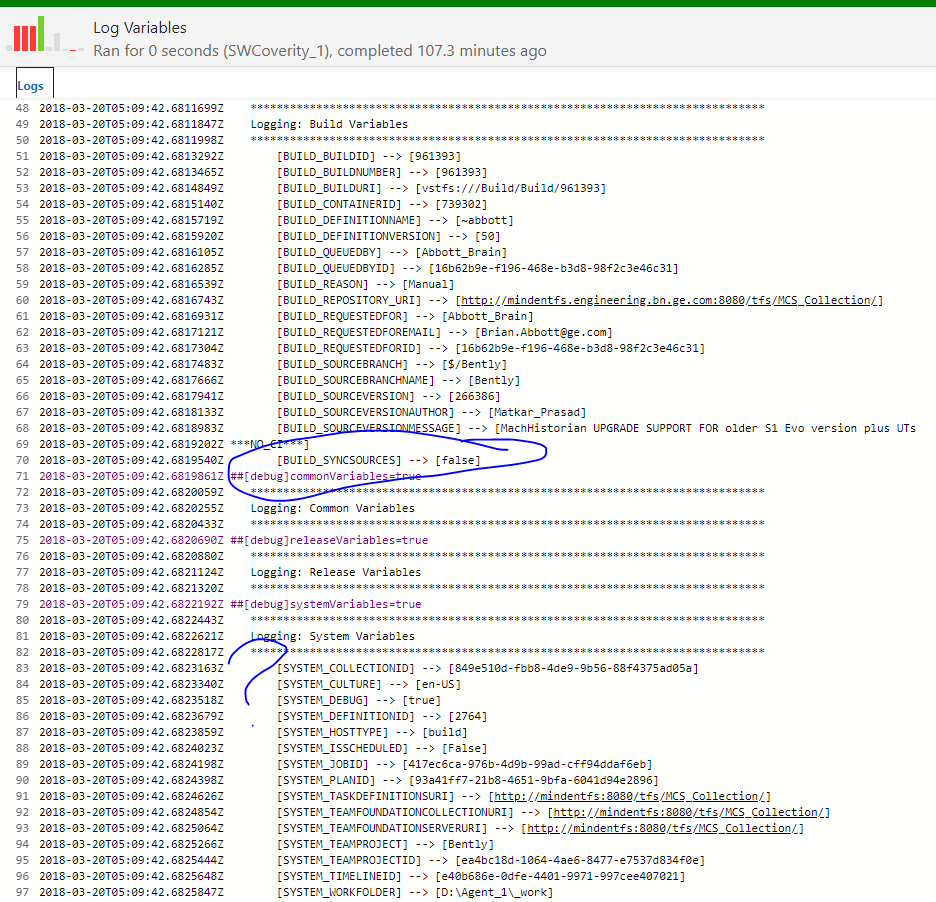
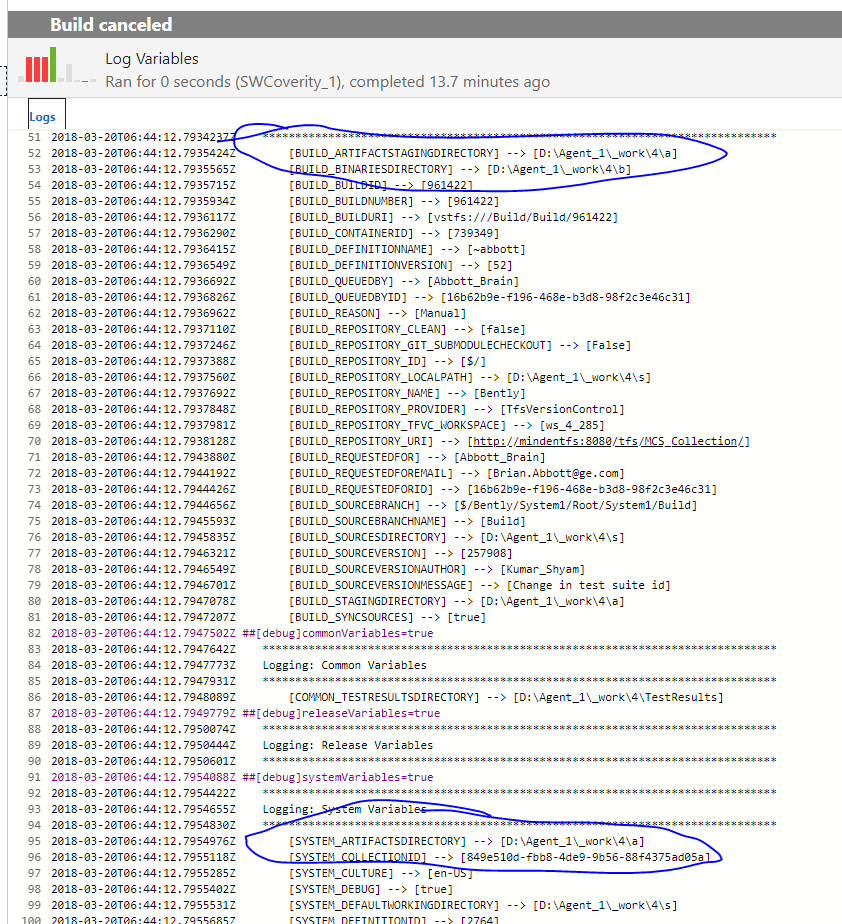
Agent and Worker's diag log
Logs are located at the _diag under agent root folder, agent log prefix with Agent_, worker log prefix with Worker_. all sensitive information should already be masked out, please double check before paste here.
 abbottbd
All 12 comments
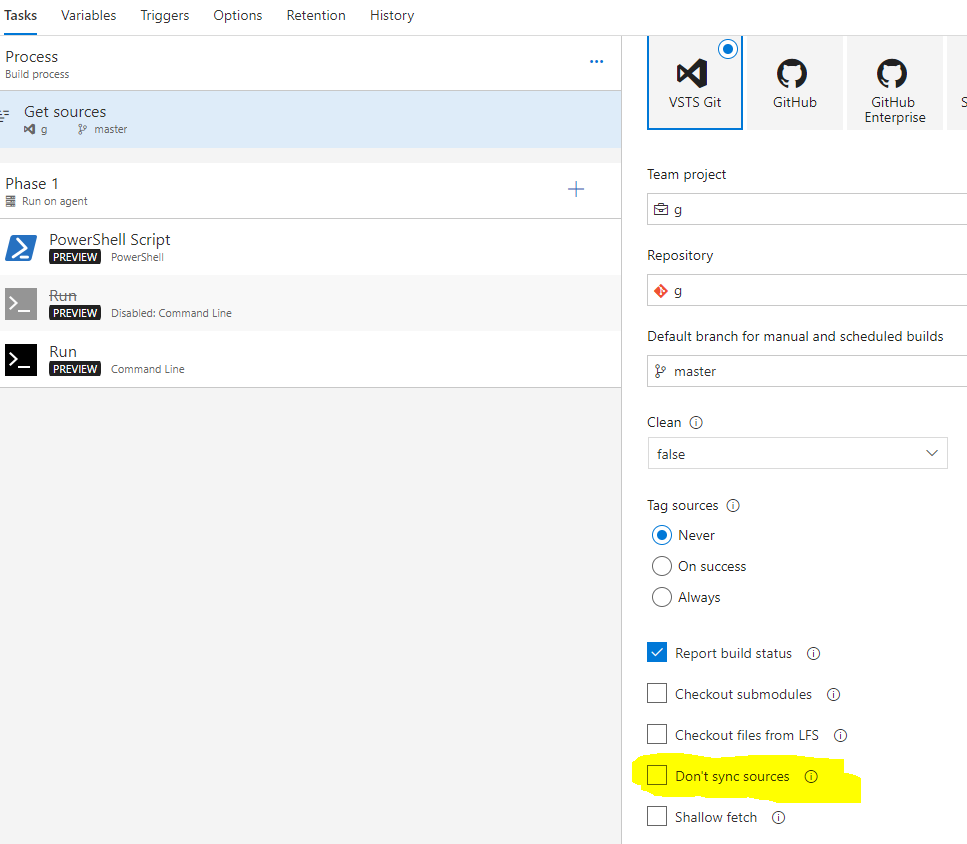
@abbottbd you shouldn't use Build.SyncSource=false anymore since it's not added for your scenarios.
you can set Dont' sync sources through definition editor UI which should has the correct behavior you want.
 TingluoHuang
on 20 Mar 2018
TingluoHuang
on 20 Mar 2018
i am going to close this issue, let us know if you need more help.
TingluoHuang
on 12 Jun 2018
I'm sorry but I that check box is only an option when using TFS GIT. We are using TFVC source control and the check box is not displayed for TFVC, so therefore I must use the variable.
abbottbd
on 12 Jun 2018
What's your scenario? What did you run in your build?
TingluoHuang
on 12 Jun 2018
Our scenario is that we have a build that is designed to run all of our 15k unit tests with code coverage, We do not do this during our normal CI (code coverage) because it doubles the CI build time. This build doesn't need to get any sources, it simply picks up the output of the CI build (all the compiled code) and then executes the unit tests. We would like to 'not' have the build download any source control (because it isn't needed) however when we do that the artifacts directory is not set and so build tasks that are designed to use that variable fail.
We also use a similar process when packaging our build output into a distributable, all the files needed exist in the CI drop folder, so thee is no need to have the packaging build get sources, however we cannot disable the source step because when we do the artifacts directory variable doesn't get set.
abbottbd
on 12 Jun 2018
@abbottbd try set agent.source.skip= true in your definition see whether that works.
TingluoHuang
on 27 Jun 2018
Hi,
I have the same problem as described above. The hint to agent.source.skip=true helped a lot. Thank you.
The only thing is still missing is the variable with the name of the workspace. In the logs of a non-skipped Get Sources I can read, it is a somehow complex procedure to find out this value:
Querying workspace information.
tf vc workspaces /format:xml /collection:https://******** /loginType:OAuth /login:.,******** /noprompt
<Workspaces>
  <Workspace computer=...
  ...
  </Workspace>
</Workspaces>
Attempting to find a workspace: 'ws_1_430'
Candidate workspace: 'ws_1_430'
Definition mapping[0]: cloak 'False', recursive 'True', server path '...', local path 'C:\w\agent\_work\1\s'
Found mapping[0]: cloak 'False', recursive 'True', server path '...', local path 'C:\w\agent\_work\1\s'
Matching workspace found.
Is there an API or similar solution I can use instead of re-implementing that task?
 klapantius
on 25 Jul 2018
klapantius
on 25 Jul 2018
@klapantius what's your scenario? you want to disable sync source but still have the TFVC workspace? the scenarios we target is either the agent pull source code for you, or you take over the entire get source process.
TingluoHuang
on 25 Jul 2018
hey Ting,
we have a ticket at vsts-tasks in progress to get the possibility to download the sources to the workspace either with current timestamp (as it is now) or with the timestamp of the last check-in of each file (see the filteime option to the tf workspace /new command - not documented on the web).
Until it gets realized we are looking for the "cheapest" workaround. That is behind my question above. Actually I have a one liner to find out the workspace name if I know the folder, but that is a little bit dirty:
$wsname = tf workfold $wsroot | ForEach-Object { if ($_ -match '^Workspace\s:\s(?<wsname>[\w\d_]+)\s\((?<owner>.*)\)$') { return """"+$Matches["wsname"]+";"+$Matches["owner"]+"""" } }
Now I would like to know if you can suggest me a better one. If not, then I think I can live with this solution.
klapantius
on 25 Jul 2018
I'm going to close this one out. The original question has been answered and the follow-up has an associated issue in the vsts-tasks repo.
 moswald
on 14 Nov 2018
moswald
on 14 Nov 2018
@TingluoHuang hi, what if I wanna use yaml and don't use UI at all. How can I set Dont' sync sources to true with yaml only?
 sinistram
on 16 Dec 2019
moswald
on 16 Dec 2019
sinistram
on 16 Dec 2019
moswald
on 16 Dec 2019
Related issues
 simonvane
·
4Comments
simonvane
·
4Comments
 alexrainman
·
5Comments
alexrainman
·
5Comments
 tomasaschan
·
4Comments
simonvane
·
3Comments
tomasaschan
·
4Comments
simonvane
·
3Comments
 moorichardmoo
·
5Comments
moorichardmoo
·
5Comments