Azure-pipelines-agent: Start VSTS Agent with custom environment variables
Agent version and platform
Version of your agent? vsts-agent-win7-x64-2.112.0
OS of the machine running the agent? Windows
VSTS type and version
VisualStudio.com or On-Prem TFS? on-Prem TFS
If On-Prem TFS, which release, 2015 RTM/QU1/QU2?
Microsoft Visual Studio Team Foundation Server
Version 15.117.27024.0
What's missing?
I want to spawn multiple Agents from the same machine with different environment variables set. Is there a standard way to do that? I already tried to install the agent service with NSSM
(which would allow for custom env variables for a service) without any success...
Could you explain how to achieve this or at least provide all the details I would need to install the agent service with NSSM myself.
BR
Chris
 cschuff
All 16 comments
Write a cmd script to set the variables and launch the agent?
In the OSX / Linux side, we support an env.sh. Just checked and not in windows: https://github.com/Microsoft/vsts-agent/blob/master/docs/start/svcsystemd.md#setting-the-environment
Can you elaborate on the specific scenario? There might be another way to achieve what you're after ... An example of the variables would be great.
 bryanmacfarlane
on 12 Feb 2018
bryanmacfarlane
on 12 Feb 2018
Hi Brian,
I have multiple Agents running on one physical machine. They are installed as windows services since they e.g. need to restart after a reboot. Each of this agents needs to run under the same windows user.
The agents need different environment variables set. I currently see no way to achieve this with the VSTS installer.
It would be great to see this as a feature.
I don't see how to solve this with a cmd script. I could have a script set variables and start the service and I put that script into autostart? Is that what you are suggesting? Sounds like a workable however not very practical solution...
Another possible solution I tried was to install the VSTS service manually via NSSM. That didn't work out... With NSSM one can easily set specific env vars for a service:
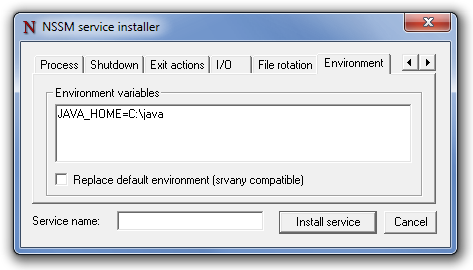
Any suggestions here?
BR
Chris
cschuff
on 14 Feb 2018
Yes, I understand you want variables per agent. I’m trying to understand what those variables are that you’re setting. We have many other mechanisms to get variables into an agent.
We didn’t do the above feature in windows because we couldn’t come up with a scenario with variables even though we tried. Every scenario we came up with had a different solution ( capabilities, def variables, running as diff accounts which is supports setting etc)
This would take feature work similar to what we did with nix OSes so I want to be crisp on the scenario. Is it Java Home? Something else?
bryanmacfarlane
on 14 Feb 2018
Simple example: Different Node.js versions per Agent. Could be JAVA_HOME as well.
In my specific case a build also checks source into a SAP-specific versioning system which makes use of local workspaces. These workspaces are 'locked' as soon as one Client is operating on them. Therefore I need to have separate workspaces per Agent -> that is what I try to configure. If there is an easier way I'm more than happy to change directions here.
cschuff
on 14 Feb 2018
In the SAP example, is it the same build definition which can be served by four agents on all the same machine but need affinity to an SAP workspace? (just making sure I understand)
bryanmacfarlane
on 18 Feb 2018
For node specifically, we have a Node Tool task that downloads, caches, and adds a specific version of node to your PATH. You can add the task as a step on your build definition. You can also add specific folders to your PATH at runtime. In a step during your build/release, echo ##vso[task.prependpath]C:\my\folder - see here for details on STDOUT commands to the agent. The changes take effect for subsequent steps that are run within the same build/release.
I'm not sure if those type of solutions solve what you are after, or if you need to lock the entire agent to different environment variables.
I don't fully understand the scenario, and please do answer Bryans questions. I might be way off here, I don't mean to derail.
 ericsciple
on 19 Feb 2018
ericsciple
on 19 Feb 2018
@bryanmacfarlane
Exactly. The build agents just need to use different SAP workspaces. A single workspace used by one agent gets locked. When the 2nd agent tries to access it the build will fail. Therefore I need one workspace per agent.
This would be a perfectly easy thing to do via environment vars per agent...
@ericsciple Thanks for the tips anyways. Didn't know about the Node Tool. Very helpful :)
cschuff
on 20 Feb 2018
@bryanmacfarlane ping
cschuff
on 19 Mar 2018
@cschuff - does the task.prependpath solution @ericsciple pointed out work for you? Also adding @TingluoHuang
bryanmacfarlane
on 19 Mar 2018
No, it does not.
I thought of setting the vars via script depending on AGENT_ID. But that either makes my build script rely on a TFS variable or would add yet another build step...
To wrap this up: Are environment vars per build agent something you consider for future TFS versions? I can also file an official support request if you think that helps (Where would I do that btw?)
cschuff
on 19 Mar 2018
Having startup vars is the right fix since we support on *nix. @TingluoHuang ?
bryanmacfarlane
on 19 Mar 2018
@cschuff @bryanmacfarlane seems reasonable, I can add it in the next version agent release, shouldn't take much time to add it.
 TingluoHuang
on 19 Mar 2018
TingluoHuang
on 19 Mar 2018
1462
TingluoHuang
on 19 Mar 2018
close the issue as a newer version agent is in release process.
TingluoHuang
on 9 Apr 2018
@TingluoHuang
Great! Thanks for your efforts.
What exactly does this mean?
"v2.133.0 [DO NOT USE. Pending for VSTS M133]"
When will the official release take place?
I already started using it and it works just fine for me. And it's damn easy to add env vars now 😄
cschuff
on 9 Apr 2018
@ericsciple I'm using your solution for Node/NPM access on our locked down Windows Core buildserver(s). Thanks man.
 markbjerke
on 26 Apr 2018
markbjerke
on 26 Apr 2018
Related issues
 bergmeister
·
52Comments
bergmeister
·
52Comments
 rusergeev
·
48Comments
rusergeev
·
48Comments
 A141133
·
80Comments
A141133
·
80Comments
 jhmoy
·
36Comments
jhmoy
·
36Comments
 gonzaloluna
·
69Comments
gonzaloluna
·
69Comments
Most helpful comment
For node specifically, we have a Node Tool task that downloads, caches, and adds a specific version of node to your PATH. You can add the task as a step on your build definition. You can also add specific folders to your PATH at runtime. In a step during your build/release,
echo ##vso[task.prependpath]C:\my\folder- see here for details on STDOUT commands to the agent. The changes take effect for subsequent steps that are run within the same build/release.I'm not sure if those type of solutions solve what you are after, or if you need to lock the entire agent to different environment variables.
I don't fully understand the scenario, and please do answer Bryans questions. I might be way off here, I don't mean to derail.