Azure-pipelines-agent: Consider cleaning up artifact after release or on maintenance
Agent version and platform
2.117.2
OS of the machine running the agent? OSX/Windows/Linux...
Windows
VSTS type and version
TFS 2017 Update 2
What's not working?
Scheduled maintenance doesn't work for release folders, only works for build folders. My guess based on the logs is that it's simply not implemented, but I think it's just as important as cleaning the build folders.
Agent and Worker's diag log
2017-11-08T23:10:38.4542051Z No build directory need to be GC. '[redacted]\SourceRootMapping\GC' doesn't exist.
2017-11-08T23:10:38.4542051Z ##[section]Maintenance finished: Delete unused build directories
2017-11-08T23:10:38.4542051Z ##[section]Finishing: Maintenance
2017-11-08T23:10:38.4542051Z ##[section]Finishing: Maintenance
 gravufo
All 22 comments
@GitHubSriramB
 TingluoHuang
on 9 Nov 2017
TingluoHuang
on 9 Nov 2017
@gravufo - which release resources is causing problems and needing cleanup / maintenance?
GC is about cleaning up orphaned enlistements and pruning enlistments used by build mapping folders (which RM doesn't use). So I think it's expected.
 bryanmacfarlane
on 9 Nov 2017
bryanmacfarlane
on 9 Nov 2017
since Release doesn't re-use artifact folder, it will leave all downloaded artifacts on disk and never delete them, @GitHubSriramB correct me if i am wrong.
I think we can just delete all of them as part of Release Maintenance Plugin.
TingluoHuang
on 9 Nov 2017
Just as @TingluoHuang said, releases are just like builds folder-wise. They create folders on the build machine which never get deleted and can become as big as a build folder (depending on the size of the artifacts and so on). It makes no sense to delete one (builds), but not the other (releases).
Also, on a side note, we realized that when the builds get cleaned, it doesn't delete empty folders under SourceRootMapping\
Finally, another minor issue is that the random IDs given to build folders keeps increasing forever, even if the builds are cleaned, the numbers don't get reused. Over time this can accumulate and could theoretically create a huge number (possibly MAX_INT?).
Let me know what you think!
gravufo
on 9 Nov 2017
The numbers used aren't per build. They are stable from build to build unless the url of the repo used by a definition changes.
It's covered here:
https://github.com/Microsoft/vsts-agent/blob/master/docs/jobdirectories.md
There's an int per definition / repo url combo used. We hash that combo and create a lookup mapping to an int. To hit int max you would need billions of definition / repo combos used by a single agent.
If you're seeing it burn an id for each build then something else is going on.
What's the highest number you've seen?
bryanmacfarlane
on 9 Nov 2017
I'm not sure we are talking about the same thing. The issue with the incrementing number is the _work/<#> folder. It's even said directly in the page you linked:
Each repository is an in incrementing int folder.
That in itself is fine, but when builds get cleaned as part of GC, the numbers should be able to be reused instead of continuing to increment forever.
Our highest number right now is not that high (~200), but I'm thinking large scale and long-term could cause issues.
The agent keeps the following info in Mappings.json to generate the next number:
{
  "lastBuildFolderCreatedOn": "09/15/2015 00:44:53 -04:00",
  "lastBuildFolderNumber": 4
}
This means that some mechanism should be implemented in order to determine the smallest unused number instead of simply incrementing that number.
Anyway, as I said, this is a minor issue. The main issue is that the GC doesn't clean release folders :)
Thanks!
gravufo
on 9 Nov 2017
Yes, we're talking about the same thing. As I stated above
There's an int per definition / repo url combo
Which is the same as:
Each repository is an in incrementing int folder
Each repository is an incrementing int in context of a build definition so it's new a build def/repo combo that introduces a new int. Do multiple builds in a row and keep building that repo, it will keep reusing the int id and not burn it - even if GC kicks in. It will only become orphaned if the url changes and GC will only clean it up if it's not being used anymore (something like 30 days). If you're seeing enlistments reclaimed that are being used, then we should look into that.
If you automated orphaning repos as fast as you could (create definition, run a build, sync, delete a def to force orphan) and did that in a loop (let's say 30 sec on each iteration), it would take close to 4000 years to run out of ints ;) We actually discussed re-using reclaimed ids and complicating the code but that's why we didn't.
We will follow up and of course keep this open for the RM issue.
bryanmacfarlane
on 9 Nov 2017
No problem, I was just suggesting :P It works just fine as it is.
Thanks for considering!
gravufo
on 9 Nov 2017
@gravufo / @TingluoHuang - RM currently does not cleanup downloaded artifacts as part of the maintenance job. However with every deployment, RM will clear the artifacts folder & download artifacts again (if SkipArtifactsDownload for the deployment is not set).
Given we have at most only artifacts corresponding to one deployment, do you see a need to clean up the downloaded artifacts as part of maintenance job?
 GitHubSriramB
on 10 Nov 2017
GitHubSriramB
on 10 Nov 2017
Yes. What you're saying is that it cleans during the next release. In the meantime, all that space is taken up and is wasted. Especially if another release for that definition is not queued within several days or weeks. When you have lots of different release definitions and when your artifacts are huge, this can be problematic.
I don't see how the build folder differs from the release folder from a GC perspective. If we follow your logic, why did you even implement the GC for builds, considering they will also get wiped during the next build (assuming you're not doing incremental builds)?
All in all, I think it's a given that GC should behave the same on builds and on releases, because doing only one of the two doesn't make sense (to me and my team at least).
Thanks
gravufo
on 10 Nov 2017
why did you even implement the GC for builds, considering they will also get wiped during the next build
No, builds are not GCed on the next build. The behavior in build is incremental and it stays around (which is what you want). Even if you select "clean" on source control options, that only leads to a git clean fdx or tf scorch - the enlistment still stays around. In order to blow away the enlistment between builds you have to go out of your way and set a special variable.
We implemented GC for builds because by default source control is incremental fetch and we want it to stay around. That introduces a few problems - they can become orphaned and need pruning. That's the other difference, we recently extended GC to prune git repos.
Releases on the other hand are wiped after every release. It's wiped on the next release (same as build if you set that variable) in the event that you want to troubleshoot or inspect the disk after a build/release.
bryanmacfarlane
on 10 Nov 2017
Hi,
The problem : Artifact stays on the build machine taking valuable disk space (50-100gig). We run release every week or so, so they don't get cleaned.
Solution : Option to clean the root release folder after the release is complete.
Sincerely, a TFS user.
 iamthegD
on 10 Nov 2017
iamthegD
on 10 Nov 2017
@iamthegD - create another issue with that suggestion and we can consider. I'll mark it as a feature request. Thanks
bryanmacfarlane
on 10 Nov 2017
Fact: Your GC cleans "working" directories which haven't been used in X days. This implies build and release directories, but it currently doesn't work for release directories. 
Use case of your maintenance feature: Our build machines become full after running a ton of different build definitions which end up staying on the build machine and taking up space forever. The GC comes in and cleans this stuff which removes the stale builds that haven't built for a while (1 day in our case). This is not currently being done with releases and so we have the same problem (taking up space forever even though they won't be redeployed for a while).
Releases on the other hand are wiped after every release. It's wiped on the next release (same as build if you set that variable) in the event that you want to troubleshoot or inspect the disk after a build/release.
No. As your colleague said, that only happens when you don't check "Skip Artifacts Download".
gravufo
on 10 Nov 2017
Do you want the clean artifacts after release feature or the delete after x days? The former seems to fit your scenario better. The latter is less predictable (release can span phases with manual interventions that can span many days).
bryanmacfarlane
on 10 Nov 2017
Indeed, I think it is the former we seek and were expecting with the maintenance feature. Basically, if the release is complete/failed/abandoned and hasn't been redeployed for X days, do you need to keep everything on the agent machine?
Let me know if it fits inside the scope of the maintenance.
Thanks again
gravufo
on 10 Nov 2017
Reactivating and letting RM decide. There's enough info in this thread. Thanks all.
bryanmacfarlane
on 11 Nov 2017
This is being addressed with this PR:
https://github.com/Microsoft/vsts-agent/pull/1460
GitHubSriramB
on 23 Mar 2018
The changes are committed. This functionality will be available with 2.133 version of agent.
GitHubSriramB
on 29 Mar 2018
Hi guys, is there any documentation available on how to use this feature on the agents?
 Malgefor
on 12 Jul 2018
Malgefor
on 12 Jul 2018
@Malgefor i don't think we have doc around this, but the UI should give you enough information to start with.
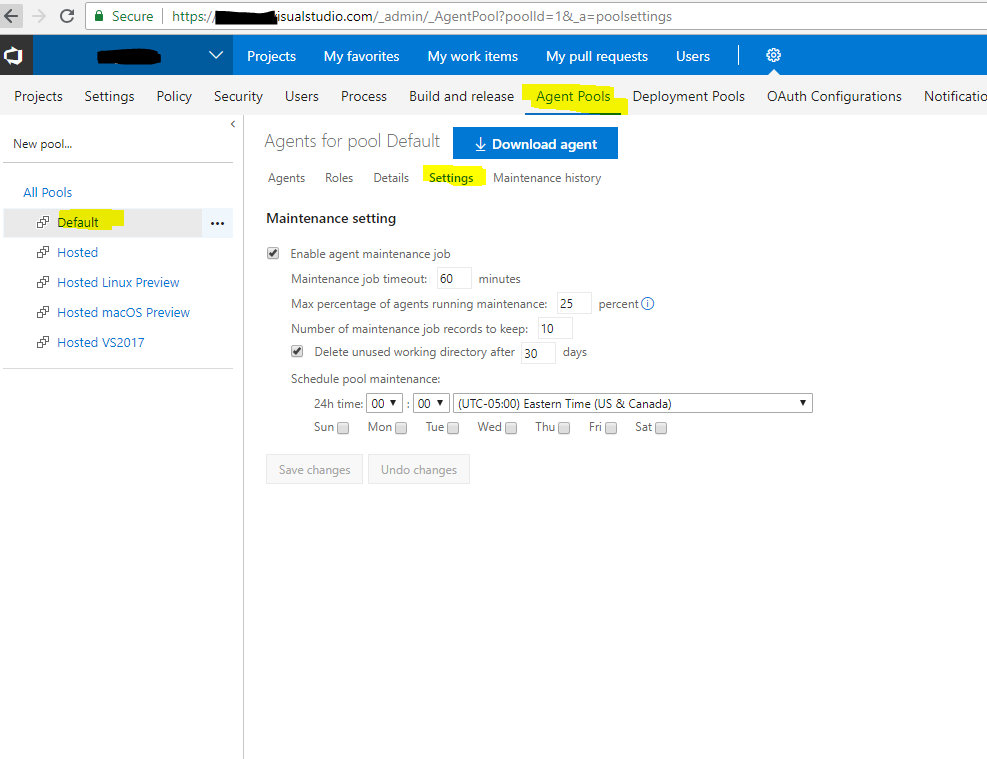
TingluoHuang
on 12 Jul 2018
Ah ok, thanks for your answer. I thought this feature was also about the agents used in deployment groups/pools, since they also keep a _work folder that gets bigger overtime. But I think that is already automatically being cleaned?
Malgefor
on 12 Jul 2018
Related issues
 bergmeister
·
52Comments
bergmeister
·
52Comments
 ChristophLindemann
·
41Comments
ChristophLindemann
·
41Comments
 vtbassmatt
·
39Comments
vtbassmatt
·
39Comments
 gonzaloluna
·
69Comments
gonzaloluna
·
69Comments
 peder
·
32Comments
peder
·
32Comments
Most helpful comment
Reactivating and letting RM decide. There's enough info in this thread. Thanks all.