Azure-pipelines-agent: Secret environment variables not accessible in task
We have a simple build task that takes in 2 variables. One is secret, the other not. The non-secret variable can be accessed fine by the task (a shell script that calls through to npm), but the secret variable is not accessible.
A printenv command executed before the npm call in the shell script does not show the secret variable (on the old agent it would show up but be starred out).
 robinweston
All 28 comments
Nit: Tasks don't take variables - they work on inputs and users can map variables into input values.
Then there's ad-hoc scripts. That's the powershell, schellscript, cmd task running your script.
Can you clarify - are you creating a task or are you running an ad-hoc with one of our tasks?
 bryanmacfarlane
on 10 May 2016
bryanmacfarlane
on 10 May 2016
We're running a Shell Script task from the pre-defined list of available task types. This shell script is failing because it can't find a secret environment variable that it is expecting. The secret variable is set in the variables section of the build definition. To verify the variable is missing we added a printenv command to the shell script and the variable indeed does not show up.
The same Shell Script works fine when run on the old node build agent (https://github.com/Microsoft/vso-agent).
robinweston
on 10 May 2016
For ad-hoc scripts, secret variables need to be passed in via inputs. That's by design.
 ericsciple
on 10 May 2016
ericsciple
on 10 May 2016
Ah ok thanks, that's good to know. So I have to explicitly use the $(variable_name) syntax and pass the secret variable as an argument to my custom shell script?
Is this behaviour documented anywhere, as it's a functionality change from the node build agent? I can absolutely see the value in the change from a security perspective.
robinweston
on 10 May 2016
It's documented here.
And I recently added it to the ##setvariable documentation here.
I'm unclear whether master from vso-agent has the behavior, or if only older versions didn't do it.
ericsciple
on 10 May 2016
That's my bad for not hunting in the documentation. I wrongly assumed the behaviour would be the same across the new and old agents.
I'm pretty sure that secret variables do get set as environment variables in the master of vso-agent. We just set up a new agent yesterday and could see the behaviour.
On 10 May 2016, at 19:51, ericsciple [email protected] wrote:
It's documented here.
And I recently added it to the ##setvariable documentation here.
I'm unclear whether master from vso-agent has the behavior, or if only older versions didn't do it.
—
You are receiving this because you authored the thread.
Reply to this email directly, view it on GitHub, or mute the thread.
robinweston
on 10 May 2016
The problem that we're trying to solve is merging the code bases from the OSX/Linux agent and Windows agent :)
I wasn't aware of this difference. It's good that you pointed it out. @bryanmacfarlane is there any place in the new documentation we can put this kind of information?
ericsciple
on 10 May 2016
Thanks for letting me know as well, just upgraded build agent. The https://www.visualstudio.com/docs/build/scripts/variables#SecretVariables link is currently 404.
 mcm-ham
on 18 May 2016
mcm-ham
on 18 May 2016
Looks like it changed: https://www.visualstudio.com/en-us/docs/build/define/variables#secret-variables
ericsciple
on 18 May 2016
Yeah, technically it was a bug in the node agent that we let it through. Should map secret variables into inputs. I'll create a coming from node agent doc.
bryanmacfarlane
on 24 May 2016
So is there any way to use a secret variable for a task's environment variable?
Could you please expand on what you mean by "map secret variables into inputs"? This is what I get when I true to use a secret variable in a build task:


I can understand why it wouldn't appear in plain text in the logs (this is good), but it also appears that the variable doesn't get mapped in the task arguments either. After all, ECHO is on. is what is displayed when no value is given to the echo command.
 ajbeaven
on 18 May 2017
ajbeaven
on 18 May 2017
It should work. Does CSC_KEY_PASSWORD have a value? Or does it contain a special leading character? E.g. & or " or something?
ericsciple
on 18 May 2017
Urgh, ain't that the way. I re-added my variable just to be sure and after doing that, it started working.
I think I must have inadvertently toggled the "lock" icon at some stage, made some changes to one of the other variables and saved the page. It looks like this clears the value for the variable but you don't know as it appears as •••••••••••. I'd suggest that you shouldn't be able to toggle the "lock" icon on previously saved secure variables to stop this from happening in the future.
Thanks for your help anyway!
ajbeaven
on 18 May 2017
Hi all,
I am smashing similar issues.
My deploy pipeline uses a key vault task to import a number of secrets. Then I have a shell task to perform substitutions to inject those secrets in a kubernetes deploy script.
All works well if I expliticly use the secret. Say a key x is accessible using $(x). But what I would like to do is the following:
- get the list of keys from the kubernetes script which is a kind of template
- for each key look up the corresponding secret and make the substitution
The first step is an easy one liner, but then it seems there is no way to access the imported secret in any indirect way. For instance, assuming y=x, in bash one should be able to say ${!y} to get the content of x. Any clue why? Is the shell task running on some kind of limited bash?
 andreacassioli
on 4 Apr 2018
andreacassioli
on 4 Apr 2018
Hi all,
I am smashing similar issues.
My deploy pipeline uses a key vault task to import a number of secrets. Then I have a shell task to perform substitutions to inject those secrets in a kubernetes deploy script.All works well if I expliticly use the secret. Say a key x is accessible using $(x). But what I would like to do is the following:
- get the list of keys from the kubernetes script which is a kind of template
- for each key look up the corresponding secret and make the substitution
The first step is an easy one liner, but then it seems there is no way to access the imported secret in any indirect way. For instance, assuming y=x, in bash one should be able to say ${!y} to get the content of x. Any clue why? Is the shell task running on some kind of limited bash?
Hi, how are you doing! i have the same problem. Could you solve this case?
 lmicheltorena
on 24 Apr 2019
lmicheltorena
on 24 Apr 2019
I'm getting very confused....
In my build pipeline I have a keyvault task:
- task: AzureKeyVault@1
inputs:
azureSubscription: '* redacted **'
KeyVaultName: ''* redacted **'
SecretsFilter: 'MoriyamaTest'
And in the debug output of this task I see:
[debug]set MoriyamaTest=**
[debug]Processed: ##vso[task.setvariable variable=MoriyamaTest;issecret=true;]*
[debug]task result: Succeeded
[debug]Processed: ##vso[task.complete result=Succeeded;]
Then I have a following powershell Task:
- powershell: echo $env:MYSECRET
env:
MySecret: $(MoriyamaTest)
And the output from that is as follows:
[command]"C:\windows\System32\WindowsPowerShell\v1.0\powershell.exe" -NoLogo -NoProfile -NonInteractive -ExecutionPolicy Unrestricted -Command ". 'd:\a_temp\0ccb3c44-e414-4bbd-baf5-fb2462b02e5b.ps1'"
[debug]$LASTEXITCODE is not set.
So for the value of my passed environment variable MySecret I am getting the string "*"
How can I pass a secret from keyvault to a subsequent powershell task?
Many Thanks.
 darrenferguson
on 26 Jun 2019
darrenferguson
on 26 Jun 2019
Remember that when you pass the secret, you must do it outside of yaml. also you must have joined in the variable options with your keyvault.
Get Outlook for iOShttps://aka.ms/o0ukef
From: Darren Ferguson notifications@github.com
Sent: Wednesday, June 26, 2019 8:41 AM
To: microsoft/azure-pipelines-agent
Cc: Leandro Oscar Micheltorena; Comment
Subject: Re: [microsoft/azure-pipelines-agent] Secret environment variables not accessible in task (#145)
I'm getting very confused....
In my build pipeline I have a keyvault task:
- task: AzureKeyVault@1
inputs:
azureSubscription: '* redacted *'
KeyVaultName: '' redacted **'
SecretsFilter: 'MoriyamaTest'
And in the debug output of this task I see:
[debug]set MoriyamaTest=**
[debug]Processed: ##vso[task.setvariable variable=MoriyamaTest;issecret=true;]*
[debug]task result: Succeeded
[debug]Processed: ##vso[task.complete result=Succeeded;]
Then I have a following powershell Task:
- powershell: echo $env:MYSECRET
env:
MySecret: $(MoriyamaTest)
And the output from that is as follows:
[command]"C:\windows\System32\WindowsPowerShell\v1.0\powershell.exe" -NoLogo -NoProfile -NonInteractive -ExecutionPolicy Unrestricted -Command ". 'd:\a_temp\0ccb3c44-e414-4bbd-baf5-fb2462b02e5b.ps1'"
[debug]$LASTEXITCODE is not set.
So for the value of my passed environment variable MySecret I am getting the string "*"
How can I pass a secret from keyvault to a subsequent powershell task?
Many Thanks.
—
You are receiving this because you commented.
Reply to this email directly, view it on GitHubhttps://github.com/microsoft/azure-pipelines-agent/issues/145?email_source=notifications&email_token=ALOMK5BEGWW6JYZ73P5CRKLP4NIUPA5CNFSM4CDLP5Y2YY3PNVWWK3TUL52HS4DFVREXG43VMVBW63LNMVXHJKTDN5WW2ZLOORPWSZGODYTHX6I#issuecomment-505838585, or mute the threadhttps://github.com/notifications/unsubscribe-auth/ALOMK5DSRRY6IXYK73VUBPLP4NIUPANCNFSM4CDLP5YQ.
lmicheltorena
on 26 Jun 2019
Thanks, I'm not sure what you mean by "must have joined in the variable options with your keyvault"?
darrenferguson
on 26 Jun 2019
You must link the key value in the pipeline library options.
anything that can help you, tell me
Get Outlook for iOShttps://aka.ms/o0ukef
From: Darren Ferguson notifications@github.com
Sent: Wednesday, June 26, 2019 9:00:32 AM
To: microsoft/azure-pipelines-agent
Cc: Leandro Oscar Micheltorena; Comment
Subject: Re: [microsoft/azure-pipelines-agent] Secret environment variables not accessible in task (#145)
Thanks, I'm not sure what you mean by "must have joined in the variable options with your keyvault"?
—
You are receiving this because you commented.
Reply to this email directly, view it on GitHubhttps://github.com/microsoft/azure-pipelines-agent/issues/145?email_source=notifications&email_token=ALOMK5BRCRFPXWCWDPK4R3LP4NK6BA5CNFSM4CDLP5Y2YY3PNVWWK3TUL52HS4DFVREXG43VMVBW63LNMVXHJKTDN5WW2ZLOORPWSZGODYTJEUQ#issuecomment-505844306, or mute the threadhttps://github.com/notifications/unsubscribe-auth/ALOMK5AJT4YTK45Z7N2QF5DP4NK6BANCNFSM4CDLP5YQ.
lmicheltorena
on 26 Jun 2019
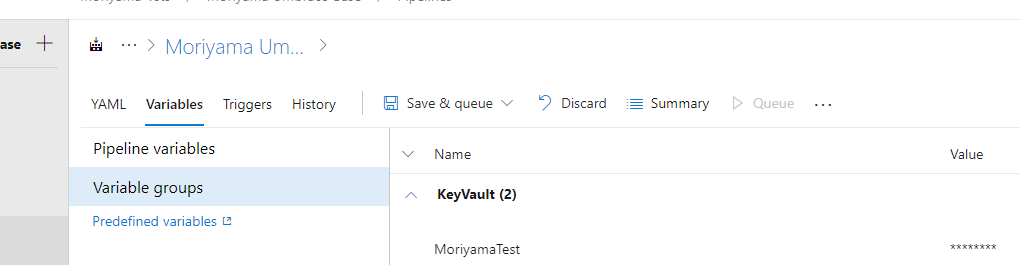
I have a variable group with my KeyVault secret linked - but the value is still passed as *
I'm also not sure what you mean by " you must do it outside of yaml".
So I have -
- variable group called Devops

In the build pipeline, I have linked the variable group:
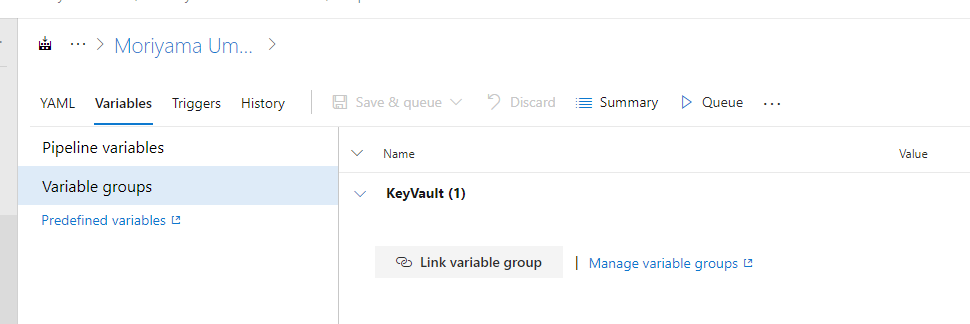
In my build YAML - I have referenced the variable group:

Lastly I have a powershell task:
- powershell: echo $env:MYSECRET
env:
MySecret: $(MoriyamaTest)
Powershell echos the value out as "*"

I'd really appreciate any help!
darrenferguson
on 26 Jun 2019
Darren,
First: the value out is valid because is a secret and should not show the value of the variable by that sample the asterisks.
Second: I had then create one file without to the yaml with the echo to (Variable) ej:
[cid:[email protected]]
And then in the yaml pipeline call the variable as $ (USERNAME). The USERNAME variable it has to be the same then is defined into the Library.
Now do you understand a little better?
Best regards
From: Darren Ferguson [mailto:[email protected]]
Sent: miércoles, 26 de junio de 2019 09:28
To: microsoft/azure-pipelines-agent azure-pipelines-agent@noreply.github.com
Cc: Leandro Oscar Micheltorena lmicheltorena@baufest.com; Comment comment@noreply.github.com
Subject: Re: [microsoft/azure-pipelines-agent] Secret environment variables not accessible in task (#145)
[image]https://user-images.githubusercontent.com/2164132/60179199-0bba3a80-9815-11e9-98bc-b1bc1eddb56c.png
I have a variable group with my KeyVault secret linked - but the value is still passed as *
I'm also not sure what you mean by " you must do it outside of yaml".
So I have -
- variable group called Devops
[image]https://user-images.githubusercontent.com/2164132/60179439-93a04480-9815-11e9-93bf-2ee1928778de.png
In the build pipeline, I have linked the variable group:
[image]https://user-images.githubusercontent.com/2164132/60179538-c9452d80-9815-11e9-9c57-7fd7cc5f697b.png
In my build YAML - I have referenced the variable group:
[image]https://user-images.githubusercontent.com/2164132/60179587-eb3eb000-9815-11e9-981f-3b83ebce44fd.png
Lastly I have a powershell task:
- powershell: echo $env:MYSECRET
env:
MySecret: $(MoriyamaTest)
Powershell echos the value out as "*"
[image]https://user-images.githubusercontent.com/2164132/60179681-1de8a880-9816-11e9-9240-01665e899669.png
I'd really appreciate any help!
—
You are receiving this because you commented.
Reply to this email directly, view it on GitHubhttps://github.com/microsoft/azure-pipelines-agent/issues/145?email_source=notifications&email_token=ALOMK5APOKBWYIL53CHZDSTP4NODZA5CNFSM4CDLP5Y2YY3PNVWWK3TUL52HS4DFVREXG43VMVBW63LNMVXHJKTDN5WW2ZLOORPWSZGODYTLJDQ#issuecomment-505853070, or mute the threadhttps://github.com/notifications/unsubscribe-auth/ALOMK5FVUELWV2BZL5G5UEDP4NODZANCNFSM4CDLP5YQ.
lmicheltorena
on 26 Jun 2019
I'm afraid your screenshot is missing :(
Second: I had then create one file without to the yaml with the echo to (Variable) ej:
I think the screenshot would help me to understand this!
Are you able to post it.
Thanks for the help.
darrenferguson
on 26 Jun 2019
Darren,
The screenshot it was attach.
I had create a file (example: test.sh) outside the yaml than contain the echo:
[cid:[email protected]]
From: Darren Ferguson [mailto:[email protected]]
Sent: miércoles, 26 de junio de 2019 10:14
To: microsoft/azure-pipelines-agent azure-pipelines-agent@noreply.github.com
Cc: Leandro Oscar Micheltorena lmicheltorena@baufest.com; Comment comment@noreply.github.com
Subject: Re: [microsoft/azure-pipelines-agent] Secret environment variables not accessible in task (#145)
I'm afraid your screenshot is missing :(
Second: I had then create one file without to the yaml with the echo to (Variable) ej:
I think the screenshot would help me to understand this!
Are you able to post it.
Thanks for the help.
—
You are receiving this because you commented.
Reply to this email directly, view it on GitHubhttps://github.com/microsoft/azure-pipelines-agent/issues/145?email_source=notifications&email_token=ALOMK5HNFR6SQKGP3M7FIHTP4NTQVA5CNFSM4CDLP5Y2YY3PNVWWK3TUL52HS4DFVREXG43VMVBW63LNMVXHJKTDN5WW2ZLOORPWSZGODYTPFDQ#issuecomment-505868942, or mute the threadhttps://github.com/notifications/unsubscribe-auth/ALOMK5EXHAQ52JOCOG2HNU3P4NTQVANCNFSM4CDLP5YQ.
lmicheltorena
on 26 Jun 2019
Hmm, I still can't see the image here....
When you say "Outside the YAML"? How do you mean? How can i call a build task outside of the YAML defnition?
Thanks!
darrenferguson
on 26 Jun 2019
Thanks, in the end i have it working, Devops is masking the value in the logs using *
So all is good, thanks for the help!
darrenferguson
on 26 Jun 2019
Hi,
I'm having a similar issue. I'm trying to pass a KeyVault secret to a PythonScriptStep. However within this step the secret becomes None. I have done the same steps as Darren, but I can't open the screenshots of Imicheltorena to see what must be done.
Any help is appreciated
 Theelepel
on 27 Jun 2019
Theelepel
on 27 Jun 2019
OK, so in the end it is working for me....

I was getting really confused, because when you output the variable to the console it is masked as *
If you take a substring of the variable and output that you will see the value.
devops is searching for all secret variables in output and masking them!
darrenferguson
on 27 Jun 2019
I have my variable group set-up with a secret (lock), the group name is being passed into the global variables, I'm setting up the env: with the secret name and every time I try to call the env variable in my script it keeps giving me this in the build logs then the agent will hang for an hour:

I'm trying to pinpoint what I'm missing but can't seem to put my finger on it. Any ideas?
 coolblknerd
on 9 Jul 2019
coolblknerd
on 9 Jul 2019
Related issues
 robinhultman
·
35Comments
robinhultman
·
35Comments
 rusergeev
·
48Comments
rusergeev
·
48Comments
 jessehouwing
·
57Comments
jessehouwing
·
57Comments
 peder
·
32Comments
peder
·
32Comments
 gonzaloluna
·
69Comments
gonzaloluna
·
69Comments
Most helpful comment
Urgh, ain't that the way. I re-added my variable just to be sure and after doing that, it started working.
I think I must have inadvertently toggled the "lock" icon at some stage, made some changes to one of the other variables and saved the page. It looks like this clears the value for the variable but you don't know as it appears as •••••••••••. I'd suggest that you shouldn't be able to toggle the "lock" icon on previously saved secure variables to stop this from happening in the future.
Thanks for your help anyway!