Azure-kinect-sensor-sdk: Subordinate Device Timestamp Not Reset to Zero on First Pulse
Describe the bug
The device timestamp obtained via k4a_image_get_device_timestamp_usec appears to no longer be reset to 0 at the time the first rising edge is received on the sync_in port for devices in subordinate mode. This appears to be a firmware regression between AzureKinectDK_Fw_1.6.104075014.bin (1.4.0-alpha.0) and AzureKinectDK_Fw_1.6.107078014.bin (1.4.0-alpha.3).
To Reproduce
- Setup device in subordinate mode
- Feed 30Hz rising edge trigger into "sync in" port (I wait 5 seconds after I start streaming to feed in the first rising edge pulse)
- Call k4a_device_get_capture until the first successful capture is obtained
- Call k4a_capture_get_color_image to get the color image
- For the first color image, print the device timestamp obtained via k4a_image_get_device_timestamp_usec for the color image
Actual Behavior
65,333us for AzureKinectDK_Fw_1.6.102075014.bin (1.3.0)
_65,255us_ for AzureKinectDK_Fw_1.6.104075014.bin (1.4.0-alpha.0)
_247,922us_ for AzureKinectDK_Fw_1.6.107078014.bin (1.4.0-alpha.3)
246,233us for AzureKinectDK_Fw_1.6.108079014.bin (1.4.0-alpha.4)
219,566us for AzureKinectDK_Fw_1.6.110079014.bin (1.4.1-beta.0)
Expected behavior
I expect the first color timestamp to be around 66ms (66,000us)
Desktop (please complete the following information):
- OS with Version: Windows 1909
- SDK Version: Tried with 1.3, 1.4 and 1.4.1beta0 SDKs (behavior appears unaffected by SDK)
- Firmware version: Various as specified above
Additional context
My current system relies on time zero being defined as the moment that the first rising edge pulse is sent to my Kinect. I believe something changed between the 1.4.0-alpha.0 and 1.4.0-alpha.3 firmwares to regress this behavior. The first color timestamp was the easiest repro I could come up with to clearly demonstrate the behavior change, but I originally found the issue when comparing images captured from a separate camera system that I have synchronized with my Azure Kinect. I noted that with the latest firmware, my camera systems are out of sync by about 6 Azure Kinect frames @ 30fps. This lines up with the offset shown above with the first color image timestamp being ~190 milliseconds off between firmware versions.
 markhog
All 12 comments
You are correct that in recent firmware updates the startup time from first capture has changed. We unfortunately don't guarantee that the startup time won't change. You shouldn't rely on the timestamp to reset at any particular moment as we don't document that behavior and it may change in the future.
 wes-b
on 4 Jun 2020
wes-b
on 4 Jun 2020
Thanks for the quick reply! Would it be possible to document how the Azure Kinects synchronize their device clocks?
According to https://github.com/microsoft/Azure-Kinect-Sensor-SDK/issues/529 it sounds like their clocks are expected to match within 33us. I guess I incorrectly assumed they were using the sync in pulse to zero the device clock. I would like to have a non-Azure Kinect device like a Raspberry Pi be able to synchronize to the same device clock the Azure Kinects are using. Do you have any recommendations of how I can synchronize my external microcontroller clock to the Kinect device clock?
Of note - I find it interesting that the real time the first Kinect image is captured doesn't appear to have changed (ex. start stopwatch in front of Kinect and send pulse to Kinect 5 seconds later - the time on the stopwatch is the same between all of the firmware versions I mentioned... it's just the device timestamp that has changed).
markhog
on 4 Jun 2020
The master sync out signal is the master color camera's VSync. On the subordinate you also know that device timestamp applied is center of exposure. So you can calculate the device time VSync was raised. On the master you will need to know what its time is when the sync pulse is raised. Then you should be able to correlate that device pulse & time with the Kinects frame information to correlate the two clocks.
Because the sync pulse is VSync, that signal is expected to be triggering at the specified framerate. Unknow issues will surface if that sync source drifts.
wes-b
on 5 Jun 2020
I think I'm following that. The part I'm a little unclear on is how to correlate the two clocks if a frame drops. I'll try to illustrate my confusion with an example.
1) Setup a single Azure Kinect (AK) in subordinate mode recording @30Hz and start streaming
2) Wait 5 seconds
3) Microcontroller sends VSYNC pulse to subordinate AK at microcontroller timestamp 5,000us
4) The first frame captured from the AK has a device timestamp of 247,922us
To correlate the device clock of the AK to my micrcontroller, I would do:
MicrocontrollerVsyncTimeUsForFrame0 = AKFrame0DeviceTimestamp - AKFrameTime / 2
MicrocontrollerVsyncTimeUsForFrame0 = 247,922 - 33,333 / 2
MicrocontrollerVsyncTimeUsForFrame0 = 231,256us
Thus the microcontroller timestamp 5,000us would correlate to a device timestamp of 231,256us for the Azure Kinect (in this example). This seems to make sense to me. Am I guaranteed that the first frame I get from the AK will be the center exposed frame immediately following the first VSYNC the AK received? Is it possible that this first frame could get dropped... creating a 33,333us offset in my clock comparison?
markhog
on 5 Jun 2020
Is this something you could help me understand better? Looks like similar questions were discussed here (https://github.com/microsoft/Azure-Kinect-Sensor-SDK/issues/943), but I'm still unsure of the answers to my questions above.
markhog
on 12 Jun 2020
The clocks on the master and subordinate camera's are synchronized at 0 with the first sync pulse. So the steps would be more like this:
- Setup a single Azure Kinect (AK) in subordinate mode recording @30hz and start streaming
- Wait 5 seconds (doesn't have to be 5s, you just need to know the Subordinates are all waiting for master)
- Microcontroller 30 FPS Vsync pulse to subordinate AK. Simultaneously Microcontroller starts 0 based timer with first pulse.
- First frame captured from AK has a timestamp of 247, 922us. Which is exactly 247,922us after the first Vsyc pulse raised by the microcontroller. This implies the first ~7 images were dropped.
wes-b
on 12 Jun 2020
Thanks Wes. I think we're on the same page now. "The clocks on the master and subordinate camera's are synchronized at 0 with the first sync pulse" was my initial assumption. This appears to no longer be true starting with the AzureKinectDK_Fw_1.6.107078014.bin (1.4.0-alpha.3) firmware. I think my initial suggested repro failed to illustrate the problem I'm seeing.
Here's a new and hopefully better repro:
- Setup two Azure Kinect devices in subordinate mode (one with the 1.4.0-alpha.0 FW and the other with 1.4.1-beta.0 FW)
- Setup a clock with millisecond precision in front of both Kinects
- Feed a 30Hz rising edge trigger (could be from a third AK or a microcontroller) into "sync in" port of AK#1 and a cable from "sync out" of AK#1 to "sync in" of AK#2
- Call k4a_device_get_capture on both Kinects until the first successful capture is obtained
- Use k4a_capture_get_color_image to get the color images
- For both devices, get first color image and print the device timestamp obtained via k4a_image_get_device_timestamp_usec for the color image
Actual Behavior
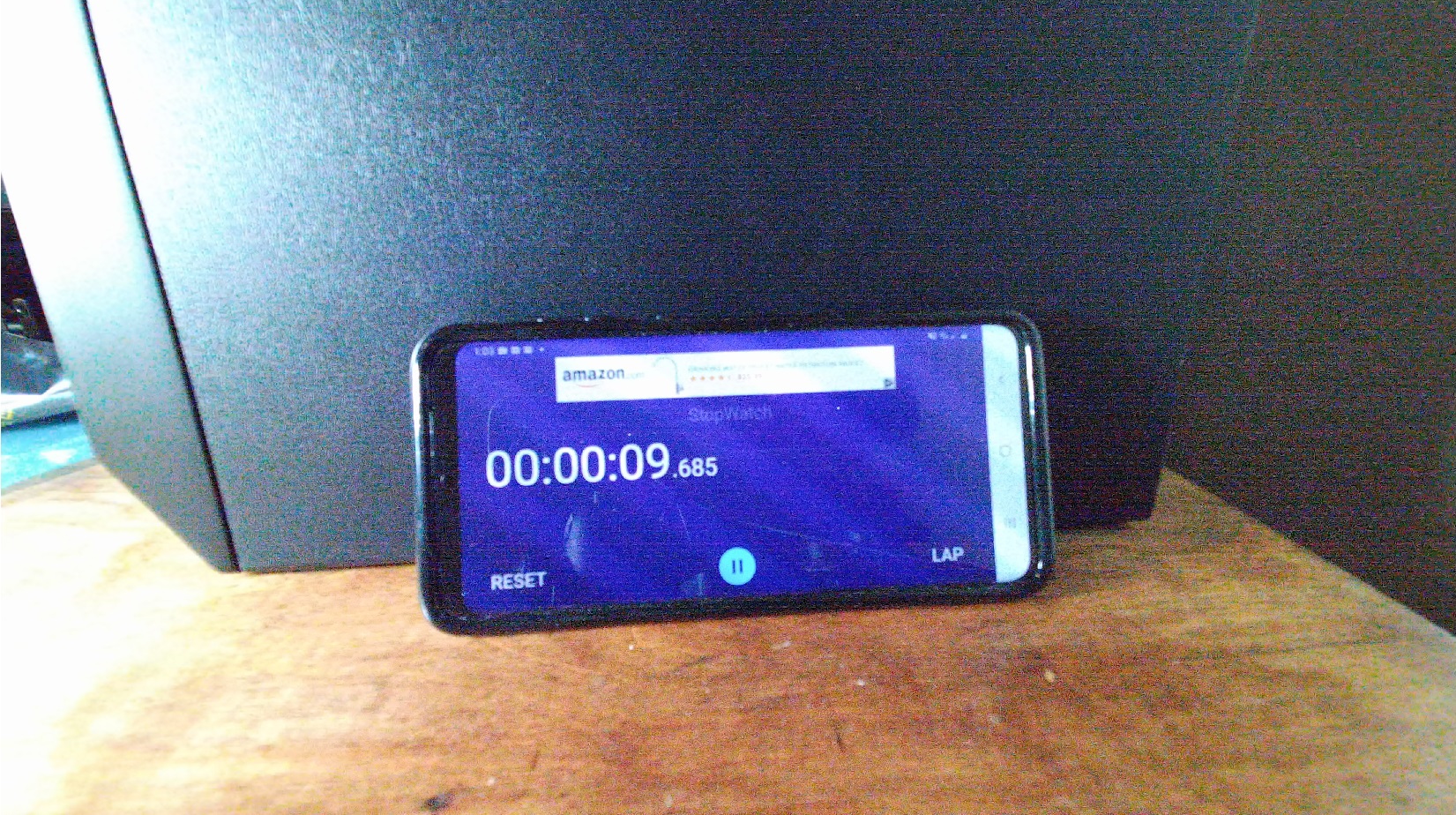
AK#1 (old FW) - First frame device timestamp is 65,255us and time displayed on millisecond clock is 9.685 seconds
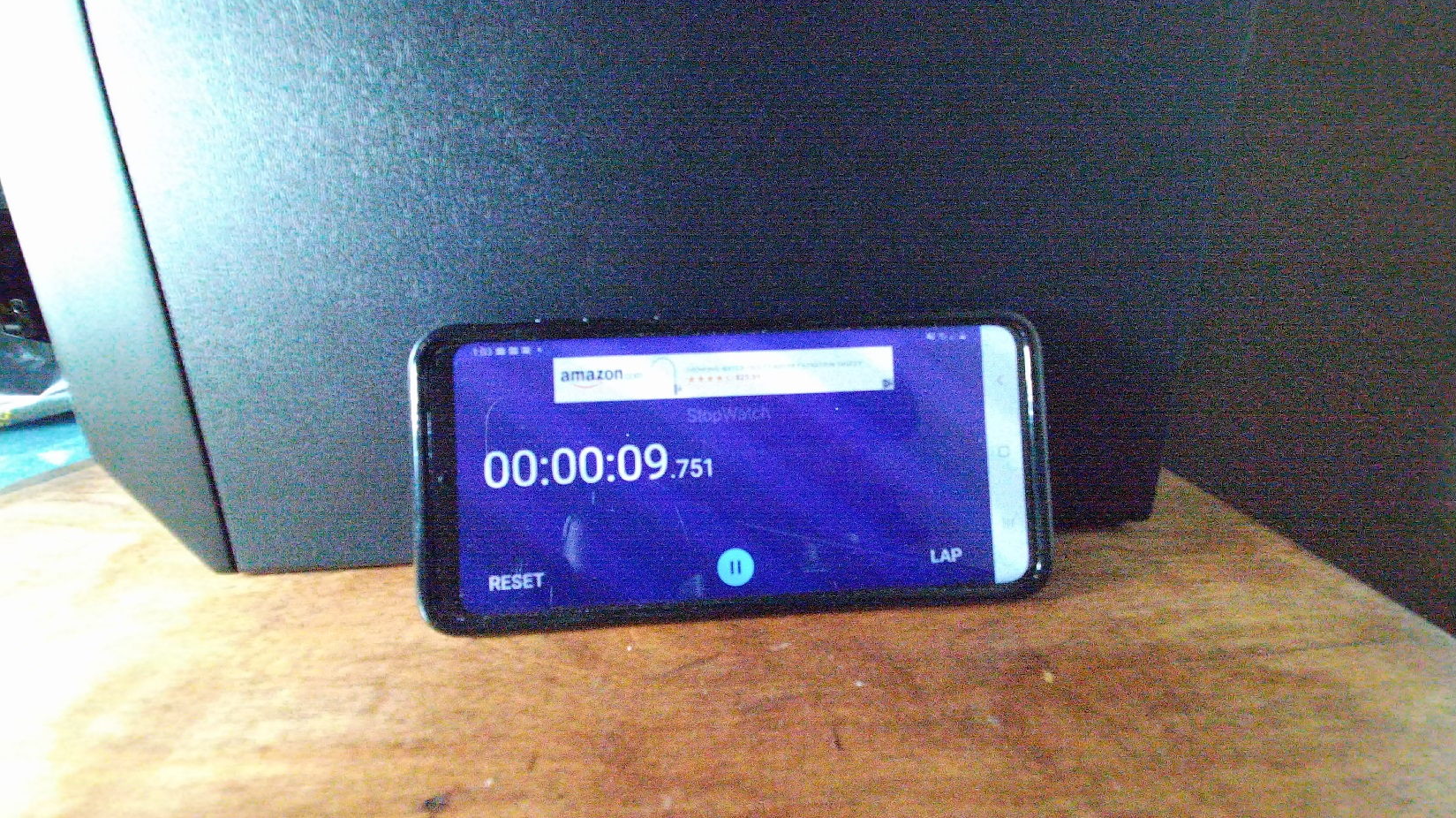
AK#2 (new FW) - First frame device timestamp is 282,711us and time displayed on millisecond clock is 9.751 seconds
Since the clocks of AK#1 and AK#2 are supposed to be synced, the offset between the millisecond clock shown in the images of the AKs should be roughly equivalent to the offset between the device timestamps of the corresponding images.
millsecondClockOffset = AK#2_Ms_Time - AK#1_Ms_Time
millsecondClockOffset = 9,751 - 9,685
millsecondClockOffset = 66ms
deviceTimestampOffset = AK#2_DeviceTimestampUs - AK#1_DeviceTimestampUs
deviceTimestampOffset = 282,711 - 65,255
deviceTimestampOffset = 217.456ms
In this example, there appears to be a ~151ms offset between the two AK device clocks. Note - that I can confirm that the two AKs are properly hardware synced as the third frame (with deviceTimestampUs=131,955) I get from AK#1 shows the millisecond clock in the image with the exact same time as the first frame from AK#2 (9.751 seconds).
Expected behavior
The computed millsecondClockOffset and deviceTimestampOffset should be roughly equivalent for the first frame of both AKs.
Additional context
AK#1 Firmware Info:
RGB camera firmware: 1.6.104
Depth camera firmware: 1.6.75
Depth config files: 6109.7 5006.27
Audio firmware: 1.6.14
Build Config: Production
Certificate Type: Microsoft
Signature Type: Microsoft
AK#2 Firmware Info:
RGB camera firmware: 1.6.110
Depth camera firmware: 1.6.79
Depth config file: 6109.7
Audio firmware: 1.6.14
Build Config: Production
Certificate Type: Microsoft
AK#1 First Frame (deviceTimestampUs=65,255)
AK#2 First Frame (deviceTimestampUs=282,711)
AK#1 Third Frame (deviceTimestampUs=131,955)
It's harder to demonstrate this because I have a somewhat complicated setup, but it's my understanding that the older FW is correctly setting the device clock to zero on the first pulse and the newer FW has some sortof offset.
markhog
on 12 Jun 2020
Is this repro helpful?
markhog
on 18 Jun 2020
Absolutely! We are chatting internally about this.
wes-b
on 18 Jun 2020
Thanks for working on this @wes-b! Is there an estimated date for a fix on this issue?
markhog
on 29 Jun 2020
Hoping there's a fix for this soon. Would love to be able to update to the latest firmware
markhog
on 13 Jul 2020
@markhog newer firmware does indeed reset its internal device timestamp clock to 200ms where as before it was 0. We don't currently have any plans to change the behavior. You should be able to adjust to this change by adding the 200ms offset in your code when attempting to sync an external trigger with the device.
This new behavior is in 1.6.110079014 and 1.6.108079014 https://github.com/microsoft/Azure-Kinect-Sensor-SDK/blob/develop/docs/usage.md#msis
wes-b
on 14 Jul 2020
Related issues
 RenderHeadsMrT
·
3Comments
RenderHeadsMrT
·
3Comments
 devLupin
·
4Comments
devLupin
·
4Comments
 MrudulaSatya
·
4Comments
MrudulaSatya
·
4Comments
 Elenaegr
·
3Comments
Elenaegr
·
3Comments
 Jalroka
·
3Comments
Jalroka
·
3Comments
Most helpful comment
@markhog newer firmware does indeed reset its internal device timestamp clock to 200ms where as before it was 0. We don't currently have any plans to change the behavior. You should be able to adjust to this change by adding the 200ms offset in your code when attempting to sync an external trigger with the device.
This new behavior is in 1.6.110079014 and 1.6.108079014 https://github.com/microsoft/Azure-Kinect-Sensor-SDK/blob/develop/docs/usage.md#msis