Azure-iot-sdk-csharp: RegistryManager causes TCP socket exhaustion under load
- OS, version, SKU and CPU architecture used: Windows 10 Desktop x64, Azure App Service (P1V2 plan on Windows)
- Application's .NET Target Framework : netcoreapp2.2
- SDK version used: Microsoft.Azure.Devices 1.20.0
Description of the issue:
We were running performance tests for our system that relies on IoT Hub. Under concurrent load from about 50 threads performing HTTP requests to our API endpoints, we started hitting System.Net.Sockets.SocketException with the following exception message:
Only one usage of each socket address (protocol/network address/port) is normally permitted
We use RegistryManager's twin methods (retrieving and updating twins) quite heavily. After further investigation, we found out that too many TCP sockets stay in "TIME_WAIT" state blocking further TCP connections to be established. The limit is around 2K active sockets on Azure App Service P1V2 Plan we were using for testing.
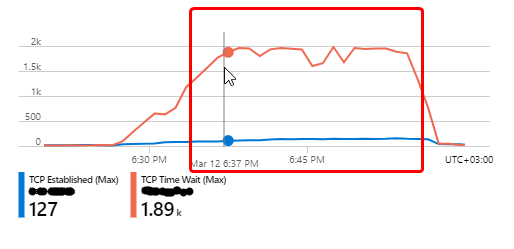
I've checked the SDK's source code and it appears that a new HttpClient and HttpClientHandler instance is created for each independent request. See the following line in HttpClientHelper class used for HTTP communication.
It would be great to have this fixed as it's the only limit that we are hitting during the test and other resources usage (CPU/memory) is pretty low.
Code sample exhibiting the issue:
The following code sample reproduces the issue. There should be some devices registered in IoT Hub instance to be able to run the code sample. The number of active sockets grows quickly when the RegistryClient is used as seen in the console output.
using System;
using System.Collections.Generic;
using System.Linq;
using System.Net.Http;
using System.Net.NetworkInformation;
using System.Threading;
using System.Threading.Tasks;
using Microsoft.Azure.Devices;
using Newtonsoft.Json.Linq;

namespace IoTHubSocketExhaustion
{
    internal class Program
    {
        internal static async Task Main(string[] args)
        {
            var cts = new CancellationTokenSource();
            Console.CancelKeyPress += (s, e) =>
            {
                e.Cancel = true;
                cts.Cancel();
            };
            var registryManager = RegistryManager.CreateFromConnectionString(
                "PUT_IOTHUB_CONNECTION_STRING_HERE");
            try
            {
                var httpClient = new HttpClient();
                await Task.WhenAll(
                    SimulateIoTHubUsage(registryManager, cts.Token),
                    //SimulateHttpClientUsage(httpClient, cts.Token),
                    PrintConnectionsCount(cts.Token));
            }
            catch (OperationCanceledException)
            {
                // Do nothing
            }
            catch (Exception ex)
            {
                Console.WriteLine(ex.Message);
            }
            Console.WriteLine("Completed. Press any key to exit.");
        }

        private static async Task SimulateHttpClientUsage(HttpClient client, CancellationToken cancellationToken)
        {
            while (!cancellationToken.IsCancellationRequested)
            {
                var tasks = Enumerable
                    .Repeat(1, 100)
                    .Select(_ => client.GetAsync("https://google.com", cancellationToken));
                await Task.WhenAll(tasks);
                Console.WriteLine("Executed 100 requests with HttpClient.");
            }
        }

        private static async Task SimulateIoTHubUsage(RegistryManager registryManager, CancellationToken cancellationToken)
        {
            var devices
                = await registryManager.CreateQuery("SELECT deviceId FROM devices").GetNextAsJsonAsync();
            var deviceIds = devices
                .Select(JObject.Parse)
                .Select(j => j["deviceId"].Value<string>())
                .RepeatUntilCount(100)
                .ToList();
            while (!cancellationToken.IsCancellationRequested)
            {
                var tasks = deviceIds.Select(x => registryManager.GetTwinAsync(x, cancellationToken));
                await Task.WhenAll(tasks);
                Console.WriteLine("Executed 100 requests to IoT Hub.");
            }
        }

        private static async Task PrintConnectionsCount(CancellationToken cancellationToken)
        {
            while (!cancellationToken.IsCancellationRequested)
            {
                var ipProperties = IPGlobalProperties.GetIPGlobalProperties();
                var tcpConnections = ipProperties.GetActiveTcpConnections();
                Console.WriteLine($"Time: {DateTime.Now:G}. TCP Connections: {tcpConnections.Length}.");
                await Task.Delay(TimeSpan.FromSeconds(5), cancellationToken);
            }
        }
    }

    internal static class EnumerableExtensions
    {
        public static IEnumerable<T> RepeatUntilCount<T>(this IEnumerable<T> items, int count)
        {
            var total = 0;
            while (total < count)
            {
                foreach (var item in items.Take(count))
                {
                    yield return item;
                    total++;
                }
            }
        }
    }
}
Console log of the issue:
RegistryManagersocket usage output (number of active sockets grows very fast)
Time: 18.03.2020 13:08:59. TCP Connections: 71.
Executed 100 requests to IoT Hub.
Executed 100 requests to IoT Hub.
Executed 100 requests to IoT Hub.
Executed 100 requests to IoT Hub.
Executed 100 requests to IoT Hub.
Time: 18.03.2020 13:09:04. TCP Connections: 684.
Executed 100 requests to IoT Hub.
Executed 100 requests to IoT Hub.
Executed 100 requests to IoT Hub.
Executed 100 requests to IoT Hub.
Executed 100 requests to IoT Hub.
Executed 100 requests to IoT Hub.
Executed 100 requests to IoT Hub.
Executed 100 requests to IoT Hub.
Time: 18.03.2020 13:09:09. TCP Connections: 1500.
Executed 100 requests to IoT Hub.
Executed 100 requests to IoT Hub.
Executed 100 requests to IoT Hub.
Executed 100 requests to IoT Hub.
The operation was canceled.
Completed. Press any key to exit.
- Reused HTTP client socket usage output (number of active sockets stays stable)
Time: 18.03.2020 12:55:46. TCP Connections: 144.
Executed 100 requests with HttpClient.
Executed 100 requests with HttpClient.
Executed 100 requests with HttpClient.
Executed 100 requests with HttpClient.
Executed 100 requests with HttpClient.
Executed 100 requests with HttpClient.
Executed 100 requests with HttpClient.
Time: 18.03.2020 12:55:51. TCP Connections: 178.
Executed 100 requests with HttpClient.
Executed 100 requests with HttpClient.
Executed 100 requests with HttpClient.
Executed 100 requests with HttpClient.
Executed 100 requests with HttpClient.
Executed 100 requests with HttpClient.
Executed 100 requests with HttpClient.
Executed 100 requests with HttpClient.
Executed 100 requests with HttpClient.
Time: 18.03.2020 12:55:56. TCP Connections: 176.
Executed 100 requests with HttpClient.
Executed 100 requests with HttpClient.
Executed 100 requests with HttpClient.
Executed 100 requests with HttpClient.
Executed 100 requests with HttpClient.
Executed 100 requests with HttpClient.
Executed 100 requests with HttpClient.
Executed 100 requests with HttpClient.
Time: 18.03.2020 12:56:01. TCP Connections: 176.
Executed 100 requests with HttpClient.
Executed 100 requests with HttpClient.
Executed 100 requests with HttpClient.
Executed 100 requests with HttpClient.
Completed. Press any key to exit.
 smolyakoff
All 14 comments
Improper Instantiation antipattern
https://docs.microsoft.com/en-us/azure/architecture/antipatterns/improper-instantiation/
https://github.com/Azure/azure-iot-sdk-csharp/blob/master/common/src/service/HttpClientHelper.cs#L131-L148
https://github.com/Azure/azure-iot-sdk-csharp/blob/master/common/src/service/HttpClientHelper.cs#L690-L706
 HiroyukiSakoh
on 23 Mar 2020
HiroyukiSakoh
on 23 Mar 2020
Hi, everyone! Are there any plans to fix this issue sooner in some kind of a patch release? Should we rather wait for a fix or consider downgrade to the version without this problem?
smolyakoff
on 25 Mar 2020
Hi @smolyakoff, I will be working on a fix this week, and then we'll ship it in a minor version. AFAIK, this is not a new problem for this SDK; I don't think downgrading would offer a resolution.
My understanding of the HttpClient.Dispose problem is not that it leaks resources, but it can take 5+ minutes for the underlying native resources to finally be freed. Lots and lots of quick calls causes the port exhaustion problem.
Please let us know if you are encountering the port exhaustion problem in a production environment. We'll work on a fix, and we'll want to make sure we do all the due diligence before shipping to ensure high quality.
 drwill-ms
on 25 Mar 2020
drwill-ms
on 25 Mar 2020
Thanks for an update @drwill-ms. We faced this issue during stress testing before going to actual production. So far it becomes a bottleneck for us as we hit the port exhaustion before hitting any other (CPU/memory) limit on App Service instances.
I don't think downgrading would offer a resolution.
@HiroyukiSakoh linked the PR where the regression was introduced. From the release history, it seems that versions 1.18.3 and older shouldn't suffer from the port exhaustion. We are considering a downgrade to unblock further performance testing efforts. Nevertheless, we would prefer to go to production with a fixed recent version of the SDK. So it would be nice if it's prioritized on your team's schedule.
smolyakoff
on 25 Mar 2020
@smolyakoff, it is prioritized. I'm working on it this week, starting today. You are right about the regression. Thanks for pointing that out. I'll aim to respect per-request timeouts (what that PR was trying to achieve) and reuse 1 (or perhaps a handful) of HttpClient instances.
drwill-ms
on 25 Mar 2020
@drwill-ms
Will this bug be merged into the LTS branch?
HiroyukiSakoh
on 31 Mar 2020
As you wish. :)
drwill-ms
on 31 Mar 2020
The release is ready to go and just awaiting verification. I anticipate it being released publicly tomorrow. Thanks again for your awesome communication and reporting on this issue. We really appreciate it.
drwill-ms
on 1 Apr 2020
@HiroyukiSakoh we expected, based on previous timelines, that we'd have released the update by today, but are held up with some testing by partner teams. They encountered some errors, but it doesn't not appear to be related to the SDK. Still, to be sure we are waiting to make sure those issues are resolved, as we think we can have it done in a day or so. I apologize for the delay.
If you are interested in evaluating a private drop, let me know and we can arrange that.
drwill-ms
on 3 Apr 2020
@drwill-ms
I'm using LTS in a project under development.
It's not a situation where i need it right away,
as there are mitigating measures such as rebooting.
Thanks for contacting me.
HiroyukiSakoh
on 3 Apr 2020
@drwill-ms We've run some load tests this week and I've downgraded Microsoft.Azure.Devices to 1.18.3 to avoid the issue. On my small attached repro case, the downgrade clearly helped, no more than 50 connections were established on my local machine.
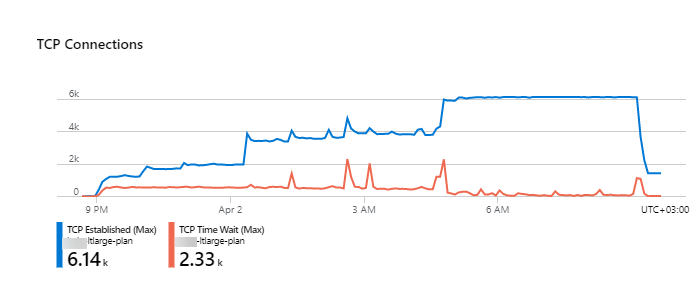
However, in the real-world API, even with an older version of the SDK, we were still facing high TCP connection usage. The diagnostics showed thousands of connections opened to IoT Hub. I've checked the application code one more time and RegistryManager and ServiceClient are used as singletons everywhere.
Here is the chart for TCP connections. We were running a constant load during the night (2 instances of P2V2 app service plans on Azure). There are weird bumps and, generally, thousands of connections remain open.
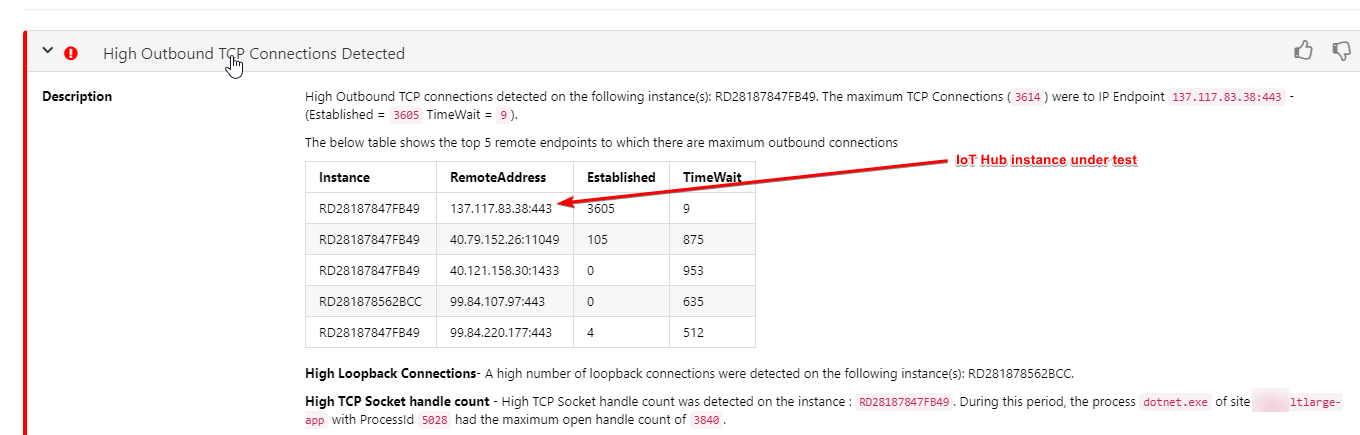
The troubleshooting page also revealed a high number of TCP connections pointing our IoT Hub instance.
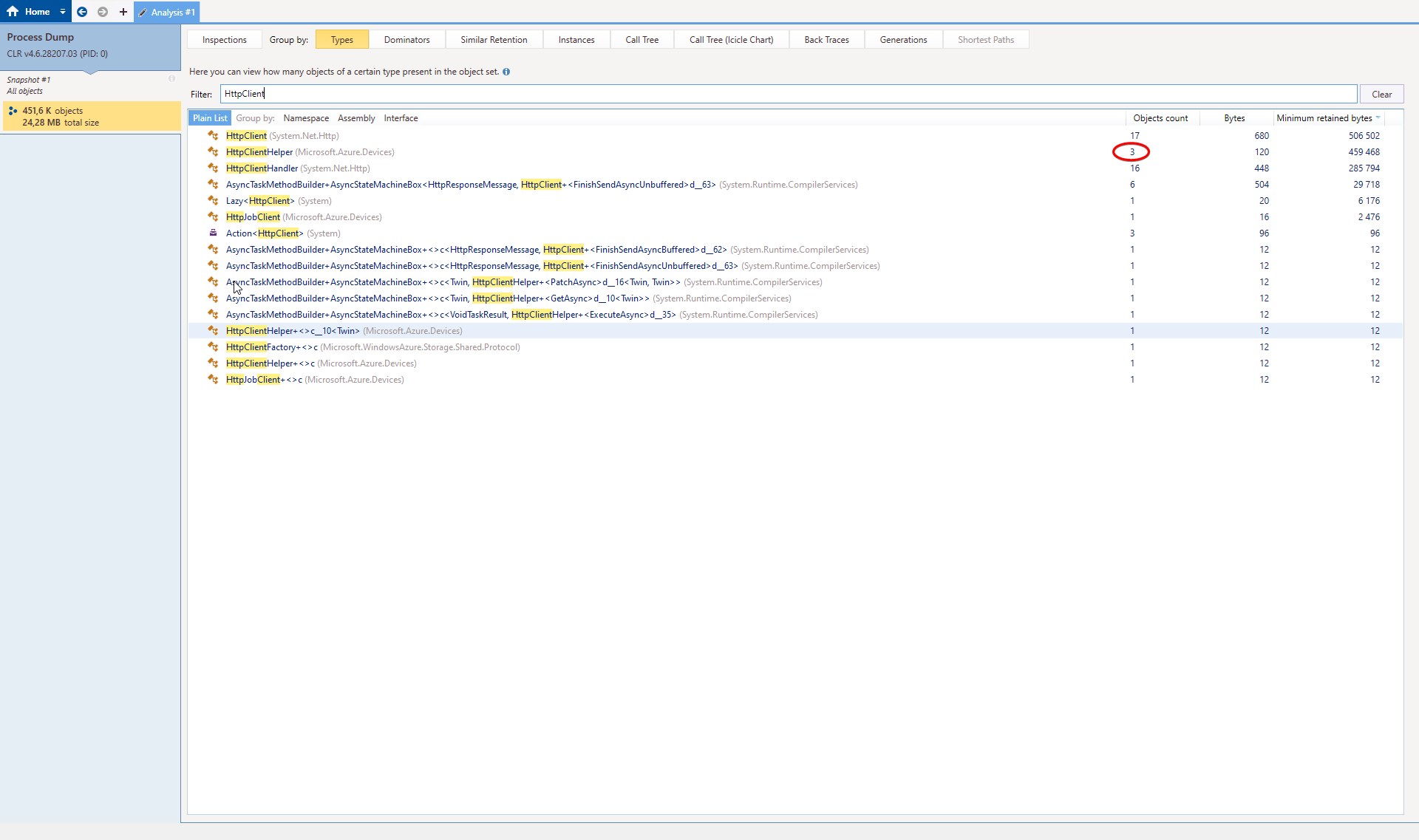
There is also a memory dump taken during the stability test run that shows 3 HttpClientHelper instances that match the ServiceClient, RegistryClient and JobClient that we are using.
Are there any other customers or partners facing similar issues? I'm now not sure if that is an SDK-only issue and what would help me to diagnose it further.
smolyakoff
on 3 Apr 2020
@smolyakoff we have not heard from other customers reporting issues with high TCP connections when using RegistryManager or ServiceClient.
You are right that ServiceClient, RegistryManager, and JobClient each have their own copy of HttpClientHelper, which in turn has a pair of HttpClients (at least as of this release we're pushing shortly). We do that so they can all have their own lifetime and HttpClient settings, and it seems reasonable to be limited to only 6 instances of HttpClient.
I welcome any feedback you have. Thanks
drwill-ms
on 3 Apr 2020
This fix has been released
https://www.nuget.org/packages/Microsoft.Azure.Devices/1.18.5
Thanks again for your contribution. Let us know if you discover any issues.
drwill-ms
on 3 Apr 2020
@HiroyukiSakoh, @smolyakoff, thank you for your contribution to our open-sourced project! Please help us improve by filling out this 2-minute customer satisfaction survey
 az-iot-builder-01
on 3 Apr 2020
az-iot-builder-01
on 3 Apr 2020
Related issues
 JohnKozell
·
4Comments
JohnKozell
·
4Comments
 atuzovic
·
7Comments
atuzovic
·
7Comments
 Feiko
·
10Comments
Feiko
·
10Comments
 appalaraju
·
9Comments
appalaraju
·
9Comments
 jsturtevant
·
5Comments
jsturtevant
·
5Comments