Azure-iot-sdk-csharp: MQTT - OpenAsync error.
Hi, I have a simple UWP project.
I want to use direct methods.
I connect my device but when call "_client.OpenAsync().Wait();" return this error.
Nuget package: Microsoft.Azure.Devices.Client version 1.3.0.
CODE:
Task.Run(async () =>
{
_client = DeviceClient.CreateFromConnectionString(
                   "HostName=myname.azure-devices.net;SharedAccessKeyName=iothubowner;SharedAccessKey=..=",
                   "mydeviceId",
                   TransportType.Mqtt);
                _client.OpenAsync().Wait();
}).Wait();
ERROR:
The parameter is incorrect. remoteServiceName
STACK TRACE:
   at Windows.Networking.Sockets.DatagramSocket.GetEndpointPairsAsync(HostName remoteHostName, String remoteServiceName)
   at Microsoft.Azure.Devices.Client.Transport.Mqtt.MqttTransportHandler.<OpenAsync>d__62.MoveNext()
--- End of stack trace from previous location where exception was thrown ---
   at System.Runtime.CompilerServices.TaskAwaiter.ThrowForNonSuccess(Task task)
   at System.Runtime.CompilerServices.TaskAwaiter.HandleNonSuccessAndDebuggerNotification(Task task)
   at Microsoft.Azure.Devices.Client.Transport.Mqtt.MqttTransportHandler.<OpenAsync>d__45.MoveNext()
--- End of stack trace from previous location where exception was thrown ---
   at System.Runtime.CompilerServices.TaskAwaiter.ThrowForNonSuccess(Task task)
   at System.Runtime.CompilerServices.TaskAwaiter.HandleNonSuccessAndDebuggerNotification(Task task)
   at Microsoft.Azure.Devices.Client.Transport.ProtocolRoutingDelegatingHandler.<TryOpenPrioritizedTransportsAsync>d__3.MoveNext()
--- End of stack trace from previous location where exception was thrown ---
   at Microsoft.Azure.Devices.Client.Transport.ProtocolRoutingDelegatingHandler.<TryOpenPrioritizedTransportsAsync>d__3.MoveNext()
--- End of stack trace from previous location where exception was thrown ---
   at System.Runtime.CompilerServices.TaskAwaiter.ThrowForNonSuccess(Task task)
   at System.Runtime.CompilerServices.TaskAwaiter.HandleNonSuccessAndDebuggerNotification(Task task)
   at Microsoft.Azure.Devices.Client.Transport.ProtocolRoutingDelegatingHandler.<OpenAsync>d__2.MoveNext()
--- End of stack trace from previous location where exception was thrown ---
   at System.Runtime.CompilerServices.TaskAwaiter.ThrowForNonSuccess(Task task)
   at System.Runtime.CompilerServices.TaskAwaiter.HandleNonSuccessAndDebuggerNotification(Task task)
   at Microsoft.Azure.Devices.Client.Transport.ErrorDelegatingHandler.<>c__DisplayClass19_0.<<ExecuteWithErrorHandlingAsync>b__0>d.MoveNext()
--- End of stack trace from previous location where exception was thrown ---
   at System.Runtime.CompilerServices.TaskAwaiter.ThrowForNonSuccess(Task task)
   at System.Runtime.CompilerServices.TaskAwaiter.HandleNonSuccessAndDebuggerNotification(Task task)
   at Microsoft.Azure.Devices.Client.Transport.ErrorDelegatingHandler.<ExecuteWithErrorHandlingAsync>d__20`1.MoveNext()
--- End of stack trace from previous location where exception was thrown ---
   at Microsoft.Azure.Devices.Client.Transport.ErrorDelegatingHandler.<ExecuteWithErrorHandlingAsync>d__20`1.MoveNext()
--- End of stack trace from previous location where exception was thrown ---
   at System.Runtime.CompilerServices.TaskAwaiter.ThrowForNonSuccess(Task task)
   at System.Runtime.CompilerServices.TaskAwaiter.HandleNonSuccessAndDebuggerNotification(Task task)
   at Microsoft.Azure.Devices.Client.Transport.ErrorDelegatingHandler.<OpenAsync>d__4.MoveNext()
--- End of stack trace from previous location where exception was thrown ---
   at System.Runtime.CompilerServices.TaskAwaiter.ThrowForNonSuccess(Task task)
   at System.Runtime.CompilerServices.TaskAwaiter.HandleNonSuccessAndDebuggerNotification(Task task)
   at Microsoft.Azure.Devices.Client.TaskHelpers.<WithTimeout>d__15.MoveNext()
I tried to change connectionString with device read connectionString.
I tried to change IoTHub resource.
Thanks
Andrea
 pandazzurro
All 14 comments
Hi
In your Connection String, you have the sharedaccesskeyname parameter.
This is not needed, and is not a valid parameter, as you are not connecting as the iothub owner, but rather as the device.
Possible are:
"HostName=
"HostName=
 mepprec
on 14 Jul 2017
mepprec
on 14 Jul 2017
I try same code on x86 UWP and work.
I can not understand.
I must try code on ARM UWP.
pandazzurro
on 18 Jul 2017
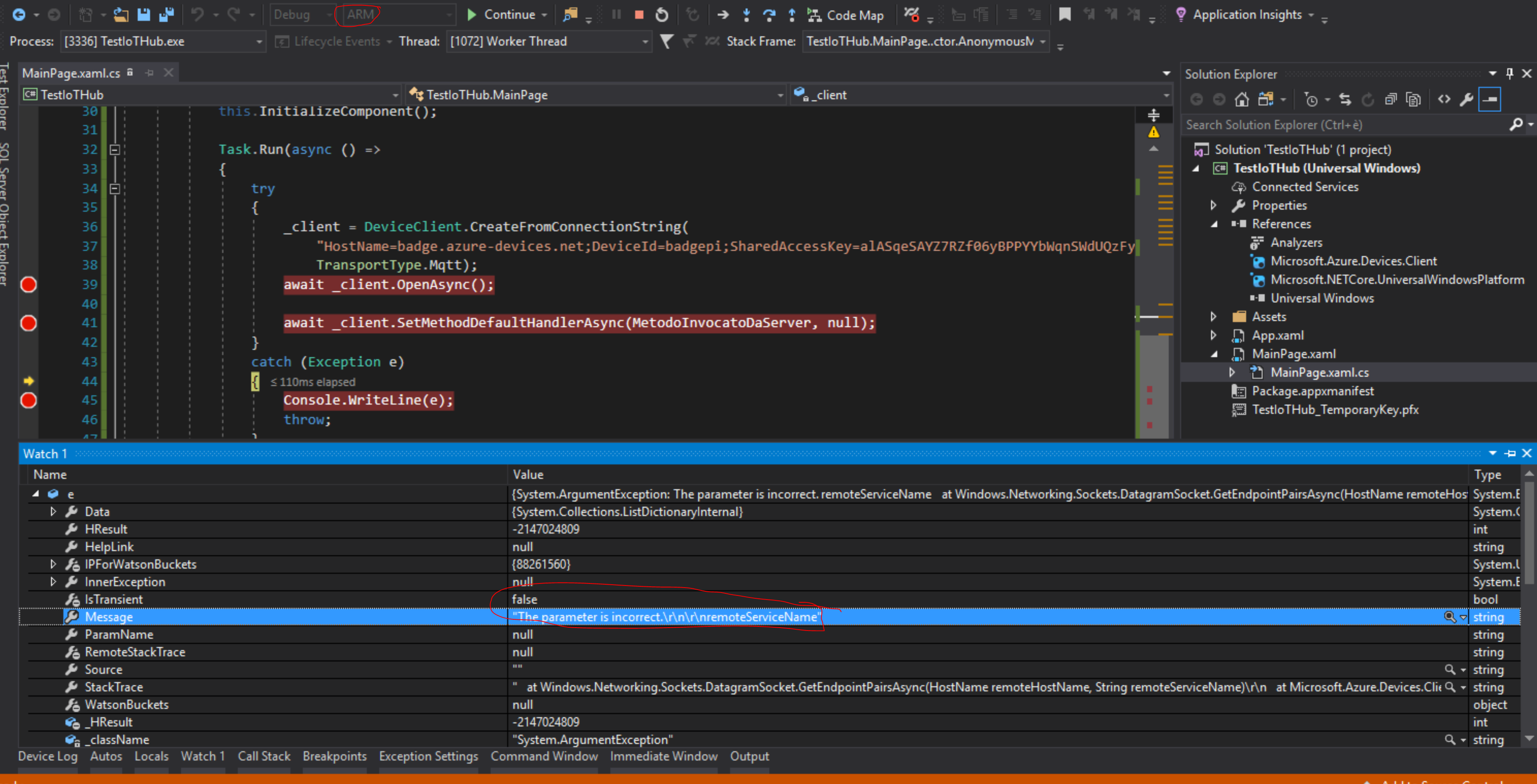
Working code on UWP (x86) not work on UWP (ARM). Device is raspberry.
I replicate error on new project with 3 lines of code. You can see in image below.
Line 39 throw error.
pandazzurro
on 18 Jul 2017
Hello @pandazzurro , the latest Nuget package is 1.3.1. Can you try again using the latest version? Also can you let me know the version of Windows 10 IoT Core that your are using?
Thank you.
 asergaz
on 19 Jul 2017
asergaz
on 19 Jul 2017
Same error with latest Nuget package (1.3.1).
Windows IoTCore version: 10.0.10586.0
Raspberry PI 2
pandazzurro
on 20 Jul 2017
Same error for me.
I'm using Device.Client Nuget package 1.3.1
Windows UWP version: 10.0.15063
On arch x86/x64
 Premier
on 25 Jul 2017
Premier
on 25 Jul 2017
Are you sure? X86 work for me.
My problem is ARM and raspberry.
In April 2017 same code work but not now
 andreatosato
on 25 Jul 2017
andreatosato
on 25 Jul 2017
Sorry, @andreatosato and @pandazzurro are same user.
I have 2 github account
pandazzurro
on 25 Jul 2017
Hello @pandazzurro and @Premier , I couldn't reproduce the issue on x86 UWP app. Can you let me know how you are defining the Method callback? It should be something like this inside public MainPage():
Task<MethodResponse> WriteToDebug(MethodRequest methodRequest, object userContext)
{
       Debug.WriteLine("Method Was called");
       return Task.FromResult(new MethodResponse(new byte[0], 200));
}
Thank you
asergaz
on 26 Jul 2017
Hi @sergaz-msft.
My problem is on ARM/raspberry.
As already mentioned above, x86 work for me.
andreatosato
on 26 Jul 2017
Hello @andreatosato . I just tested the UWP app on an ARM/raspberry 3 device using Windows 10 IoT core Insider Preview v.10.0.16237.1001 and it is working fine. Can you do the same test on that OS version? Is the issue still on the "_client.OpenAsync().Wait();" ?
Thanks
asergaz
on 26 Jul 2017
Works!
Thanks
pandazzurro
on 30 Jul 2017
Hello @pandazzurro I am glad you made it working. Can you just confirm on what OS version you test it? Thanks
asergaz
on 7 Aug 2017
Windows 10 IoT core Insider Preview v.10.0.16237.1001
andreatosato
on 7 Aug 2017
Related issues
 andyce1010
·
8Comments
andyce1010
·
8Comments
 dmytro-gokun
·
10Comments
dmytro-gokun
·
10Comments
 patridge
·
7Comments
patridge
·
7Comments
 varunpuranik
·
6Comments
varunpuranik
·
6Comments
 jsturtevant
·
5Comments
jsturtevant
·
5Comments