Azure-iot-sdk-c: iothub_ll_telemetry-sample: Failure: sending socket failed and failure opening connection to endpoint
Hi All,
I am new to Azure IoT and I could able to run sample applications from Azure IoT Device SDK for C on Ubuntu and one more ST IoT node.
But when I try to run on a tiny Linux embedded device where RAM is 4MB it's failing to run. And it is taking a huge time and end up with the below errors. Please suggest to me that how can resolve this issue.
Azure IoT device SDK for C version: 1.3.8/1.3.9
Application Name : iothub_ll_telemetry-sample
This sample application working perfectly fine with Ubuntu or any commercial ST IoT node. I have followed the building procedure explained in documentation.
Log:
root@custom#./iothub_ll_telemetry-sample
Creating IoTHub Device handle
Sending message 1 to IoTHub
Error: Time:Thu Jan 28 05:44:36 2021 File:/usr/src/debug/azure-iot-sdk-c/1.3.9-r0/azure-iot-sdk-c/c-utility/adapters/socketio_berkeley.c Func:socketio_send Line:940 Failure: sending socket failed. errno=32 (Broken pipe).
Error: Time:Thu Jan 28 05:44:39 2021 File:/usr/src/debug/azure-iot-sdk-c/1.3.9-r0/azure-iot-sdk-c/c-utility/adapters/tlsio_openssl.c Func:write_outgoing_bytes Line:642 Error in xio_send.
Error: Time:Thu Jan 28 05:44:43 2021 File:/usr/src/debug/azure-iot-sdk-c/1.3.9-r0/azure-iot-sdk-c/c-utility/adapters/tlsio_openssl.c Func:send_handshake_bytes Line:686 Error in write_outgoing_bytes.
Error: Time:Thu Jan 28 05:46:16 2021 File:/usr/src/debug/azure-iot-sdk-c/1.3.9-r0/azure-iot-sdk-c/umqtt/src/mqtt_client.c Func:onOpenComplete Line:454 Error: failure opening connection to endpoint
The device client has been disconnected
Sending message 2 to IoTHub
Sending message 3 to IoTHub
Error: Time:Thu Jan 28 05:52:07 2021 File:/usr/src/debug/azure-iot-sdk-c/1.3.9-r0/azure-iot-sdk-c/umqtt/src/mqtt_client.c Func:onOpenComplete Line:454 Error: failure opening connection to endpoint
The device client has been disconnected
Sending message 4 to IoTHub
Sending message 5 to IoTHub
Error: Time:Thu Jan 28 06:03:47 2021 File:/usr/src/debug/azure-iot-sdk-c/1.3.9-r0/azure-iot-sdk-c/c-utility/adapters/socketio_berkeley.c Func:socketio_send Line:940 Failure: sending socket failed. errno=32 (Broken pipe).
Error: Time:Thu Jan 28 06:03:58 2021 File:/usr/src/debug/azure-iot-sdk-c/1.3.9-r0/azure-iot-sdk-c/c-utility/adapters/tlsio_openssl.c Func:write_outgoing_bytes Line:642 Error in xio_send.
Error: Time:Thu Jan 28 06:04:07 2021 File:/usr/src/debug/azure-iot-sdk-c/1.3.9-r0/azure-iot-sdk-c/c-utility/adapters/tlsio_openssl.c Func:send_handshake_bytes Line:686 Error in write_outgoing_bytes.
Error: Time:Thu Jan 28 06:06:23 2021 File:/usr/src/debug/azure-iot-sdk-c/1.3.9-r0/azure-iot-sdk-c/umqtt/src/mqtt_client.c Func:onOpenComplete Line:454 Error: failure opening connection to endpoint
The device client has been disconnected
 shrinivasragolu
All 40 comments
Hi @shrinivasragolu can you double check to turn on verbose logs and run it again?
https://github.com/Azure/azure-iot-sdk-c/blob/593e81183e962c402790e76b41a63c776e78f420/iothub_client/samples/iothub_ll_telemetry_sample/iothub_ll_telemetry_sample.c#L124-L125
 danewalton
on 1 Feb 2021
danewalton
on 1 Feb 2021
Hi Dane,
Thanks for quick response. the two line change already available in the 1.3.9 version git repo. So I did not modify anything . Please find the procedure I have followed.
git clone -b 1.3.9 https://github.com/Azure/azure-iot-sdk-c.git
cd azure-iot-sdk-c
git submodule update --init
//Replace connectionstring value with actual one//
mkdir cmake
cmake -DCMAKE_BUILD_TYPE=Debug -Dno_logging=OFF ..
./iothub_client_ll_telemetry_sample
root@bolt-rev-a0:/usr/sbin# ./iothub_ll_telemetry_sample
Creating IoTHub Device handle
Sending message 1 to IoTHub
Sending message 2 to IoTHub "Thats all.....nothing is executing..."
After seeing creating iot device handle message, it is hanging completely...
Completely clueless. Network is working fine according to me. Feel free to tell me what tests I need to perform for networking connections. Is hanging such a small application on 4MB RAM is due to RAM/timing/server response/data format/length???
Please help me in fixing this issue. Also give me what I can add to more logs from execution.
Thanks in advance,
Srinivas.
shrinivasragolu
on 2 Feb 2021
When I turn on verbose logs I get output that looks like the following:
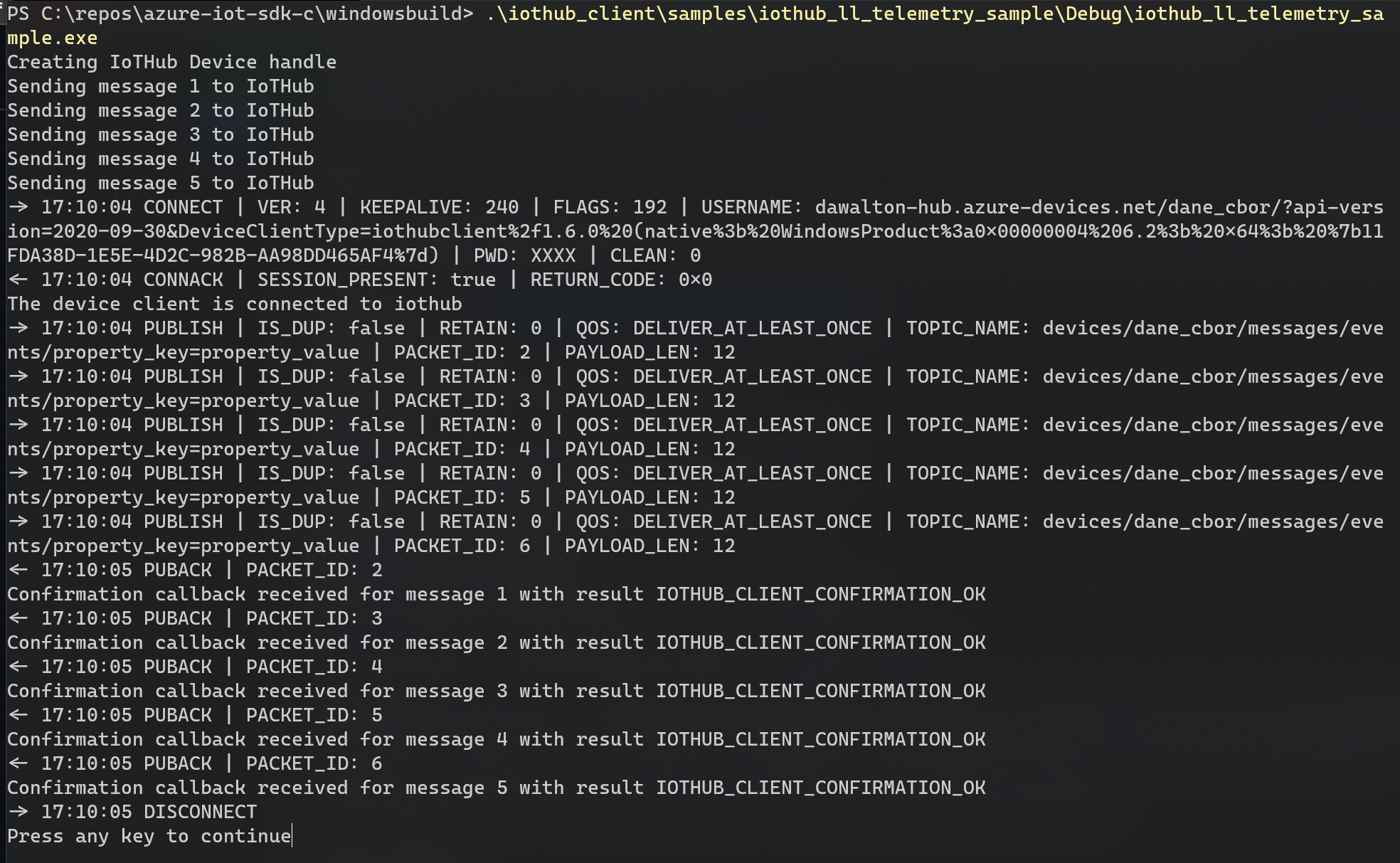
Yours doesn't get to the part which has the -> and <-?
danewalton
on 3 Feb 2021
Hi Dane,
I have given more time to pick up logs and I captured and given below. But it took a long time such as one hour to get these capture.
I have not changed even a single line from 1.3.9 release except adding connection string
Log
Creating IoTHub Device handle
Sending message 1 to IoTHub
Sending message 2 to IoTHub
Error: Time:Thu Jan 1 04:55:48 1970 File:/usr/src/debug/azure-iot-sdk-c/1.3.9-r0/azure-iot-sdk-c/c-utility/adapters/tlsio_openssl.c Func:send_handshake_bytes Line:674 error:1416F086:SSL routines:tls_process_server_certificate:certificate verify failed
Error: Time:Thu Jan 1 04:56:09 1970 File:/usr/src/debug/azure-iot-sdk-c/1.3.9-r0/azure-iot-sdk-c/umqtt/src/mqtt_client.c Func:onOpenComplete Line:454 Error: failure opening connection to endpoint
The device client has been disconnected
Sending message 3 to IoTHub
Sending message 4 to IoTHub
Error: Time:Thu Jan 1 05:03:04 1970 File:/usr/src/debug/azure-iot-sdk-c/1.3.9-r0/azure-iot-sdk-c/c-utility/adapters/tlsio_openssl.c Func:send_handshake_bytes Line:674 error:1416F086:SSL routines:tls_process_server_certificate:certificate verify failed
Error: Time:Thu Jan 1 05:03:28 1970 File:/usr/src/debug/azure-iot-sdk-c/1.3.9-r0/azure-iot-sdk-c/umqtt/src/mqtt_client.c Func:onOpenComplete Line:454 Error: failure opening connection to endpoint
The device client has been disconnected
Sending message 5 to IoTHub
Error: Time:Thu Jan 1 05:05:15 1970 File:/usr/src/debug/azure-iot-sdk-c/1.3.9-r0/azure-iot-sdk-c/iothub_client/src/iothubtransport_mqtt_common.c Func:InitializeConnection Line:2424 mqtt_client timed out waiting for CONNACK
Error: Time:Thu Jan 1 05:07:08 1970 File:/usr/src/debug/azure-iot-sdk-c/1.3.9-r0/azure-iot-sdk-c/umqtt/src/mqtt_client.c Func:onOpenComplete Line:454 Error: failure opening connection to endpoint
The device client has been disconnected
Error: Time:Thu Jan 1 05:09:02 1970 File:/usr/src/debug/azure-iot-sdk-c/1.3.9-r0/azure-iot-sdk-c/umqtt/src/mqtt_client.c Func:onOpenComplete Line:454 Error: failure opening connection to endpoint
The device client has been disconnected
Error: Time:Thu Jan 1 05:10:53 1970 File:/usr/src/debug/azure-iot-sdk-c/1.3.9-r0/azure-iot-sdk-c/umqtt/src/mqtt_client.c Func:onOpenComplete Line:454 Error: failure opening connection to endpoint
The device client has been disconnected
Error: Time:Thu Jan 1 05:19:12 1970 File:/usr/src/debug/azure-iot-sdk-c/1.3.9-r0/azure-iot-sdk-c/c-utility/adapters/tlsio_openssl.c Func:send_handshake_bytes Line:674 error:1416F086:SSL routines:tls_process_server_certificate:certificate verify failed
Error: Time:Thu Jan 1 05:19:49 1970 File:/usr/src/debug/azure-iot-sdk-c/1.3.9-r0/azure-iot-sdk-c/umqtt/src/mqtt_client.c Func:onOpenComplete Line:454 Error: failure opening connection to endpoint
The device client has been disconnected
Info: Failed DNS lookup for Srinivas-IoTHub.azure-devices.net: -3
Error: Time:Thu Jan 1 05:20:52 1970 File:/usr/src/debug/azure-iot-sdk-c/1.3.9-r0/azure-iot-sdk-c/c-utility/adapters/socketio_berkeley.c Func:initiate_socket_connection Line:304 DNS resolution failed
Error: Time:Thu Jan 1 05:20:53 1970 File:/usr/src/debug/azure-iot-sdk-c/1.3.9-r0/azure-iot-sdk-c/c-utility/adapters/socketio_berkeley.c Func:socketio_open Line:825 lookup_address_and_connect_socket failed
Error: Time:Thu Jan 1 05:20:55 1970 File:/usr/src/debug/azure-iot-sdk-c/1.3.9-r0/azure-iot-sdk-c/umqtt/src/mqtt_client.c Func:onOpenComplete Line:454 Error: failure opening connection to endpoint
The device client has been disconnected
Error: Time:Thu Jan 1 05:20:57 1970 File:/usr/src/debug/azure-iot-sdk-c/1.3.9-r0/azure-iot-sdk-c/c-utility/adapters/tlsio_openssl.c Func:on_underlying_io_open_complete Line:761 Invalid tlsio_state. Expected state is TLSIO_STATE_OPENING_UNDERLYING_IO.
Error: Time:Thu Jan 1 05:20:58 1970 File:/usr/src/debug/azure-iot-sdk-c/1.3.9-r0/azure-iot-sdk-c/c-utility/adapters/tlsio_openssl.c Func:tlsio_openssl_open Line:1280 Failed opening the underlying I/O.
Error: Time:Thu Jan 1 05:21:29 1970 File:/usr/src/debug/azure-iot-sdk-c/1.3.9-r0/azure-iot-sdk-c/umqtt/src/mqtt_client.c Func:mqtt_client_connect Line:1042 Error: io_open failed
Error: Time:Thu Jan 1 05:21:30 1970 File:/usr/src/debug/azure-iot-sdk-c/1.3.9-r0/azure-iot-sdk-c/iothub_client/src/iothubtransport_mqtt_common.c Func:SendMqttConnectMsg Line:2329 failure connecting to address Srinivas-IoTHub.azure-devices.net.
Error: Time:Thu Jan 1 05:23:56 1970 File:/usr/src/debug/azure-iot-sdk-c/1.3.9-r0/azure-iot-sdk-c/umqtt/src/mqtt_client.c Func:onOpenComplete Line:454 Error: failure opening connection to endpoint
The device client has been disconnected
Error: Time:Thu Jan 1 05:28:42 1970 File:/usr/src/debug/azure-iot-sdk-c/1.3.9-r0/azure-iot-sdk-c/umqtt/src/mqtt_client.c Func:onOpenComplete Line:454 Error: failure opening connection to endpoint
The device client has been disconnected
Info: Failed DNS lookup for Srinivas-IoTHub.azure-devices.net: -3
Error: Time:Thu Jan 1 05:30:54 1970 File:/usr/src/debug/azure-iot-sdk-c/1.3.9-r0/azure-iot-sdk-c/c-utility/adapters/socketio_berkeley.c Func:initiate_socket_connection Line:304 DNS resolution failed
Error: Time:Thu Jan 1 05:30:55 1970 File:/usr/src/debug/azure-iot-sdk-c/1.3.9-r0/azure-iot-sdk-c/c-utility/adapters/socketio_berkeley.c Func:socketio_open Line:825 lookup_address_and_connect_socket failed
Error: Time:Thu Jan 1 05:30:56 1970 File:/usr/src/debug/azure-iot-sdk-c/1.3.9-r0/azure-iot-sdk-c/umqtt/src/mqtt_client.c Func:onOpenComplete Line:454 Error: failure opening connection to endpoint
The device client has been disconnected
Error: Time:Thu Jan 1 05:30:57 1970 File:/usr/src/debug/azure-iot-sdk-c/1.3.9-r0/azure-iot-sdk-c/c-utility/adapters/tlsio_openssl.c Func:on_underlying_io_open_complete Line:761 Invalid tlsio_state. Expected state is TLSIO_STATE_OPENING_UNDERLYING_IO.
Error: Time:Thu Jan 1 05:30:59 1970 File:/usr/src/debug/azure-iot-sdk-c/1.3.9-r0/azure-iot-sdk-c/c-utility/adapters/tlsio_openssl.c Func:tlsio_openssl_open Line:1280 Failed opening the underlying I/O.
Error: Time:Thu Jan 1 05:31:40 1970 File:/usr/src/debug/azure-iot-sdk-c/1.3.9-r0/azure-iot-sdk-c/umqtt/src/mqtt_client.c Func:mqtt_client_connect Line:1042 Error: io_open failed
Error: Time:Thu Jan 1 05:31:42 1970 File:/usr/src/debug/azure-iot-sdk-c/1.3.9-r0/azure-iot-sdk-c/iothub_client/src/iothubtransport_mqtt_common.c Func:SendMqttConnectMsg Line:2329 failure connecting to address Srinivas-IoTHub.azure-devices.net.
Info: Failed DNS lookup for Srinivas-IoTHub.azure-devices.net: -3
Error: Time:Thu Jan 1 05:33:24 1970 File:/usr/src/debug/azure-iot-sdk-c/1.3.9-r0/azure-iot-sdk-c/c-utility/adapters/socketio_berkeley.c Func:initiate_socket_connection Line:304 DNS resolution failed
Error: Time:Thu Jan 1 05:33:28 1970 File:/usr/src/debug/azure-iot-sdk-c/1.3.9-r0/azure-iot-sdk-c/c-utility/adapters/socketio_berkeley.c Func:socketio_open Line:825 lookup_address_and_connect_socket failed
Error: Time:Thu Jan 1 05:33:31 1970 File:/usr/src/debug/azure-iot-sdk-c/1.3.9-r0/azure-iot-sdk-c/umqtt/src/mqtt_client.c Func:onOpenComplete Line:454 Error: failure opening connection to endpoint
The device client has been disconnected
Error: Time:Thu Jan 1 05:33:35 1970 File:/usr/src/debug/azure-iot-sdk-c/1.3.9-r0/azure-iot-sdk-c/c-utility/adapters/tlsio_openssl.c Func:on_underlying_io_open_complete Line:761 Invalid tlsio_state. Expected state is TLSIO_STATE_OPENING_UNDERLYING_IO.
Error: Time:Thu Jan 1 05:33:37 1970 File:/usr/src/debug/azure-iot-sdk-c/1.3.9-r0/azure-iot-sdk-c/c-utility/adapters/tlsio_openssl.c Func:tlsio_openssl_open Line:1280 Failed opening the underlying I/O.
Error: Time:Thu Jan 1 05:34:30 1970 File:/usr/src/debug/azure-iot-sdk-c/1.3.9-r0/azure-iot-sdk-c/umqtt/src/mqtt_client.c Func:mqtt_client_connect Line:1042 Error: io_open failed
Error: Time:Thu Jan 1 05:34:32 1970 File:/usr/src/debug/azure-iot-sdk-c/1.3.9-r0/azure-iot-sdk-c/iothub_client/src/iothubtransport_mqtt_common.c Func:SendMqttConnectMsg Line:2329 failure connecting to address Srinivas-IoTHub.azure-devices.net.
Error: Time:Thu Jan 1 05:39:47 1970 File:/usr/src/debug/azure-iot-sdk-c/1.3.9-r0/azure-iot-sdk-c/umqtt/src/mqtt_client.c Func:onOpenComplete Line:454 Error: failure opening connection to endpoint
The device client has been disconnected
Error: Time:Thu Jan 1 05:45:29 1970 File:/usr/src/debug/azure-iot-sdk-c/1.3.9-r0/azure-iot-sdk-c/c-utility/adapters/socketio_berkeley.c Func:socketio_send Line:940 Failure: sending socket failed. errno=32 (Broken pipe).
Error: Time:Thu Jan 1 05:45:32 1970 File:/usr/src/debug/azure-iot-sdk-c/1.3.9-r0/azure-iot-sdk-c/c-utility/adapters/tlsio_openssl.c Func:write_outgoing_bytes Line:642 Error in xio_send.
Error: Time:Thu Jan 1 05:45:36 1970 File:/usr/src/debug/azure-iot-sdk-c/1.3.9-r0/azure-iot-sdk-c/c-utility/adapters/tlsio_openssl.c Func:send_handshake_bytes Line:686 Error in write_outgoing_bytes.
Error: Time:Thu Jan 1 05:46:50 1970 File:/usr/src/debug/azure-iot-sdk-c/1.3.9-r0/azure-iot-sdk-c/umqtt/src/mqtt_client.c Func:onOpenComplete Line:454 Error: failure opening connection to endpoint
The device client has been disconnected
Error: Time:Thu Jan 1 05:52:29 1970 File:/usr/src/debug/azure-iot-sdk-c/1.3.9-r0/azure-iot-sdk-c/c-utility/adapters/socketio_berkeley.c Func:socketio_send Line:940 Failure: sending socket failed. errno=32 (Broken pipe).
Error: Time:Thu Jan 1 05:52:33 1970 File:/usr/src/debug/azure-iot-sdk-c/1.3.9-r0/azure-iot-sdk-c/c-utility/adapters/tlsio_openssl.c Func:write_outgoing_bytes Line:642 Error in xio_send.
Error: Time:Thu Jan 1 05:52:36 1970 File:/usr/src/debug/azure-iot-sdk-c/1.3.9-r0/azure-iot-sdk-c/c-utility/adapters/tlsio_openssl.c
=============================================================================
Please help me with your inputs, that what is going wrong. So that we could able to resolve the issue
Thanks in advance,
Srinivas
shrinivasragolu
on 3 Feb 2021
Ahh I see thank you very much for getting the logs. This helps greatly.
Okay this line right here:
Func:send_handshake_bytes Line:674 error:1416F086:SSL routines:tls_process_server_certificate:certificate verify failed
leads me to believe that you need the server cert baked in. So this section needs to be included:
https://github.com/Azure/azure-iot-sdk-c/blob/593e81183e962c402790e76b41a63c776e78f420/iothub_client/samples/iothub_ll_telemetry_sample/iothub_ll_telemetry_sample.c#L128-L132
which you can do with this CMake option:
So your CMake command would look like
cmake -Duse_sample_trusted_cert=ON ..
Give that a try and let me know if that helps!
danewalton
on 3 Feb 2021
Hi Dane,
Above code changes are already available in source repo. I just changed the cmake build option as
cmake -Dno_logging=OFF -Duse_sample_trusted_cert=ON ..
Log
Creating IoTHub Device handle
Sending message 1 to IoTHub
Error: Time:Thu Feb 4 10:32:08 2021 File:/usr/src/debug/azure-iot-sdk-c/1.3.9-r0/azure-iot-sdk-c.orig/umqtt/src/mqtt_client.c Func:onOpenComplete Line:454 Error: failure opening connection to endpoint
The device client has been disconnected
Sending message 2 to IoTHub
Sending message 3 to IoTHub
Error: Time:Thu Feb 4 10:45:52 2021 File:/usr/src/debug/azure-iot-sdk-c/1.3.9-r0/azure-iot-sdk-c.orig/umqtt/src/mqtt_client.c Func:onOpenComplete Line:454 Error: failure opening connection to endpoint
The device client has been disconnected
Sending message 4 to IoTHub
Sending message 5 to IoTHub
Info: Failed DNS lookup for Srinivas-IoTHub.azure-devices.net: -3
Error: Time:Thu Feb 4 10:49:32 2021 File:/usr/src/debug/azure-iot-sdk-c/1.3.9-r0/azure-iot-sdk-c.orig/c-utility/adapters/socketio_berkeley.c Func:initiate_socket_connection Line:304 DNS resolution failed
Error: Time:Thu Feb 4 10:49:33 2021 File:/usr/src/debug/azure-iot-sdk-c/1.3.9-r0/azure-iot-sdk-c.orig/c-utility/adapters/socketio_berkeley.c Func:socketio_open Line:825 lookup_address_and_connect_socket failed
Error: Time:Thu Feb 4 10:49:34 2021 File:/usr/src/debug/azure-iot-sdk-c/1.3.9-r0/azure-iot-sdk-c.orig/umqtt/src/mqtt_client.c Func:onOpenComplete Line:454 Error: failure opening connection to endpoint
The device client has been disconnected
Error: Time:Thu Feb 4 10:49:35 2021 File:/usr/src/debug/azure-iot-sdk-c/1.3.9-r0/azure-iot-sdk-c.orig/c-utility/adapters/tlsio_openssl.c Func:on_underlying_io_open_complete Line:761 Invalid tlsio_state. Expected state is TLSIO_STATE_OPENING_UNDERLYING_IO.
Error: Time:Thu Feb 4 10:49:36 2021 File:/usr/src/debug/azure-iot-sdk-c/1.3.9-r0/azure-iot-sdk-c.orig/c-utility/adapters/tlsio_openssl.c Func:tlsio_openssl_open Line:1280 Failed opening the underlying I/O.
Error: Time:Thu Feb 4 10:50:34 2021 File:/usr/src/debug/azure-iot-sdk-c/1.3.9-r0/azure-iot-sdk-c.orig/umqtt/src/mqtt_client.c Func:mqtt_client_connect Line:1042 Error: io_open failed
Error: Time:Thu Feb 4 10:50:35 2021 File:/usr/src/debug/azure-iot-sdk-c/1.3.9-r0/azure-iot-sdk-c.orig/iothub_client/src/iothubtransport_mqtt_common.c
Not sure what is going wrong? Is it related to some kind of network issue? Because the same application is running fine on ubuntu and ST IoT node perfectly.
Please help me in identifying the issue and its high time I need to fix it.
Thanks in advance,
Srinivas.
shrinivasragolu
on 4 Feb 2021
Yes this looks like some kind of networking issue. Can you verify that it is indeed connected to the internet? Are you using WiFi, ethernet, etc?
danewalton
on 4 Feb 2021
Hi Dane,
I am using Ethernet and I could verify network connectivity by pinging websites such as google.com and others as well. Also verified AWS IoT applications on the same hardware. How can I further test network connectivity? Does these logs give any clarity regarding the issue?
root@bolt-rev-a0:/usr/sbin# ping google.com
google.com is alive!
Please let me know what could be wrong
shrinivasragolu
on 5 Feb 2021
The log shows that DNS failed.
utility/adapters/socketio_berkeley.c Func:initiate_socket_connection Line:304 DNS resolution failed
Can you capture a Wireshark trace of this failure?
Is the DNS server configured for your platform?
 ericwol-msft
on 6 Feb 2021
ericwol-msft
on 6 Feb 2021
Hi Ericwol,
I have checked DNS and could able to ping using ping command. Please see below output.
root@bolt-rev-a0:/usr/sbin# ping www.youtube.com
www.youtube.com is alive!
root@bolt-rev-a0:/usr/sbin# ping www.timesofindia.indiatimes.com
www.timesofindia.indiatimes.com is alive!
I could not able to run tshark(Wireshark), because of memory constraints as it is embedded board.
Again I took fresh code and sending the logs. Please help me to resolve this issue. Pasting fresh logs
Log:
root@bolt-rev-a0:/usr/sbin# ./iothub_ll_telemetry_sample
Creating IoTHub Device handle
Sending message 1 to IoTHub
Error: Time:Thu Jan 1 01:54:54 1970 File:/usr/src/debug/azure-iot-sdk-c/1.3.9-r0/azure-iot-sdk-c/c-utility/adapters/tlsio_openssl.c Func:send_handshake_bytes Line:724 error:1416F086:SSL routines:tls_process_server_certificate:certificate verify failed
Error: Time:Thu Jan 1 01:55:33 1970 File:/usr/src/debug/azure-iot-sdk-c/1.3.9-r0/azure-iot-sdk-c/umqtt/src/mqtt_client.c Func:onOpenComplete Line:454 Error: failure opening connection to endpoint
The device client has been disconnected
Sending message 2 to IoTHub
Sending message 3 to IoTHub
Sending message 4 to IoTHub
Error: Time:Thu Jan 1 02:01:57 1970 File:/usr/src/debug/azure-iot-sdk-c/1.3.9-r0/azure-iot-sdk-c/c-utility/adapters/tlsio_openssl.c Func:send_handshake_bytes Line:724 error:1416F086:SSL routines:tls_process_server_certificate:certificate verify failed
Error: Time:Thu Jan 1 02:02:31 1970 File:/usr/src/debug/azure-iot-sdk-c/1.3.9-r0/azure-iot-sdk-c/umqtt/src/mqtt_client.c Func:onOpenComplete Line:454 Error: failure opening connection to endpoint
The device client has been disconnected
Sending message 5 to IoTHub
Error: Time:Thu Jan 1 02:03:53 1970 File:/usr/src/debug/azure-iot-sdk-c/1.3.9-r0/azure-iot-sdk-c/umqtt/src/mqtt_client.c Func:onOpenComplete Line:454 Error: failure opening connection to endpoint
The device client has been disconnected
Error: Time:Thu Jan 1 02:12:42 1970 File:/usr/src/debug/azure-iot-sdk-c/1.3.9-r0/azure-iot-sdk-c/c-utility/adapters/tlsio_openssl.c Func:send_handshake_bytes Line:724 error:1416F086:SSL routines:tls_process_server_certificate:certificate verify failed
Error: Time:Thu Jan 1 02:13:25 1970 File:/usr/src/debug/azure-iot-sdk-c/1.3.9-r0/azure-iot-sdk-c/umqtt/src/mqtt_client.c Func:onOpenComplete Line:454 Error: failure opening connection to endpoint
The device client has been disconnected
Info: Failed DNS lookup for Srinivas-IoTHub.azure-devices.net: -3
Error: Time:Thu Jan 1 02:14:16 1970 File:/usr/src/debug/azure-iot-sdk-c/1.3.9-r0/azure-iot-sdk-c/c-utility/adapters/socketio_berkeley.c Func:initiate_socket_connection Line:308 DNS resolution failed
Error: Time:Thu Jan 1 02:14:17 1970 File:/usr/src/debug/azure-iot-sdk-c/1.3.9-r0/azure-iot-sdk-c/c-utility/adapters/socketio_berkeley.c Func:socketio_open Line:829 lookup_address_and_connect_socket failed
Error: Time:Thu Jan 1 02:14:19 1970 File:/usr/src/debug/azure-iot-sdk-c/1.3.9-r0/azure-iot-sdk-c/umqtt/src/mqtt_client.c Func:onOpenComplete Line:454 Error: failure opening connection to endpoint
The device client has been disconnected
Error: Time:Thu Jan 1 02:14:20 1970 File:/usr/src/debug/azure-iot-sdk-c/1.3.9-r0/azure-iot-sdk-c/c-utility/adapters/tlsio_openssl.c Func:on_underlying_io_open_complete Line:839 Invalid tlsio_state. Expected state is TLSIO_STATE_OPENING_UNDERLYING_IO.
Error: Time:Thu Jan 1 02:14:22 1970 File:/usr/src/debug/azure-iot-sdk-c/1.3.9-r0/azure-iot-sdk-c/c-utility/adapters/tlsio_openssl.c Func:tlsio_openssl_open Line:1426 Failed opening the underlying I/O.
Error: Time:Thu Jan 1 02:14:52 1970 File:/usr/src/debug/azure-iot-sdk-c/1.3.9-r0/azure-iot-sdk-c/umqtt/src/mqtt_client.c Func:mqtt_client_connect Line:1093 Error: io_open failed
Error: Time:Thu Jan 1 02:14:53 1970 File:/usr/src/debug/azure-iot-sdk-c/1.3.9-r0/azure-iot-sdk-c/iothub_client/src/iothubtransport_mqtt_common.c Func:SendMqttConnectMsg Line:2521 failure connecting to address Srinivas-IoTHub.azure-devices.net.
Error: Time:Thu Jan 1 02:17:31 1970 File:/usr/src/debug/azure-iot-sdk-c/1.3.9-r0/azure-iot-sdk-c/umqtt/src/mqtt_client.c Func:onOpenComplete Line:454 Error: failure opening connection to endpoint
The device client has been disconnected
Error: Time:Thu Jan 1 02:20:46 1970 File:/usr/src/debug/azure-iot-sdk-c/1.3.9-r0/azure-iot-sdk-c/umqtt/src/mqtt_client.c Func:onOpenComplete Line:454 Error: failure opening connection to endpoint
The device client has been disconnected
Error: Time:Thu Jan 1 02:23:01 1970 File:/usr/src/debug/azure-iot-sdk-c/1.3.9-r0/azure-iot-sdk-c/umqtt/src/mqtt_client.c Func:onOpenComplete Line:454 Error: failure opening connection to endpoint
The device client has been disconnected
Error: Time:
Thanks in advance,
Srinivas.
1.txt
shrinivasragolu
on 10 Feb 2021
Func:send_handshake_bytes Line:724 error:1416F086:SSL routines:tls_process_server_certificate:certificate verify failed
Are you setting the Azure hub root CA cert (Baltimore Root) in your code? It's not connecting because it can't validate the host cert.
ericwol-msft
on 10 Feb 2021
Hi Eric,
Apart from replacing the connection string with the actual connection string, I did nothing in the actual source repo.
I just used the CMake options like below for building
"-Dno_logging=OFF --loglevel=VERBOSE --trace .."
git clone -b LTS_01_2021_Ref01 https://github.com/Azure/azure-iot-sdk-c.git
cd azure-iot-sdk-c
git submodule update --init
mkdir cmake
cd cmake
cmake -Dno_logging=OFF --loglevel=VERBOSE --trace ..
(Replaced the connection string with actual one" ie: static const char* connectionString = "[device connection string]";
cmake --build .
I have not set any certificate as such explicitly in the source code. The same instructions work on Ubuntu 18.04 perfectly fine.
Even if we use connection string still certificates will be used? If yes, how could I proceed? Please help me in proceeding with this issue.
Thanks in advance,
Srinivas.
shrinivasragolu
on 11 Feb 2021
Even if we use connection string still certificates will be used?
Yes, The TLS layer needs to validate the certificate from the IoT Hub service endpoint to make sure the connection is secure.
The same instructions work on Ubuntu 18.04 perfectly fine.
That is because OSes like this has a certificate store with trusted root CAs already installed
ericwol-msft
on 11 Feb 2021
Hi Eric,
Still stuck at the same point, how can I make it work. Because I have not modified anything in the source code for my embedded platform.
Any inputs or resolution for this issue?
Thanks,
Srinivas
shrinivasragolu
on 15 Feb 2021
Try using the following CMake flow:
cmake -Duse_sample_trusted_cert=ON ..
# Put in your connection string. Make sure to enable verbose logs shown below.
cmake --build .
Without a Wireshark trace this can be difficult to diagnose remotely.
Could you also try using telnet to "ping" the iothub you are trying to connect to with the device? Just to be sure the device could possibly establish a connection with the endpoint?
telnet <YOUR_HUB_NAME_HERE> 8883
I have not modified anything in the source code for my embedded platform.
Also, what TLS stack are you using and how are you setting the root of trust for your CA certificates?
ericwol-msft
on 16 Feb 2021
Hi @shrinivasragolu. Thank you for bringing your questions to the C SDK team. Please continue to use this GitHub thread for communication. Do not message personal email accounts or LinkedIn accounts for help. Thank you.
 momuno
on 17 Feb 2021
momuno
on 17 Feb 2021
Hi Ericwol/Danewalton,
I could able to telnet to Azure IoT Hub
root@bolt-rev-a0:/usr/sbin# telnet Srinivas-IoTHub.azure-devices.net 8883
Connected to Srinivas-IoTHub.azure-devices.net
^C
Console escape. Commands are:
l go to line mode
c go to character mode
z suspend telnet
e exit telnet
Coming to the CA certificates I guess, it is using Baltimore. It is basically default implementation.
Is there any way to find which CA certs used and enable a complete log?
In the README of certs directory
"**_The Azure IoT Hub certificates presented during TLS negotiation shall be always validated using the appropriate root CA certificate(s).
The samples in this repository leverage the certificates in certs.c for the United States, Germany sovereign cloud and China sovereign cloud.
For other regions (and private cloud environments), please use the appropriate root CA certificate.
Always prefer using the local system's Trusted Root Certificate Authority store instead of hardcoding the certificates (i.e. using certs.c such as our samples require in certain combinations).
"_**
Mine is neither Windows nor Debian-based Linux. A tiny Linux embedded system with connectivity.
I could see some RootCA certificates in /etc/ssl/certs path, I am attaching the same
Does it cause a problem with CA certificates?
Thanks,
Srinivas.
certs.txt
shrinivasragolu
on 19 Feb 2021
That ask again is "What TLS stack are you using and how are you setting the root of trust for your CA certificates?"
ericwol-msft
on 19 Feb 2021
Hi Eric,
I could see its using openssl as TLS stack from build log
.................................................................................................................
[ 25%] Building C object c-utility/CMakeFiles/aziotsharedutil.dir/adapters/tlsio_openssl.c.o
[ 26%] Building C object c-utility/CMakeFiles/aziotsharedutil.dir/adapters/x509_openssl.c.o
.................................................................................................................
and I have build with options:
cmake --debug-output --trace-expand --loglevel=VERBOSE -Duse_sample_trusted_cert=ON ..
.............................................................................................................................................................................................
ifdef SET_TRUSTED_CERT_IN_SAMPLES
    // Setting the Trusted Certificate. This is only necessary on systems without
    // built in certificate stores.
       (void)printf("SET_TRUSTED_CERT_IN_SAMPLES is ON\r\n");
       (void)printf("certificates are %s\r\n",certificates);
        IoTHubDeviceClient_LL_SetOption(device_ll_handle, OPTION_TRUSTED_CERT, certificates);
endif // SET_TRUSTED_CERT_IN_SAMPLES
.......................................................................................................................................................................................................
root@bolt-rev-a0:/usr/sbin# ./iothub_ll_telemetry_sample
Creating IoTHub Device handle
SET_TRUSTED_CERT_IN_SAMPLES is ON
certificates are -----BEGIN CERTIFICATE-----
MIIDdzCCAl+gAwIBAgIEAgAAuTANBgkqhkiG9w0BAQUFADBaMQswCQYDVQQGEwJJ
RTESMBAGA1UEChMJQmFsdGltb3JlMRMwEQYDVQQLEwpDeWJlclRydXN0MSIwIAYD
VQQDExlCYWx0aW1vcmUgQ3liZXJUcnVzdCBSb290MB4XDTAwMDUxMjE4NDYwMFoX
DTI1MDUxMjIzNTkwMFowWjELMAkGA1UEBhMCSUUxEjAQBgNVBAoTCUJhbHRpbW9y
ZTETMBEGA1UECxMKQ3liZXJUcnVzdDEiMCAGA1UEAxMZQmFsdGltb3JlIEN5YmVy
VHJ1c3QgUm9vdDCCASIwDQYJKoZIhvcNAQEBBQADggEPADCCAQoCggEBAKMEuyKr
mD1X6CZymrV51Cni4eiVgLGw41uOKymaZN+hXe2wCQVt2yguzmKiYv60iNoS6zjr
IZ3AQSsBUnuId9Mcj8e6uYi1agnnc+gRQKfRzMpijS3ljwumUNKoUMMo6vWrJYeK
mpYcqWe4PwzV9/lSEy/CG9VwcPCPwBLKBsua4dnKM3p31vjsufFoREJIE9LAwqSu
XmD+tqYF/LTdB1kC1FkYmGP1pWPgkAx9XbIGevOF6uvUA65ehD5f/xXtabz5OTZy
dc93Uk3zyZAsuT3lySNTPx8kmCFcB5kpvcY67Oduhjprl3RjM71oGDHweI12v/ye
jl0qhqdNkNwnGjkCAwEAAaNFMEMwHQYDVR0OBBYEFOWdWTCCR1jMrPoIVDaGezq1
BE3wMBIGA1UdEwEB/wQIMAYBAf8CAQMwDgYDVR0PAQH/BAQDAgEGMA0GCSqGSIb3
DQEBBQUAA4IBAQCFDF2O5G9RaEIFoN27TyclhAO992T9Ldcw46QQF+vaKSm2eT92
9hkTI7gQCvlYpNRhcL0EYWoSihfVCr3FvDB81ukMJY2GQE/szKN+OMY3EU/t3Wgx
jkzSswF07r51XgdIGn9w/xZchMB5hbgF/X++ZRGjD8ACtPhSNzkE1akxehi/oCr0
Epn3o0WC4zxe9Z2etciefC7IpJ5OCBRLbf1wbWsaY71k5h+3zvDyny67G7fyUIhz
ksLi4xaNmjICq44Y3ekQEe5+NauQrz4wlHrQMz2nZQ/1/I6eYs9HRCwBXbsdtTLS
R9I4LtD+gdwyah617jzV/OeBHRnDJELqYzmp
-----END CERTIFICATE-----
-----BEGIN CERTIFICATE-----
MIIDrzCCApegAwIBAgIQCDvgVpBCRrGhdWrJWZHHSjANBgkqhkiG9w0BAQUFADBh
MQswCQYDVQQGEwJVUzEVMBMGA1UEChMMRGlnaUNlcnQgSW5jMRkwFwYDVQQLExB3
d3cuZGlnaWNlcnQuY29tMSAwHgYDVQQDExdEaWdpQ2VydCBHbG9iYWwgUm9vdCBD
QTAeFw0wNjExMTAwMDAwMDBaFw0zMTExMTAwMDAwMDBaMGExCzAJBgNVBAYTAlVT
MRUwEwYDVQQKEwxEaWdpQ2VydCBJbmMxGTAXBgNVBAsTEHd3dy5kaWdpY2VydC5j
b20xIDAeBgNVBAMTF0RpZ2lDZXJ0IEdsb2JhbCBSb290IENBMIIBIjANBgkqhkiG
9w0BAQEFAAOCAQ8AMIIBCgKCAQEA4jvhEXLeqKTTo1eqUKKPC3eQyaKl7hLOllsB
CSDMAZOnTjC3U/dDxGkAV53ijSLdhwZAAIEJzs4bg7/fzTtxRuLWZscFs3YnFo97
nh6Vfe63SKMI2tavegw5BmV/Sl0fvBf4q77uKNd0f3p4mVmFaG5cIzJLv07A6Fpt
43C/dxC//AH2hdmoRBBYMql1GNXRor5H4idq9Joz+EkIYIvUX7Q6hL+hqkpMfT7P
T19sdl6gSzeRntwi5m3OFBqOasv+zbMUZBfHWymeMr/y7vrTC0LUq7dBMtoM1O/4
gdW7jVg/tRvoSSiicNoxBN33shbyTApOB6jtSj1etX+jkMOvJwIDAQABo2MwYTAO
BgNVHQ8BAf8EBAMCAYYwDwYDVR0TAQH/BAUwAwEB/zAdBgNVHQ4EFgQUA95QNVbR
TLtm8KPiGxvDl7I90VUwHwYDVR0jBBgwFoAUA95QNVbRTLtm8KPiGxvDl7I90VUw
DQYJKoZIhvcNAQEFBQADggEBAMucN6pIExIK+t1EnE9SsPTfrgT1eXkIoyQY/Esr
hMAtudXH/vTBH1jLuG2cenTnmCmrEbXjcKChzUyImZOMkXDiqw8cvpOp/2PV5Adg
06O/nVsJ8dWO41P0jmP6P6fbtGbfYmbW0W5BjfIttep3Sp+dWOIrWcBAI+0tKIJF
PnlUkiaY4IBIqDfv8NZ5YBberOgOzW6sRBc4L0na4UU+Krk2U886UAb3LujEV0ls
YSEY1QSteDwsOoBrp+uvFRTp2InBuThs4pFsiv9kuXclVzDAGySj4dzp30d8tbQk
CAUw7C29C79Fv1C5qfPrmAESrciIxpg0X40KPMbp1ZWVbd4=
-----END CERTIFICATE-----
-----BEGIN CERTIFICATE-----
MIIEMzCCAxugAwIBAgIDCYPzMA0GCSqGSIb3DQEBCwUAME0xCzAJBgNVBAYTAkRF
MRUwEwYDVQQKDAxELVRydXN0IEdtYkgxJzAlBgNVBAMMHkQtVFJVU1QgUm9vdCBD
bGFzcyAzIENBIDIgMjAwOTAeFw0wOTExMDUwODM1NThaFw0yOTExMDUwODM1NTha
ME0xCzAJBgNVBAYTAkRFMRUwEwYDVQQKDAxELVRydXN0IEdtYkgxJzAlBgNVBAMM
HkQtVFJVU1QgUm9vdCBDbGFzcyAzIENBIDIgMjAwOTCCASIwDQYJKoZIhvcNAQEB
BQADggEPADCCAQoCggEBANOySs96R+91myP6Oi/WUEWJNTrGa9v+2wBoqOADER03
UAifTUpolDWzU9GUY6cgVq/eUXjsKj3zSEhQPgrfRlWLJ23DEE0NkVJD2IfgXU42
tSHKXzlABF9bfsyjxiupQB7ZNoTWSPOSHjRGICTBpFGOShrvUD9pXRl/RcPHAY9R
ySPocq60vFYJfxLLHLGvKZAKyVXMD9O0Gu1HNVpK7ZxzBCHQqr0ME7UAyiZsxGsM
lFqVlNpQmvH/pStmMaTJOKDfHR+4CS7zp+hnUquVH+BGPtikw8paxTGA6Eian5Rp
/hnd2HN8gcqW3o7tszIFZYQ05ub9VxC1X3a/L7AQDcUCAwEAAaOCARowggEWMA8G
A1UdEwEB/wQFMAMBAf8wHQYDVR0OBBYEFP3aFMSfMN4hvR5COfyrYyNJ4PGEMA4G
A1UdDwEB/wQEAwIBBjCB0wYDVR0fBIHLMIHIMIGAoH6gfIZ6bGRhcDovL2RpcmVj
dG9yeS5kLXRydXN0Lm5ldC9DTj1ELVRSVVNUJTIwUm9vdCUyMENsYXNzJTIwMyUy
MENBJTIwMiUyMDIwMDksTz1ELVRydXN0JTIwR21iSCxDPURFP2NlcnRpZmljYXRl
cmV2b2NhdGlvbmxpc3QwQ6BBoD+GPWh0dHA6Ly93d3cuZC10cnVzdC5uZXQvY3Js
L2QtdHJ1c3Rfcm9vdF9jbGFzc18zX2NhXzJfMjAwOS5jcmwwDQYJKoZIhvcNAQEL
BQADggEBAH+X2zDI36ScfSF6gHDOFBJpiBSVYEQBrLLpME+bUMJm2H6NMLVwMeni
acfzcNsgFYbQDfC+rAF1hM5+n02/t2A7nPPKHeJeaNijnZflQGDSNiH+0LS4F9p0
o3/U37CYAqxva2ssJSRyoWXuJVrl5jLn8t+rSfrzkGkj2wTZ51xY/GXUl77M/C4K
zCUqNQT4YJEVdT1B/yMfGchs64JTBKbkTCJNjYy6zltz7GRUUG3RnFX7acM2w4y8
PIWmawomDeCTmGCufsYkl4phX5GOZpIJhzbNi5stPvZR1FDUWSi9g/LMKHtThm3Y
Johw1+qRzT65ysCQblrGXnRl11z+o+I=
-----END CERTIFICATE-----
Sending message 1 to IoTHub
Could you please help me to progress further?
Thanks in advance,
Srinivas.
shrinivasragolu
on 23 Feb 2021
fyi this issue is also in StackOverflow: https://stackoverflow.com/questions/65955304/failure-opening-connection-to-endpoint-the-device-client-has-been-disconnected
 asergaz
on 23 Feb 2021
asergaz
on 23 Feb 2021
fyi this issue is also in StackOverflow: https://stackoverflow.com/questions/65955304/failure-opening-connection-to-endpoint-the-device-client-has-been-disconnected
Created by me initially, I can delete if its a duplicate
shrinivasragolu
on 23 Feb 2021
@shrinivasragolu please proceed and delete the thread in StackOverflow since it has no answers or comments so far. Thank you!
asergaz
on 23 Feb 2021
Hi @shrinivasragolu. Assuming you got your cert situation figured out, you could have a networking issue more generally or, we've seen previously, an NTP problem setting the current time. Please check for either of those. Any further updates on what errors/problems you are now seeing would also help.
danewalton
on 24 Feb 2021
Hi Dane/Eric,
On the same board, I have tried AWS IoT applications successfully. Hence not doubting the network as of now.
I am not sure why there is no log or hint to solve this issue. A few points of concern are.
1) Is there any way or implementation to capture complete verbose logs? Please provide me if there any. Because I am clueless at this point of time and desperately waiting for the solution. Not able to get what is going wrong.
2) Even I have tried "azure sdk for c" and end up with MQTT client disconnection issues. posted under a separate bug of the same repo. https://github.com/Azure/azure-sdk-for-c/issues/1624
3) Could you please provide interactive debugging support to find out the issue? Because I have provided almost all the required information.
I request you to provide little elaborated response with key checks and debugging options.
Thanks in advance,
Srinivas.
shrinivasragolu
on 1 Mar 2021
To get the wireshark trace you can use tcpdump.
sudo tcpdump port '(53 or 8883)' -w hub_traffic.out
Can you please share the hub_traffic.out with us.
 hihigupt
on 2 Mar 2021
hihigupt
on 2 Mar 2021
Hi hihigupt,
Unfortunately, due to memory constraints I am not able to run tcpdump.
Please suggest me if there is any other way to print detailed debug verbose logs which can give some clue.
Also provide any reference for adding debug information log functions, which can give more detailed logs as I could not run Wireshark or tcpdump.
Again attaching the error log for you reference.
log1.txt
 srinivas1506
on 3 Mar 2021
srinivas1506
on 3 Mar 2021
Your log file shows networking errors (Error: failure opening connection to endpoint). You need to capture networking traces in order for us to assist you on this issue. My I recommend that your reproduce this issue on another platform where you are able to capture network traces.
ericwol-msft
on 3 Mar 2021
Hi,
I am really happy to see positive responses to help me out :-)
I am still searching for ways, to capture network logs remotely using network equipment in the lab and port mirroring.
I am suspecting more of OpenSSL as of now.
Until I get network logs, I am thinking to use MbedTLS (Already used on the same platform with AWS telemetry apps --> works fine). I could also see c-utility adaptors for all well know cryptographic libraries(Openssl, mbedtls, wolfssl ...)
Could you please help me that how can I use mbedtls as my TLS/SSL library, if possible?
Thanks,
Srinivas.
shrinivasragolu
on 4 Mar 2021
Good idea trying to switch libs.
We have these switches here which should help: https://github.com/Azure/azure-iot-sdk-c/blob/eb13ae6226037b0f0e774c9ad84cca07af715ebd/CMakeLists.txt#L101-L106
Try
cmake -Duse_openssl=OFF -Duse_mbedtls=ON ..
Make sure to have mbedtls installed so that it can link to the library.
danewalton
on 4 Mar 2021
Oh my god... It is working with mbedtls. As I suspected its the problem with OpenSSL, but I don't know what it is. My goal is working azure IoT applications on my custom hardware. Validated SaS based device string applications only. Will validate rest tomorrow. Please don't close this bug till each application works fine.
Thank you so much to each and everyone...
Output Log:
root@bolt-rev-a0:/usr/sbin# ./iothub_ll_telemetry_sample
Creating IoTHub Device handle
Sending message 1 to IoTHub
-> 00:03:57 CONNECT | VER: 4 | KEEPALIVE: 240 | FLAGS: 192 | USERNAME: Srinivas-IoTHub.azure-devices.net/sriniDeviceId/?api-version=2020-09-30&DeviceClientTy0
<- 00:03:58 CONNACK | SESSION_PRESENT: true | RETURN_CODE: 0x0
The device client is connected to iothub
Sending message 2 to IoTHub
Sending message 3 to IoTHub
-> 00:04:00 PUBLISH | IS_DUP: false | RETAIN: 0 | QOS: DELIVER_AT_LEAST_ONCE | TOPIC_NAME: devices/sriniDeviceId/messages/events/property_key=property_value 2
-> 00:04:02 PUBLISH | IS_DUP: false | RETAIN: 0 | QOS: DELIVER_AT_LEAST_ONCE | TOPIC_NAME: devices/sriniDeviceId/messages/events/property_key=property_value 2
-> 00:04:03 PUBLISH | IS_DUP: false | RETAIN: 0 | QOS: DELIVER_AT_LEAST_ONCE | TOPIC_NAME: devices/sriniDeviceId/messages/events/property_key=property_value 2
<- 00:04:06 PUBACK | PACKET_ID: 2
Confirmation callback received for message 1 with result IOTHUB_CLIENT_CONFIRMATION_OK
<- 00:04:07 PUBACK | PACKET_ID: 3
Confirmation callback received for message 2 with result IOTHUB_CLIENT_CONFIRMATION_OK
<- 00:04:08 PUBACK | PACKET_ID: 4
Confirmation callback received for message 3 with result IOTHUB_CLIENT_CONFIRMATION_OK
Sending message 4 to IoTHub
-> 00:04:09 PUBLISH | IS_DUP: false | RETAIN: 0 | QOS: DELIVER_AT_LEAST_ONCE | TOPIC_NAME: devices/sriniDeviceId/messages/events/property_key=property_value 2
<- 00:04:11 PUBACK | PACKET_ID: 5
Confirmation callback received for message 4 with result IOTHUB_CLIENT_CONFIRMATION_OK
Sending message 5 to IoTHub
-> 00:04:13 PUBLISH | IS_DUP: false | RETAIN: 0 | QOS: DELIVER_AT_LEAST_ONCE | TOPIC_NAME: devices/sriniDeviceId/messages/events/property_key=property_value 2
<- 00:04:15 PUBACK | PACKET_ID: 6
Confirmation callback received for message 5 with result IOTHUB_CLIENT_CONFIRMATION_OK
-> 00:04:17 DISCONNECT
Thanks,
Srinivas.
srinivas1506
on 4 Mar 2021
There's a chance it's the way openssl has been compiled for your device. You can try double checking how that is compiled for it.
danewalton
on 4 Mar 2021
Hi Dane,
I have upgraded openssl version and trying to link to the applications while running. Will update you.
One more issue I have been observing that with iothub_ll_c2d_sample application. Could you please go through the log and help me in understanding this issue? sending messages from Azure IoT Explorer.
I have used SaS based token key using "connection string"
root@bolt-rev-a0:/usr/sbin# ./iothub_ll_c2d_sample
Creating IoTHub Device handle
Waiting for message to be sent to device (will quit after 3 messages)
Error: Time:Fri Mar 5 07:25:38 2021 File:/usr/src/debug/azure-iot-sdk-c/1.3.9-r0/azure-iot-sdk-c/c-utility/adapters/tlsio_mbedtls.c Func:on_underlying_io_open_complete Line:190 Failure in ssl handshake has the server certificate been added?
Error: Time:Fri Mar 5 07:25:38 2021 File:/usr/src/debug/azure-iot-sdk-c/1.3.9-r0/azure-iot-sdk-c/umqtt/src/mqtt_client.c Func:onOpenComplete Line:454 Error: failure opening connection to endpoint
Error: Time:Fri Mar 5 07:26:10 2021 File:/usr/src/debug/azure-iot-sdk-c/1.3.9-r0/azure-iot-sdk-c/iothub_client/src/iothubtransport_mqtt_common.c Func:UpdateMqttConnectionStateIfNeeded Line:2623 mqtt_client timed out waiting for CONNACK
Error: Time:Fri Mar 5 07:26:20 2021 File:/usr/src/debug/azure-iot-sdk-c/1.3.9-r0/azure-iot-sdk-c/c-utility/adapters/tlsio_mbedtls.c Func:on_underlying_io_open_complete Line:190 Failure in ssl handshake has the server certificate been added?
Error: Time:Fri Mar 5 07:26:20 2021 File:/usr/src/debug/azure-iot-sdk-c/1.3.9-r0/azure-iot-sdk-c/umqtt/src/mqtt_client.c Func:onOpenComplete Line:454 Error: failure opening connection to endpoint
Error: Time:Fri Mar 5 07:26:52 2021 File:/usr/src/debug/azure-iot-sdk-c/1.3.9-r0/azure-iot-sdk-c/iothub_client/src/iothubtransport_mqtt_common.c Func:UpdateMqttConnectionStateIfNeeded Line:2623 mqtt_client timed out waiting for CONNACK
Error: Time:Fri Mar 5 07:27:04 2021 File:/usr/src/debug/azure-iot-sdk-c/1.3.9-r0/azure-iot-sdk-c/c-utility/adapters/tlsio_mbedtls.c Func:on_underlying_io_open_complete Line:190 Failure in ssl handshake has the server certificate been added?
Error: Time:Fri Mar 5 07:27:05 2021 File:/usr/src/debug/azure-iot-sdk-c/1.3.9-r0/azure-iot-sdk-c/umqtt/src/mqtt_client.c Func:onOpenComplete Line:454 Error: failure opening connection to endpoint
Error: Time:Fri Mar 5 07:27:37 2021 File:/usr/src/debug/azure-iot-sdk-c/1.3.9-r0/azure-iot-sdk-c/iothub_client/src/iothubtransport_mqtt_common.c Func:UpdateMqttConnectionStateIfNeeded
Thanks,
Srinivas
srinivas1506
on 5 Mar 2021
Failure in ssl handshake has the server certificate been added?
This again seems that the server certs haven't been coded onto the device. Please try:
cmake -Duse_openssl=OFF -Duse_mbedtls=ON -Duse_sample_trusted_cert=ON ..
Hi Dane,
I could see where it is failing in tlsio_mbedtls.c and I am not sure what is going wrong.
static void on_underlying_io_open_complete(void *context, IO_OPEN_RESULT open_result)
..................................................................................................................................................................................................
if (result == MBEDTLS_ERR_SSL_CA_CHAIN_REQUIRED)
                {
                    LogError("Failure in SSL handshake has the server certificate been added?");
                }
My understandings are:
1) RootCA shall be fetched from either local linux distribution certificate store(even I tried to run ./update-ca-certificates), or from certs/certs.c. But certs.c are not meant for EastUS(my current IoT hub location) as per my understanding
2) My tiny Linux is open embedded based yocto project distribution. I am not sure its picks updated certificates needed for
3) With (mbedtls + connection string), If I use the option -Duse_sample_trusted_cert=ON it's failing at the handshake stage for all applications. If I don't use this option telemetry and convenience applications are working but c2d telemetry sample is failing.
4) From where can I get root CA and how can I link to the device so that handshake will be successful?
Thanks,
Srinivas
srinivas1506
on 8 Mar 2021
But certs.c are not meant for EastUS(my current IoT hub location) as per my understanding
No the certs in certs.c are meant for your region. Those should work in place of a cert store.
I'm confused I thought you said mbedTLS was working?
danewalton
on 8 Mar 2021
Dane,
Let me clear the confusion. With openssl, all applications are failing with connectivity errors. I have tried with connection string only ..
1) With mbedtls + If I don't use "-Duse_sample_trusted_cert=ON", telemetry and convenience applications are working fine. But c2d application is giving same errors
2) If I use "-Duse_sample_trusted_cert=ON", none of the applications are working with mbedtls and throwing the same errors.
Now tell me, if certs.c used and works perfectly fine with East US, then why it is throwing errors? Or is there any way to explicitly mention root of trust in either case? Even I have used "-Duse_baltimore_cert=ON" option to build as it is default rootCA.
Thanks,
Srinivas.
srinivas1506
on 9 Mar 2021
I could figure out the problem with c2d sample application.
When I use option cmake -Duse_openssl=OFF -Duse_mbedtls=ON -Duse_sample_trusted_cert=ON, it is not defining SET_TRUSTED_CERT_IN_SAMPLES.
So I manually defined in the same application and could able to proceed.
Why it is not using -Duse_sample_trusted_cert=ON to define SET_TRUSTED_CERT_IN_SAMPLES?
srinivas1506
on 9 Mar 2021
ahhh interesting looks like you found a bug. Our c2d sample wasn't adding the sample certs in the CMake. I have a PR for that here:
https://github.com/Azure/azure-iot-sdk-c/pull/1894
Thanks for the catch!
Okay with that, are there any other issues you're running into?
danewalton
on 10 Mar 2021
going to go ahead and close this for now. please let us know if you run into further issues
danewalton
on 2 Apr 2021
Related issues
 wlisac
·
4Comments
wlisac
·
4Comments
 moncef-bibani
·
4Comments
moncef-bibani
·
4Comments
 geebinge
·
4Comments
geebinge
·
4Comments
 thematrix9
·
4Comments
thematrix9
·
4Comments
 chinnaece
·
5Comments
chinnaece
·
5Comments
Most helpful comment
Oh my god... It is working with mbedtls. As I suspected its the problem with OpenSSL, but I don't know what it is. My goal is working azure IoT applications on my custom hardware. Validated SaS based device string applications only. Will validate rest tomorrow. Please don't close this bug till each application works fine.
Thank you so much to each and everyone...
Output Log:
root@bolt-rev-a0:/usr/sbin# ./iothub_ll_telemetry_sample
Creating IoTHub Device handle
Sending message 1 to IoTHub
-> 00:03:57 CONNECT | VER: 4 | KEEPALIVE: 240 | FLAGS: 192 | USERNAME: Srinivas-IoTHub.azure-devices.net/sriniDeviceId/?api-version=2020-09-30&DeviceClientTy0
<- 00:03:58 CONNACK | SESSION_PRESENT: true | RETURN_CODE: 0x0
The device client is connected to iothub
Sending message 2 to IoTHub
Sending message 3 to IoTHub
-> 00:04:00 PUBLISH | IS_DUP: false | RETAIN: 0 | QOS: DELIVER_AT_LEAST_ONCE | TOPIC_NAME: devices/sriniDeviceId/messages/events/property_key=property_value 2
-> 00:04:02 PUBLISH | IS_DUP: false | RETAIN: 0 | QOS: DELIVER_AT_LEAST_ONCE | TOPIC_NAME: devices/sriniDeviceId/messages/events/property_key=property_value 2
-> 00:04:03 PUBLISH | IS_DUP: false | RETAIN: 0 | QOS: DELIVER_AT_LEAST_ONCE | TOPIC_NAME: devices/sriniDeviceId/messages/events/property_key=property_value 2
<- 00:04:06 PUBACK | PACKET_ID: 2
Confirmation callback received for message 1 with result IOTHUB_CLIENT_CONFIRMATION_OK
<- 00:04:07 PUBACK | PACKET_ID: 3
Confirmation callback received for message 2 with result IOTHUB_CLIENT_CONFIRMATION_OK
<- 00:04:08 PUBACK | PACKET_ID: 4
Confirmation callback received for message 3 with result IOTHUB_CLIENT_CONFIRMATION_OK
Sending message 4 to IoTHub
-> 00:04:09 PUBLISH | IS_DUP: false | RETAIN: 0 | QOS: DELIVER_AT_LEAST_ONCE | TOPIC_NAME: devices/sriniDeviceId/messages/events/property_key=property_value 2
<- 00:04:11 PUBACK | PACKET_ID: 5
Confirmation callback received for message 4 with result IOTHUB_CLIENT_CONFIRMATION_OK
Sending message 5 to IoTHub
-> 00:04:13 PUBLISH | IS_DUP: false | RETAIN: 0 | QOS: DELIVER_AT_LEAST_ONCE | TOPIC_NAME: devices/sriniDeviceId/messages/events/property_key=property_value 2
<- 00:04:15 PUBACK | PACKET_ID: 6
Confirmation callback received for message 5 with result IOTHUB_CLIENT_CONFIRMATION_OK
-> 00:04:17 DISCONNECT
Thanks,
Srinivas.