Azure-iot-sdk-c: Failure SSL handshake -9984
VS Code on Windows, Platformio
Device
ESP 32
SDK Version
Latest available libraries on Platformio
- azure/AzureIoTUtility@^1.3.9
- azure/AzureIoTProtocol_MQTT@^1.3.9
- azure/AzureIoTProtocol_HTTP@^1.3.9
- azure/AzureIoTSocket_WiFi@^1.0.1
- arduino-libraries/AzureIoTHub@^1.3.9
Protocol
MQTT
Describe the Bug
Not able to connect to IoT Hub. Getting error "Failure ssl handshare -9984" followed by "failure opening connection to endpoint" and "The device client has been disconnected".
I have the certs.h and certs.c files in place as well. No code modification from what is available in samples except that its done using Platformio.
Let me know if any other details are needed.
Thanks.
Console Logs
Connected to wifi
Fetching NTP epoch time failed! Waiting 2 seconds to retry.
Fetched NTP epoch time is: 1605928647
Info: Creating IoTHub Device handle
Info: Sending message 1 to IoTHub
->Error: Time:Sat Nov 21 03:17:28 2020 File:.pio\libdeps\featheresp32\AzureIoTUtility\src\adapters\tlsio_mbedtls.c Func:on_underlying_io_open_complete Line:195 Failure ssl handshake -9984
->Error: Time:Sat Nov 21 03:17:28 2020 File:.pio\libdeps\featheresp32\AzureIoTProtocol_MQTT\src\azure_umqtt_c\mqtt_client.c Func:onOpenComplete Line:454 Error: failure opening connection to endpoint
Info: The device client has been disconnected
Info: Sending message 2 to IoTHub
Info: Sending message 3 to IoTHub
Info: Sending message 4 to IoTHub
Info: Sending message 5 to IoTHub
->Error: Time:Sat Nov 21 03:18:04 2020 File:.pio\libdeps\featheresp32\AzureIoTHub\src\iothubtransport_mqtt_common.c Func:InitializeConnection Line:2424 mqtt_client timed out waiting for CONNACK
 moizhraj
All 31 comments
Hey @moizhraj I checked the other issue out. Just to reiterate here for others to also see that could have the same issue.
That stems from this error code on mbedTLS (MBEDTLS_ERR_X509_CERT_VERIFY_FAILED):
https://github.com/ARMmbed/mbedtls/blob/7af3764f9e0d151f57e3e45696e9ac665ef1ea8c/include/mbedtls/x509.h#L72
While you may have certs.c and certs.h compiled, do you have the option set for the samples to set the trusted certs? Example here:
https://github.com/Azure/azure-iot-sdk-c/blob/a2b4ee5556811f89f5731eb20ede50fa27a3335f/iothub_client/samples/iothub_ll_telemetry_sample/iothub_ll_telemetry_sample.c#L131
 danewalton
on 25 Nov 2020
danewalton
on 25 Nov 2020
While you may have
certs.candcerts.hcompiled, do you have the option set for the samples to set the trusted certs? Example here:
Hey @danewalton yes, I have that set.
moizhraj
on 25 Nov 2020
As @maxgerhardt alluded to you should also probably define the Baltimore Cert macro to only include the cert which is needed (USE_BALTIMORE_CERT):
https://github.com/Azure/azure-iot-arduino/blob/3306566893a886a44885399d6ce9296a72271ccd/src/certs/certs.c#L20
danewalton
on 25 Nov 2020
This is already the default option in my project which he says didn't work, too :/ (refer https://github.com/maxgerhardt/pio-azure-iot-arduino-demo/blob/master/platformio.ini#L21)
 maxgerhardt
on 25 Nov 2020
maxgerhardt
on 25 Nov 2020
And you aren't getting the same errors @maxgerhardt?
danewalton
on 25 Nov 2020
@moizhraj would it be possible to get a wireshark trace at all?
danewalton
on 25 Nov 2020
would it be possible to get a wireshark trace at all?
@danewalton No, I don't have that setup. If it's something straightforward, I can probably try that. Any pointers?
moizhraj
on 26 Nov 2020
I have a router with OpenWRT + tcpdump installed and can do a Wireshark .pcapng dump, but I don't have a device connection string to test with since I can't open an Azure account. Also the error most likely has something to do with the exact hub name @moizhraj is connecting against, which I still don't know which one exactly it is
maxgerhardt
on 26 Nov 2020
@maxgerhardt Created a test hub with a test device, here is the hostname - iot-practice.azure-devices.net
moizhraj
on 26 Nov 2020
Hm that one has a really new certificate on its 443 HTTPS port. Using openssl s_client -showcerts -host iot-practice.azure-devices.net -port 443, saving the root cert PEM string and doing a openssl x509 -in cert.pem -text -noout on that saved string file gives
Certificate:
    Data:
        Version: 3 (0x2)
        Serial Number:
            7f:00:01:b8:bb:64:25:4e:59:b3:cf:26:b3:00:00:00:01:b8:bb
    Signature Algorithm: sha256WithRSAEncryption
        Issuer: C=US, O=Microsoft Corporation, CN=Microsoft RSA TLS CA 02
        Validity
            Not Before: Oct 27 22:23:15 2020 GMT
            Not After : Oct 27 22:23:15 2021 GMT
        Subject: CN=*.azure-devices.net
        Subject Public Key Info:
            Public Key Algorithm: rsaEncryption
                Public-Key: (2048 bit)
                Modulus:
                    00:e4:fc:62:20:6b:7a:66:79:74:e8:f7:85:a5:2a:
..
                    0b:fd
                Exponent: 65537 (0x10001)
..
@danewalton is this the right port to look at when wanting to know which cert to put in cert.c, and is this certificate certs.c?
Also a RSA2048 isn't the most microcontroller friendly key type, memory and processing time wise... why don't they use ECDSA?
Edit: Oh actually he says he's using MQTT, but port 1883 on that host isn't open so I can't check against certs. But it might be different than the HTTPS certs..
maxgerhardt
on 26 Nov 2020
Ahhh no it isn't 443 good catch. IoT hub connections are to 8883.
danewalton
on 26 Nov 2020
Even with MQTT? Original post says he runs the example in MQTT mode.
maxgerhardt
on 26 Nov 2020
danewalton
on 26 Nov 2020
And ugh... the certificate chain I have is displayed upside down. I posted the last certificate in the chain (server). Also, the root certificate is not included in the certificate chain sent by the server -- just the server cert and intermediate CA (use openssl s_client -showcerts -host iot-practice.azure-devices.net -port 8883). The Root CA, called i:C = IE, O = Baltimore, OU = CyberTrust, CN = Baltimore CyberTrust Root is just not in there.
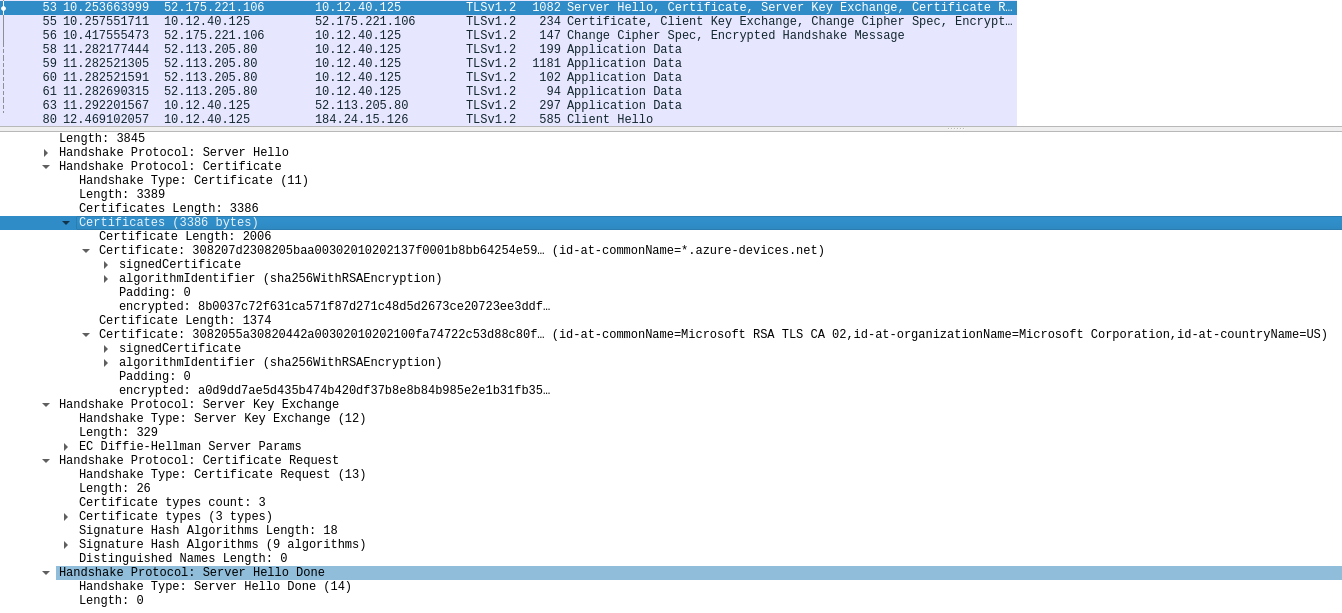
(I'm assuming the MQTT server will use the same cert chain)
But this should be the "Baltimore" root cert that is enabled by standard right? Do you have a definite source for the public part of root certificate file (.pem)?
maxgerhardt
on 26 Nov 2020
So the cert that the service would send isn't the Baltimore Cert.
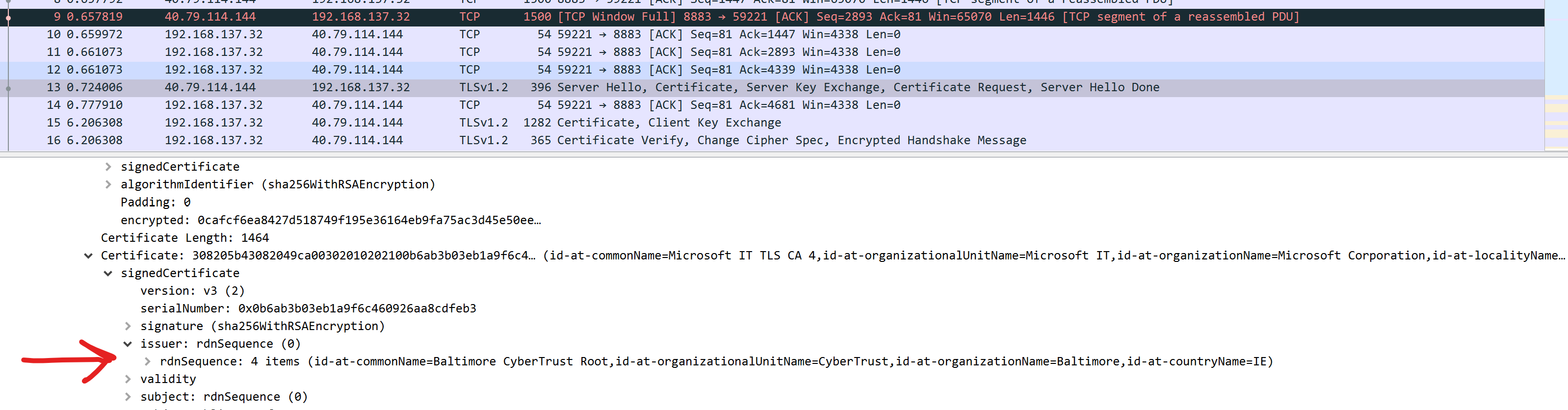
But it is issued by the Baltimore Root. So having the Baltimore Root cert baked into the device allows it to make sure that if a server cert is presented, it can check to make sure it chains up to a trusted root. In this case, the cert that you see in your Wireshark trace chains up to the Baltimore Cert.
TLDR: that is expected behavior.
I do have an ESP32 device and would love to give your repo a whirl to try and get a repro. I tried cloning it and building via Platform IO but am getting compilation errors such as these:
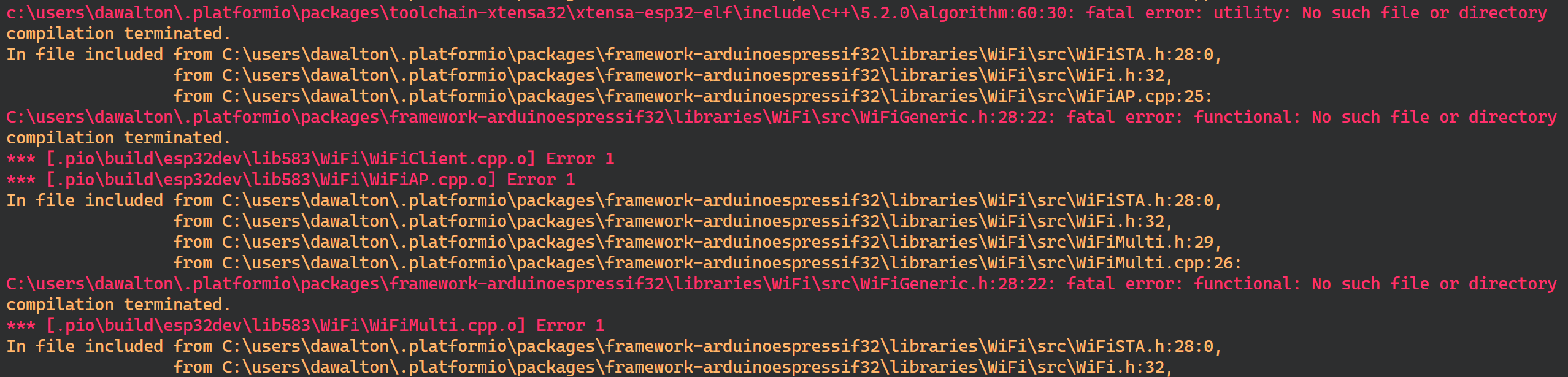
Any tips on what other setup instructions I need. My intuition is that setup is a mix of your repo and the original you link to.
danewalton
on 26 Nov 2020
Regarding the PlatformIO error, please make sure that you pio upgrade --dev once to get the newest PlatformIO core version. If you're using it in conjunction with VSCode, open a PIO CLI to execute that command. Further execute pio platform update to update your platform (=espressif32 builder code, toolchain, arduino core version). Then do a "Clean" (project tasks) and then "Build" to retry.
The beginning of the build shows a dependency graph which should look like this
$ pio run -v
Processing esp32dev (platform: espressif32; board: esp32dev; framework: arduino; lib_deps: AzureIoTHub, AzureIoTUtility, AzureIoTProtocol_MQTT, AzureIoTProtocol_HTTP, AzureIoTSocket_WiFi; build_flags: -DDONT_USE_UPLOADTOBLOB -DUSE_BALTIMORE_CERT -DUSE_MBEDTLS; monitor_speed: 1000000)
------------------------------------------------------------------------------------------------------------------------------------
CONFIGURATION: https://docs.platformio.org/page/boards/espressif32/esp32dev.html
PLATFORM: Espressif 32 (2.0.0) > Espressif ESP32 Dev Module
HARDWARE: ESP32 240MHz, 320KB RAM, 4MB Flash
DEBUG: Current (esp-prog) External (esp-prog, iot-bus-jtag, jlink, minimodule, olimex-arm-usb-ocd, olimex-arm-usb-ocd-h, olimex-arm-usb-tiny-h, olimex-jtag-tiny, tumpa)
PACKAGES:
 - framework-arduinoespressif32 3.10004.201016 (1.0.4)
 - tool-esptoolpy 1.20600.0 (2.6.0)
 - toolchain-xtensa32 2.50200.80 (5.2.0)
LDF: Library Dependency Finder -> http://bit.ly/configure-pio-ldf
LDF Modes: Finder ~ chain, Compatibility ~ soft
Found 34 compatible libraries
Scanning dependencies...
Dependency Graph
|-- <AzureIoTHub> 1.3.9
|   |-- <AzureIoTUtility> 1.3.9
|   |   |-- <WiFi> 1.0
|   |   |-- <WiFiClientSecure> 1.0
|   |   |   |-- <WiFi> 1.0
|-- <AzureIoTUtility> 1.3.9
|   |-- <WiFi> 1.0
|   |-- <WiFiClientSecure> 1.0
|   |   |-- <WiFi> 1.0
|-- <AzureIoTProtocol_MQTT> 1.3.9
|   |-- <AzureIoTHub> 1.3.9
|   |   |-- <AzureIoTUtility> 1.3.9
|   |   |   |-- <WiFi> 1.0
|   |   |   |-- <WiFiClientSecure> 1.0
|   |   |   |   |-- <WiFi> 1.0
|   |-- <AzureIoTUtility> 1.3.9
|   |   |-- <WiFi> 1.0
|   |   |-- <WiFiClientSecure> 1.0
|   |   |   |-- <WiFi> 1.0
|-- <AzureIoTProtocol_HTTP> 1.3.9
|   |-- <AzureIoTUtility> 1.3.9
|   |   |-- <WiFi> 1.0
|   |   |-- <WiFiClientSecure> 1.0
|   |   |   |-- <WiFi> 1.0
|   |-- <AzureIoTHub> 1.3.9
|   |   |-- <AzureIoTUtility> 1.3.9
|   |   |   |-- <WiFi> 1.0
|   |   |   |-- <WiFiClientSecure> 1.0
|   |   |   |   |-- <WiFi> 1.0
|-- <AzureIoTSocket_WiFi> 1.0.0
|   |-- <WiFi> 1.0
|   |-- <AzureIoTUtility> 1.3.9
|   |   |-- <WiFi> 1.0
|   |   |-- <WiFiClientSecure> 1.0
|   |   |   |-- <WiFi> 1.0
|-- <WiFi> 1.0
|-- <WiFiClientSecure> 1.0
|   |-- <WiFi> 1.0
If it doesn't look like that something's wrong. You can also check the versions form that snippet. (Espressif32 2.0.0, arduino 1.0.04, compiler 5.2.0)
Also if you privately send me the device connection string via Email I can also compile the firmware locally and test it in my local WiFi.
maxgerhardt
on 26 Nov 2020
If the above doesn't work, you can delete all the packages from C:\Users\<username>\.platformio\packages and restart vs code, wait for the packages to load, and try compiling again. Had the same issue when I switched to a different laptop.
moizhraj
on 26 Nov 2020
@moizhraj ahhh yup that did it thanks for the help. looks like this thread is a two way street haha.
I'll get it running on my device and see if I can get a repro.
danewalton
on 26 Nov 2020
hey @danewalton, you had a chance to look at this issue?
moizhraj
on 1 Dec 2020
Finally getting around to it and was having issues connecting to the device on my laptop (serial upload). My desktop seems to be working though so will report back shortly.
danewalton
on 2 Dec 2020
Alright so I cloned @maxgerhardt repo as is, plugged in my wifi name and password and connection string, and uploaded it to my ESP32 WROOM32 device and it connects and sends the data. In what region is your IoT Hub set up?
danewalton
on 2 Dec 2020
Strange, which certs did you use?
In what region is your IoT Hub set up?
Its West US 2.
moizhraj
on 2 Dec 2020
Okay cool.
Based on the platform config I'm using the Baltimore cert.
Possibly the easiest way to understand what could be going on is a Wireshark trace. Are you using a laptop that has Wifi by chance?
danewalton
on 2 Dec 2020
Are you using a laptop that has Wifi by chance?
Yes, it has Wifi :) but dont know how to configure the Wireshark and get the trace.
moizhraj
on 2 Dec 2020
Gotcha gotcha cool. Well lets see if I can help you with that. Wireshark is pretty cool so no better time to try it out!
Start by downloading it here. After you have the various components installed, on first startup, it should look something like this:
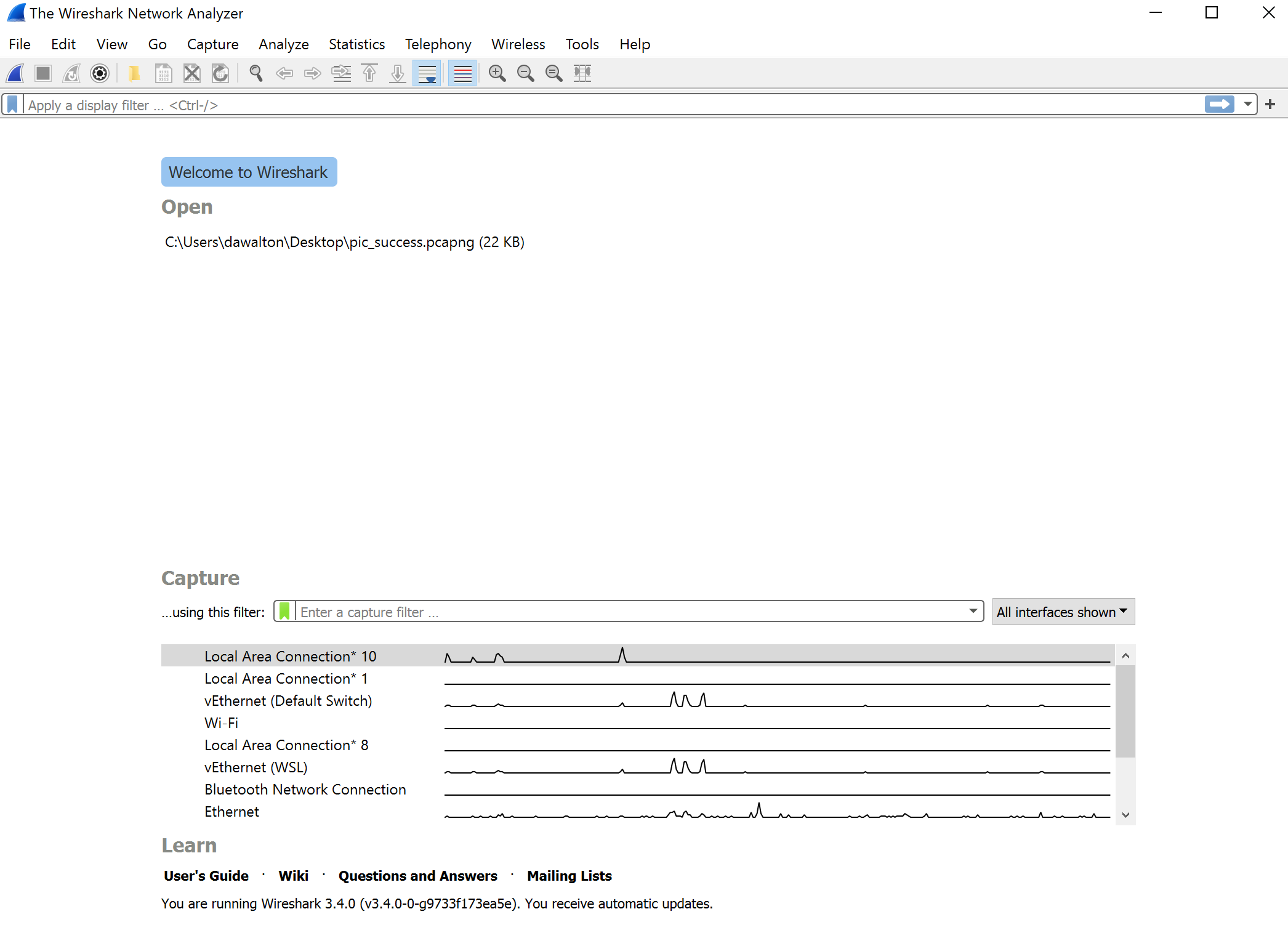
Connect your device to the WiFi hotspot you create on your computer and monitor the WiFi on wireshark. After you have a connection attempt from your device, you should be able to save the Wireshark trace to a file and upload it here.
danewalton
on 2 Dec 2020
So I started the trace, but I only see 2 traces for my device (whois and announcement/broadcast). Tried to filter the trace by the IP address I got for my device (192.168.0.31).. here is the screenshot, I can share the whole trace but just want to confirm if there aren't any further steps.

moizhraj
on 2 Dec 2020
hey, @danewalton @maxgerhardt - so I tried with a fresh setup and got this to work, the only diff I see when I compare it with the old one is, I have certs.h added in my main file :(
moizhraj
on 2 Dec 2020
@danewalton, @moizhraj, @maxgerhardt, thank you for your contribution to our open-sourced project! Please help us improve by filling out this 2-minute customer satisfaction survey
 az-iot-builder-01
on 2 Dec 2020
az-iot-builder-01
on 2 Dec 2020
I have certs.h added in my main file :(
Okay just so that I understand, in the main project folder, e.g src/ or include/ in my repo, you have added your own certs.h file and that overshadowed the internal one? Or do you mean you included the certs.h in the main.cpp file (which shouldn't change the firmware really)?
Alright so I cloned @maxgerhardt repo as is, plugged in my wifi name and password and connection string, and uploaded it to my ESP32 WROOM32 device and it connects and sends the data.
Yay now I know that my repo works in general, and should be much nicer to use than the original Arduino IDE repo with platform.txt modifications and library generation directives :D
maxgerhardt
on 2 Dec 2020
Yea thanks for that repo @maxgerhardt it does make it easier (I still had to go through and use the Arduino IDE to get the BSP for the ESP32 I think though).
And @moizhraj glad to see it's working! It is odd that it would compile without that. At least you have Wireshark to mess around with now :)
danewalton
on 2 Dec 2020
Okay just so that I understand, in the main project folder, e.g
src/orinclude/in my repo, you have added your owncerts.hfile and that overshadowed the internal one?
Added my own certs.h file :(..
moizhraj
on 2 Dec 2020
Related issues
 alexeystrakh
·
5Comments
alexeystrakh
·
5Comments
 hizzawaseem
·
3Comments
hizzawaseem
·
3Comments
 kenyelima
·
3Comments
kenyelima
·
3Comments
 Anil-Poolayulla-Chelottillam
·
7Comments
Anil-Poolayulla-Chelottillam
·
7Comments
 chinnaece
·
5Comments
chinnaece
·
5Comments
Most helpful comment
Okay just so that I understand, in the main project folder, e.g
src/orinclude/in my repo, you have added your owncerts.hfile and that overshadowed the internal one? Or do you mean you included thecerts.hin themain.cppfile (which shouldn't change the firmware really)?Yay now I know that my repo works in general, and should be much nicer to use than the original Arduino IDE repo with
platform.txtmodifications and library generation directives :D