Azure-iot-sdk-c: How to implement x509 authentication in iOS?
I am trying connect Azure IOT Hub from iOS devices by using MQTT protocol with x509 certificate and private key.
I am using Azure iOS sample project with iOS SDK from cocoaPods. I modified the iothub_sample.m with x509 sample c code for x509 testing. And it failed with error "Unsupported x509".
From issue 1115 and issue 942, it tells that x509 authentication is currently not support in iOS SDK but it is in backlog and it can be workaround by building the C SDK using OpenSSL.
Now i succeed to build the C SDK using OpenSSL and it looks correct with c executable file on my mac:
Creating IoTHub handle
Sending message 1 to IoTHub
Sending message 2 to IoTHub
Sending message 3 to IoTHub
Sending message 4 to IoTHub
Sending message 5 to IoTHub
Confirmation callback received for message 1 with result IOTHUB_CLIENT_CONFIRMATION_OK
Confirmation callback received for message 2 with result IOTHUB_CLIENT_CONFIRMATION_OK
Confirmation callback received for message 3 with result IOTHUB_CLIENT_CONFIRMATION_OK
Confirmation callback received for message 4 with result IOTHUB_CLIENT_CONFIRMATION_OK
Confirmation callback received for message 5 with result IOTHUB_CLIENT_CONFIRMATION_OK
I want to know how to use those C SDK in iOS and when will x509 be available in iOS SDK(cocoaPods)?
(I found several .a libraries and header file in the C SDK project but i am not sure how to correctly import them into my iOS project).
 ghost
ghost
All 10 comments
Hi @rafilho @YoDaMa , could you help?
ghost
on 10 Oct 2019
Hi @alain-noa,
Please refer to our documentation for getting started with development on iOS: https://docs.microsoft.com/en-us/azure/iot-hub/quickstart-send-telemetry-ios
If this is missing the information you are looking for, please let us know so that we can update the documentation.
Also, thanks for the feedback on x509 support. This is currently in our backlog but do not have an ETA for this yet. Please vote on this User voice item, which can also be used for tracking our plans. I just added it, so it may not appear immediately, so please check back later in the day if the link doesn't work yet.
Thanks!
 gregman-msft
on 16 Oct 2019
gregman-msft
on 16 Oct 2019
Hi @gregman-msft thanks for explanation! We will vote it on Azure feedback forums.
x509 authentication is very important for us and we are currently blocked by iOS platform. We will keep trying to workaround it before it is officially supported in iOS, any advice or guidance would be greatly appreciated!
ghost
on 17 Oct 2019
Still cannot vote the item for "This idea is awaiting moderator approval".
ghost
on 23 Oct 2019
Succeed to integrate the c sdk in my iOS project and works with x509 authentication through openssl. Below are the steps what i did, hope it helps other poor iOS guys like me. I don't know cmake so it must looks stupid that i build the sdk, please don't hesitate to help to improve, thx :)
1. Import OpenSSL library and cURL library to iOS project
You can easily find their source code on github but it's not friendly to generate libraries for iOS. After a million times try, finally i found workable pod library for OpenSSL and framework for cURL, just add the pod for OpenSSL and import the framework for cURL in the iOS project.
It's still recommended to build the libraries from source code if it is comfortable for you.
Then add-lz to Other Linker Flags in your project build settings, this will against the built-in zlib.
2. Build C SDK for iOS
- Clone C SDK
git clone [email protected]:Azure/azure-iot-sdk-c.git.Generate an XCode Project, set to use openssl
- cd C SDK root directory
mkdir cmakecd cmakecmake -G Xcode -DOPENSSL_ROOT_DIR:PATH=/usr/local/opt/openssl -Duse_openssl:bool=ON ..
DOPENSSL_ROOT_DIR is the path of your openssl library in step 1
- Config build settings
- Open
azure_iot_sdks.xcodeprojin cmake folder - Edit Build Settings for all library targets (
aziotsharedutil,iothub_client...)
- Change Base SDK from
macostoios - Add architectures whatever you need
- Change Base SDK from
- Edit Search Paths for target
aziotsharedutilto linkOpenSSLlibrary andcURLlibrary that in step 1
- If you use static library, add path for header file to Header Search Paths and add path for
.alibrary to Library Search Paths - If you use framework, just add the path to Framework Search Paths
- If you use static library, add path for header file to Header Search Paths and add path for
For example, this is you openssl static library, you need to add
../openssl/includeto Header Search Paths and add../openssl/libto Library Search Paths
openssl
├── include
│ └── openssl
│ ├── aes.h
│ ├── ... (header files)
└── lib
├── libcrypto.a
└── libssl.a
- Build C SDK
- If all the configuration are correct, you should be able to build all the libraries with iOS device or iOS simulator in
azure_iot_sdks.xcodeproj
3. Import C SDK to iOS project
- After step 2, you will get all C SDK libraries you need in /cmake folder in your C SDK project. However, the headers and static libraries are scattered in different paths, you have to link them to your iOS project.
- You can refer to C SDK sample project to check all the header search path, for example, open
azure_iot_sdks.xcodeproj, go to Build Settings > Search Paths of any target for sample (like iothub_II_Client_x509_sample), you can see the search path for each library.
You can refer to https://github.com/Azure/azure-iot-sdk-c/issues/1260 if you there is a problem.
ghost
on 25 Oct 2019
@alain-noa thanks so much for your detailed explanation, I hope this will help some of the other users looking for the same support. I've been trying to fix the user voice site issue, but very glad you have been able to unblock yourself. We'll reference this for any other similar requests in the meantime.
gregman-msft
on 29 Oct 2019
Add a missing detail:
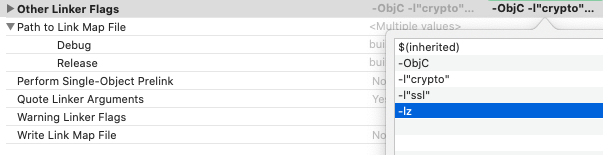
Add -lz to Other Linker Flags in your project build settings, this will against the built-in zlib.
Which resolve below compile error:
Undefined symbols for architecture x86_64:
"_inflate", referenced from:
_inflate_stream in curl(libcurl_la-content_encoding.o)
"_zlibVersion", referenced from:
_gzip_init_writer in curl(libcurl_la-content_encoding.o)
_curl_version in curl(libcurl_la-version.o)
_curl_version_info in curl(libcurl_la-version.o)
"_inflateEnd", referenced from:
_inflate_stream in curl(libcurl_la-content_encoding.o)
_exit_zlib in curl(libcurl_la-content_encoding.o)
"_inflateInit2_", referenced from:
_inflate_stream in curl(libcurl_la-content_encoding.o)
_gzip_init_writer in curl(libcurl_la-content_encoding.o)
"_inflateInit_", referenced from:
_deflate_init_writer in curl(libcurl_la-content_encoding.o)
ld: symbol(s) not found for architecture x86_64
clang: error: linker command failed with exit code 1 (use -v to see invocation)
ghost
on 31 Oct 2019
I create a template project for reference.
ghost
on 31 Oct 2019
Thank you very much, @alain-noa !
 ewertons
on 12 Nov 2019
ewertons
on 12 Nov 2019
@alain-noa, @gregman-msft, @ewertons, thank you for your contribution to our open-sourced project! Please help us improve by filling out this 2-minute customer satisfaction survey
 az-iot-builder-01
on 12 Nov 2019
az-iot-builder-01
on 12 Nov 2019
Related issues
 vpetrigo
·
5Comments
vpetrigo
·
5Comments
 moncef-bibani
·
4Comments
moncef-bibani
·
4Comments
 hizzawaseem
·
3Comments
vpetrigo
·
6Comments
hizzawaseem
·
3Comments
vpetrigo
·
6Comments
 caobaokun
·
7Comments
caobaokun
·
7Comments
Most helpful comment
Succeed to integrate the c sdk in my iOS project and works with x509 authentication through openssl. Below are the steps what i did, hope it helps other poor iOS guys like me. I don't know cmake so it must looks stupid that i build the sdk, please don't hesitate to help to improve, thx :)
1. Import OpenSSL library and cURL library to iOS project
You can easily find their source code on github but it's not friendly to generate libraries for iOS. After a million times try, finally i found workable pod library for OpenSSL and framework for cURL, just add the pod for OpenSSL and import the framework for cURL in the iOS project.
Then add
-lzto Other Linker Flags in your project build settings, this will against the built-in zlib.2. Build C SDK for iOS
git clone [email protected]:Azure/azure-iot-sdk-c.git.Generate an XCode Project, set to use openssl
mkdir cmakecd cmakecmake -G Xcode -DOPENSSL_ROOT_DIR:PATH=/usr/local/opt/openssl -Duse_openssl:bool=ON ..azure_iot_sdks.xcodeprojin cmake folderaziotsharedutil,iothub_client...)macostoiosaziotsharedutilto linkOpenSSLlibrary andcURLlibrary that in step 1.alibrary to Library Search Pathsazure_iot_sdks.xcodeproj3. Import C SDK to iOS project
azure_iot_sdks.xcodeproj, go to Build Settings > Search Paths of any target for sample (like iothub_II_Client_x509_sample), you can see the search path for each library.You can refer to https://github.com/Azure/azure-iot-sdk-c/issues/1260 if you there is a problem.