Azure-functions-vs-build-sdk: Generated function.json does not include direction property for EventHubTrigger
Sdk Version: 1.0.24
Extensions.EventHubs: 3.0.0 or 3.0.2
Visual Studio 15.9.6
There is no direction parameter that may be passed into the EventHubTrigger Attribute. The generated function.json does not contain a direction property. Function fails to execute/trigger on EventHub input events.
Actual result:
{
"generatedBy": "Microsoft.NET.Sdk.Functions-1.0.24",
"configurationSource": "attributes",
"bindings": [
{
"type": "eventHubTrigger",
"connection": "EventHubListener",
"eventHubName": "eventHubName",
"name": "myEventHubMessage"
}
],
"disabled": false,
"scriptFile": "../bin/MyFunctions.dll",
"entryPoint": "MyFunctions.EventHubFunction1.Run"
}
Expected result:
{
"generatedBy": "Microsoft.NET.Sdk.Functions-1.0.24",
"configurationSource": "attributes",
"bindings": [
{
"type": "eventHubTrigger",
"connection": "EventHubListener",
"eventHubName": "eventHubName",
"name": "myEventHubMessage",
"direction": "in"
}
],
"disabled": false,
"scriptFile": "../bin/MyFunctions.dll",
"entryPoint": "MyFunctions.EventHubFunction1.Run"
}
 kkurkowski
All 37 comments
@brettsam can you take a look?
 ColbyTresness
on 27 Feb 2019
ColbyTresness
on 27 Feb 2019
@brettsam pointed me to @ahmelsayed - can you take a look?
ColbyTresness
on 27 Feb 2019
I'd think this is expected. All triggers are in by default and we intentionally don't serialize that property. Is this causing any issues?
 ahmelsayed
on 27 Feb 2019
ahmelsayed
on 27 Feb 2019
I know I'm not the OP, but I'm hoping my experience could be helpful here since I was about to reply to this thread before I figured out my issue. I thought the lack of the "in" direction was likely the reason my function was not triggering, but in actuality the issue was that the function could not access the event hub connection string environment variable. Environment variables in local.appsettings.json are not kept when your function is published. You will need to add an entry to application settings on the function itself in Azure after you publish or deploy a settings file ahead of time. Hopefully that info is helpful to someone; there isn't much logging on event triggers, so it took me a bit to figure out that was the issue.
TL;DR - My app on functions SDK 1.0.26 works without issue without the "in" direction. I just thought it was necessary because I didn't realize I needed to add some environment variables in the portal yet.
 zarochi
on 4 Mar 2019
zarochi
on 4 Mar 2019
@ahmelsayed Hi! Missing property "direction" disables standard binding editor. Please see this: https://github.com/Azure/azure-functions-vs-build-sdk/issues/120 and this:https://social.msdn.microsoft.com/Forums/azure/en-US/a44a525c-26f2-4c71-ad19-deec03e9c56c/integrate-standard-editor-not-displaying?forum=AzureFunctions
 marexv
on 25 Sep 2019
marexv
on 25 Sep 2019
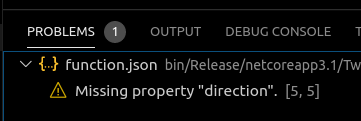
What's the solution here? No matter what I do, "direction": "in" gets removed from my function.json upon deploy and the project fails to deploy 100% of the time. Using a very simple test project based on Microsoft's own documentation.
I'm not sure what @zarochi meant by deploying a settings file ahead of time... this isn't documented?
I cannot get my first 'hello world' function to deploy using the official instructions.
Dotnet 3.1.201
Azure Functions Core Tools 3.0.2245
Function Runtime Version: 3.0.13139.0
Ubuntu 16.04
 ghost
on 20 Apr 2020
ghost
on 20 Apr 2020
@arcooke -- can you share what your csproj file looks like? Are you using the latest version of Microsoft.NET.Sdk.Functions?
 brettsam
on 20 Apr 2020
brettsam
on 20 Apr 2020
@brettsam Sure
<Project Sdk="Microsoft.NET.Sdk">
<PropertyGroup>
<TargetFramework>netcoreapp3.1</TargetFramework>
<AzureFunctionsVersion>v3</AzureFunctionsVersion>
<RootNamespace>test_functions</RootNamespace>
</PropertyGroup>
<ItemGroup>
<PackageReference Include="Microsoft.NET.Sdk.Functions" Version="3.0.6" />
<PackageReference Include="Twilio" Version="5.39.1" />
</ItemGroup>
<ItemGroup>
<None Update="host.json">
<CopyToOutputDirectory>PreserveNewest</CopyToOutputDirectory>
</None>
<None Update="local.settings.json">
<CopyToOutputDirectory>PreserveNewest</CopyToOutputDirectory>
<CopyToPublishDirectory>Never</CopyToPublishDirectory>
</None>
</ItemGroup>
</Project>
My function is just the boilerplate C# HTTP Trigger code generated from VSCode. Debug works fine, deploy fails
[FunctionName("TestFunction")]
public static async Task<IActionResult> Run(
[HttpTrigger(AuthorizationLevel.Function, "get", "post", Route = null)] HttpRequest req,
ILogger log)
{
log.LogInformation("C# HTTP trigger function processed a request.");
string name = req.Query["name"];
string requestBody = await new StreamReader(req.Body).ReadToEndAsync();
dynamic data = JsonConvert.DeserializeObject(requestBody);
name = name ?? data?.name;
string responseMessage = string.IsNullOrEmpty(name)
? "This HTTP triggered function executed successfully. Pass a name in the query string or in the request body for a personalized response."
: $"Hello, {name}. This HTTP triggered function executed successfully.";
return new OkObjectResult(responseMessage);
}
Action: azureFunctions.deploy
Error type: 500
Error Message: An error has occurred.
Version: 0.22.0
OS: linux
OS Release: 5.3.1-050301-generic
Product: Visual Studio Code
Product Version: 1.44.1
Language: en
Call Stack
extension.bundle.js:309:399876
retryCallback extension.bundle.js:225:114550
retryCallback extension.bundle.js:157:31063
extension.bundle.js:157:32676
handleRedirect extension.bundle.js:171:7752
extension.bundle.js:157:29848
Request._callback extension.bundle.js:1:669125
Request.n._callback.n.callback.n.callback [as callback] extension.bundle.js:201:4483
Request.emit events.js:203:13
Request.<anonymous> extension.bundle.js:201:17592
Request.emit events.js:208:15
IncomingMessage.<anonymous> extension.bundle.js:201:16382
Object.onceWrapper events.js:291:20
IncomingMessage.emit events.js:208:15
endReadableNT _stream_readable.js:1168:12
processTicksAndRejections task_queues.js:77:11
Thank you for the quick reply
ghost
on 20 Apr 2020
Is there any sort of workaround I can use to get my function deployed in the meantime? My only alternative at this point is to spin up a full-blown web server. This project is needed by folks who are working from home due to the virus and I need to get it up as soon as possible. If there's no immediate fix, I'll need to switch gears.
ghost
on 21 Apr 2020
I'm pretty sure that "direction" has never been required for triggers -- so I don't think that is the problem here. This seems like a deployment issue.
- What kind of Function hosting plan are you deploying to? Linux/Windows? Consumption?
- What region?
- Do you get any other error messages when you deploy?
- Would you be willing to share your app name? (feel free to email it to me if you'd like; email is in my github profile).
brettsam
on 21 Apr 2020
Sure thing.
- Windows, Consumption
- South Central US
- No other errors, only what's been shared above
- curafaxfa
Thank you
ghost
on 21 Apr 2020
I looked in our logs and while I can see the deployment failures, I don't see any obvious reason as to why they're failing. You may have more details -- could you look in your kudu site (https://{yoursite}.scm.azurewebsites.net/DebugConsole) and go to D:\home\LogFiles\kudu\trace. Are there any xml files in there that look like they refer to zipdeploy failures and contain any more details?
brettsam
on 21 Apr 2020
I have the same issue.
Any function for service bus topic trigger created directly from portal is correct (C# Script function).
Publishing from Visual Studio (C# function): the portal designer see the service bus as an output binding.
Please look at a function.json generated for a run.csx implementation ->
using System;
using System.Threading.Tasks;
public static void Run(string mySbMsg, ILogger log)
{
log.LogInformation($"C# ServiceBus topic trigger function processed message: {mySbMsg}");
}
and the generated function.json ->
{
"bindings": [
{
"name": "mySbMsg",
"type": "serviceBusTrigger",
"direction": "in",
"topicName": "shipment",
"subscriptionName": "CourierSoft",
"connection": "cp01_RootManageSharedAccessKey_SERVICEBUS"
}
]
}
You have the direction parameter in the generated file.
For a C# function, function.json generated by VS and uploaded to Azure is:
{
"generatedBy": "Microsoft.NET.Sdk.Functions-3.0.7",
"configurationSource": "attributes",
"bindings": [
{
"type": "serviceBusTrigger",
"connection": "ServiceBusConnection",
"topicName": "shipment",
"subscriptionName": "CourierSoft",
"isSessionsEnabled": false,
"name": "sbMsg"
}
],
"disabled": false,
"scriptFile": "../bin/ShipmentFunctionApp.dll",
"entryPoint": "ShipmentFunctionApp.Awb_GetNewFromPUD.Run"
}
Whats going on?
 EmilDamian
on 9 May 2020
EmilDamian
on 9 May 2020
I'm using 3.0.7 (and also tried 3.0.6) of the Azure Functions SDK, and got this error message in the portal. This is for a brand new Functions project using the EventHubTrigger attribute, built in Visual Studio (latest updates as of 5/9/2020).
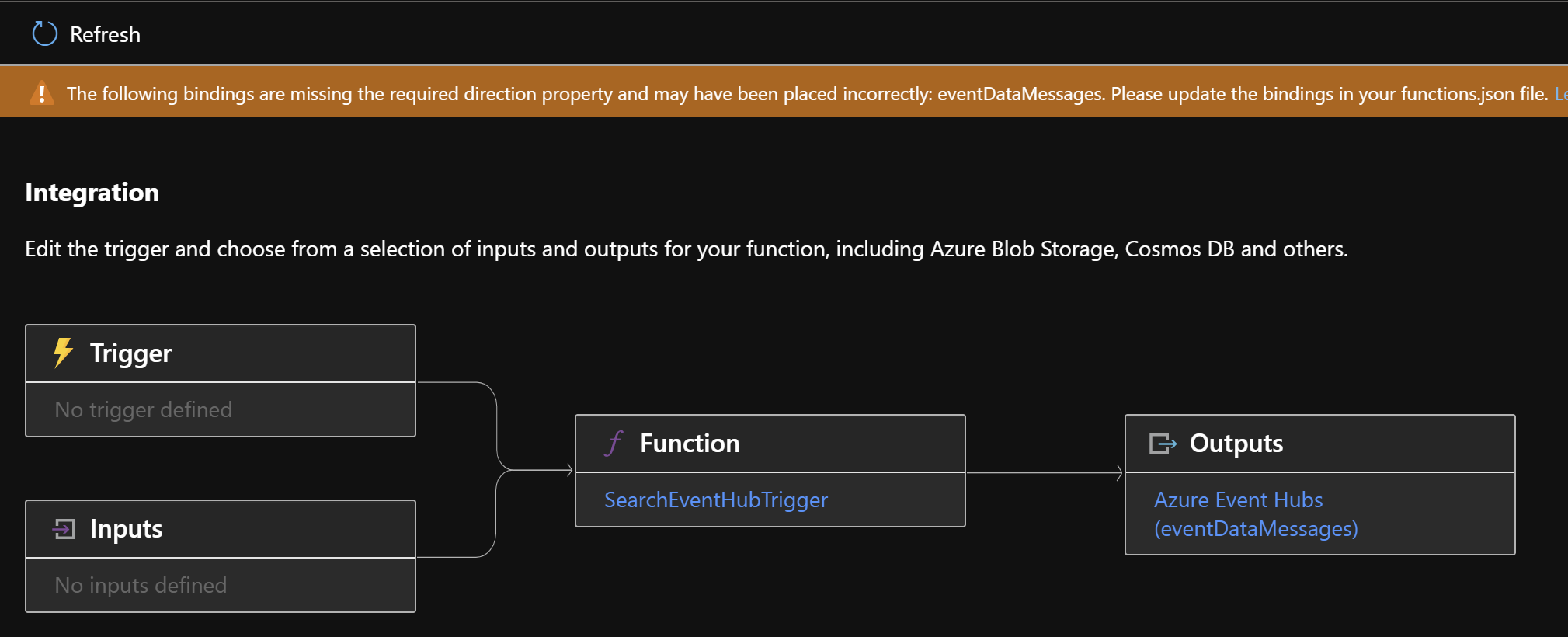
If the validation done in the Azure Portal is looking for that "direction" property and getting confused when it doesn't see it, then there's a problem with not serializing the property. Or the validation in the Azure Portal is incorrect, in which case where else is that faulty logic being used (if it's shared)?
[FunctionName("SearchEventHubTrigger")]
public async Task RunAsync(
     [EventHubTrigger("search", Connection = "EventHubConnectionString")]
     EventData[] eventDataMessages)
 danvanderboom
on 9 May 2020
danvanderboom
on 9 May 2020
I am experiencing the same thing as @danvanderboom deploying a ServiceBusTrigger.
 mhenderson442
on 10 May 2020
mhenderson442
on 10 May 2020
I'm having it with a BlobTrigger.
 nkind88
on 11 May 2020
nkind88
on 11 May 2020
As mentioned above (https://github.com/Azure/azure-functions-vs-build-sdk/issues/272#issuecomment-468059181), the "direction" property is not required and this is likely an issue with our schema validation in the portal. Is anyone experiencing runtime issues -- or is this all portal-related?
@ehamai / @ammanifold / @nertim -- what drives the warning that is being shown above? Is it our schema in the schema store?
brettsam
on 11 May 2020
It also looks like the portal isn't rendering this correctly as that image above should have eventDataMessages as a trigger, rather than an output binding.
brettsam
on 11 May 2020
I can run my code fine locally in VS Community 2019. But I can't get the Function to run on Azure and get this similar to Dan:
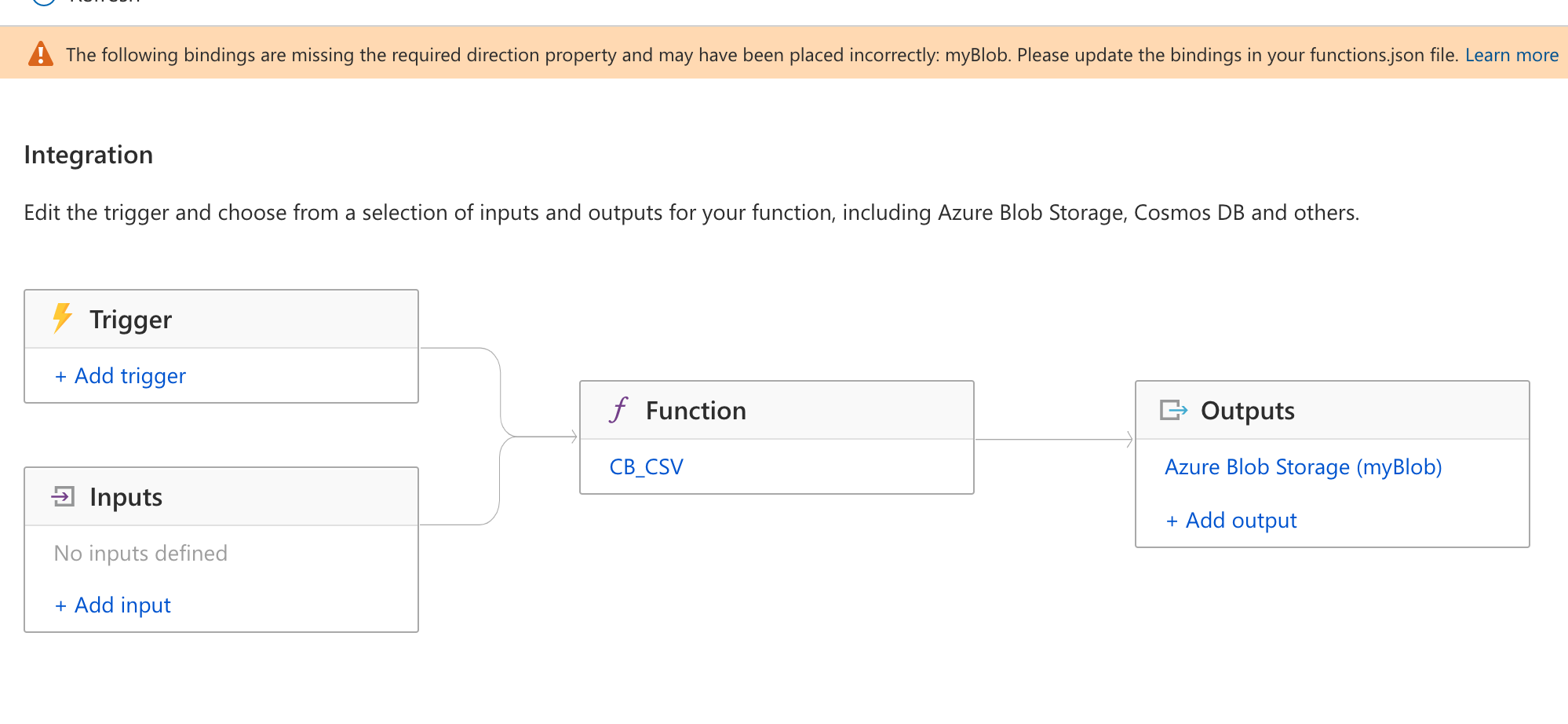
Note that it thinks myBlob is Output, not input.
nkind88
on 11 May 2020
@refortie can you help take a look please?
 ammanifold
on 11 May 2020
ammanifold
on 11 May 2020
For the portal display issue, we are having some offline discussions on how to handle it. They should still be able to all run correctly. Any runtime issues would be unrelated
 refortie
on 11 May 2020
refortie
on 11 May 2020
@refortie For what it's worth the issue appears to be a portal display issue. At least for me. I pulled up the same screen on an app that's been running for over a year and saw the same message.
mhenderson442
on 14 May 2020
Hi, I have the same warning message show up on my Blog Trigger. My BlobTrigger functions have been deployed since yesterday and still got getting triggered. While I also have other Blob Trigger functions with same configs that work just fine.
 truonggiangdao
on 14 May 2020
truonggiangdao
on 14 May 2020
Any solution ???
 Siboooooo
on 28 May 2020
Siboooooo
on 28 May 2020
Note that this does not impact the running of your function, it only impacts the Portal's Integration tab. Precompiled (VS-built) functions have never included the full function.json as this wasn't required, and this doesn't behave well with the new Portal UX.
There will be a series of changes coming to (a) make that clear in the portal while we work to (b) generate the full function.json so the portal can display the full binding definition.
brettsam
on 28 May 2020
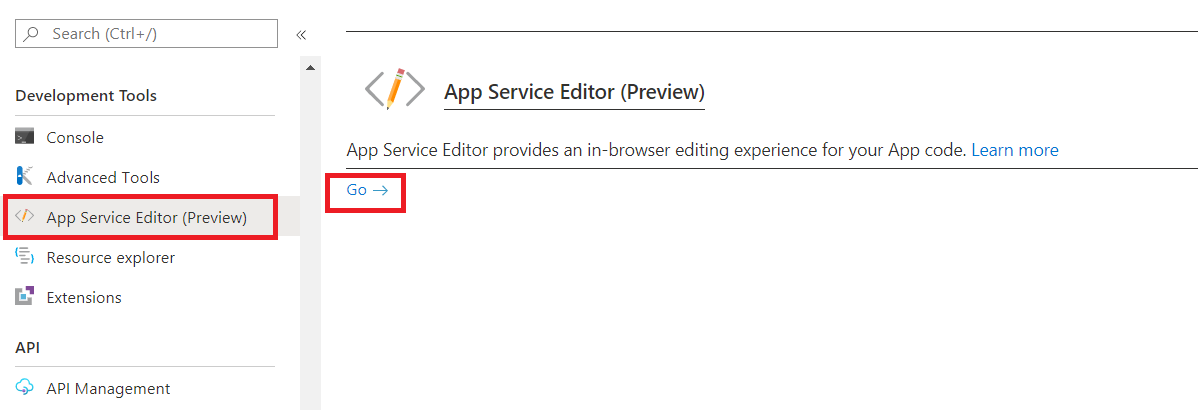
One quick fix would be to use App Service Editor (in-browser editing) for updating function.json file and adding direction property.
 Rohit-Indus
on 1 Jun 2020
Rohit-Indus
on 1 Jun 2020
Hi,
I am facing the same problem with the following function.json.
{
  "generatedBy": "Microsoft.NET.Sdk.Functions-3.0.7",
  "configurationSource": "attributes",
  "bindings": [
    {
      "type": "httpTrigger",
      "methods": [
        "get",
        "post"
      ],
      "authLevel": "function",
      "name": "req"
    }
  ],
  "disabled": false,
  "scriptFile": "../bin/azwarfunc.dll",
  "entryPoint": "Company.Function.WarFunc01.Run"
}
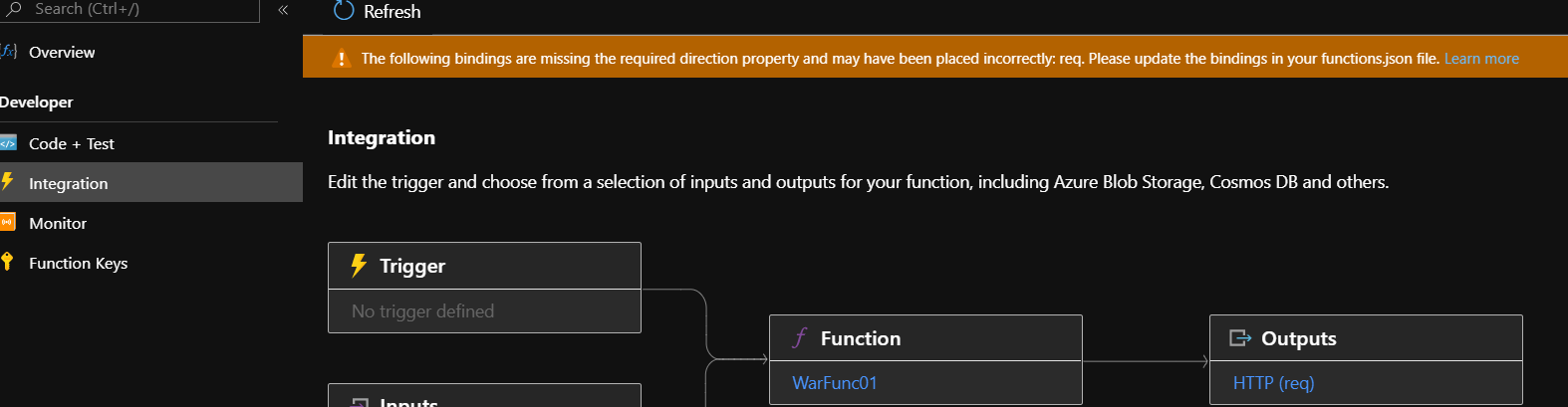
I am getting a 404 when I try to test. I am deploying this via devops not sure if I miss anything else.
 Rakesh-Gnana-Selvan-888
on 2 Jun 2020
Rakesh-Gnana-Selvan-888
on 2 Jun 2020
Your function.json looks okay. The 404 is unrelated to this warning.
Again, note that this is not a runtime issue, but a Portal display issue. Precompiled apps do not emit full function.json files (and never have; they're not strictly required for running). The new Portal UX does not currently handle this scenario so it displays this banner.
If you are using a .NET Visual Studio precompiled app you can safely ignore this warning in the Portal until it is fixed.
If you are running into issues at runtime and cannot figure them out, please open a new issue and we can address it there.
brettsam
on 2 Jun 2020
Hi Brett,
Thanks, It was a pbm with my ARM template it was creating a function app with run time ~1.
I changed it and redeployed again everything is fine.
Rakesh-Gnana-Selvan-888
on 2 Jun 2020
i am facing the same issue with service bus topic trigger. it doesn't trigger and when looked closely the direction attribute was missing in function.json. Has anyone found the apt solution?
 YalamanchiliBhavana
on 10 Jul 2020
YalamanchiliBhavana
on 10 Jul 2020
Direction is not required and not related to your SB trigger not triggering. If you're seeing issues with that, please open a separate issue (or check your app logs for an error explaining what the issue may be).
brettsam
on 10 Jul 2020
there are no errors logged in the logs.The function itself is not triggering.When we create a function through portal it triggers fine but when the function is created in vs 2019 and deployed through CI/CD pipeline then the function doesn't triggers.I have manually update the function.json and included direction attribute, then it triggers fine.
YalamanchiliBhavana
on 10 Jul 2020
If you could share your Function App name (either explicitly or privately), I can see if I find anything from the backend logs.
brettsam
on 10 Jul 2020
Function Started TimeStamp : 2020-07-10 18:13:15.237
Id=884deaad-9d69-4466-859d-c53248c208e5
Execution Timestamp : 2020-07-10 18:13:15.243
Region: North Central US
YalamanchiliBhavana
on 10 Jul 2020
@brettsam did you get a chance to check it from your end?
YalamanchiliBhavana
on 13 Jul 2020
Any updates on this? I'm running into the same issue. My function (based on a Microsoft example) runs locally, but I can't deploy due to Missing property "direction". [5,5]
 vorkuta
on 28 Jan 2021
vorkuta
on 28 Jan 2021
Any fix or guidance? I followed the exact steps on the tutorial and am receiving the same error others have mentioned:
Missing property "direction". [5,5]
 rsknowles
on 27 May 2021
rsknowles
on 27 May 2021
Related issues
 mpelnens
·
8Comments
mpelnens
·
8Comments
 rybkov
·
8Comments
rybkov
·
8Comments
 craig006
·
7Comments
craig006
·
7Comments
 chrisxpr
·
11Comments
chrisxpr
·
11Comments
 edupatriota
·
5Comments
edupatriota
·
5Comments
Most helpful comment
I'm using 3.0.7 (and also tried 3.0.6) of the Azure Functions SDK, and got this error message in the portal. This is for a brand new Functions project using the EventHubTrigger attribute, built in Visual Studio (latest updates as of 5/9/2020).

If the validation done in the Azure Portal is looking for that "direction" property and getting confused when it doesn't see it, then there's a problem with not serializing the property. Or the validation in the Azure Portal is incorrect, in which case where else is that faulty logic being used (if it's shared)?