Azure-functions-vs-build-sdk: Live unit testing build failure - GenerateFunctions (could not load file or assembly Microsoft.Build)
I have been attempting to get live unit testing to work with my functions project that is targeting .net standard 2.0. Although I am able to build the project and run my unit tests via test explorer, the live unit test output always indicates build failed. I enabled verbose logging and noticed these two errors:
[10:27:21.997 Verbose] - BuildManager - C:\Users\AndrewKeller\.nuget\packages\microsoft.net.sdk.functions\1.0.6\build\netstandard1.0\Microsoft.NET.Sdk.Functions.Build.targets(32,5): error MSB4060: The "GenerateFunctions" task has been declared or used incorrectly, or failed during construction. Check the spelling of the task name and the assembly name.
[10:27:21.997 Verbose] - BuildManager - C:\Users\AndrewKeller\.nuget\packages\microsoft.net.sdk.functions\1.0.6\build\netstandard1.0\Microsoft.NET.Sdk.Functions.Build.targets(32,5): error MSB4061: The "GenerateFunctions" task could not be instantiated from "C:\Users\AndrewKeller\.nuget\packages\microsoft.net.sdk.functions\1.0.6\build\netstandard1.0....\tools\net46\Microsoft.NET.Sdk.Functions.MSBuild.dll". Could not load file or assembly 'Microsoft.Build, Version=15.1.0.0, Culture=neutral, PublicKeyToken=b03f5f7f11d50a3a' or one of its dependencies. The system cannot find the file specified..
Not sure if this is what's breaking the live unit tests or not. I'd also note that I am experiencing the issue Azure/Azure-Functions#634, but neither the workaround there nor the one mentioned in Azure/azure-functions-vs-build-sdk#128 has worked for me.
 ghost
ghost
All 25 comments
I can definitely repro this, but I'm not sure what the problem is. I'm not too familiar with how live tests work in VS. @vijayrkn do you know?
Enabling Live Tests in VS for a function app shows the error mentioned in the issue above about Microsoft.Build 15.1 (I had to turn live test log to verbose)
 ahmelsayed
on 8 Feb 2018
ahmelsayed
on 8 Feb 2018
Not sure if it is because of the build version here - https://github.com/Azure/azure-functions-vs-build-sdk/blob/master/src/Microsoft.NET.Sdk.Functions.MSBuild/Microsoft.NET.Sdk.Functions.MSBuild.csproj#L11
If the test explorer works, I would assume live unit testing should also work with this version of msbuild. Let me check if there are other related bugs in live unit testing.
 vijayrkn
on 8 Feb 2018
vijayrkn
on 8 Feb 2018
@elicient-ack thanks for reporting this! It's a bug in Live Unit Testing, and I have a fix that we'll try to roll into the next VS update. Unfortunately for the meantime, I have no suggestions for ways you can work around this 🤕 .
 KevinH-MS
on 12 Feb 2018
KevinH-MS
on 12 Feb 2018
The fix for this has been merged into the next VS 2017 Update (15.6).
KevinH-MS
on 21 Feb 2018
Will we have this fix in next 15.6 preview?
 denisbredikhin
on 26 Feb 2018
denisbredikhin
on 26 Feb 2018
@denisbredikhin yeah, this fix should be in the latest preview (https://www.visualstudio.com/vs/preview/)
KevinH-MS
on 26 Feb 2018
I had a similar problems in my project, where we use custom MsBuild tasks. I've tried Visual Studio 15.6.0 Preview 6 and I still have this problem:
[09:08:47.019 Verbose] - BuildManager - C:\Program Files (x86)\BrightEye\MEScontrol.net SDK\ThirdParty\Targets\MEScontrol.Cop.targets(89,3): error MSB4061: The "CheckRulesTask2" task could not be instantiated from "C:\Program Files (x86)\BrightEye\MEScontrol.net SDK\ThirdParty\Targets\MEScontrol.Cop.dll". Could not load file or assembly 'Microsoft.Build, Version=15.1.0.0, Culture=neutral, PublicKeyToken=b03f5f7f11d50a3a' or one of its dependencies. The system cannot find the file specified.
denisbredikhin
on 27 Feb 2018
@denisbredikhin that is certainly not good...
Can you provide a snippet of the task definition/invocation from MESControl.Cop.targets so I could try to repro?
Also, can you check Help > About and post the version of VS you're trying? (I can double check which build has the fix)
KevinH-MS
on 27 Feb 2018
@denisbredikhin nevermind...I was able to construct a simple test that fails on my own. Something must have regressed at the last minute. 🤕 I'll investigate. Thanks for testing this!
KevinH-MS
on 27 Feb 2018
So, this is rather odd, but for my test scenario, the error goes away after I make some edit to the code (the error only appears on the very first build). @denisbredikhin do you see the same thing?
KevinH-MS
on 27 Feb 2018
No, I constantly have this error, even after changes in my tests. Should I still share MESControl.Cop.targets with you?
This is VS version:
`Microsoft Visual Studio Enterprise 2017 Preview
Version 15.6.0 Preview 6.0
VisualStudio.15.Preview/15.6.0-pre.6.0+27421.1
Microsoft .NET Framework
Version 4.7.02556
Installed Version: Enterprise
C# Tools 2.7.0-beta3-62620-07. Commit Hash: e873e69306527a0424e97af2985370556f474019
C# components used in the IDE. Depending on your project type and settings, a different version of the compiler may be used.
Common Azure Tools 1.10
Provides common services for use by Azure Mobile Services and Microsoft Azure Tools.
NuGet Package Manager 4.6.0
NuGet Package Manager in Visual Studio. For more information about NuGet, visit http://docs.nuget.org/.
ProjectServicesPackage Extension 1.0
ProjectServicesPackage Visual Studio Extension Detailed Info
Visual Basic Tools 2.7.0-beta3-62620-07. Commit Hash: e873e69306527a0424e97af2985370556f474019
Visual Basic components used in the IDE. Depending on your project type and settings, a different version of the compiler may be used.
Visual Studio Code Debug Adapter Host Package 1.0
Interop layer for hosting Visual Studio Code debug adapters in Visual Studio`
denisbredikhin
on 28 Feb 2018
Thanks! Yeah, if you could still share MESControl.Cop.targets (my email is kevinh@microsoft if you don't want to post it here), I'll make sure it works with the next iteration of the fix.
KevinH-MS
on 28 Feb 2018
Kevin, I've sent you all information that can be helpful.
denisbredikhin
on 28 Feb 2018
I've updated Visual Studio to version 15.6.1 and I still have this problem.
denisbredikhin
on 9 Mar 2018
Checked with Visual Studio 15.7 Preview 1 - same story.
denisbredikhin
on 14 Mar 2018
Hi folks,
Sorry for the delay. A better fix for this has been checked in to 15.7. At the moment, I'm not sure if it will make in into 15.7 Preview 2, but it will definitely be in Preview 3.
KevinH-MS
on 14 Mar 2018
Still the same with Preview 2, waiting for Preview 3.
denisbredikhin
on 22 Mar 2018
Hello @KevinH-MS
Thanks for the help, issue is solved in 15.7 Preview 3.
But I still can't use Live Unit Testing, because we have MsBuild task that checks that OutputPath of the project is correct. But LUT modifies OutputPath (to something like .vs\SolutionName\lut\0\b). Is there a way to avoid this modification? Or is there a way to check from MsBuild task that it is compiled from LUT?
denisbredikhin
on 10 Apr 2018
Hi @denisbredikhin Glad to hear it's really fixed this time!
Regarding the other task, yeah, you can add Condition="'$(BuildingForLiveUnitTesting)' != 'true'" to disable during LUT background builds.
There's currently no way to avoid the output path modification.
KevinH-MS
on 10 Apr 2018
Hello @KevinH-MS
I was able to disable my MsBuild task using the way you've suggested.
But I still can't use LUT. I'm not sure this issue is the best place to discuss it, if you also think so, please suggest me where we can continue.
First issue that I have:
System.IO.FileNotFoundException : Could not load file or assembly 'Microsoft.IntelliTrace.ObjectModel, Version=15.0.0.0, Culture=neutral, PublicKeyToken=b03f5f7f11d50a3a' or one of its dependencies. The system cannot find the file specified.
Stack trace is following:
[09:57:31.786 Info] - TestDriver - [TestRunner 1]    at System.Reflection.RuntimeModule.GetTypes(RuntimeModule module)
   at System.Reflection.RuntimeModule.GetTypes()
   at System.Reflection.Assembly.GetTypes()
   at MEScontrol.Services.WarningGeneratorEntityListener.<>c__DisplayClass13_0.<RegisterWarningGenerator>b__1(Assembly a)
   at System.Linq.Enumerable.<SelectManyIterator>d__17
2.MoveNext()
at System.Linq.Enumerable.WhereEnumerableIterator1.MoveNext()
at MEScontrol.Services.WarningGeneratorEntityListener.<>c__DisplayClass13_2.<RegisterWarningGenerator>b__3(IRegistrator r)
In WarningGeneratorEntityListener I do following:
var types = AppDomain.CurrentDomain.GetAssemblies()
                        .Where(a => !a.GetName().Name.In(excludedAssemblies))
                        .SelectMany(a => a.GetTypes()).Where(t => warningGeneratorTriggerInfo.EntityType.IsAssignableFrom(t));
Second issue is following:
In every test (actually in base class) I have following code:
private static ServerHostWrapper wrapper = null;
[OneTimeSetUp]
public void TestFixtureSetup()
{
if (wrapper != null)
  return;
wrapper = StartServerHost();
...
Internally StartServerHost throws exception if it has been already called (for check we are using private bool flag of singleton object).
In normal test run it works just fine.
But my LUT logging is full of following errors:
[09:57:32.618 Info] - TestDriver - [TestRunner 1] System.InvalidOperationException : Already intialized
[09:57:32.618 Info] - TestDriver - [TestRunner 1]    at MEScontrol.Common.ConfigurationOptionsRegistryBuilder.Initialize() in C:\MEScontrol\_Repository\Common\Trunk\Common\Configuration\Registries\ConfigurationOptionsRegistryBuilder.cs:line 21
   at MEScontrol.Common.ServerHost.InnerStart() in C:\MEScontrol\_Repository\Common\Trunk\Common\Host\ServerHost.cs:line 255
   at MEScontrol.Common.ServerHost.Start() in C:\MEScontrol\_Repository\Common\Trunk\Common\Host\ServerHost.cs:line 249
   at MEScontrol.Common.ServerHostWrapper.Start() in C:\MEScontrol\_Repository\Common\Trunk\Common\Host\ServerHostWrapper.cs:line 33
   at MEScontrol.Tests.TestBase.StartServerHost()
   at MEScontrol.Tests.TestBase.TestFixtureSetup()
denisbredikhin
on 12 Apr 2018
Hi @denisbredikhin
It looks like what's happening is that when the tests are running under instrumentation, there are additional assemblies loaded into the executing AppDomain, and the test is sensitive to that. When the test code is iterating through Assemblies, perhaps it could ignore certain ones by name or by public key?
In any case, the best way to proceed would be to report a problem through VS feedback:
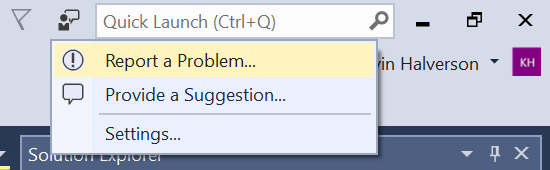
I (or someone from my team) can then follow up with you until this is resolved. Thanks!
KevinH-MS
on 13 Apr 2018
Was this ever resolved? I have this issue in VS2017 and VS2019.
 Scythen
on 11 Dec 2018
Scythen
on 11 Dec 2018
Was this ever resolved? I have this issue in VS2017 and VS2019.
yeah i think it was, it works on my machine for sure 👍
 m1nkeh
on 11 Dec 2018
m1nkeh
on 11 Dec 2018
I just created a brand-new solution (VS 2017 15.9.5) with a single Functions V2 project and a single MSTest project … and Live Unit Testing fails to load. The important part of the log, I think, is this stack trace:
[09:22:47.100 Verbose] - BuildManager - C:\Users\adria\.nuget\packages\microsoft.net.sdk.functions\1.0.24\build\netstandard1.0\Microsoft.NET.Sdk.Functions.Build.targets(41,5): error MSB4018: The "GenerateFunctions" task failed unexpectedly.
System.TypeInitializationException: The type initializer for 'Microsoft.NET.Sdk.Functions.Tasks.DotNetMuxer' threw an exception. ---> System.IO.FileNotFoundException: Could not load file or assembly 'System.Runtime.InteropServices.RuntimeInformation, Version=4.0.1.0, Culture=neutral, PublicKeyToken=b03f5f7f11d50a3a' or one of its dependencies. The system cannot find the file specified.
   at Microsoft.NET.Sdk.Functions.Tasks.DotNetMuxer.TryFindMuxerPath()
   at Microsoft.NET.Sdk.Functions.Tasks.DotNetMuxer..cctor()
Is this related or would it make more sense to open a new issue? Any ideas what's going on?
 AdrianPell
on 18 Jan 2019
AdrianPell
on 18 Jan 2019
Looks different since the original issue was with Microsoft.Build not loaded. Can you create a separate issue with "Report a problem tool" as mentioned here https://github.com/Azure/azure-functions-vs-build-sdk/issues/155#issuecomment-380966153. That will make it easier to be routed to the right team.
vijayrkn
on 18 Jan 2019
Related issues
 chrisxpr
·
11Comments
ahmelsayed
·
12Comments
chrisxpr
·
11Comments
ahmelsayed
·
12Comments
 justin-typsy
·
6Comments
justin-typsy
·
6Comments
 jiaweihuo18
·
9Comments
jiaweihuo18
·
9Comments
 rupeshtech
·
4Comments
rupeshtech
·
4Comments
Most helpful comment
Hi folks,
Sorry for the delay. A better fix for this has been checked in to 15.7. At the moment, I'm not sure if it will make in into 15.7 Preview 2, but it will definitely be in Preview 3.