Azure-functions-host: HttpTrigger PUT always returns 403 status code after version 3.0.15417 rollout
Azure functions team is currently rolling out the new version 3.0.15417 in West Europe and this version introduces a bug with the PUT verb of the HttpTrigger returns a 403 HTTP stats code every time instead of a 2XX and the trigger is never executed.
The telemetry shows that the problem starts exactly when the function app version change from 3.0.15405 to 3.015417 and the same code deployed on North Europe with version 3.0.15405 continues working fine.
I suggest urgently stop the rollout of version 3.0.15417 or many clients will be affected, this issue is happening to me with various subscriptions and tenants and I know other colleagues are affected too.
- Timestamp: 30/3/2021 20:46:47 UTC
- Function App version: 3.015417
- Function App name: *
- Function name(s): **
- Invocation ID: not available because the client invocation never reach the trigger
- Region: West Europe
Repro steps
Provide the steps required to reproduce the problem:
- Azure function App with version: 3.0.15417
- HttpTrigger with PUT verb with AuthorizationLevel = Function
- Call the HttpTrigger with the "x-functions-key" header auth using the default host-key value or other created
- Region: West Europe
Expected behavior
A response with status code 2XX and trigger execution successful
Actual behavior
Status code 403 is returned and no trigger execution occur
Known workarounds
Use the master-key as x-functions-key header
Related information
- .Net Core 3.1
- Functions V3
- HttpTriger
 alejandromelis
All 26 comments
Same issue here with different timestamp.
Timestamp 29/3/2021 22:55:50 UTC
Add some related information too:
- If you call the function using the function key instead host key, it returns 401 Http Status Code
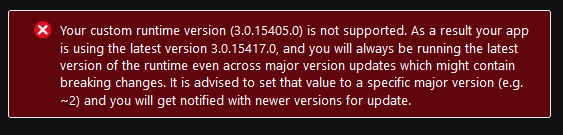
- It does not allow you to pin the function to previous version:
 Arterot
on 31 Mar 2021
Arterot
on 31 Mar 2021
Thank you for reporting. We're investigating the issue. In the meantime, please the correct pinning version should be 3.0.15406
FYI: @Francisco-Gamino @soninaren
 fabiocav
on 31 Mar 2021
fabiocav
on 31 Mar 2021
For information on how to pin to a runtime version, please see: https://docs.microsoft.com/en-us/azure/azure-functions/set-runtime-version
fabiocav
on 31 Mar 2021
Thanks a lot for your answer. I've tried to pin the previous version but I can't because the portal does not allow it, do you know a valid version number to pin?
alejandromelis
on 31 Mar 2021
It works, this pin it to 3.0.15405, it shows the message anyways but reversioning to the want we need.

Thank you
Arterot
on 31 Mar 2021
@Arterot if you're getting that message, that indicates your app is not impacted by the new version rollout.
@alejandromelis did you try with the version I've specified above?
fabiocav
on 31 Mar 2021
@fabiocav It works with the 3.0.15406 version
There is a way to know the right number to pin an older version?
alejandromelis
on 31 Mar 2021
@alejandromelis at the moment, this is based on the announcements information and what is available on the site. We're working on enhancements to make this information more easily accessible
fabiocav
on 31 Mar 2021
@alejandromelis are you able to share an invocation ID now that your app is back up so we can take a closer look?
fabiocav
on 31 Mar 2021
@fabiocav The invocation IDs are:
Function App A: 67a93ceb-c48b-4c06-b6b1-2d89b8271b16 - 31/3/2021 14:17:53 UTC
Function App A (same code but other deployment): 79663906-5798-4659-95e8-cf99f0ffa0e6 - 31/3/2021 14:02:11 UCT
Function App B: 6dfd60f0-1dcd-49de-97a1-4fdb2b228d0e
alejandromelis
on 31 Mar 2021
Thanks @alejandromelis for the invocation IDs. I am looking into this issue.
 Francisco-Gamino
on 31 Mar 2021
Francisco-Gamino
on 31 Mar 2021
Hi @alejandromelis -- I found the invocation IDs, but I have a different time rage. Could you please confirm the time ranges for the invocation IDs?
Francisco-Gamino
on 31 Mar 2021
Hi @Francisco-Gamino, I've updated my previous comment with the timestamp, but for the last InvocationId timestamp I need more time.
Here is a new one InvocationId from another function App that was failing previously but currently there is not receiving traffic because the traffic is still commuted to North Europe Zone, this InvocationId is from before the incident, but think is enough to you locate the function operation and the function app.
Function App C: e317bdb8-046d-4462-9fe4-4c8c94dfd7c4 - 28/3/2021 18:26:55 UTC
Thanks!
alejandromelis
on 31 Mar 2021
@Francisco-Gamino please, ignore the InvocationId with a strikethrough in my comment, belong to another affected FunctionApp but the operation was not affected.
alejandromelis
on 31 Mar 2021
Hello @alejandromelis -- we are not able to repro the issue on the latest version.
We can see that you are sending the request via Postman, so we are assuming you are running some tests. Could you please re-validate your tests against that version?
Francisco-Gamino
on 31 Mar 2021
Hello @Francisco-Gamino
The function apps with the following InvocationIds are pinned to version 3.0.15405 through 3.0.15406:
- 67a93ceb-c48b-4c06-b6b1-2d89b8271b16 - 31/3/2021 14:17:53 UTC
- 79663906-5798-4659-95e8-cf99f0ffa0e6 - 31/3/2021 14:02:11 UCT
The function app with the following InvocationId is using the latest version (3.0.15417):
- 79663906-5798-4659-95e8-cf99f0ffa0e6 - 31/3/2021 14:02:11 UCT
With this one I can reproduce the bug right now, I can share with you the HTTP request with a safe payload and temporal FunctionKey via mail or other secure via.
alejandromelis
on 31 Mar 2021
Hi @alejandromelis -- Could you please try to reset your default host key and retry again? If this does not solve the issue, could you please reach out to customer support for us to look into this further? Thank you.
Francisco-Gamino
on 1 Apr 2021
available functions minor versions are announced at https://github.com/Azure/app-service-announcements/issues
 LeoYang1234
on 1 Apr 2021
LeoYang1234
on 1 Apr 2021
Hi @alejandromelis -- Could you please try to reset your default host key and retry again? If this does not solve the issue, could you please reach out to customer support for us to look into this further? Thank you.
- Reset the HostKey don't resolve the problem, returns 403
- Adding a new HostKey and use it don't resolve the problem, returns 403
- If you try to use the function key returns 401
Note that the rest function operations of the same FunctionApps with POST, GET, and DELETE are not affected by the issue, only the HTTPTriggers with PUT verb.
I think you should deep review this issue, you have made some changes related to the binding, and the controllers recently between v3.0.15405 and v3.0.15417.
https://github.com/Azure/azure-functions-host/compare/v3.0.15405...v3.0.15417
There is an opened case with customer support, but without any answer yet.
alejandromelis
on 1 Apr 2021
@Francisco-Gamino @fabiocav
I discovered a way to easily reproduce the issue, it happens when you change the "routePrefix" to empty instead "API", please see the code https://github.com/alejandromelis/functionapp-httpput-failing
When you publish in a Windows consumption plan (I'vn't test with others) the branch master (with route prefix empty) and call the PUT endpoint using the default host key, the endpoint returns 404, but if you publish the "with-routePrefix" (with the default configuration routePrefix "api") branch the endpoint returns 200Ok.
Please, I think that issue is important and we have more PUT endpoints with routePrefix empty the workaround is just a temporal solution.
I'll update the customer support with this information.
Thanks in advance!
alejandromelis
on 1 Apr 2021
Hello, I don't have much to add to this other than after a few hours of debugging, I've come to the realisation that I am also experiencing this bug.
The only error I've been able to recover was from Application Insights -> Live metrics, which showed this when the request would fail:

Here are some details about my Azure Function:
- Linux Consumption Plan
- Http triggers
- .NET Core 3.1
- Runtime v3.0.15417.0
- routePrefix: ""
- Microsoft.Azure.Functions.Extensions v1.0.0
- Microsoft.NET.Sdk.Functions v3.0.7
- UK South
AuthorizationLevel.Anonymouson all functions- Uses custom JWT authentication (doesn't use
.AddAuthentication.AddJwtBeareretc.) - Custom domain and LetsEncrypt
- No Azure Front Door/Fireall/CDN/Access Restrictions
Not quite figured out how to pin the runtime version for a Linux consumption app, for now I'll just change the function to use another verb instead of PUT.
Sorry I can't be of much more help, but if you need any more information from me in order to assist with efforts to identify the root cause, please let me know.
Thanks in advanced and I appreciate the work you do!
 a-f
on 2 Apr 2021
a-f
on 2 Apr 2021
Hi @alejandromelis -- thank you for the additional details. We have a repro and we are still investigating this issue.
Francisco-Gamino
on 3 Apr 2021
Hello @a-f -- Here is how you can pin your Consumption Linux app: https://docs.microsoft.com/en-us/azure/azure-functions/set-runtime-version?tabs=portal#manual-version-updates-on-linux.
Please keep in mind that pinning the app should be temporary as it can degrade performance. As soon as we have a fix, I will update this issue.
Francisco-Gamino
on 3 Apr 2021
Thank you all for engaging here and providing the detailed information for a repro. We've identified the issue and we're currently working on a patch. In the meantime, please follow the pinning instructions in order to mitigate the issue.
Thank you!
fabiocav
on 3 Apr 2021
Thanks a lot @fabiocav and azure functions team. I understand that the issue should be resolved with #7266
alejandromelis
on 5 Apr 2021
For anyone else arriving here, the issue only occurs for PUT requests with a single URL segment. If you keep the api segment prefix that is the default, you won't see the error.
We were able to produce this incorrect behaviour using only very basic proxies with no user code at all.
Aside from addressing the issue of _incorrectly_ validating a completely valid Bearer token, I think it important to note that the Kestrel middleware seems to attempt to validate any Bearer token. As it happens we are using our own generated bearer tokens. Our system is aligned to standards, so includes the ".well-known/openid-configuration" parts and jwk and what not, but not everyone will go to that much trouble, so the framework might try to validate tokens it has no business trying to validate.
There should be an "opt in" for this - an AppSetting that becomes "on" when framework-supported authentication is required. IMHO
 richardhauer
on 11 Apr 2021
richardhauer
on 11 Apr 2021
Related issues
 justinyoo
·
3Comments
justinyoo
·
3Comments
 horihiro
·
3Comments
horihiro
·
3Comments
 ladeak
·
3Comments
ladeak
·
3Comments
 helgemahrt
·
4Comments
helgemahrt
·
4Comments
 mathewc
·
4Comments
mathewc
·
4Comments
Most helpful comment
Thank you all for engaging here and providing the detailed information for a repro. We've identified the issue and we're currently working on a patch. In the meantime, please follow the pinning instructions in order to mitigate the issue.
Thank you!