Azure-functions-host: 'Development' returned as environment name in Azure after disabling any function
 Ads5555
All 56 comments
I've the same Problem: since 2020-06-18 the default Environment on Azure Functions (West Europe, Runtime Version 3.0.13901.0) has changed from "Production" to "Development".
I've never disabled my Function, but I had an Deployment on 2020-06-18.
 devdorn
on 22 Jun 2020
devdorn
on 22 Jun 2020
I'm seeing some very weird behavior with environment name as well. My function didn't have AZURE_FUNCTIONS_ENVIRONMENT set and was returning "Production" in Azure, but when I did set AZURE_FUNCTIONS_ENVIRONMENT it changed to "Development" and now no matter what I set AZURE_FUNCTIONS_ENVIRONMENT to (or even remove it) it always is "Development" now. Something definitely seems buggy in that area.
 IGx89
on 25 Jun 2020
IGx89
on 25 Jun 2020
I seem to have the same problem. No matter what value I set for AZURE_FUNCTIONS_ENVIRONMENT, IHostEnvironment.EnvironmentName always returns "Development".
 wagich
on 12 Jul 2020
wagich
on 12 Jul 2020
This happened to me today, nothing I could do would change IHostEnvironment.EnvironmentName to what I set AZURE_FUNCTIONS_ENVIRONMENT value as in the configuration. I opted for a code-fix that checks the environment variable first, and if it's empty defaults to the IHostEnvironment value. Locally, when debugging with v3.0.2630 core tools, this does not happen.
 smokedlinq
on 7 Aug 2020
smokedlinq
on 7 Aug 2020
Hello, we will investigate this issue and provide information based on our findings. Thank you.
 madelinegordon
on 13 Aug 2020
madelinegordon
on 13 Aug 2020
Is this related to #6085?
 rigdern
on 23 Aug 2020
rigdern
on 23 Aug 2020
Is this related to #6085?
My functions were respecting the prod environment config until I disabled them. It could be related but I think the investigation would need to determine that.
Ads5555
on 24 Aug 2020
In my case it happend from the beginning on a completely new function app I deployed to via docker. It might well be two separate or related problems and me hitting #6085 too…
wagich
on 24 Aug 2020
Hello, we were able to repro this issue, and we believe the cause is related to the scoping of components within the Functions Host - the WebHost (outer scope) component is only fully restarted when a Function app is stopped and then started up again, whereas the ScriptHost (inner scope) is the only component that is restarted when a Function app is restarted from the portal - essentially we only do a partial restart in this case. It seems that whenever only a partial restart occurs, 'IHostEnvironment.EnvironmentName` becomes 'Development'. This can be mitigated by stopping your Function app, waiting a few seconds, and then starting it back up again.
madelinegordon
on 26 Aug 2020
@madelinegordon @ankitkumarr is this scheduled as a priority fix? This seems like a bad bug - as mentioned in #6085 , it's happens not only in the relatively rare case of disabling/enabling a function, but also after deploys or restarts.
If this was the same type of bug in plain App Service where customer's code was running with the wrong environment settings, there would be a big freakout and fast fix - this can cause bad things like customers calling the dev APIs instead of prod APIs and subsequent data/PII issues...
 ericsampson
on 22 Sep 2020
ericsampson
on 22 Sep 2020
@fabiocav and @anthonychu -- Thoughts on the investigation and priority for this?
 ankitkumarr
on 22 Sep 2020
ankitkumarr
on 22 Sep 2020
Assigning to Sprint 87 as a stretch goal
 pragnagopa
on 14 Oct 2020
pragnagopa
on 14 Oct 2020
This might slip into the next sprint. Updating to reflect that.
 fabiocav
on 28 Oct 2020
fabiocav
on 28 Oct 2020
I am having similar issues. I am unable to change it to anything but "Development" when deployed in Azure. According to the docs, it should have defaulted to "Production" in Azure anyways. I set "AZURE_FUNCTIONS_ENVIRONMENT" directly in the function app configuration. I also tried "ASPNETCORE_ENVIRONMENT" for kicks, even though the docs said for function apps you should use "AZURE_FUNCTIONS_ENVIRONMENT". I was unable to get it to change in Azure. I'm going to have to use something else to determine environment such as a completely separate environmental variable. Blew a couple hours debugging this thinking I was making mistakes which is really unfortunate. Hopefully this can be resolved soon.
FYI: This did not occur after I disabled/enabled a function as I have never disabled any of my functions. I only started running into this issue after I had a need to determine environment when I added appsettings.json files (i.e appsettings.Staging.json).
 OnAzureCloud9
on 16 Nov 2020
OnAzureCloud9
on 16 Nov 2020
I am having similar issues. I am unable to change it to anything but "Development" when deployed in Azure. According to the docs, it should have defaulted to "Production" in Azure anyways. I set "AZURE_FUNCTIONS_ENVIRONMENT" directly in the function app configuration. I also tried "ASPNETCORE_ENVIRONMENT" for kicks, even though the docs said for function apps you should use "AZURE_FUNCTIONS_ENVIRONMENT". I was unable to get it to change in Azure. I'm going to have to use something else to determine environment such as a completely separate environmental variable. Blew a couple hours debugging this thinking I was making mistakes which is really unfortunate. Hopefully this can be resolved soon.
FYI: This did not occur after I disabled/enabled a function as I have never disabled any of my functions. I only started running into this issue after I had a need to determine environment when I added appsettings.json files (i.e appsettings.Staging.json).
We experience the same issue. Since we have no way to update the environment to anything else, it causes a separate 'environment' settings file to load, which overwrites some settings from the regular settings file. Therefore, we cannot deploy our solution to our validation environment, as this one also returns 'Development' from the context.EnvironmentName property.
Why is this ticket open for several months now, as this is causing actual issues and not just a gimmick which is failing?
 BloodSeaker
on 26 Nov 2020
BloodSeaker
on 26 Nov 2020
It is really disappointing that this continues to slip. It is a bad bug
ericsampson
on 26 Nov 2020
@BloodSeaker It's not optimal or elegant but you can work around the issue. You will just have to manage the environment setting yourself, such as by your own environmental variable, and not rely on the hosting environment property and rely on your own implementation instead. Then you can use your own custom app settings (probably an environmental variable) to determine which app settings files to load.
OnAzureCloud9
on 30 Nov 2020
We experienced this as well but were able to work around it both locally and in Azure. We are setting the AZURE_FUNCTIONS_ENVIRONMENT environment variable even though it was mentioned in previous comments that it didn't work.
 baharedankoyuncu
on 1 Dec 2020
baharedankoyuncu
on 1 Dec 2020
@ericsampson @baharedankoyuncu are you still able to repro this? If so, can you please provide information about the version you're using and your setup?
Thanks!
fabiocav
on 10 Dec 2020
@fabiocav are you asking because something has changed?
We were using V2. I'd have to back out the workaround that we ended up using, in order to verify that it's still happening. I'm not sure that I'll have time to do that anytime soon.
ericsampson
on 11 Dec 2020
@ericsampson it's just not something our team has been able to repro using the latest bits, so getting confirmation on the version would be helpful.
Adding @ankitkumarr and @pragnagopa if additional context is needed.
fabiocav
on 11 Dec 2020
@ericsampson - We spent sometime going over the repro steps mentioned in the description. We could not repro the issue with the latest runtime. Tried few combinations. It would be great if you can try to repro on a different app to ensure your prod app is not effected.
pragnagopa
on 11 Dec 2020


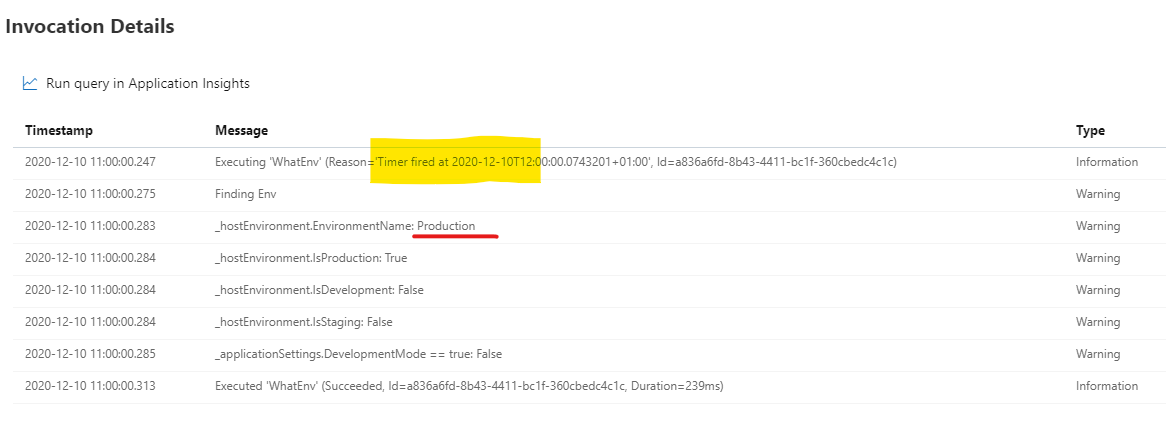
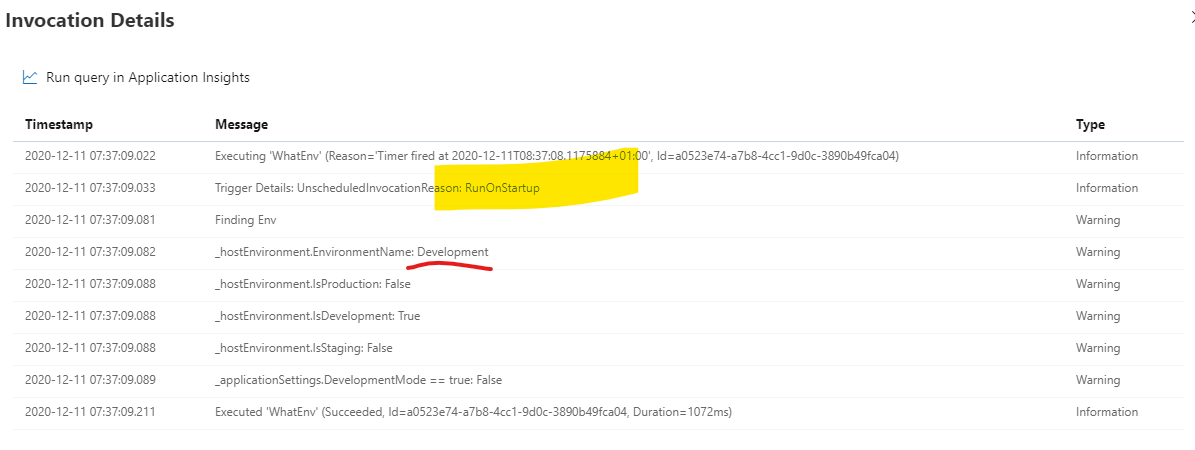
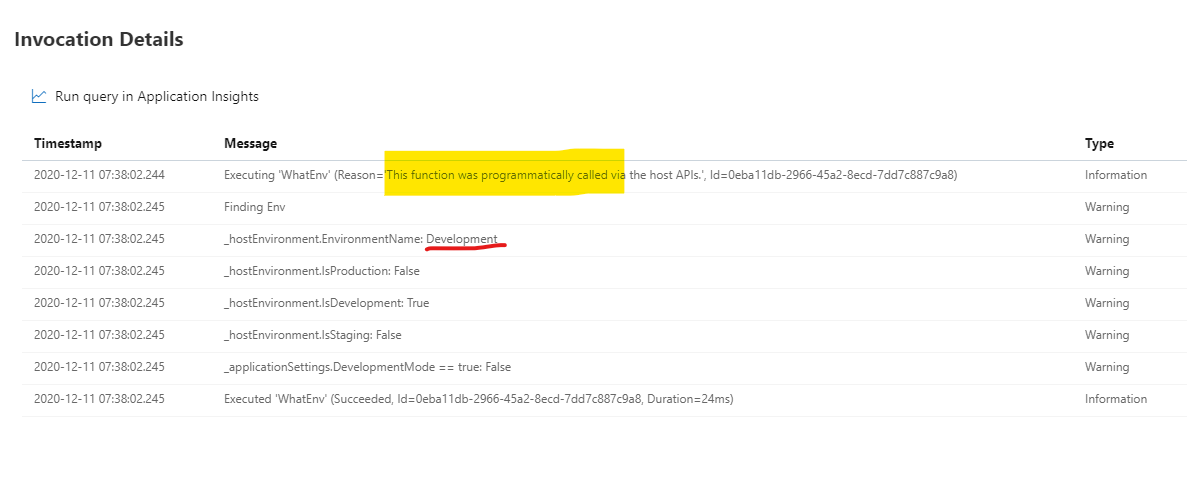
I've implemented an TimerTrigger function which runs daily and prints out the Env setting.
This was yesterday (triggered):
This was today, before I triggered the function manually over the portal > RunOnStartup:
Run in Portal:
And this was an triggered execution on Dec 4th:
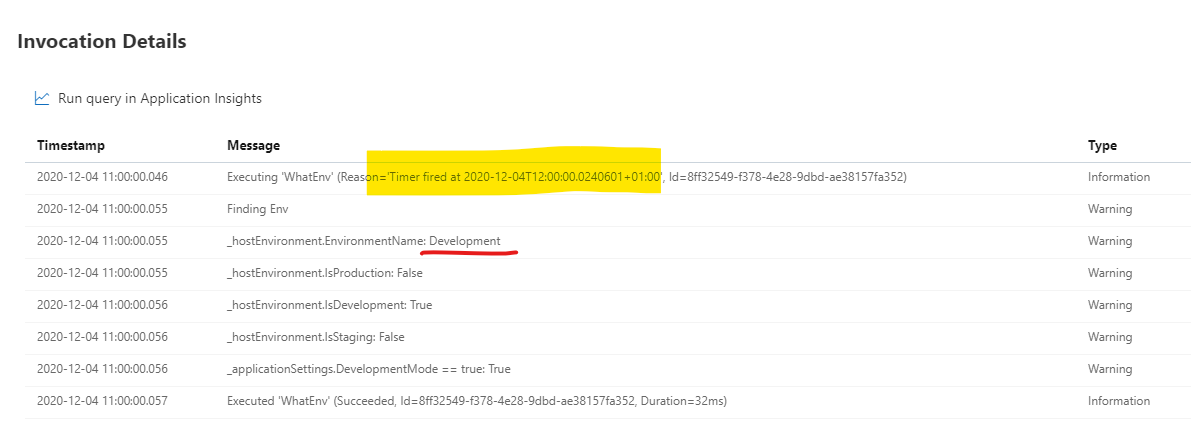
For me it's an unreliable behavior.
devdorn
on 11 Dec 2020
It was unreliable for us as well, it didn’t happen every time. I’m glad you have a way to reproduce it :)
ericsampson
on 11 Dec 2020
FWIW in our case, we had set an explicit portal setting value of either Staging or Production and were seeing it return Dev sometimes after lifecycle events. Doing a full stop and restart, as was suggested upthread, did not help.
ericsampson
on 11 Dec 2020
Any update on this issue?
I've encountered this nasty bug in the last few days, initially I thought it was related to the Snapshot Debugger, but seems I'm getting the same inconsistent behaviour with Environment.
I've found that the function can be honouring the setting one minute, but then either changing a AppService configuration setting in the Azure Portal, performing an ARM deploy or deploying the Function app itself can put it into this state. Only 'fix' seems to be to shutdown the function for a time and then start it.
This is clearly not useful for a production scenario (particularly as it's reverting to 'Development'!), and as others have said should be prioritised given that it can cause significant behaviour change for seemingly no obvious reasons.
 Simon-Gregory-LG
on 30 Dec 2020
Simon-Gregory-LG
on 30 Dec 2020
As stopping and starting the app is never an acceptable or workable solution, this is my temporary code workaround for FunctionsStartup.ConfigureAppConfiguration:
        public override void ConfigureAppConfiguration(IFunctionsConfigurationBuilder builder)
        {
            var context = builder.GetContext();

            // Workaround for unstable EnvironmentName in Azure
            // (see https://github.com/Azure/azure-functions-host/issues/6239)
            var environmentName = Environment.GetEnvironmentVariable("AZURE_FUNCTIONS_ENVIRONMENT") ??
                                    Environment.GetEnvironmentVariable("ASPNETCORE_ENVIRONMENT") ??
                                    context.EnvironmentName;

            builder.ConfigurationBuilder
                        .SetBasePath(context.ApplicationRootPath)
                        .AddJsonFile("appsettings.json", optional: false, reloadOnChange: true)
                        .AddJsonFile($"appsettings.{environmentName}.json", optional: true, reloadOnChange: true)
                        .AddEnvironmentVariables();
        }
But please, please, please fix this. I've lost many hours to this already - others will surely, or even worse may not even notice they have incorrect configurations running.
Simon-Gregory-LG
on 30 Dec 2020
Maybe helpful, but I do encounter this behavior only on Functions not on AppServices.
devdorn
on 30 Dec 2020
Maybe helpful, but I do encounter this behavior only on Functions not on AppServices.
@devdorn can you clarify what you mean by that?
Thanks for the additional details. What you've share points to a possible race, so that narrows things down a bit.
fabiocav
on 30 Dec 2020
I'm guessing Consumption plan vs fixed plan.
ericsampson
on 30 Dec 2020
I see. Thank you! That does provide some additional clues about what might be happening here. Thank you!
fabiocav
on 30 Dec 2020
BloodSeaker
on 30 Dec 2020
devdorn
on 30 Dec 2020
 helmerm
on 7 Jan 2021
ericsampson
on 2 Feb 2021
fabiocav
on 3 Feb 2021
fabiocav
on 17 Feb 2021
helmerm
on 7 Jan 2021
ericsampson
on 2 Feb 2021
fabiocav
on 3 Feb 2021
fabiocav
on 17 Feb 2021
 jonsagara
on 4 Mar 2021
jonsagara
on 4 Mar 2021
 betim-raqi
on 4 Mar 2021
Simon-Gregory-LG
on 4 Mar 2021
betim-raqi
on 4 Mar 2021
Simon-Gregory-LG
on 4 Mar 2021
 krosk93
on 30 Mar 2021
fabiocav
on 30 Mar 2021
ericsampson
on 30 Mar 2021
krosk93
on 30 Mar 2021
fabiocav
on 30 Mar 2021
ericsampson
on 30 Mar 2021
 DavidZidar
on 2 Apr 2021
fabiocav
on 2 Apr 2021
DavidZidar
on 2 Apr 2021
fabiocav
on 2 Apr 2021
 tiwaripradeep123
on 6 Apr 2021
tiwaripradeep123
on 6 Apr 2021
 rmaziarka
on 16 Apr 2021
rmaziarka
on 16 Apr 2021
 bedwards-humana
on 4 May 2021
ericsampson
on 4 May 2021
fabiocav
on 4 May 2021
ericsampson
on 4 May 2021
ericsampson
on 4 May 2021
fabiocav
on 5 May 2021
ericsampson
on 5 May 2021
ericsampson
on 5 May 2021
fabiocav
on 6 May 2021
bedwards-humana
on 4 May 2021
ericsampson
on 4 May 2021
fabiocav
on 4 May 2021
ericsampson
on 4 May 2021
ericsampson
on 4 May 2021
fabiocav
on 5 May 2021
ericsampson
on 5 May 2021
ericsampson
on 5 May 2021
fabiocav
on 6 May 2021
Related issues
 ElvenSpellmaker
·
3Comments
ElvenSpellmaker
·
3Comments
 ladeak
·
3Comments
ladeak
·
3Comments
 silencev
·
3Comments
silencev
·
3Comments
 christopheranderson
·
4Comments
christopheranderson
·
4Comments
 rati3l
·
3Comments
rati3l
·
3Comments
Most helpful comment
As stopping and starting the app is never an acceptable or workable solution, this is my temporary code workaround for
FunctionsStartup.ConfigureAppConfiguration:But please, please, please fix this. I've lost many hours to this already - others will surely, or even worse may not even notice they have incorrect configurations running.