Azure-functions-host: CRITICAL ISSUE!! Platform Changes to Startup.cs using ConfigurationBuilder and builder.Services.Configure??
5642 ## Investigative information
Have a few dozen C# Azure Functions. Using ConfigurationBuilder in Startup.cs to add json then using builder.Services.Configure to map to settings classes and inject in Functions.
Been working great, but now all of a sudden "POOF" the Settings classes are all null starting May 15!
- Timestamp: 2020-05-16T06:44:37Z (All day May 15-16)
- Function App version: v3
- Function App name: Contact Me
- Function name(s) (as appropriate): Contact Me
- Invocation ID: 0098e8b1-bed9-4402-a068-5c724f2f7a67
- Region: Central US
Repro steps
1) Called the function and passed in json like the following:
{
"email": "[email protected]"
}
2) The injected settings class built from the json config files, which worked fine up until May 15, now all values are displaying null in the class.
Expected behavior
1) Startup.cs uses ConfigurationBuilder to add json configuration files then uses builder.Services.Configure to map to settings classes.
There is an overlay on top of the json config where --SECRET-- placeholders get replaced by Environment Variables that map to Key Vault values.
This issue happens whether or not settings have secrets or not
2) The settings classes are then injected in Functions.
3) The settings are supposed to contain the values from the json or the environment variables.
Actual behavior
For step 3 - for some reason all the settings classes being injected are all NULL
Known workarounds
None - dead in the water
Related information
Have a few dozen C# Azure Functions. Using ConfigurationBuilder in Startup.cs to add json then using builder.Services.Configure to map to settings classes and inject in Functions.
Been working great, but now all of a sudden "POOF" the Settings classes are all null starting May 15!
 drewid
All 28 comments
I'm having the same problem even without custom JSON. Just configuring the startup according to the tutorial doesn't seem to work. All the settings are null. https://docs.microsoft.com/en-us/azure/azure-functions/functions-dotnet-dependency-injection#working-with-options-and-settings
 RedFolder
on 18 May 2020
RedFolder
on 18 May 2020
Gotta admit I'm pretty freaked out right now. Everything I'm coding depends on Azure Functions underneath; have a few dozen so far and it's a pretty sophisticated setup and has been running really well.
drewid
on 18 May 2020
Even more concerned.
I can run it locally but not in the cloud using the same code that was running fine before.
So I reverted back to older code and published to a brand new azure function app. All getting Null for all settings with code that worked Thursday.
drewid
on 18 May 2020
I thought I was doing something wrong until I saw your issue. Works locally for me too, but fails when deployed to Azure. This is a showstopper!
RedFolder
on 18 May 2020
It could definitely be something I am doing, and was concerned it was something with my code, or something I changed (have been progressively locking down access to the functions) but it is replicatable no matter what I do and still happens when I isolate it from my changes.
With Build coming up this week, was wondering if some breaking change accidentally got made and hopefully it is just an oops that is easily changed. If so, hope it can get rectified and whatever caused it to not happen again. One of the dangers of CI/CD
drewid
on 18 May 2020
I don't think it's anything we're doing since Microsoft's own sample code doesn't work. Between patch Tuesday and Build, I also thought some untested code may have been deployed behind the scenes.
RedFolder
on 18 May 2020
Ok there is a release going out per the announcements list. I'm linking to that discussion here https://github.com/Azure/app-service-announcements-discussions/issues/156. In the meantime it appears version 3.0.13353 is still available so I believe you should be able to mitigate by pinning to that version as detailed here
 jeffhollan
on 18 May 2020
jeffhollan
on 18 May 2020
Can you confirm the host versions that you're seeing this with? From the backend logs on @drewid's app above (which I found with the function invocation id), it doesn't look like they were ever running the build that just started rolling out (3.0.13614).
 brettsam
on 18 May 2020
brettsam
on 18 May 2020
Something weird happened here -- can you check your deployed host.json file and remove the extensionBundle section? I see that it's there -- but it shouldn't be if this is a .NET precompiled app. My guess is that this host.json does not match what you expect it to.
brettsam
on 18 May 2020
@drewid -- It looks like host.json was deleted at some point, and we incorrectly auto-created one with bundles. I think that redeploying the correct host.json will get things running again.
@RonPeters -- If you could share your Function App name (either explicitly or privately), I can see if I find anything from the backend logs for your issue.
brettsam
on 18 May 2020
@brettsam Thanks for the assistance. Try this: 2020-05-17 01:39:08.946, c2f42ac00b074e47bc18bc12a498b9cd, North Central US
RedFolder
on 18 May 2020
Also my runtime version is 3.0.13353.0
RedFolder
on 18 May 2020
@brettsam what should the host.json look like? I rebuilt, made sure it was marked as content and copy as newer and republished. Still getting the issue.
drewid
on 18 May 2020
Can you share what your csproj file looks like? It shouldn't be marked as content... the default template looks like this:
<None Update="host.json">
  <CopyToOutputDirectory>PreserveNewest</CopyToOutputDirectory>
</None>
I had it set to none - but with saying it wasn't there confused me so made the change. Set it back
How to specifically set the version for the functions - in the .csproj? Instructions I see are pretty vague. AzureFunctionsVersion does not like to be set to "3.0.13353" or "v3.0.13353". It bombs when I run things locally.
drewid
on 18 May 2020
@brettsam
Here is the current host.json setting. Should it be set to CopyToPublishDirectory? Getting turned around right now
<None Update="host.json">
     <CopyToOutputDirectory>PreserveNewest</CopyToOutputDirectory>
     <CopyToPublishDirectory>Never</CopyToPublishDirectory>
</None>
Change it to exactly what I had above -- remove that CopyToPublishDirectory completely. That probably explains it -- you're not deploying it so we're guessing what it should be (incorrectly).
brettsam
on 18 May 2020
I will remove that for the host.json. I don't think I had anything specified there - will go back and check. Is the following format correct for specifying a specific version? Still getting null settings.
<PropertyGroup>
     <TargetFramework>netcoreapp3.1</TargetFramework>
     <AzureFunctionsVersion>v3.0.13353</AzureFunctionsVersion>
     <DisableFunctionExtensionVersionUpdate>true</DisableFunctionExtensionVersionUpdate>
</PropertyGroup>
Specifying a version won't help -- you're already on 13353. You haven't yet been moved to the latest deployment (it's only in a very small region) -- so that's not the issue here. Deploy that host.json and I think you'll be working. That setting in csproj must be <AzureFunctionsVersion>v3</AzureFunctionsVersion> or some build steps may fail.
brettsam
on 18 May 2020
@RonPeters -- I'll take a look at your scenario in the morning. If you are able to share your csproj as well, that'd help.
brettsam
on 18 May 2020
@brettsam - ok, reset my .csproj file - have the following as you specified. But I am getting a "There are some issues with your runtime version. Click here for details" and the function host is not running.
<AzureFunctionsVersion>v3</AzureFunctionsVersion>
and
<None Update="host.json">
  <CopyToOutputDirectory>PreserveNewest</CopyToOutputDirectory>
</None>
You're now getting this error from your startup code. So looks like things are working as we expect now; get that file deployed as part of your publishing (or make it optional) and that error should go away.
System.IO.FileNotFoundException : The configuration file 'local.settings.json' was not found and is not optional. The physical path is 'D:\home\site\wwwroot\local.settings.json'.
Thanks! I'm getting a working function again - and with the settings working.
Hmm - not sure how local.settings.json wasn't getting uploaded, must have accidentally quarked that with the fixes.
So @brettsam - now that the .csproj is all squared away again - what's the scoop on what happened? Still not sure what happened or why. Code was working and then not on Friday. Thanks - very happy to get things all going again.
and thanks @jeffhollan
drewid
on 18 May 2020
I'll share what I think are the operative parts of the csproj:
<TargetFramework>netcoreapp3.1</TargetFramework>

<AzureFunctionsVersion>v3</AzureFunctionsVersion>
<None Update="host.json">

  <CopyToOutputDirectory>PreserveNewest</CopyToOutputDirectory>

</None>

<None Update="local.settings.json">

  <CopyToOutputDirectory>PreserveNewest</CopyToOutputDirectory>

  <CopyToPublishDirectory>Never</CopyToPublishDirectory>

</None>
I'm not trying to use appsettings.json or local.settings.json when on Azure. I want to read the settings that are set in the portal.
RedFolder
on 18 May 2020
@drewid -- I'm not sure that anything changed on our end -- I went back 10 days in our logs and it looks like your Startup.cs was never being called until last night. Is it possible that the APIs that needed these settings applied were never called until the 15th?
It does look like the underlying bug here is fixed in the latest release that is rolling out now. If you are missing a host.json and have a precompiled app we will now generate a more accurate default host.json for you (https://github.com/Azure/azure-functions-host/pull/5761) /cc @soninaren
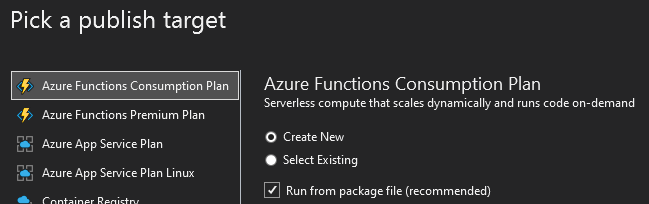
Side note -- I'd also recommend that you choose "Run from package" when you deploy from VS. It's not the cause of the issue here, but it does make your deployments more reliable and atomic (https://docs.microsoft.com/en-us/azure/azure-functions/run-functions-from-deployment-package#benefits-of-running-from-a-package-file).
brettsam
on 18 May 2020
@RonPeters -- I wasn't able to find that invocation id anywhere in our logs. Is that a function invocation that you ran in production? If you aren't able to get an invocation to run -- feel free to email me your app name directly. My Microsoft email is in my github profile.
brettsam
on 18 May 2020
@brettsam definitely have had Startup.cs working for setting configs for maybe 6 months?
I'm loading about a dozen json files for setting values for a slew of integrations. For sensitive values they get values from a local secrets.json file and when deployed, from key vault values through function settings.
It could be that I changed the deployment option/method? Will revisit. Either way, it looks like there was a bug on the Azure end, not on my end, that was causing things because my working code did itself not change and I chose deployment options that "should work". Shrug.
Many thanks for helping ensure that both my deployment settings and the functions service are working as they should be!!
Kudos again @brettsam
drewid
on 18 May 2020
I worked with @RonPeters and he was hitting https://github.com/Azure/azure-functions-host/issues/5860 -- using -r win-x86 was causing extensions.json to not be build correctly. We're tracking both of these issues elsewhere, so I'm going to close this.
brettsam
on 18 May 2020
Related issues
 svickers
·
3Comments
svickers
·
3Comments
 silencev
·
3Comments
silencev
·
3Comments
 justinyoo
·
3Comments
justinyoo
·
3Comments
 mathewc
·
3Comments
mathewc
·
3Comments
 ElvenSpellmaker
·
3Comments
ElvenSpellmaker
·
3Comments