Azure-functions-host: Azure Function not triggered unless restarted/refreshed via Azure Portal
We have an Azure Function with service bus trigger hosted in Consumption plan on Windows. Function is not triggered despite messages on the queue.
Restarting/refreshing the function via Portal fixes function for some period of time (less than 24 hours), after which it goes back to same behavior.
Investigative information
Please provide the following:
Following is last successful manual invocation details.
- Timestamp: 2020-05-01 15:10:15.499
- Function App version: 2.0
- Function App name: tmbaseball-contextualdatascrapers-release
- Function name(s) (as appropriate): _there is only a single function_
- Invocation ID: c8efaccf97bee4449ef9e5bdabf59917
- Region: EAST US 2
Expected behavior
Function is triggered when message is put on a queue
Actual behavior
Function is never triggered, no information logged at all.
Known workarounds
If restarted/refreshed via Azure Portal triggers for some time (less than 24h)
Related information
- Bindings
Service Bus Trigger - Hosting Plan
Consumption - Hosted on
Windows
 gmanvel
All 11 comments
Same Issue here with Runtime 3 c# package:
Bindings
Service Bus Trigger
Time Trigger 15 Minutes (Tried that as a workaround. The trigger also stopped triggering after less than an hour.)Hosting Plan
App Service Plan (Free)Hosten on
Windows
There is a workaround:
Even though I have no HTTP Endpoint trigger, calling the function URL every 5 minutes keeps it alive and messages are handled as they come in.
The same function works on a non free tier as expected, even without the time trigger.
 Andreas717
on 6 May 2020
Andreas717
on 6 May 2020
Experiencing the same issue. Just started with a new project and I have only one ServiceBusTrigger. Today the function stopped processing new messages after 7 minutes of inactivity. The last log messages I have are:
07:18:53 > Stopping JobHost
07:18:53 > Job host stopped
07:11:18 > Executed 'QueueListener' (Succeeded, Id=bf19a42c-d160-49a7-a67d-aef0bcf75936)
Environment: Windows, Consumption, West Europe, Microsoft.NET.Sdk.Functions: v3.0.7
At the moment I need to restart the app almost every hour to get it working again. Any updates on this?
 Zenuka
on 20 May 2020
Zenuka
on 20 May 2020
Can you share your function app name, either directly or indirectly? This will help us investigate. Thanks!
 mhoeger
on 20 May 2020
mhoeger
on 20 May 2020
Do you have enough info with the following log message and that our function is running from West Europe?
20-5-2020 12:01:22.078 Executing 'QueueListener' (Reason='', Id=04c04d21-f5d7-4bc9-b0b1-a965e1ccae33)
Zenuka
on 20 May 2020
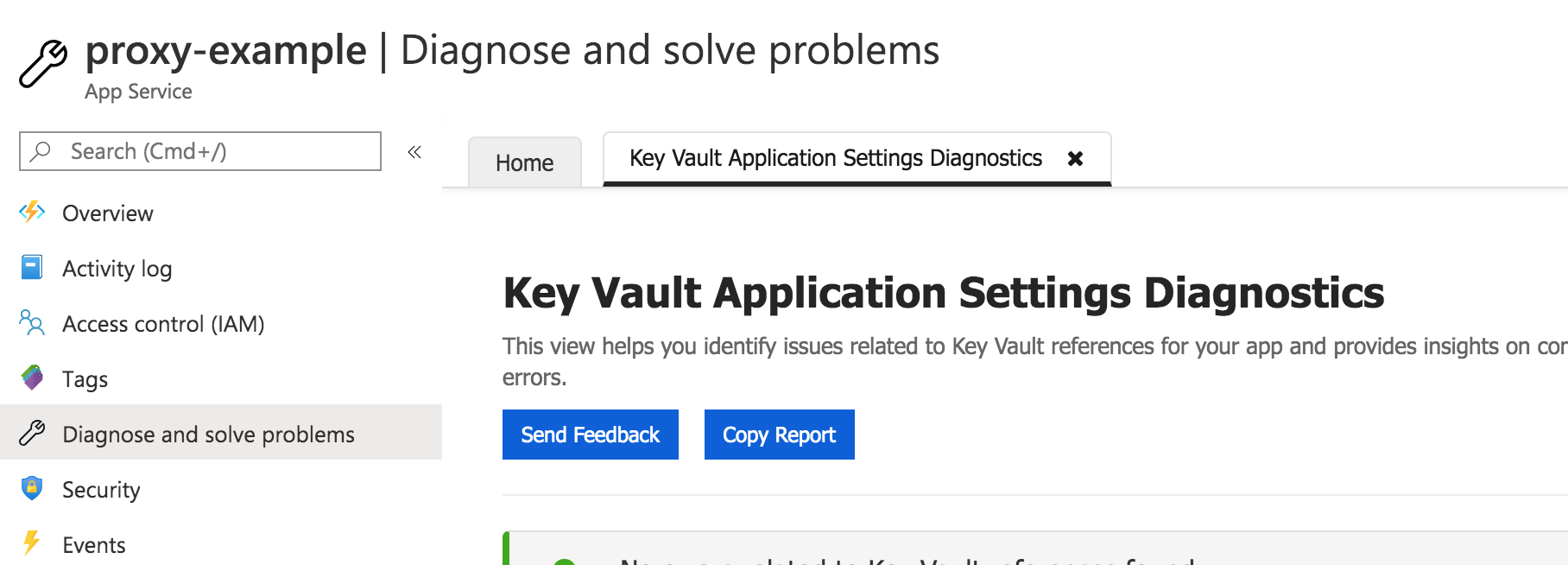
@Zenuka - It looks like your issue is with your key vault references. Can you go to the Azure Portal => your function app => Diagnose and solve problems => Search "Azure Functions Diagnostics" for "key vault application settings diagnostics"? You should see a view like this that has more details:
mhoeger
on 20 May 2020
@gmanvel and @Andreas717, very sorry for the delay in response.
@gmanvel - I think your problems might stem from your app name being > 32 characters long (see https://github.com/Azure/azure-functions-host/issues/2015)
@Andreas717 - I don't have enough details to investigate your specific issue
mhoeger
on 20 May 2020
Wow, thanks a lot! You're a life saver! It is strange that it's working. I supplied a reference to an item in keyvault without a version id because I found somewhere that it would work as well. I'll add the version for now. Thanks again!
Zenuka
on 20 May 2020
@mhoeger I don't think that #2015 applies to us - our function name is 21 characters long & we have host id set in app settings
Function app details:
Executed: 2020-05-13 14:32:48.856
Execution Id=ad84a431-fb37-4b14-b22d-a7f935f0ea83
Region: East US 2
gmanvel
on 21 May 2020
Unfortunately the problem wasn't fixed by changing the key vault reference. I just got back from a couple of days off and the messages in the queue are still piling up. Yesterday morning the function app shutdown again but didn't start back up again with messages in the queue. We've filed a support ticket with Azure as well. (It's the same function app)
2020-06-02T05:20:28.824Z Executed 'QueueListener' (Succeeded, Id=9fea5cd6-33c6-4328-8927-a8db562b3b61)
After talking to Azure support, I found out that the scaling controller cannot use Managed Identity like I used in the connection string for the trigger. Switching back to a connection string with an access key in it, fixed it for me.
Zenuka
on 8 Jun 2020
After talking to Azure support, the advise is to not keep trigger related details (like service bus queue name & service bus connection string) in configuration.
Reason:
Connection string settings could be configured in appsettings.json and loaded via FunctionStartup class. However, the scope of the appsettings.json is the function app. ScaleController is separate service for consumption plan function apps and it does not inject “FunctionsStartup” class. Therefore, scaleController service failed to resolve service bus connection string value in appsettings.json properly even if triggers was synced successfully in function runtime.
Suggested setting service bus connection string value in AppSettings
This suggestion fixed it for us.
gmanvel
on 23 Jun 2020
Related issues
 svickers
·
3Comments
svickers
·
3Comments
 ladeak
·
3Comments
ladeak
·
3Comments
 silencev
·
4Comments
silencev
·
4Comments
 mathewc
·
4Comments
mathewc
·
4Comments
 slim-souissi
·
3Comments
slim-souissi
·
3Comments
Most helpful comment
Experiencing the same issue. Just started with a new project and I have only one ServiceBusTrigger. Today the function stopped processing new messages after 7 minutes of inactivity. The last log messages I have are:
Environment: Windows, Consumption, West Europe, Microsoft.NET.Sdk.Functions: v3.0.7
At the moment I need to restart the app almost every hour to get it working again. Any updates on this?