Azure-functions-host: Azure Functions Error HTTP Error 500.37 - ANCM Failed to Start Within Startup Time Limit
Hello
I have upgraded a Azure Functions application to .NET Core 3.1 and runtime version 3. Since then my app shows the following message a couple of times during the day and the app hangs.

The only solution is to start en stop the app again. In the portal i get this message:
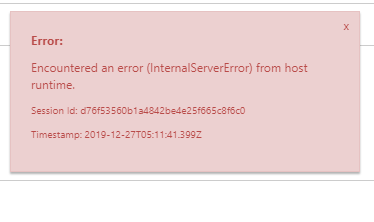
When i look in the Eventlog.xml i see some error message like
Application '/LM/W3SVC/1452214351/ROOT' with physical root 'D:Program Files (x86)SiteExtensionsFunctions3.0.1293932bit' failed to load coreclr. Exception message: Managed server didn't initialize after 120000 ms.
or
Application: w3wp.exe CoreCLR Version: 4.700.19.56402 .NET Core Version: 3.1.0 Description: The process was terminated due to an unhandled exception. Exception Info: System.AggregateException: One or more errors occurred. (The handle is invalid.) ---> System.IO.IOException: The handle is invalid.at System.ConsolePal.WindowsConsoleStream.Write(Byte[] buffer, Int32 offset, Int32 count)at System.IO.StreamWriter.Flush(Boolean flushStream, Boolean flushEncoder)at System.IO.StreamWriter.WriteLine(String value)at System.IO.TextWriter.SyncTextWriter.WriteLine(String value)at System.Console.WriteLine(String value)at Microsoft.AspNetCore.Hosting.WebHostExtensions.RunAsync(IWebHost host, CancellationToken token, String startupMessage)at Microsoft.AspNetCore.Hosting.WebHostExtensions.RunAsync(IWebHost host, CancellationToken token, String startupMessage)at Microsoft.AspNetCore.Hosting.WebHostExtensions.RunAsync(IWebHost host, CancellationToken token) --- End of inner exception stack trace --- at System.Threading.Tasks.Task.ThrowIfExceptional(Boolean includeTaskCanceledExceptions)at System.Threading.Tasks.Task.Wait(Int32 millisecondsTimeout, CancellationToken cancellationToken)at System.Threading.Tasks.Task.Wait()at Microsoft.Azure.WebJobs.Script.WebHost.Program.Main(String[] args) in C:azure-functions-hostsrcWebJobs.Script.WebHostProgram.cs:line 28
I also got this exception
Microsoft.Azure.WebJobs.Host.FunctionTimeoutException: Timeout value of 00:30:00 was exceeded by function: CaptureLowestPricCapture_Lowest_Prices_Amazon_FR
at Microsoft.Azure.WebJobs.Host.Executors.FunctionExecutor.TryHandleTimeoutAsync(Task invokeTask, CancellationToken shutdownToken, Boolean throwOnTimeout, CancellationToken timeoutToken, TimeSpan timeoutInterval, IFunctionInstance instance, Action onTimeout) in C:projectsazure-webjobs-sdk-rqm4tsrcMicrosoft.Azure.WebJobs.HostExecutorsFunctionExecutor.cs:line 665
at Microsoft.Azure.WebJobs.Host.Executors.FunctionExecutor.InvokeAsync(IFunctionInvoker invoker, ParameterHelper parameterHelper, CancellationTokenSource timeoutTokenSource, CancellationTokenSource functionCancellationTokenSource, Boolean throwOnTimeout, TimeSpan timerInterval, IFunctionInstance instance) in C:projectsazure-webjobs-sdk-rqm4tsrcMicrosoft.Azure.WebJobs.HostExecutorsFunctionExecutor.cs:line 576
at Microsoft.Azure.WebJobs.Host.Executors.FunctionExecutor.ExecuteWithWatchersAsync(IFunctionInstanceEx instance, ParameterHelper parameterHelper, ILogger logger, CancellationTokenSource functionCancellationTokenSource) in C:projectsazure-webjobs-sdk-rqm4tsrcMicrosoft.Azure.WebJobs.HostExecutorsFunctionExecutor.cs:line 532
at Microsoft.Azure.WebJobs.Host.Executors.FunctionExecutor.ExecuteWithLoggingAsync(IFunctionInstanceEx instance, ParameterHelper parameterHelper, IFunctionOutputDefinition outputDefinition, ILogger logger, CancellationTokenSource functionCancellationTokenSource) in C:projectsazure-webjobs-sdk-rqm4tsrcMicrosoft.Azure.WebJobs.HostExecutorsFunctionExecutor.cs:line 470
at Microsoft.Azure.WebJobs.Host.Executors.FunctionExecutor.ExecuteWithLoggingAsync(IFunctionInstanceEx instance, FunctionStartedMessage message, FunctionInstanceLogEntry instanceLogEntry, ParameterHelper parameterHelper, ILogger logger, CancellationToken cancellationToken) in C:projectsazure-webjobs-sdk-rqm4tsrcMicrosoft.Azure.WebJobs.HostExecutorsFunctionExecutor.cs:line 278
at Microsoft.Azure.WebJobs.Host.Executors.FunctionExecutor.ExecuteWithLoggingAsync(IFunctionInstanceEx instance, FunctionStartedMessage message, FunctionInstanceLogEntry instanceLogEntry, ParameterHelper parameterHelper, ILogger logger, CancellationToken cancellationToken) in C:projectsazure-webjobs-sdk-rqm4tsrcMicrosoft.Azure.WebJobs.HostExecutorsFunctionExecutor.cs:line 325
at Microsoft.Azure.WebJobs.Host.Executors.FunctionExecutor.TryExecuteAsyncCore(IFunctionInstanceEx functionInstance, CancellationToken cancellationToken) in C:projectsazure-webjobs-sdk-rqm4tsrcMicrosoft.Azure.WebJobs.HostExecutorsFunctionExecutor.cs:line 117
I have attached the complete log file.
eventlog.zip
regards
Dieter
 dieterdp
All 18 comments
I have more info, it's getting stranger and stranger, i am on a App Service Plan but my function is still timing out after 30 mins. Always On is enabled
dieterdp
on 28 Dec 2019
Hello
The absence of "functionTimeout": "04:00:00" in my host. json was the problem.
Some functions take a lot of time to execute and then you get this message, witch is strange because in V2 this was not a issue.
kind regards
Dieter
dieterdp
on 30 Dec 2019
I have to reopen this, this still happens since the upgrade to V3. Before the upgrade this was not a problem, how can i debug this because I don't know why this happens.
dieterdp
on 13 Jan 2020
Hi,
I am having the same issue when upgrading from .netcore 2.1 to 3.1. Were you able to find any solution?
 mufia001
on 24 Jul 2020
mufia001
on 24 Jul 2020
I solved this problem by increasing the startupTimeLimit check this post
<?xml version="1.0"?>
<configuration xmlns:xdt="http://schemas.microsoft.com/XML-Document-Transform">
  <location>
    <system.webServer>
      <aspNetCore xdt:Transform="SetAttributes(startupTimeLimit)" startupTimeLimit="300">
      </aspNetCore>
    </system.webServer>
  </location>
</configuration>
 hamzahamidi
on 24 Jul 2020
hamzahamidi
on 24 Jul 2020
Thanks for the suggestion, hamzahamidi. I tried extending the time limit, but the IIS throws 500.19 error. It works fine in my local environment in visual studio. It only occurs when i deploy the application in IIS Hosting server.
mufia001
on 25 Jul 2020
@mufia001 HTTP Error 500.19 occurs because the ApplicationHost.config file or the Web.config file contains a malformed XML element. Can you share your config here ?
hamzahamidi
on 25 Jul 2020
@hamzahamidi The error occurred because of additional
<aspNetCorexdt:Transform="SetAttributes(startupTimeLimit)" startupTimeLimit="300">
in the code. For some reason, The IIS Hosting server doesn't recognize the aspNetCore attribute in web.config. This is a silly problem, because only DevOps have access to the Production Test server which leaves me with a very little insight.
Also, when the application is started with 500.37, i see only two lines in log:
[Microsoft.AspNetCore.DataProtection.KeyManagement.XmlKeyManager]: Creating key {f246df33-c357-4d80-8584-354b84d3996d} with creation date 2020-07-24 22:04:23Z, activation date 2020-07-24 22:04:23Z, and expiration date 2020-10-22 22:04:23Z.
07/24/2020 18:04:23.919 [] [Warning] [] [] [Microsoft.AspNetCore.DataProtection.KeyManagement.XmlKeyManager]: No XML encryptor configured. Key {f246df33-c357-4d80-8584-354b84d3996d} may be persisted to storage in unencrypted form.
I certainly believe that this has nothing to do with the 500.37 ANCM. I will look in IIS logs to see if I can find anything. Will post an update if I find anything useful.
mufia001
on 27 Jul 2020
Remove xdt:Transform="SetAttributes(startupTimeLimit)" and only leave the startupTimeLimit parameter
<aspNetCore startupTimeLimit="300" ></aspNetCore>
@hamzahamidi thanks for correcting me. I update my web.config. The time limit is increased to 300 seconds
HTTP Error 500.37 - ANCM Failed to Start Within Startup Time Limit
Common solutions to this issue:
ANCM failed to start after 300000 milliseconds
but the error is not gone. Another follow up question, I updated my Startup.cs to use
app.UseRouting();
app.UseEndpoints
because the
routes.MapSpaFallbackRoute
wasn't supported any longer in netcore 3.1. Wonder if there is any better alternative than using endpoints
mufia001
on 27 Jul 2020
@dieterdp Were you able to find any solution?
 AsifulNobel
on 23 Oct 2020
AsifulNobel
on 23 Oct 2020
We have also encountered similar errors, with these two events found in app service event log during the app termination. Based on the first event the startup time limit is already set to quite large. (Running in isolated Azure Germany, soon to be migrating out of it)
 <Data>Application '/LM/W3SVC/99750795/ROOT' with physical root 'D:\Program Files (x86)\SiteExtensions\Functions\3.0.15193\32bit\' failed to load coreclr. Exception message:
Managed server didn't initialize after 3600000 ms.</Data>
and
<Data>Application: w3wp.exe
CoreCLR Version: 4.700.20.56602
.NET Core Version: 3.1.11
Description: The process was terminated due to an unhandled exception.
Exception Info: System.AggregateException: One or more errors occurred. (The handle is invalid.)
---> System.IO.IOException: The handle is invalid.
at System.ConsolePal.WindowsConsoleStream.Write(Byte[] buffer, Int32 offset, Int32 count)
at System.IO.StreamWriter.Flush(Boolean flushStream, Boolean flushEncoder)
at System.IO.StreamWriter.WriteLine(String value)
at System.IO.TextWriter.SyncTextWriter.WriteLine(String value)
at System.Console.WriteLine(String value)
at Microsoft.AspNetCore.Hosting.WebHostExtensions.RunAsync(IWebHost host, CancellationToken token, String startupMessage)
at Microsoft.AspNetCore.Hosting.WebHostExtensions.RunAsync(IWebHost host, CancellationToken token, String startupMessage)
at Microsoft.AspNetCore.Hosting.WebHostExtensions.RunAsync(IWebHost host, CancellationToken token)
--- End of inner exception stack trace ---
at System.Threading.Tasks.Task.ThrowIfExceptional(Boolean includeTaskCanceledExceptions)
at System.Threading.Tasks.Task.Wait(Int32 millisecondsTimeout, CancellationToken cancellationToken)
at System.Threading.Tasks.Task.Wait()
at Microsoft.Azure.WebJobs.Script.WebHost.Program.Main(String[] args) in D:\a\1\s\src\WebJobs.Script.WebHost\Program.cs:line 29
</Data>
 athamala
on 9 Feb 2021
athamala
on 9 Feb 2021
@ConnorMcMahon / @fabiocav , Could you please look into this issue
 v-anvari
on 12 Feb 2021
v-anvari
on 12 Feb 2021
Hey everyone,
Apologies for late reply. Wasn’t aware that others are having the same issue. I was able to solve this problem by rewriting my Startup.cs file. It’s been a long time since I worked on it, so I don’t remember everything on the top of my head. I would suggest going through .Netcore 3.1 upgrade documentation by Microsoft. Please do not skip any steps, and make sure that your Startups.cs file look exactly the way it does when creating a new .Netcore 3.1 project.
mufia001
on 13 Feb 2021
@athamala , Let us know if you were able to resolve the errors.
v-anvari
on 15 Feb 2021
I will take a look at our function Startup and see that it follows the documentation.
athamala
on 15 Feb 2021
We encounter similar issue as well, with quite large Azure Function App, which contains a few long-running functions.
3600000 ms timeout seems to be a new "default" startupTimeLimit value, as we don't set it anywhere - and it is reported back to us in eventlog.xml.
Application '/LM/W3SVC/1748392322/ROOT' with physical root
'D:\Program Files (x86)\SiteExtensions\Functions\3.0.15571\32bit\'
failed to load coreclr. Exception message:

Managed server didn't initialize after 3600000 ms.
We have NO custom Site Extensions installed, and "MSDeploy" Site Extension only, visible in Kudu "LogFiles" folder.
Our AzureFunctionsVersion is v3, we target .NET Core 3.1. "3.0.15571" seem to be a Azure Function Host release (released earlier this month).
For all participants: please, share any updates you might have, connected with this issue. Thanks!
 vtkachenko
on 27 Apr 2021
vtkachenko
on 27 Apr 2021
Hi @vtkachenko , Your query looks like a different scenario, Can you open a new case with your project details so that we can further look into it.
v-anvari
on 29 Apr 2021
Related issues
 ahmelsayed
·
4Comments
ahmelsayed
·
4Comments
 ElvenSpellmaker
·
3Comments
ElvenSpellmaker
·
3Comments
 horihiro
·
3Comments
horihiro
·
3Comments
 svickers
·
3Comments
svickers
·
3Comments
 christopheranderson
·
4Comments
christopheranderson
·
4Comments
Most helpful comment
I have to reopen this, this still happens since the upgrade to V3. Before the upgrade this was not a problem, how can i debug this because I don't know why this happens.