Azure-functions-host: Breaking changes in version 2.0.12949
After Microsoft automated update from version 2.0.12888 to 2.0.12949 a breaking change for those who are using protobuf-net nuget (https://github.com/protobuf-net/protobuf-net) was introduced.
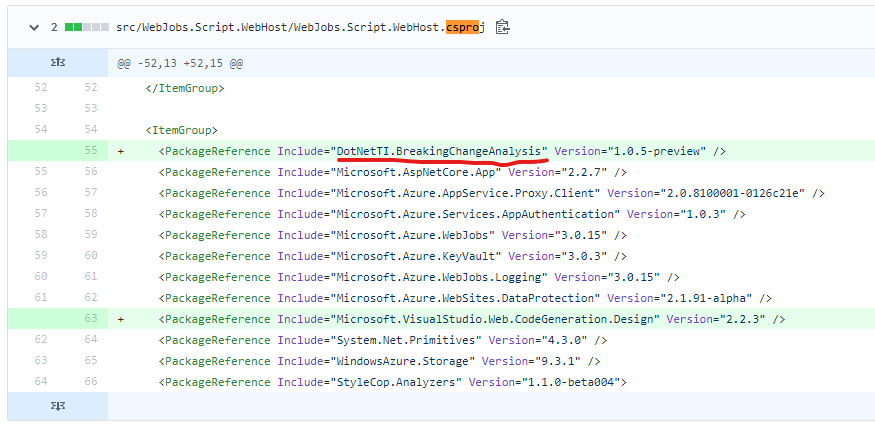
I think that the issue is introduced by commit https://github.com/Azure/azure-functions-host/commit/b0de28f184a0d6cbbc2f35edd304c0c1fcdff5f2#diff-68e549809d4bad3e7fa30a1f08fbdbb9
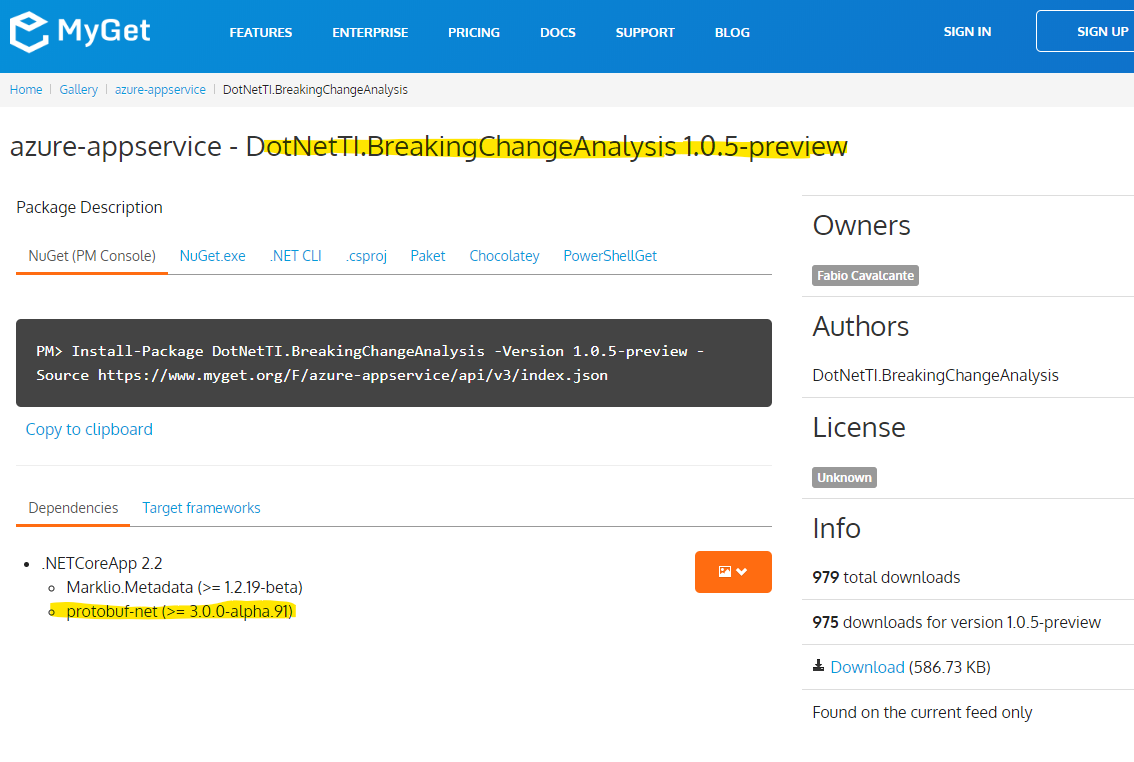
A reference to DotNetTI.BreakingChangeAnalysis (https://myget.org/feed/azure-appservice/package/nuget/DotNetTI.BreakingChangeAnalysis) was added in WebJobs.Script.WebHost.csproj, but this library has a reference to protobuf-net 3.0.0-alpha.91 (https://www.nuget.org/packages/protobuf-net/3.0.0-alpha.91)
We are running functions in production with version ~2 referencing to protobuf-net version 2.4.4 (https://www.nuget.org/packages/protobuf-net/2.4.4) and after automatic update to version 2.0.12949 we are receiving this error message:
_System.MissingMethodException : Method not found: 'ProtoBuf.Meta.RuntimeTypeModel ProtoBuf.Meta.TypeModel.Create()'._
As workaround we have set the version to 2.0.12888
 alejandromelis
All 25 comments
Updating the SDK version to 1.0.31 (as @fabiocav suggest) avoid this issue, but introduce a new issue, now the System.Diagnostics.Activity.Current is null in every execution.
alejandromelis
on 20 Dec 2019
You have deployed the new version of the function host (2.0.12961) and the error appears again.
alejandromelis
on 21 Jan 2020
Updating the SDK version to 1.0.31 avoid this issue, but introduce a new issue, now the System.Diagnostics.Activity.Current is null in every execution.
alejandromelis
on 21 Jan 2020
Thank you for reporting this.
One question, what version of System.Diagnostics are you referencing?
 fabiocav
on 21 Jan 2020
fabiocav
on 21 Jan 2020
/cc @brettsam
fabiocav
on 21 Jan 2020
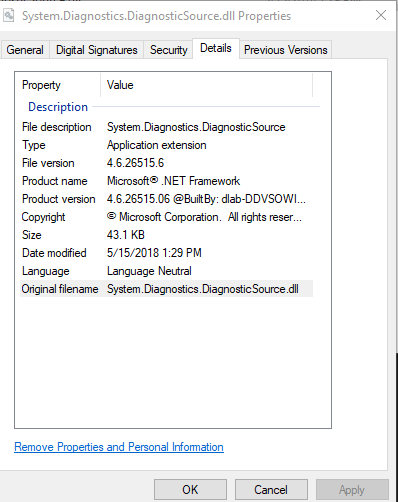
but I'm not referencing it directly, let me check at reference tree, I'll update you soon
alejandromelis
on 21 Jan 2020
My deps.json show that the reference comes from Microsoft.AspNetCore.Mvc.Core/2.2.5
``json "Microsoft.AspNetCore.Mvc.Core/2.2.5": {
"dependencies": {
"Microsoft.AspNetCore.Authentication.Core": "2.2.0",
"Microsoft.AspNetCore.Authorization.Policy": "2.2.0",
"Microsoft.AspNetCore.Hosting.Abstractions": "2.2.0",
"Microsoft.AspNetCore.Http": "2.2.2",
"Microsoft.AspNetCore.Http.Extensions": "2.2.0",
"Microsoft.AspNetCore.Mvc.Abstractions": "2.2.0",
"Microsoft.AspNetCore.ResponseCaching.Abstractions": "2.2.0",
"Microsoft.AspNetCore.Routing": "2.2.0",
"Microsoft.AspNetCore.Routing.Abstractions": "2.2.0",
"Microsoft.Extensions.DependencyInjection": "2.2.0",
"Microsoft.Extensions.DependencyModel": "2.1.0",
"Microsoft.Extensions.FileProviders.Abstractions": "2.2.0",
"Microsoft.Extensions.Logging.Abstractions": "2.2.0",
"System.Diagnostics.DiagnosticSource": "4.5.0",
"System.Threading.Tasks.Extensions": "4.5.1"
},
alejandromelis
on 21 Jan 2020
We have a couple of options to get around that, but before we explore those, can you please try pinning back to 2.0.12950?
fabiocav
on 21 Jan 2020
the version 2.0.12950 works, when pine this versions and the portal show that the 2.0.12888 is being used, but is working fine

I still have the sdk 1.0.29
alejandromelis
on 21 Jan 2020
That version is correct. This should give you the behavior you had with 12888.
This has been assigned to the sprint starting this week and we'll have a permanent fix then
fabiocav
on 21 Jan 2020
@fabiocav It's possible to do a rollback, I've more than 20 function apps affected this at this time and increasing. I've more than 100 function apps that could be affected by this issue
alejandromelis
on 21 Jan 2020
+1 on this. Me and my team have a number of business critical function apps that have been hit by this. We've mitigated by pinning non-busted runtime versions
 delroyh
on 22 Jan 2020
delroyh
on 22 Jan 2020
I'm really glad I came across this post, as it helped us solve our own production issues due to the breaking changes in this upgrade that occurred all of the sudden (with no deploy, and right after the extensions version of the host in Azure had apparently been updated)
After nearly 2 days of wheel spinning and trying to rework our assembly dependencies as a workaround, and trying every previously released version to pin to, I was very surprised to find that I had to use version "2.0.12950" for it to fallback to "2.0.12888". That's very counter intuitive and not documented anywhere.
I think it would be very useful in either the Functions Host release announcements, or on the associated documentation page that details the version pinning, if there was a running list of which version numbers can be pinned. In attempting to solve this problem, I found several previous users on previous issues requesting the same, and I feel that info would go a long way in resolving breaking change issues that could arise later.
My $0.02
 rickfunaki
on 24 Jan 2020
rickfunaki
on 24 Jan 2020
We're working on having this fixed and deployed as a hotfix. We'll keep the issue updated as we move forward on that.
fabiocav
on 24 Jan 2020
Hi,
Just ran into this issue and it seems like we have a really similar situation, a conflict with the Protobuf-net Version that the Host is referencing (3.0.0.alpha whatever), whereas we have a dependency on v 2.4.0. I've also tried reverting to the Host version: 2.0.12888 but with no luck, the Azure Portal states it's not compatible anymore
I opened an issue here, but seems like it was the wrong repository. Anyway, here's the link:
https://github.com/Azure/Azure-Functions/issues/1463
Thougths ? am I right on this, should we also be expecting this hotfix ?
Thanks a lot,
Vlad
 andronachev
on 28 Jan 2020
andronachev
on 28 Jan 2020
@andronachev It looks like from your other thread that you are using "2.0.12888" as the specified rollback version - if that's the version you want to revert to, you have to specify "2.0.12950" instead - that worked for me as seen in the screencaps above from alejandromelis, it will fallback to "2.0.12888".
rickfunaki
on 28 Jan 2020
@rickfunaki yes, thanks, that would be a temporary option but right now we hotfixed our code to work around this exception, but of couse it's not something that we want to keep doing, we want this fixed, as everybody does :)
Anyway I am just waiting for confirmation that we are indeed having the same type of issue, even though I am 99% sure we are. As for the fix, I get it from this thread that there is a hotfix coming soon. How soon it will be up and running in all azure centers would also be nice to know
andronachev
on 28 Jan 2020
@rickfunaki - I tried downgrading a dummy function to 2.0.12950 and as stated in this thread, indeed, the result is that the used version is in fact 2.0.12888.0

Which actually solves the issue - I can make use of the Event Store Connection (in our case we use the EventStore nuget package which is dependent on protobuf-net v 2.4.0 )
So looking forward to the hotfix for this
Thanks
andronachev
on 28 Jan 2020
@alejandromelis (or @andronachev ) I'm validating this for the next release and wanted to make sure I had a reliable repro that reflected the problem you were seeing. Do you have a repro you can share?
fabiocav
on 31 Jan 2020
Ok, this weekend I'll share it
alejandromelis
on 31 Jan 2020
Hi, also I will set a basic example up later today, thanks
andronachev
on 31 Jan 2020
Hi @fabiocav,
I created this simple repo: https://github.com/andronachev/FunctionReproHostbUg
It has just a function with a HTTP Trigger which simply tries to connect to an instance of Event Store. The Event Store Client package that the function uses has a dependency on protobuf-net 2.4.0 , the function's Runtime Host is dependent on protobug-net 3.0.0 , hence the exception I was talking about in my comment & post above.
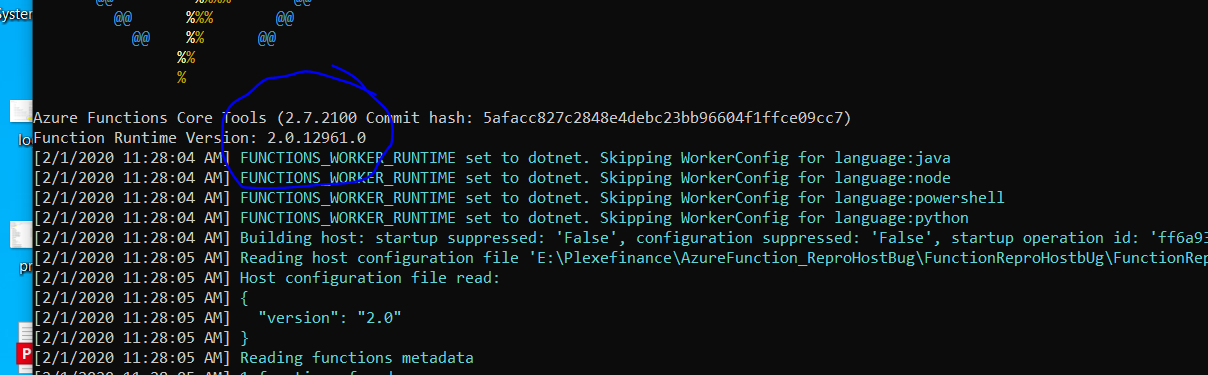
Also screenshots from my localhost (which unfortunately seems like I've hade the Azure Functions Tools updated automatically and now runs version : 2.0.12961 , so I now get the exception locally:

FYI I used the default localhost connection string to event store, so chances are, you will get a different connection refused-type of exception, if this bug in itself is fixed. Alternatively if you want to have a successful connection to event store, just download the binaries for event store and run the .exe without any other configurations needed : https://eventstore.org/downloads/
Thanks
Vlad
andronachev
on 1 Feb 2020
@rickfunaki - I tried downgrading a dummy function to 2.0.12950 and as stated in this thread, indeed, the result is that the used version is in fact 2.0.12888.0
Which actually solves the issue - I can make use of the Event Store Connection (in our case we use the EventStore nuget package which is dependent on protobuf-net v 2.4.0 )
So looking forward to the hotfix for this
Thanks
We are experiencing the same issue and your suggestion solves the issue for us.
Explicitly setting FUNCTIONS_EXTENSION_VERSION to 2.0.12950 makes the runtime to fall back to version 2.0.12888.0 as displayed in the warning message.

 janisBerz
on 5 Feb 2020
janisBerz
on 5 Feb 2020
@fabiocav Any estimate when can the fix be expected to be released?
 Gonnagle
on 11 Feb 2020
Gonnagle
on 11 Feb 2020
The fix for this particular issue has been globally deployed. You should no longer see this problem on Azure deployed functions.
fabiocav
on 21 Feb 2020
Related issues
 yvele
·
3Comments
yvele
·
3Comments
 christopheranderson
·
4Comments
christopheranderson
·
4Comments
 ahmelsayed
·
4Comments
ahmelsayed
·
4Comments
 justinyoo
·
3Comments
justinyoo
·
3Comments
 rati3l
·
3Comments
rati3l
·
3Comments
Most helpful comment
+1 on this. Me and my team have a number of business critical function apps that have been hit by this. We've mitigated by pinning non-busted runtime versions