Azure-functions-host: Unable to resolve service for type 'ISqlServerHelper' while attempting to activate ''.
I am facing the below issue when publishing an Azure V2 Function. Locally everything works as expected but the DI is failing when running the function on Azure.
Unable to resolve service for type 'ISqlServerHelper' while attempting to activate 'Function'.
This is my constructor:

This is my startup class:
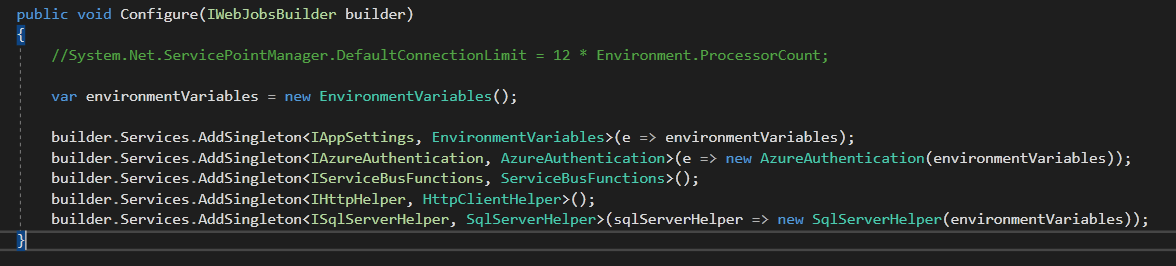
I am unable to find anything online or any other issue similar to mine.
 grik001
All 37 comments
I might have the same problem with my DI. It only works locally, when published I get some error (below). But it is only with the most recent version 2.0.12353.0. When I force it to this version 2.0.12342.0 all works including on Azure.
Can you try it as well? Just change it from 2~ to 2.0.12342.0 and restart. If it works with the previous version then probably something has changed, I see there was some work on Microsoft.Azure.WebJobs.Host from 3.0.4 to 3.0.5 which probably affected this :(

This is my error, xxxxx is redacted.
2019-03-13T20:16:49.959 [Error] Executed 'BullhornUpdater' (Failed, Id=eb6f8852-db83-44ac-900d-e19979dace08)System.InvalidOperationException : Unable to resolve service for type 'xxxxx' while attempting to activate 'xxxxx'.at Microsoft.Extensions.DependencyInjection.ActivatorUtilities.GetService(IServiceProvider sp,Type type,Type requiredBy,Boolean isDefaultParameterRequired)at lambda_method(Closure ,IServiceProvider ,Object[] )at Microsoft.Azure.WebJobs.Host.Executors.DefaultJobActivator.CreateInstanceT at C:projectsazure-webjobs-sdk-rqm4tsrcMicrosoft.Azure.WebJobs.HostExecutorsDefaultJobActivator.cs : 42at Microsoft.Azure.WebJobs.Host.Executors.DefaultJobActivator.CreateInstanceT at C:projectsazure-webjobs-sdk-rqm4tsrcMicrosoft.Azure.WebJobs.HostExecutorsDefaultJobActivator.cs : 32at Microsoft.Azure.WebJobs.Host.Executors.ActivatorInstanceFactory1.<>c__DisplayClass1_1.<.ctor>b__0(IFunctionInstanceEx i) at C:\projects\azure-webjobs-sdk-rqm4t\src\Microsoft.Azure.WebJobs.Host\Executors\ActivatorInstanceFactory.cs : 20at Microsoft.Azure.WebJobs.Host.Executors.ActivatorInstanceFactory1.Create(IFunctionInstanceEx functionInstance) at C:projectsazure-webjobs-sdk-rqm4tsrcMicrosoft.Azure.WebJobs.HostExecutorsActivatorInstanceFactory.cs : 26at Microsoft.Azure.WebJobs.Host.Executors.FunctionInvoker2.CreateInstance(IFunctionInstanceEx functionInstance) at C:\projects\azure-webjobs-sdk-rqm4t\src\Microsoft.Azure.WebJobs.Host\Executors\FunctionInvoker.cs : 44at Microsoft.Azure.WebJobs.Host.Executors.FunctionExecutor.ParameterHelper.Initialize() at C:\projects\azure-webjobs-sdk-rqm4t\src\Microsoft.Azure.WebJobs.Host\Executors\FunctionExecutor.cs : 845at async Microsoft.Azure.WebJobs.Host.Executors.FunctionExecutor.TryExecuteAsyncCore(IFunctionInstanceEx functionInstance,CancellationToken cancellationToken) at C:\projects\azure-webjobs-sdk-rqm4t\src\Microsoft.Azure.WebJobs.Host\Executors\FunctionExecutor.cs : 116
2019-03-13T20:16:49.995 [Error] Executed 'BullhornUpdater' (Failed, Id=eb6f8852-db83-44ac-900d-e19979dace08)System.InvalidOperationException : Unable to resolve service for type 'xxxxx' while attempting to activate 'xxxxx'.at Microsoft.Extensions.DependencyInjection.ActivatorUtilities.GetService(IServiceProvider sp,Type type,Type requiredBy,Boolean isDefaultParameterRequired)at lambda_method(Closure ,IServiceProvider ,Object[] )at Microsoft.Azure.WebJobs.Host.Executors.DefaultJobActivator.CreateInstance[T](IServiceProvider serviceProvider) at C:\projects\azure-webjobs-sdk-rqm4t\src\Microsoft.Azure.WebJobs.Host\Executors\DefaultJobActivator.cs : 42at Microsoft.Azure.WebJobs.Host.Executors.DefaultJobActivator.CreateInstance[T](IFunctionInstanceEx functionInstance) at C:\projects\azure-webjobs-sdk-rqm4t\src\Microsoft.Azure.WebJobs.Host\Executors\DefaultJobActivator.cs : 32at Microsoft.Azure.WebJobs.Host.Executors.ActivatorInstanceFactory1.<>c__DisplayClass1_1.<.ctor>b__0(IFunctionInstanceEx i) at C:projectsazure-webjobs-sdk-rqm4tsrcMicrosoft.Azure.WebJobs.HostExecutorsActivatorInstanceFactory.cs : 20at Microsoft.Azure.WebJobs.Host.Executors.ActivatorInstanceFactory1.Create(IFunctionInstanceEx functionInstance) at C:\projects\azure-webjobs-sdk-rqm4t\src\Microsoft.Azure.WebJobs.Host\Executors\ActivatorInstanceFactory.cs : 26at Microsoft.Azure.WebJobs.Host.Executors.FunctionInvoker2.CreateInstance(IFunctionInstanceEx functionInstance) at C:projectsazure-webjobs-sdk-rqm4tsrcMicrosoft.Azure.WebJobs.HostExecutorsFunctionInvoker.cs : 44at Microsoft.Azure.WebJobs.Host.Executors.FunctionExecutor.ParameterHelper.Initialize() at C:projectsazure-webjobs-sdk-rqm4tsrcMicrosoft.Azure.WebJobs.HostExecutorsFunctionExecutor.cs : 845at async Microsoft.Azure.WebJobs.Host.Executors.FunctionExecutor.TryExecuteAsyncCore(IFunctionInstanceEx functionInstance,CancellationToken cancellationToken) at C:projectsazure-webjobs-sdk-rqm4tsrcMicrosoft.Azure.WebJobs.HostExecutorsFunctionExecutor.cs : 116
 VaclavElias
on 13 Mar 2019
VaclavElias
on 13 Mar 2019
Hi, @VaclavElias thanks for your reply. I have tried changing the version but I am still getting the same error. I cannot compare to the previous version as I was using v1 Function previously.
grik001
on 14 Mar 2019
@grik001 not sure what the problem is then. We have to wait for the next release and test again :(
Another person reported the same https://github.com/Azure/azure-functions-host/issues/4203.
VaclavElias
on 18 Mar 2019
The VaclavElias' solution helped for me after I switched the target framework form .Net standard 2.0 to .Net core 2.1
 FedoroffSoft
on 19 Mar 2019
FedoroffSoft
on 19 Mar 2019
Ohh yeah, I didn't know it is related but my target framework is also .NET Core, specifically 2.2 in my case.
VaclavElias
on 19 Mar 2019
Same problem here. VaclavElias work around worked. So something is breaking injection on version 2.0.12353.0.
 matt-dib
on 21 Mar 2019
matt-dib
on 21 Mar 2019
My Function was originally .Net Core. I had to change to .Net Standard for a reason. I cannot remember exactly what it was but I think it was stopping me from running it locally.
grik001
on 22 Mar 2019
It has been more than a week and we still didn't get any response from Microsoft on this breaking issue. Microsoft basically silently breaks all my functions and hence a large part of my application without any acknowledgement email about critical issue.
This makes Azure Function feels like a beta product. Or is it?
 nguyenquyhy
on 23 Mar 2019
nguyenquyhy
on 23 Mar 2019
There is an official response on the issue I linked above. It is a defect and they are working on it. The issue above I linked is more specific and clear that it is DI, including way around I suggested.
The fix should be out next release.
VaclavElias
on 23 Mar 2019
This issue is so bad that I would expect at least a response here and an email for all Functions customers. Suddenly our whole background architecture went down, and if this was any other Azure services that we are using, we would have already received regular status update from Microsoft about the issue.
nguyenquyhy
on 23 Mar 2019
I cannot comment much on that I just dealt with it. Also not sure if I am right. There is lots of work behind organic DI and it is not even officially documented as it is still work in progress? If I am right you have to be careful with your architecture and be flexible to reverse or go different way around till this is properly documented and implemented as it is a new feature especially on business critical applications. It seems very few people implemented new DI so not too much discussion here 😀
VaclavElias
on 23 Mar 2019
I am pretty ok with stuffs get broken. I understand Azure Functions is quite new, and things get changed a lot lately. That's why we have some back up solution and can circumvent soon after we get alert from Application Insights.
However, I am pretty upset about the communication from Microsoft on this comparing to any other Azure services that they have put into GA. We wasted time looking all around our codes and deployments since there is no notification from Microsoft about a known issue. Even after we found the workaround in this Github thread and another StackOverflow thread, we didn't see any response from Microsoft either (except from the other thread you linked).
nguyenquyhy
on 23 Mar 2019
Seeing the same issue. Changing the version from 2~ to 2.0.12342.0 and restarting seems to resolve the issue as well (something appears to be broken in the current runtime).
 dfbaskin
on 25 Mar 2019
dfbaskin
on 25 Mar 2019
My host runtime was updated over the weekend to "2.0.12353.0" and Dependency Injection no longer worked. I put the explicit version to be "2.0.12342.0" and all is running once again.
All our Function apps are using .NET Core 2.1
{
"id": "my-func-id",
"state": "Running",
"version": "2.0.12353.0",
"versionDetails": "2.0.12353.0 Commit hash: ea047ee4b5f394719d43060f713916eb14068820"
}
This was the exception is was receiving:
System.InvalidOperationException: Unable to resolve service for type 'Core.Application.RigFiles.IRigFileIngestionManager' while attempting to activate 'Presentation.Functions.RigFileIngestionFunctionApp.RigFileDataIngestionFunction'.
at Microsoft.Extensions.DependencyInjection.ActivatorUtilities.GetService(IServiceProvider sp, Type type, Type requiredBy, Boolean isDefaultParameterRequired)
at lambda_method(Closure , IServiceProvider , Object[] )
at Microsoft.Azure.WebJobs.Host.Executors.DefaultJobActivator.CreateInstanceT in C:projectsazure-webjobs-sdk-rqm4tsrcMicrosoft.Azure.WebJobs.HostExecutorsDefaultJobActivator.cs:line 42
at Microsoft.Azure.WebJobs.Host.Executors.DefaultJobActivator.CreateInstanceT in C:projectsazure-webjobs-sdk-rqm4tsrcMicrosoft.Azure.WebJobs.HostExecutorsDefaultJobActivator.cs:line 32
at Microsoft.Azure.WebJobs.Host.Executors.ActivatorInstanceFactory1.<>c__DisplayClass1_1.<.ctor>b__0(IFunctionInstanceEx i) in C:\projects\azure-webjobs-sdk-rqm4t\src\Microsoft.Azure.WebJobs.Host\Executors\ActivatorInstanceFactory.cs:line 20
at Microsoft.Azure.WebJobs.Host.Executors.ActivatorInstanceFactory1.Create(IFunctionInstanceEx functionInstance) in C:projectsazure-webjobs-sdk-rqm4tsrcMicrosoft.Azure.WebJobs.HostExecutorsActivatorInstanceFactory.cs:line 26
at Microsoft.Azure.WebJobs.Host.Executors.FunctionInvoker`2.CreateInstance(IFunctionInstanceEx functionInstance) in C:projectsazure-webjobs-sdk-rqm4tsrcMicrosoft.Azure.WebJobs.HostExecutorsFunctionInvoker.cs:line 44
at Microsoft.Azure.WebJobs.Host.Executors.FunctionExecutor.ParameterHelper.Initialize() in C:projectsazure-webjobs-sdk-rqm4tsrcMicrosoft.Azure.WebJobs.HostExecutorsFunctionExecutor.cs:line 845
at Microsoft.Azure.WebJobs.Host.Executors.FunctionExecutor.TryExecuteAsyncCore(IFunctionInstanceEx functionInstance, CancellationToken cancellationToken) in C:projectsazure-webjobs-sdk-rqm4tsrcMicrosoft.Azure.WebJobs.HostExecutorsFunctionExecutor.cs:line 116
 chrislangston
on 25 Mar 2019
chrislangston
on 25 Mar 2019
We have identified the regression with runtime version 2.0.12353 and the fix will be rolled with the next release.
 pragnagopa
on 25 Mar 2019
pragnagopa
on 25 Mar 2019
Also having an issue with FunctionRuntimeVersion: 2.0.12353.0. How can I manually specify the runtime to use when debugging locally?
 adstep
on 25 Mar 2019
adstep
on 25 Mar 2019
Thanks @adstep for confirming. Pasting instructions here as well to roll back runtime used by VS
To use older runtime from Visual Studio, open debug options
- Set Executable to %userprofile%appdataLocalAzureFunctionsToolsReleases2.18.3clifunc.exe
- Set Application Arguments to host start
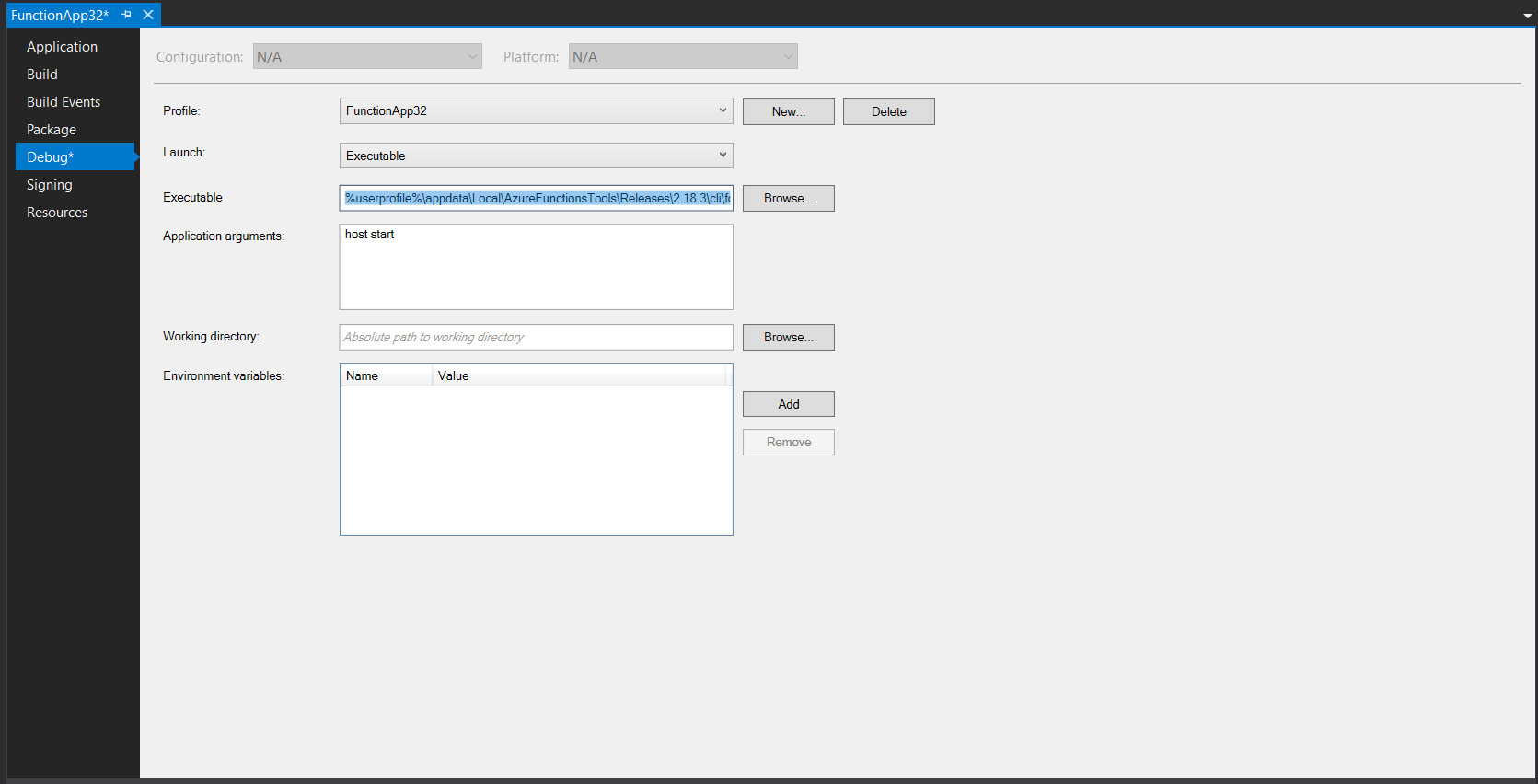
If you do not have %userprofile%appdataLocalAzureFunctionsToolsReleases2.18.3 folder on your machine, please download it manually following instructions here: https://github.com/Azure/azure-functions-tooling-feed/wiki/Fixing-Azure-Function-Core-Tools-download-issues-for-Visual-Studio#manually-download-and-extract-all-the-artifacts
pragnagopa
on 25 Mar 2019
Thanks @adstep for confirming. Pasting instructions here as well to roll back runtime used by VS
To use older runtime from Visual Studio, open debug options
- Set Executable to %userprofile%appdataLocalAzureFunctionsToolsReleases2.18.3clifunc.exe
- Set Application Arguments to host start
If you do not have %userprofile%appdataLocalAzureFunctionsToolsReleases2.18.3 folder on your machine, please download it manually following instructions here: https://github.com/Azure/azure-functions-tooling-feed/wiki/Fixing-Azure-Function-Core-Tools-download-issues-for-Visual-Studio#manually-download-and-extract-all-the-artifacts
Hi @pragnagopa
I'm not following your instructions on how to run the previous version of the runtime when I'm using Visual Studio 2017?
Can you tell me what you mean by "To use older runtime from Visual Studio, open debug options"?
If I change the "Debug Profile" in Visual Studio for the Project for "Launch" from "Project" to executable I see where I can specify the full path to the "%userprofile%appdataLocalAzureFunctionsToolsReleases2.18.3clifunc.exe"
What values do I put in for "Set Application Arguments to host start"?
Thanks,
Chris
chrislangston
on 26 Mar 2019
@chrislangston - Added screen shot above. Hope that helps.
pragnagopa
on 26 Mar 2019
@chrislangston - Added screen shot above. Hope that helps.
@pragnagopa Yes that is exactly what I was needing. Thank you so much for the quick reply. You're awesome!
chrislangston
on 26 Mar 2019
New release is out: https://github.com/Azure/azure-functions-host/releases/tag/v2.0.12382
 mhoeger
on 30 Mar 2019
mhoeger
on 30 Mar 2019
I just tried azure functions in visual studio 2019 today and the following was my experience.
I had to change csproj til targetframework to netstandard20 for the startup Configure method to be called when running locally.
Then everything ran fine locally.
Azure Functions Core Tools (2.5.553 Commit hash: b63f...
Functions Runtime Version 2.0.12382
When deploying to azure (following dialogs in visual studio and creating a new host and function app) application insights reports that the function fails and that its "unable to resolve service for type..." and when looking at SDK version in application insights its at azurefunctions: 2.0.12382.0 .
So my question is, should that not mean that my local host runner is the same as the one on azure and why does the code not behave identically? (dependency injection not resolving a constructor dependency).
 pksorensen
on 12 Apr 2019
pksorensen
on 12 Apr 2019
@pksorensen - can you share your deployed function app name, either directly or indirectly?
mhoeger
on 12 Apr 2019
@pksorensen can you please also share the version of the Microsoft.NET.Sdk.Functions package you're using? I suspect you're not on the latest version. Can you please update and retry?
 fabiocav
on 12 Apr 2019
fabiocav
on 12 Apr 2019
@mhoeger @fabiocav
When just using the newly created project in VS, it used 1.0.24 of the Sdk.Functions. I have updated that now to 1.0.26.
Just deployed it again to : https://earthmlsatellitesopenaccesshubingestor.azurewebsites.net
West Europe
pksorensen
on 12 Apr 2019
A different error now,
Access to the path 'D:\Program Files (x86)\SiteExtensions\Functions\2.0.12382\32bit\cache' is denied.
so looks like updating SDK functions worked. thats an application error
pksorensen
on 12 Apr 2019
Little remark about the 2.0.12342.0 run-time version. I've found out that the AddScoped works as AddSingleton in that version. The 2.0.12382.0 doesn't have known problems with the DI.
Actually I'm going to specify the exact version 2.0.12382.0 for all of my servers. The ~2 is dangerous because your production server can suddenly brake down after the runtime-version was changed by Azure team.
FedoroffSoft
on 16 Apr 2019
@FedoroffSoft and others - I would be careful of pining to a specific version of the functions host, as we sometimes do remove them. You can follow Azure/app-service-announcements where we post an issue when we do remove versions though (example: https://github.com/Azure/app-service-announcements/issues/167)
DI is a feature we're currently working on officially supporting, so thanks for your patience!
mhoeger
on 17 Apr 2019
As a FYI for anybody that might still run into this error, it will still occur if you provide a concrete class to AddTransient and use the concrete type as a constructor argument, but only once deployed. It runs fine locally. Any other combination (i.e. adding the abstract type as constructor argument or to AddTransient) will generate an error when running locally, but the other one wont. After correctly passing 2 type arguments to AddTransient it worked fine.
 binkiesjoris
on 23 May 2019
binkiesjoris
on 23 May 2019
Just in case this is helpful to anyone, I couldn't figure out why _none_ of my dependencies were being injected when running in a functions app despite working locally. (I had the same sort of exception as reported in this issue.)
Turns out I had the Microsoft.Azure.WebJobs.Script.ExtensionsMetadataGenerator package installed and removing that fixed it for me.
 bennor
on 12 Jun 2019
bennor
on 12 Jun 2019
@mhoeger Can you please let us know if this issue is fixed already on ~2?
 leszekkoc
on 13 Jun 2019
leszekkoc
on 13 Jun 2019
@leszekkoc - yes, the issue originally reported is fixed on ~2! We detail how to use DI on our docs page here. If you are still having issues with DI, please open up a new issue for us to investigate. Thanks!
mhoeger
on 13 Jun 2019
@mhoeger - the upgrade to Microsoft.NET.Sdk.Functions package version 1.0.29 has done the job in my case.
leszekkoc
on 14 Jun 2019
Still failing for me in azure when works locally. I am on 1.0.29, .net core 2.2, sdk 2.0.12507.0. I put a throw inside the startup class and it does not seem to hit that. Assembly tag is there. I had it working on an older sdk version. When I upgraded everything DI has stopped working. I went back to an hello world project with the same issues. Trying different combinations of libs but nothing working yet.
 grendo
on 30 Jun 2019
grendo
on 30 Jun 2019
@grendo - can you share your deployed function app name, either directly or indirectly?
mhoeger
on 1 Jul 2019
Any update on DI in Azure Functions? I've tried every solution provided here, but I cannot get DI to work on localhost. Every time got Microsoft.Extensions.DependencyInjection.Abstractions: Unable to resolve service for type error. I'm running newest Microsoft.NET.Sdk.Functions nuget (ver. 1.0.29).
 michalchecinski
on 12 Jul 2019
michalchecinski
on 12 Jul 2019
@michalchecinski the initial issue is a bit stale and prior to the DI changes. Can you please open a new issues with a repro/example of what your current setup so we can take a closer look?
fabiocav
on 13 Jul 2019
Related issues
 yvele
·
3Comments
yvele
·
3Comments
 christopheranderson
·
4Comments
christopheranderson
·
4Comments
 ahmelsayed
·
4Comments
ahmelsayed
·
4Comments
 justinyoo
·
3Comments
justinyoo
·
3Comments
 JasonBSteele
·
3Comments
JasonBSteele
·
3Comments
Most helpful comment
It has been more than a week and we still didn't get any response from Microsoft on this breaking issue. Microsoft basically silently breaks all my functions and hence a large part of my application without any acknowledgement email about critical issue.
This makes Azure Function feels like a beta product. Or is it?