Azure-functions-host: Expand/Improve Functions ARM APIs
Expand the set of Functions ARM APIs to cover scenarios that aren't possible currently via ARM. Another goal is to support the migration of the Functions portal to ARM apis solely, rather than accessing Kudu/Runtime APIs directly.
Some operations are already supported by existing ARM APIs even though the portal isn't using them currently. The new APIs needed include:
- host key apis (/host/keys), read/write/delete
- function key apis (/functions/
/keys), read/write/delete
This list isn't exhaustive.
 mathewc
All 30 comments
Moving to backlog since work is done - just waiting on release
mathewc
on 5 Mar 2019
@mathewc do you know what would be the ETA for the release that will include these changes? Is there a summary of what exactly has changed?
 vludax
on 12 Mar 2019
vludax
on 12 Mar 2019
Summary of updates:
- the list function(s) APIs updated to return the invoke_url_template for http trigger functions
- caching layer added to improve reliability
- new APIs added for key management
API samples below:
GET api/sites/{name}[/slots/{slot}]/functions
{
"value": [
{
"id": "/subscriptions/ED8A94B8-02F3-41DC-B9E9-468F5CF5B641/resourceGroups/Default-Web-EastUS/providers/Microsoft.Web/sites/functions-app/functions/HttpTrigger",
"name": "functions-app/HttpTrigger",
"type": "Microsoft.Web/sites/functions",
"location": "East US",
"properties": {
"name": "HttpTrigger",
"function_app_id": null,
"script_root_path_href": "https://functions-app.azurewebsites.net/admin/vfs/site/wwwroot/HttpTrigger/",
"script_href": "https://functions-app.azurewebsites.net/admin/vfs/site/wwwroot/HttpTrigger/run.csx",
"config_href": "https://functions-app.azurewebsites.net/admin/vfs/site/wwwroot/HttpTrigger/function.json",
"test_data_href": "https://functions-app.azurewebsites.net/admin/vfs/data/Functions/sampledata/HttpTrigger.dat",
"secrets_file_href": null,
"href": "https://functions-app.azurewebsites.net/admin/functions/HttpTrigger",
"config": {
"bindings": [
{
"type": "httpTrigger",
"name": "req",
"direction": "in",
"methods": [
"get"
],
"route": "products/{category:alpha?}/{id:int?}"
},
{
"type": "http",
"name": "$return",
"direction": "out"
}
]
},
"files": null,
"test_data": null,
"invoke_url_template": "https://functions-app.azurewebsites.net/api/products/{category:alpha?}/{id:int?}",
"language": "CSharp"
}
}
],
"nextLink": null,
"id": null
}
GET api/sites/{name}[/slots/{slot}]/functions/{functionName}
{
"id": "/subscriptions/ED8A94B8-02F3-41DC-B9E9-468F5CF5B641/resourceGroups/Default-Web-EastUS/providers/Microsoft.Web/sites/functions-app/functions/httptrigger",
"name": "functions-app/HttpTrigger",
"type": "Microsoft.Web/sites/functions",
"location": "East US",
"properties": {
"name": "HttpTrigger",
"function_app_id": null,
"script_root_path_href": "https://functions-app.azurewebsites.net/admin/vfs/site/wwwroot/HttpTrigger/",
"script_href": "https://functions-app.azurewebsites.net/admin/vfs/site/wwwroot/HttpTrigger/run.csx",
"config_href": "https://functions-app.azurewebsites.net/admin/vfs/site/wwwroot/HttpTrigger/function.json",
"test_data_href": "https://functions-app.azurewebsites.net/admin/vfs/data/Functions/sampledata/HttpTrigger.dat",
"secrets_file_href": null,
"href": "https://functions-app.azurewebsites.net/admin/functions/HttpTrigger",
"config": {
"bindings": [
{
"type": "httpTrigger",
"name": "req",
"direction": "in",
"methods": [
"get"
],
"route": "products/{category:alpha?}/{id:int?}"
},
{
"type": "http",
"name": "$return",
"direction": "out"
}
]
},
"files": null,
"test_data": null,
"invoke_url_template": "https://functions-app.azurewebsites.net/api/products/{category:alpha?}/{id:int?}",
"language": "CSharp"
}
}
POST api/sites/{name}[/slots/{slot}]/functions/{functionName}/listkeys
{
"default": "<keyvalue>",
"test-key-2": "<keyvalue>"
}
PUT api/sites/{name}[/slots/{slot}]/functions/{functionName}/keys/{keyName}
{
"properties": {
"name":"<keyName>",
"value":<keyValue>"
}
}
{
"id": "/subscriptions/ED8A94B8-02F3-41DC-B9E9-468F5CF5B641/resourceGroups/Default-Web-EastUS/providers/Microsoft.Web/sites/functions-app/functions/httptrigger/keys/test-key",
"name": "test-key",
"type": "Microsoft.Web/sites/functions/keys",
"location": "East US",
"properties": {
"name": "test-key",
"value": "<keyvalue>"
}
}
DELETE api/sites/{name}[/slots/{slot}]/functions/{functionName}/keys/{keyName}
Response: 204 NoContent
POST api/sites/{name}[/slots/{slot}]/host/default/listkeys
{
"masterKey": "<keyvalue>",
"functionKeys": {
"default": "<keyvalue>",
"my-key": "<keyvalue>"
},
"systemKeys": {
"test-system": "<keyvalue>",
"my-key": "<keyvalue>"
}
}
PUT api/sites/{name}[/slots/{slot}]/host/default/{functionkeys|systemkeys}/{keyName}
{
"properties": {
"name":"<keyName>",
"value":<keyValue>"
}
}
{
"id": "/subscriptions/ED8A94B8-02F3-41DC-B9E9-468F5CF5B641/resourceGroups/Default-Web-EastUS/providers/Microsoft.Web/sites/functions-app/host/default/functionkeys/test-key",
"name": "test-key",
"type": "Microsoft.Web/sites/host/functionkeys",
"location": "East US",
"properties": {
"name": "test-key",
"value": "<keyvalue>"
}
}
DELETE api/sites/{name}[/slots/{slot}]/host/default/{functionkeys|systemkeys}/{keyName}
Response: 204 NoContent
POST /api/sites/{name}[/slots/{slot}]/host/default/sync
{
"status": "success"
}
POST /api/sites/{name}[/slots/{slot}]/host/default/listsyncstatus
{
"status": "success"
}
@mathewc how does one use this from an ARM template to retrieve the default host key?
 john-mills-nz
on 9 May 2019
john-mills-nz
on 9 May 2019
You can call the host/default/listkeys API which returns the masterKey as part of the json response.
mathewc
on 9 May 2019
@mathewc Thanks for replying. I could not find any documentation about host/default/listkeys but I was able to get the default host key using admin/host/keys/{keyname} using REST via Postman and PowerShell. However, I am trying to get this value from inside an ARM JSON template. Is this possible? Is there a way to call the REST APIs from the ARM template or using listkeys or listsecrets?
john-mills-nz
on 9 May 2019
Note that this new API isn't released yet. The update is rolling out with an ETA of a couple weeks. So doc etc. isn't updated yet. Once the APIs are live I'll update this issue.
mathewc
on 9 May 2019
@mathewc - I assume "POST api/sites/{name}[/slots/{slot}]/functions/{functionName}/listkeys" would only work after the functions have been deployed to the function app right? I.e., I wouldn't be able to retrieve a key or full webhook URL for a specific function name before it's been deployed (i.e., no 'placeholder' feature in the works in addition to this API update)?
 nzthiago
on 15 May 2019
nzthiago
on 15 May 2019
No - if the specified functionName isn't a function, you'll get a 404.
mathewc
on 15 May 2019
Thanks for all the info above.
@mathewc - Do we know when we will have the ability to get the Function App Host key directly from an ARM Template? Using ListSecrets doesn't only gets the individual Functions rather than the Function App key.
Unless i'm missing something and this is something that's already available to use?
Cheers
Nick
 NickBlackburn
on 22 May 2019
NickBlackburn
on 22 May 2019
That question was answered above - you can call the host/default/listkeys API which returns the masterKey as part of the json response. Just waiting for the deployment of this to continue - it's not done yet.
mathewc
on 23 May 2019
@mathewc Will this be in v1 and v2 of the host runtime or just v2?
 oatsoda
on 28 May 2019
oatsoda
on 28 May 2019
ARM APIs will work regardless of version
mathewc
on 28 May 2019
Is it possible to create and delete Host keys/function key from ARM templates now?
 SaiGopal90
on 10 Jun 2019
SaiGopal90
on 10 Jun 2019
Closing this since these APIs are now live.
mathewc
on 18 Jun 2019
@mathewc Is there any documentation explaining how to use this via an ARM template? I am unsure how to get the Host key via ARM.
e.g.
Variables:
"functionAppId": "[concat(resourceGroup().id,'/providers/Microsoft.Web/sites/', parameters('functionName'))]"
Template:
listkeys(variables('functionAppId'),'2016-08-01').key
oatsoda
on 26 Jun 2019
OK, so I managed to figure out how to get the Master Key:
listkeys(concat(variables('functionAppId'), '/host/default/'),'2016-08-01').masterKey
Still struggling to get a named Host key though....If I use systemKeys instead of masterKey I get 400 bad request...
oatsoda
on 26 Jun 2019
Right - also issue https://github.com/Azure/Azure-Functions/issues/1007 shows a template example of this. You don't list named keys individually for host keys - the host listkeys operation returns a json response containing all the keys:
{
"masterKey": "<keyvalue>",
"functionKeys": {
"default": "<keyvalue>",
"myKey": "<keyvalue>"
},
"systemKeys": {
"test-system": "<keyvalue>",
"my-key": "<keyvalue>"
}
}
and you can dot into them as needed in your template (e.g. systemKeys['test-system'], functionKeys.myKey, etc.).
mathewc
on 26 Jun 2019
@mathewc Thanks for your reply.
I cannot get that syntax working in an ARM template. If I take my working example with masterKey:
listkeys(concat(variables('functionAppId'), '/host/default/'),'2016-08-01').masterKey
And try either:
listkeys(concat(variables('functionAppId'), '/host/default/'),'2016-08-01').systemKeys.default
or
listkeys(concat(variables('functionAppId'), '/host/default/'),'2016-08-01').systemKeys['default']
Then I get the error:
New-AzureRmResourceGroupDeployment : 11:27:43 - Resource Microsoft.Web/sites/config '<webapp>/appsettings' failed with message '{
"error": {
"code": "InvalidTemplate",
"message": "Unable to process template language expressions for resource
'/subscriptions/<subid>/resourceGroups/<resgrp>/providers/Microsoft.Web/sites/<webapp>/config/appsettings' at line '321'
and column '13'. 'The language expression property 'default' doesn't exist, available properties are 'eventgridextensionconfig_extension'.'",
"additionalInfo": [
{
"type": "TemplateViolation",
"info": {
"lineNumber": 321,
"positionNumber": 13,
"snippet": ""
}
}
]
}
}'
I can confirm that I do have a default key too. I've tried creating my own and referencing that instead - just in case the default one is a special case - but that causes the same error.
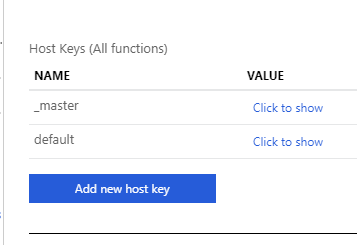
oatsoda
on 27 Jun 2019
There is no 'default' system key. The 'default' key shown in the portal is actually the functionKeys.default key. The structure is as I listed above in my sample response. You can also dump your own keys and see the structure you're working with.
mathewc
on 27 Jun 2019
@mathewc Are "systemkeys" Host Keys then?
In the portal I have both a default function key and a default Host key...
I'll try and call the rest API manually but I was struggling with the authentication!
oatsoda
on 27 Jun 2019
All the keys returned from the host/default/listkeys are considered host level keys, in that they aren't scoped to a single function. In the manage tab for an http function, the portal shows:
- A "function keys" section that contains only keys created specifically for the function. Those keys ONLY work for this single function. The keys shown here can be retrieved via the
.../functions/{name}/listkeysAPI - A "host keys" section that shows keys that work for ALL functions. That includes the master key of course, as well as any host level function keys, which work for all functions
System keys aren't currently shown in the portal. These are keys created for special uses, e.g. EventGrid triggers, etc. that you don't manage directly.
mathewc
on 27 Jun 2019
@mathewc OK, thanks, I think I understand!. So to confirm, that means I should use "functionKeys.default" to retrieve the key that is called "default" in the Host Keys section in the portal?
oatsoda
on 27 Jun 2019
So to conclude here is a sample to inject a default functions key in a key vault secret
"variables": {
    "functionAppId": "[concat(parameters('functionAppResourceGroup'),'/providers/Microsoft.Web/sites/', parameters('functionAppName'))]"
},
"resources": [
    {
        "type": "Microsoft.KeyVault/vaults/secrets",
        "name": "[concat(parameters('keyVaultName'),'/', parameters('functionAppName'))]",
        "apiVersion": "2015-06-01",
        "properties": {
        "contentType": "text/plain",
        "value": "[listkeys(concat(variables('functionAppId'), '/host/default/'),'2016-08-01').functionKeys.default]"
        },
        "dependsOn": []
    }
]
 DibranMulder
on 2 Jul 2019
DibranMulder
on 2 Jul 2019
Fun fact, when the Function App is stopped then the ARM deployment will throw a bad request.
{
    "Code": "Unauthorized",
    "Message": "Encountered an error (Forbidden) from extensions API.",
    "Target": null,
    "Details": [
        {
            "Message": "Encountered an error (Forbidden) from extensions API."
        },
        {
            "Code": "Unauthorized"
        },
        {
            "ErrorEntity": {
                "Code": "Unauthorized",
                "Message": "Encountered an error (Forbidden) from extensions API."
            }
        }
    ]
}
Here's an example of an ARM template with integration between Event Grid and functions
 jcbrooks92
on 20 Jul 2019
jcbrooks92
on 20 Jul 2019
@mathewc : Thanks. I have started using the list keys functions through ARM. But randomly it is giving wrong Host key. Is this something to do with the API version in listkeys call ? Is there any new API version released. I am using Function App V2. Below is the list keys call i have added.
[listkeys(concat(variables('functionAppId'), '/host/default'), '2018-11-01')]
Should i update '2018-11-01' to some new value ?
 lekhas01
on 31 Jul 2019
lekhas01
on 31 Jul 2019
{
  "id": "/subscriptions/ED8A94B8-02F3-41DC-B9E9-468F5CF5B641/resourceGroups/Default-Web-EastUS/providers/Microsoft.Web/sites/functions-app/host/default/functionkeys/test-key",
  "name": "test-key",
  "type": "Microsoft.Web/sites/host/functionkeys",
  "location": "East US",
  "properties": {
    "name": "test-key",
    "value": "<keyvalue>"
  }
}
is it possible to deploy this resource to different ResourceGroup than defined in template? "'ResourceGroup' property is not supported for resource type"
 Planche95
on 28 Oct 2019
Planche95
on 28 Oct 2019
@mathewc i tried to get the key with the api you post, however I got the below error.
This command is in preview. It may be changed/removed in a future release.
 npcXxX
on 5 Nov 2019
npcXxX
on 5 Nov 2019
Which API specifically? What version of CLI/SDK are you using? This isn't coming from the backend - the APIs are definitely not in preview. Are you using the az rest command (as per here)? Likely it's the CLI command that is in preview.
mathewc
on 5 Nov 2019
Related issues
 justinyoo
·
3Comments
justinyoo
·
3Comments
 alaatm
·
4Comments
alaatm
·
4Comments
 rati3l
·
3Comments
rati3l
·
3Comments
 slim-souissi
·
3Comments
slim-souissi
·
3Comments
 shibayan
·
3Comments
shibayan
·
3Comments
Most helpful comment
So to conclude here is a sample to inject a default functions key in a key vault secret