Azure-functions-host: The binding type(s) 'queueTrigger' are not registered.
When I run my very basic C# function locally, it will not work with queueTrigger input bindings. It will compile but it will not run. I get the error:
Function1: The binding type(s) 'queueTrigger' are not registered. Please ensure the type is correct and the binding extension is installed.
This wasn't a problem for me several weeks ago before I upgraded to the latest version of everything. And I definitely DO have the Microsoft.Azure.WebJobs.Extensions.Storage nuget package installed.
What I'm running:
Azure Functions Core Tools 2.3.199
Function Runtime Version: 2.0.12246.0
Functions SDK 1.0.24
netcoreapp2.2
VS2017
I have two functions defined. The one set up with QueueTrigger input will not work. My second function which uses a TimerTrigger works fine.
using System;
using Microsoft.Azure.WebJobs;
using Microsoft.Azure.WebJobs.Host;
using Microsoft.Extensions.Logging;
using Microsoft.WindowsAzure.Storage.Table;

namespace FunctionAppTest
{
    public static class Function1
    {
        [FunctionName("Function1")]
        public static void Run([QueueTrigger("myqueue-items", Connection = "defaultConnection")]string myQueueItem, ILogger log)
        {
            log.LogInformation($"C# Queue trigger function processed: {myQueueItem}");
        }

        [FunctionName("FunctionTimer")]
        public static void Run2([TimerTrigger("0 * * * * *")] TimerInfo timer, ILogger log)
        {
            log.LogInformation($"C# Queue trigger function processed: {timer}");
        }
    }
}
Console window gives me this output:
Azure Functions Core Tools (2.3.199 Commit hash: fdf734b09806be822e7d946fe17928b419d8a289)
Function Runtime Version: 2.0.12246.0
[1/7/2019 3:47:33 AM] Starting Rpc Initialization Service.
[1/7/2019 3:47:33 AM] Initializaing RpcServer
[1/7/2019 3:47:33 AM] Building host: startup suppressed:False, configuration suppressed: False
[1/7/2019 3:47:33 AM] Reading host configuration file 'C:\Users\danzo\Source\repos\FunctionAppTest\FunctionAppTest\bin\Debug\netcoreapp2.2\host.json'
[1/7/2019 3:47:33 AM] Host configuration file read:
[1/7/2019 3:47:33 AM] {
[1/7/2019 3:47:33 AM]   "version": "2.0"
[1/7/2019 3:47:33 AM] }
[1/7/2019 3:47:33 AM] Initializing Host.
[1/7/2019 3:47:33 AM] Host initialization: ConsecutiveErrors=0, StartupCount=1
[1/7/2019 3:47:33 AM] Starting JobHost
[1/7/2019 3:47:33 AM] Starting Host (HostId=desktopsa5rdrj-1278724627, InstanceId=aaead7b2-c480-49d0-82ba-013cd55293ef, Version=2.0.12246.0, ProcessId=18404, AppDomainId=1, InDebugMode=False, InDiagnosticMode=False, FunctionsExtensionVersion=)
[1/7/2019 3:47:33 AM] Loading functions metadata
[1/7/2019 3:47:33 AM] 2 functions loaded
[1/7/2019 3:47:33 AM] WorkerRuntime: dotnet. Will shutdown other standby channels
[1/7/2019 3:47:34 AM] Generating 1 job function(s)
[1/7/2019 3:47:34 AM] Found the following functions:
[1/7/2019 3:47:34 AM] FunctionAppTest.Function1.Run2
[1/7/2019 3:47:34 AM]
[1/7/2019 3:47:34 AM] Host initialized (599ms)
[1/7/2019 3:47:34 AM] Executing 'FunctionTimer' (Reason='Timer fired at 2019-01-06T22:47:34.7538352-05:00', Id=f39a1425-2318-44fc-8ede-45dda8b705c7)
[1/7/2019 3:47:34 AM] C# Queue trigger function processed: Microsoft.Azure.WebJobs.TimerInfo
[1/7/2019 3:47:34 AM] Executed 'FunctionTimer' (Succeeded, Id=f39a1425-2318-44fc-8ede-45dda8b705c7)
[1/7/2019 3:47:35 AM] The next 5 occurrences of the 'FunctionAppTest.Function1.Run2' schedule will be:
[1/7/2019 3:47:35 AM] 1/6/2019 10:48:00 PM
[1/7/2019 3:47:35 AM] 1/6/2019 10:49:00 PM
[1/7/2019 3:47:35 AM] 1/6/2019 10:50:00 PM
[1/7/2019 3:47:35 AM] 1/6/2019 10:51:00 PM
[1/7/2019 3:47:35 AM] 1/6/2019 10:52:00 PM
[1/7/2019 3:47:35 AM]
[1/7/2019 3:47:35 AM] Host started (1399ms)
[1/7/2019 3:47:35 AM] Job host started
[1/7/2019 3:47:35 AM] The following 1 functions are in error:
[1/7/2019 3:47:35 AM] Function1: The binding type(s) 'queueTrigger' are not registered. Please ensure the type is correct and the binding extension is installed.
[1/7/2019 3:47:35 AM]
Hosting environment: Production
Content root path: C:\Users\danzo\Source\repos\FunctionAppTest\FunctionAppTest\bin\Debug\netcoreapp2.2
Now listening on: http://0.0.0.0:7071
Application started. Press Ctrl+C to shut down.
[1/7/2019 3:47:40 AM] Host lock lease acquired by instance ID '0000000000000000000000007E11F9F3'.
My debug window gives me this output:
ScriptHost
IWebJobsExceptionHandlerFactory
IHost
IEventCollectorFactory
IConfiguration
'func.exe' (CoreCLR: clrhost): Loaded 'C:\Users\danzo\AppData\Local\AzureFunctionsTools\Releases\2.15.0\cli\System.Threading.Tasks.Dataflow.dll'. Skipped loading symbols. Module is optimized and the debugger option 'Just My Code' is enabled.
'func.exe' (CoreCLR: clrhost): Loaded 'C:\Users\danzo\AppData\Local\AzureFunctionsTools\Releases\2.15.0\cli\Microsoft.Azure.WebJobs.Logging.dll'.
IHostingEnvironment
IConfiguration
IOptions`1
ILoggerFactory
DistributedLockManagerContainerProvider
DefaultTriggerBindingFactory
IExtensionRegistryFactory
IConfiguration
IConfiguration
DefaultScriptWebHookProvider
CompositeBindingProviderFactory
IJobHostMetadataProviderFactory
'func.exe' (CoreCLR: clrhost): Loaded 'C:\Users\danzo\AppData\Local\AzureFunctionsTools\Releases\2.15.0\cli\System.Runtime.Loader.dll'. Skipped loading symbols. Module is optimized and the debugger option 'Just My Code' is enabled.
ILoggerFactory
IEnumerable`1
ScriptHost
ScriptHost
Exception thrown: 'System.IO.FileNotFoundException' in System.Private.CoreLib.dll
'func.exe' (CoreCLR: clrhost): Loaded 'C:\Users\danzo\Source\repos\FunctionAppTest\FunctionAppTest\bin\Debug\netcoreapp2.2\bin\FunctionAppTest.dll'. Symbols loaded.
Exception thrown: 'Microsoft.Azure.WebJobs.Script.FunctionConfigurationException' in Microsoft.Azure.WebJobs.Script.dll
Exception thrown: 'Microsoft.Azure.WebJobs.Script.FunctionConfigurationException' in System.Private.CoreLib.dll
Exception thrown: 'Microsoft.Azure.WebJobs.Script.FunctionConfigurationException' in System.Private.CoreLib.dll
'func.exe' (CoreCLR: clrhost): Loaded 'C:\Users\danzo\AppData\Local\AzureFunctionsTools\Releases\2.15.0\cli\NCrontab.Signed.dll'. Skipped loading symbols. Module is optimized and the debugger option 'Just My Code' is enabled.
'func.exe' (CoreCLR: clrhost): Loaded 'C:\Users\danzo\AppData\Local\AzureFunctionsTools\Releases\2.15.0\cli\Microsoft.CodeAnalysis.Scripting.dll'. Skipped loading symbols. Module is optimized and the debugger option 'Just My Code' is enabled.
'func.exe' (CoreCLR: clrhost): Loaded 'C:\Users\danzo\AppData\Local\AzureFunctionsTools\Releases\2.15.0\cli\NuGet.ProjectModel.dll'. Skipped loading symbols. Module is optimized and the debugger option 'Just My Code' is enabled.
'func.exe' (CoreCLR: clrhost): Loaded 'C:\Users\danzo\AppData\Local\AzureFunctionsTools\Releases\2.15.0\cli\NuGet.Versioning.dll'. Skipped loading symbols. Module is optimized and the debugger option 'Just My Code' is enabled.
'func.exe' (CoreCLR: clrhost): Loaded 'C:\Users\danzo\AppData\Local\AzureFunctionsTools\Releases\2.15.0\cli\NuGet.LibraryModel.dll'. Skipped loading symbols. Module is optimized and the debugger option 'Just My Code' is enabled.
'func.exe' (CoreCLR: clrhost): Loaded 'C:\Users\danzo\AppData\Local\AzureFunctionsTools\Releases\2.15.0\cli\System.Reflection.Emit.dll'. Skipped loading symbols. Module is optimized and the debugger option 'Just My Code' is enabled.
'func.exe' (CoreCLR: clrhost): Loaded 'ScriptHost'.
Exception thrown: 'System.IO.FileNotFoundException' in System.Private.CoreLib.dll
'func.exe' (CoreCLR: clrhost): Loaded 'C:\Users\danzo\Source\repos\FunctionAppTest\FunctionAppTest\bin\Debug\netcoreapp2.2\bin\Microsoft.Azure.WebJobs.Extensions.Storage.dll'.
'func.exe' (CoreCLR: clrhost): Loaded 'C:\Users\danzo\AppData\Local\AzureFunctionsTools\Releases\2.15.0\cli\System.Net.Security.dll'. Skipped loading symbols. Module is optimized and the debugger option 'Just My Code' is enabled.
'func.exe' (CoreCLR: clrhost): Loaded 'C:\Users\danzo\AppData\Local\AzureFunctionsTools\Releases\2.15.0\cli\System.Text.Encoding.dll'. Skipped loading symbols. Module is optimized and the debugger option 'Just My Code' is enabled.
Exception thrown: 'System.Threading.Tasks.TaskCanceledException' in System.Private.CoreLib.dll
IScriptJobHost
IOptions`1
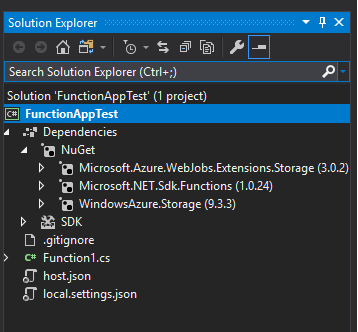
Here is what my solution looks like:
What I've tried:
I've tried changing frameworks to .net core 2.1 and 2.0, even .net standard 2.0.
I've tried rolling back to previous nuget versions of the various packages (3.0.1 and 3.0.0 of storage extensions, 1.0.23 of functions sdk, 9.3.1 of azure storage).
I've tried manually starting my function using the functions host (func.exe).
FWIW, I get the same error if I try to use Cosmos DB input bindings.
This is obviously not a production app but my real app is having the same issue when I run it locally and I do need it working in production very soon. Any help would be GREATLY appreciated!
Thanks,
Dan
 danielzoeller
All 13 comments
I too am having exactly this issue. Did you manage to get it to work in the end or are you still looking for assistance?
If anyone can provide any input I'd be extremely grateful.
 alexhitchins
on 29 Jan 2019
alexhitchins
on 29 Jan 2019
No, I never figured it out. I narrowed it down to a nuget problem (I think) but I ended up having to basically wipe my machine and reinstall everything (vs2017, .net core, etc). It was as if my development machine had become very confused on where to look for nuget packages.
danielzoeller
on 29 Jan 2019
I am also getting
Exception thrown: 'System.Threading.Tasks.TaskCanceledException' in System.Private.CoreLib.dll
IScriptJobHost
IOptions`1
in DEBUG window when I run my azure functions locally, but that does not stop my function from running. It works perfectly but I am not sure how that error is coming, there is surely something wrong but it does not give any exception, it just logs in the DEBUG output window vs 2017
 Aditi-Kradle
on 12 Feb 2019
Aditi-Kradle
on 12 Feb 2019
I am also encountering this issue. V1 functions are fine, it's V2 causing an issue. HttpTrigger binding is fine, QueueTrigger binding gives the dreaded "The binding type(s) 'queueTrigger' are not registered. Please ensure the type is correct and the binding extension is installed." I have the Microsoft.Azure.WebJobs.Extensions.Storage NuGet package installed as well.
 Furynation
on 16 Feb 2019
Furynation
on 16 Feb 2019
@Furynation same for me and it's driving me nuts! One thing I'm finding strange that I'm digging into is my Azure Functions Core Tools say they're version 2.4.379 (hash: ab2c4db3b43f9662b82494800dd770698788bf2d) but it appears the latest is 2.4.317. Not sure if it's related but what I'm digging into now.
 davidkassa
on 21 Feb 2019
davidkassa
on 21 Feb 2019
This is (mostly) working for me. https://github.com/Azure/Azure-Functions/issues/928#issuecomment-466093874
davidkassa
on 21 Feb 2019
Have you installed the extensions (https://docs.microsoft.com/en-us/azure/azure-functions/functions-run-local#register-extensions)?
func extensions install
 dhensby
on 25 Mar 2019
dhensby
on 25 Mar 2019
What worked for me was creating a file called extensions.json like this:
{
  "extensions":[
    { "name": "AzureStorage", "typeName":"Microsoft.Azure.WebJobs.Extensions.Storage.AzureStorageWebJobsStartup, Microsoft.Azure.WebJobs.Extensions.Storage, Version=3.0.5.0, Culture=neutral, PublicKeyToken=31bf3856ad364e35"}
  ]
}
and placing it in the bin folder with the .dlls
 amieres
on 8 Apr 2019
amieres
on 8 Apr 2019
I had the same problem in a project I'm working on and was able to narrow down the cause of this.
In my case a custom nuget.config file was causing the problem, which looks like this (actual package sources removed):
<?xml version="1.0" encoding="utf-8"?>
  <configuration>
    <config>
      <add key="globalPackagesFolder" value=".\packages" />
    </config>

    <packageSources>
        <clear />
        <add key="someLocalTfsServer" />
        <add key="anotherLocalTfsServer" />
        <add key="nuget.org" value="https://api.nuget.org/v3/index.json" protocolVersion="3" />
    </packageSources>

    <disabledpackagesources>
        ...
    </disabledpackagesources>

</configuration>
The specific line which is causing the problem is:
<add key="globalPackagesFolder" value=".\packages" />
When removing the line defining the global package folder my problem was gone, I was able to reproduce this every time I added the line back. I'm not sure what is causing this behaviour since the required package (in my case microsoft.azure.webjobs.extensions.storage) exists in the global packages folder.
The output also contains an interesting FileNotFoundException (excerpt):
IEnumerable`1
ScriptHost
ScriptHost
Exception thrown: 'System.IO.FileNotFoundException' in System.Private.CoreLib.dll
'func.exe' (CoreCLR: clrhost): Loaded …
….
….
IScriptJobHost
So it seems like it might not find the required package when the package folder is higher up (or just not at the default location) in the project hierarchy. This exception does not occur when I use the nuget.config without the globalPackageFolder definition.
 RobinTTY
on 9 Apr 2019
RobinTTY
on 9 Apr 2019
In my case it looks like the format and storage of extension bundles changed between versions. I just went into my AppData\Local\Temp\Functions folder and renamed the existing extension bundles to disabled, and it redownloaded them and then worked fine.
Probably a breaking change that didn't get detected in QA.
 JustinGrote
on 31 May 2019
JustinGrote
on 31 May 2019
I had the same error "The binding type(s) 'queueTrigger' are not registered. Please ensure the type is correct and the binding extension is installed." with output log
Exception thrown: 'System.IO.FileNotFoundException' in System.Private.CoreLib.dll
'func.exe' (CoreCLR: clrhost): Loaded …
Not exactly sure what was wrong but I updated all nuget packages for which an updated version was available and it worked.
 ArpitLabs
on 24 Jun 2019
ArpitLabs
on 24 Jun 2019
Try to erase your C:\users[user]\AppData\Local\Temp\Functions as it is the place where the VS2017 stores binding bundles. It solved my issue.
 PetrPospisil
on 4 Jul 2019
PetrPospisil
on 4 Jul 2019
Closing this issue as the details here mix of using bundles and not using bundles. Please open separate issue.
@ArpitLabs - please open separate issue with repro details including if you are using extension bundles or not.
 pragnagopa
on 16 Jul 2019
pragnagopa
on 16 Jul 2019
Related issues
 shibayan
·
3Comments
shibayan
·
3Comments
 silencev
·
4Comments
silencev
·
4Comments
 ladeak
·
3Comments
ladeak
·
3Comments
 svickers
·
3Comments
svickers
·
3Comments
 krillehbg
·
3Comments
krillehbg
·
3Comments
Most helpful comment
What worked for me was creating a file called
extensions.jsonlike this:and placing it in the
binfolder with the .dlls