Azure-functions-host: V2 Function not scaling for Servicebus trigger
We have a V2 function app created by VS 2017 (15.9.0) which contains a single function triggered by listening to a servicebus subscription. For each message read, we are simulating 30 secs of cpu intensive work. We submitted 250 messages to the servicebus topic. The messages are read, but only a single function instance is created; ie. no function server instance scaling. The single instance is running at 100% cpu and 160MB memory
When doing exactly the same but with a v1 function, the number of servers scales up within 5 seconds.
Our issue is: why is the v2 function not scaling ?
Update: Mitigation steps are to do one of the following: (1) Restart the function app, (2) Disable / enable a function inside the function app, (3) Update an app setting in the Portal
Investigative information
Please provide the following:
- Timestamp: 2018-11-14T15:21:05.000Z
- Function App version (1.0 or 2.0): 2.0
- Function App name: andyTestV2
- Function name(s) (as appropriate): Function1
- Invocation ID: 283eb6f3-b8d1-4b54-822f-b47d3fd5ba4b
- Region: UK South
Repro steps
- create new function v2 app in vs 2017
- use code below to create new test function
- publish to azure function app
- submit messages service bus topic
Expected behavior
When submitting over 100 messages
The function should scale out (have multiple server instances)
Actual behavior
Only a single server instance is created.
Known workarounds
Revert to v1 function
Related information
I also tried with an empty host.json with the same results
FunctionApp1.csproj
<Project Sdk="Microsoft.NET.Sdk">
  <PropertyGroup>
    <TargetFramework>netcoreapp2.1</TargetFramework>
    <AzureFunctionsVersion>v2</AzureFunctionsVersion>
  </PropertyGroup>
  <ItemGroup>
    <PackageReference Include="Microsoft.Azure.WebJobs.Extensions.ServiceBus" Version="3.0.0" />
    <PackageReference Include="Microsoft.NET.Sdk.Functions" Version="1.0.*" />
  </ItemGroup>
  <ItemGroup>
    <None Update="host.json">
      <CopyToOutputDirectory>PreserveNewest</CopyToOutputDirectory>
    </None>
    <None Update="local.settings.json">
      <CopyToOutputDirectory>PreserveNewest</CopyToOutputDirectory>
      <CopyToPublishDirectory>Never</CopyToPublishDirectory>
    </None>
  </ItemGroup>
</Project>
host.json
{
  "version": "2.0",

  "functionTimeout": "00:10:00",

  "extensions": {
    "serviceBus": {
      "messageHandlerOptions": {
        "autoComplete": true,
        "maxConcurrentCalls": 6
      }
    }
  }

}
Function Source
using System;
using Microsoft.Azure.WebJobs;
using Microsoft.Extensions.Logging;

namespace FunctionApp1
{
    public static class Function1
    {
        [FunctionName("Function1")]
        public static void Run([ServiceBusTrigger("UpdateRequestTopic", "UpdateRequestSubscription", Connection = "ServiceBusConnectionString")]string mySbMsg, ILogger log, ExecutionContext context)
        {
            log.LogInformation($"C# ServiceBus topic trigger function processing message: {mySbMsg}  InvocationId: {context.InvocationId}");
            SlowProcess(30);
        }


        public static void SlowProcess(int secondsToProcess)
        {
            long nthPrime = FindPrimeNumber(secondsToProcess);
        }

        private static long FindPrimeNumber(int secondsToProcess)
        {
            DateTime finish = DateTime.UtcNow.AddSeconds(secondsToProcess);

            int count = 0;
            long a = 2;
            //while (count < n)
            while (DateTime.UtcNow < finish)
            {
                long b = 2;
                int prime = 1;// to check if found a prime
                while (b * b <= a)
                {
                    if (a % b == 0)
                    {
                        prime = 0;
                        break;
                    }
                    b++;
                }
                if (prime > 0)
                {
                    count++;
                }
                a++;
            }
            return (--a);
        }
    }
}
 AndyBensonTSB
All 22 comments
I noticed a similar issue where my functions wont scale past a single instance but did scale to 150+ instances a week prior. My workaround was to force my runtime to the following version: 2.0.12134
I was on 2.0.12165 and have the same issue on 2.0.12161
 JacquesCC
on 14 Nov 2018
JacquesCC
on 14 Nov 2018
@mhoeger can you triage/assign this for investigation? based on a recent regression, this may also be related to Easy Auth.
 fabiocav
on 14 Nov 2018
fabiocav
on 14 Nov 2018
Many thanks @JacquesCC
Changed the runtime to 2.0.12134.0 and scaling worked immediately.
AndyBensonTSB
on 15 Nov 2018
@fabiocav
I didn't want to create another issue (happy to if you want), but i can confirm that this is happening to queue triggered functions as well and that the runtime downgrade mentioned by @JacquesCC (thanks) fixes it
Our function that generates and processes 2+ million queue messages did not scale past a single instance since i kicked things off last night.
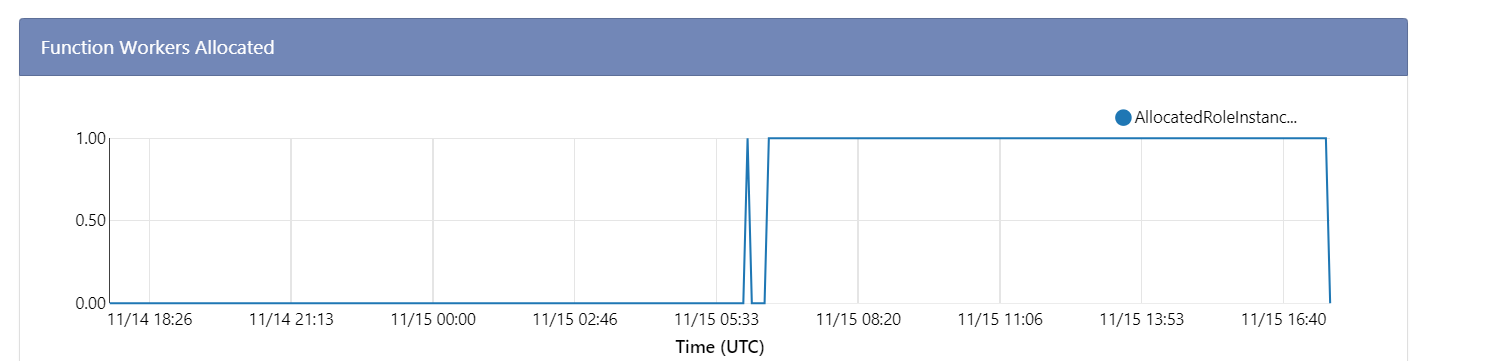
I just tried the runtime downgrade and less then ten minutes later, i'm at 5+ instances and rising fast!

 mayoatte
on 15 Nov 2018
mayoatte
on 15 Nov 2018
Curious, if you remove the version downgrade/pinning, do you see the issue resurfaced? The fact that it started working may have less to do with the actual target version, but more with what happens when you make that change. Trying to get clarity on that.
fabiocav
on 15 Nov 2018
@fabiocav
I was trying your suggestion (i am also interested in the answer) but i'm seeing something strange that i wanted to note.
I changed it back to ~2 and then shut down the app so the instances could go down to zero. But i see that two instances are still alive and processing records even after the shutdown (all the others shut down).


I know the image above says 1 instance left (it went from 2 to 1 in the time it took to take the screenshot), Seems to have taken several minutes for those last two to get the message that the app was shut down.
I'll start the app back up when it hits zero.
Edit: Activity log says 20 minutes since i shut down the function app and that one instance is still running and processing requests. The server name in the live stream is: 8b8d07e846406e899a76395084da415a5e3754ca628c2d004bf67f9644c81e7b
mayoatte
on 15 Nov 2018
@fabiocav
Alrighty. The last instance stopped and i restarted the function app (extension version ~2) and now it seems to be scaling past one instance (8 instances with 84k messages in the queue).

mayoatte
on 15 Nov 2018
Also. @AndyBensonTSB i just realized i'm monopolizing your thread. Apologies. Happy to move the discussion elswhere if you or @fabiocav prefer.
mayoatte
on 15 Nov 2018
@mayoatbm - could you share your function app name, either directly or indirectly? This will help us figure out if you guys are seeing the same issue. Thanks!
 mhoeger
on 15 Nov 2018
mhoeger
on 15 Nov 2018
@mhoeger
Sure...doing the partial share thing...
- Subscription: 22ce...594d
- App Name: bn...ator
mayoatte
on 15 Nov 2018
Thanks for sharing and confirming that the restart mitigated the scaling issue @mayoatbm
@AndyBensonTSB and mayoatbm - from our logs, we do think that your issues have the same root cause.
cc: @tohling who is also investigating
mhoeger
on 15 Nov 2018
We've identified the problem as an edge-case platform bug.
Symptoms:
A function app may not scale beyond one instance when it should (on heavy incoming load). As a note, the function app will currently auto-heal if experiencing this issue, _but_ only if load is high enough to scale out > 1 hour after a function app instance spins up.
Mitigation:
Any of the following actions will mitigate this issue:
- Restart the function app
- Disable / enable a function inside the function app
- Update an app setting in the Portal
A complete fix is being worked on but is not yet deployed. We are tracking this issue internally (fix will be deployed in ANT 80).
mhoeger
on 16 Nov 2018
@mhoeger
Thanks a ton for the the updates and info re: mitigation. We're at 200+ instances right now (across a few function apps) so i'd say we're scaling out well since this cropped up.
We appreciate you guys looking into it so quickly, we'll keep an eye out for the complete fix.
Btw, any thoughts on the odd behavior i mentioned to @fabiocav above (instance that kept running for 20+ minutes after the function app was shut down)? That was somewhat worrisome.
mayoatte
on 16 Nov 2018
@mayoatbm - expected behavior :) we keep an instance warm for ~20 minutes after the last execution to minimize cold start
mhoeger
on 16 Nov 2018
@mhoeger Ahh that makes me feel better (makes sense why that's a good thing). Should that instance have been processing requests (it was in our case) if it's just for cold start mitigation?
Thanks for responding so quickly.
mayoatte
on 16 Nov 2018
@AndyBensonTSB and @JacquesCC - it's a good idea to revert the version pinning on your apps since the mitigation was the restart triggered by the app setting change and not the app setting itself
mhoeger
on 16 Nov 2018
@mayoatbm - sorry, if you manually stopped your app that actually isn't expected behavior... my bad! We'll take a look
mhoeger
on 16 Nov 2018
Any progress on this?
 JonCanning
on 25 Jan 2019
JonCanning
on 25 Jan 2019
@JonCanning - The root cause of the issue is in an area that has a slower deployment cycle, so we are still waiting for the fix to roll out (it's checked in and going to be rolled out in the coming weeks). This issue should be an edge-case though, are you running into it too? If you have a function app name (either directly or indirectly) and time-frame, I can investigate if you'd like
mhoeger
on 25 Jan 2019
@mhoeger @tohling any updates on this? Did a fix roll out with ANT 80?
 jeffhollan
on 27 Feb 2019
jeffhollan
on 27 Feb 2019
Joseph C. put in a fix for this issue in ANT 80. Closing this issue as ANT 80 is now deployed!
mhoeger
on 27 Feb 2019
@mayoatbm - expected behavior :) we keep an instance warm for ~20 minutes after the last execution to minimize cold start
Is this documented somewhere? We've suspected and had to build work around for this behavior in our CI/CD pipelines.
 dwoldo
on 15 Oct 2019
dwoldo
on 15 Oct 2019
Related issues
 horihiro
·
3Comments
horihiro
·
3Comments
 alaatm
·
4Comments
alaatm
·
4Comments
 christopheranderson
·
4Comments
christopheranderson
·
4Comments
 silencev
·
3Comments
silencev
·
3Comments
 rati3l
·
3Comments
rati3l
·
3Comments
Most helpful comment
Also. @AndyBensonTSB i just realized i'm monopolizing your thread. Apologies. Happy to move the discussion elswhere if you or @fabiocav prefer.