Azure-functions-host: Azure Storage Queue Trigger Not Firing
I am running into a recurring issue with several of my functions that have azure storage queue trigger bindings where they will stop firing altogether despite new items getting added into the respective queues. I will then subsequently have to stop/restart the entire function app in Azure Portal and they will start working again for a brief period of time and then stop working again. I have the function app connected to Application Insights and I am not seeing any errors being reported there. How can I go about effectively troubleshooting this to determine where the issue might be?
Investigative information
Please provide the following:
- Timestamp: 9/20/2018 9:34am PT
- Function App version (1.0 or 2.0): 2.0 beta
- Function App name:
- Function name(s) (as appropriate):
- Invocation ID: 0ea524a9-1af1-451f-8bb2-7796038f2603
- Region: West US
Repro steps
Provide the steps required to reproduce the problem:
- Queue a new item in an Azure Storage queue that has a function with a queue trigger binding to it.
- Function doesnt fire and process message.
Expected behavior
Function should fire and pickup and process message.
Actual behavior
Function doesnt fire. Item remains in queue.
Known workarounds
Restart function app. Function will subsequently fire and process message.
Related information
 dotnetron
All 33 comments
I'm experiencing the same issue for the past week also.
Queue trigger will work for a period then stop triggering on messages.
I have the Health Monitor enabled but the function doesn't restart. I have to restart manually each time.
It has something to do with the function scaling. When the function scales back to 1 that remaining server does not trigger on any new messages.
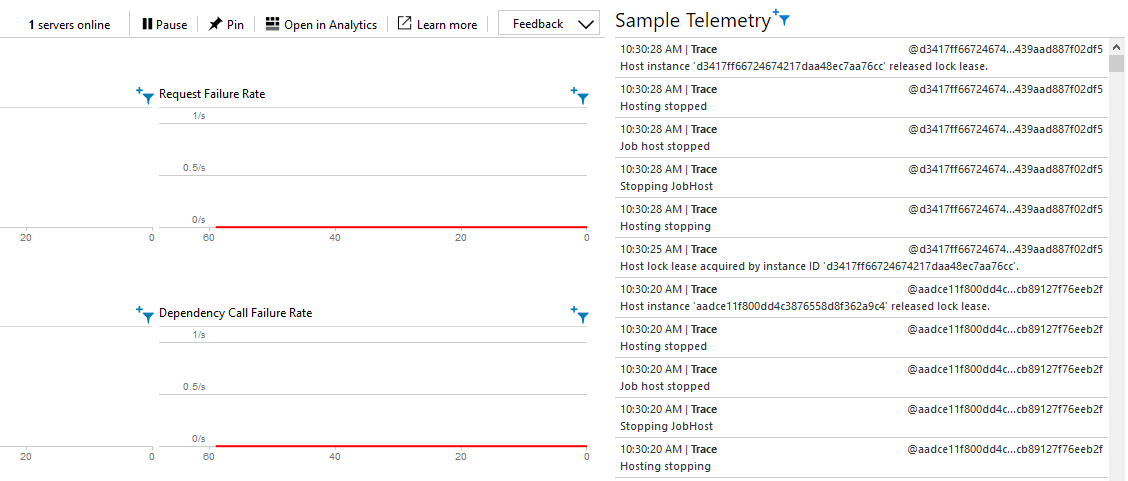
Applications Insights live monitor shows 1 server online but it's not triggering with queue messages.
Applications Insights show an exceptions for exceeding the Connections limit.
I'm using Algolia C# client which uses HttpClient so I'm guessing when the functions scales it exceeds the 300 allowed connections limit.
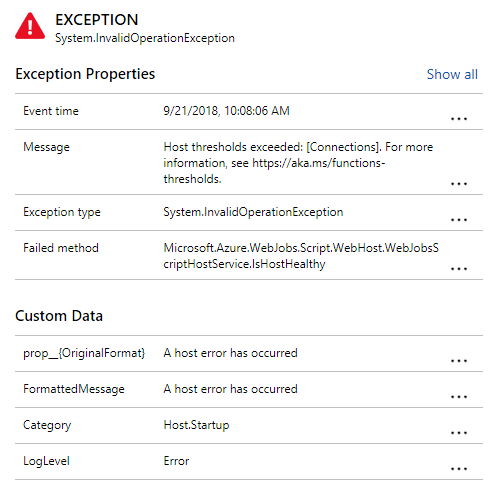
However, the functions never recovers after exceeding the connection limit.
This function ran previous for weeks without issues and has only been affected by the last two function updates.
 NoelOConnell
on 21 Sep 2018
NoelOConnell
on 21 Sep 2018
This issue continues to persist for me and is causing service level issues for our application. I even tried upgrading all the function project nuget references to latest versions of the libraries but that did not help either.
dotnetron
on 23 Oct 2018
Could you potentially be hitting the issue described here: https://github.com/Azure/azure-functions-host/issues/3600#issuecomment-433486127? Has to do with changing the host.json MaxQueuePollingInterval to use a timespan instead of a number
 maiqbal11
on 29 Oct 2018
maiqbal11
on 29 Oct 2018
The maxPollingInterval in my host.json was set to a number (5000). I changed it to a timespan as #3600 suggests. Will do some testing & advise.
dotnetron
on 29 Oct 2018
Hi @dotnetron, is this still an issue?
maiqbal11
on 7 Nov 2018
This is indeed an issue. After some inactive period storage queue triggers do not work anymore. Login into the portal fixes the issues within seconds. I have spent quite sometime now, researching this and applied all the suggestions (forcing trigger sync, adding a sidekick timer function to keep alive, MaxQueuePollingInterval as timespan etc.) - Nothing solves it 100%.
It's blocking our product development annoyingly. Would appreciate any directions. And happy to help with any info that might help investigate this.
 MoimHossain
on 13 Nov 2018
MoimHossain
on 13 Nov 2018
I am also in trouble with this problem.
I strongly hope into this problem being resolved quickly.
 yuka1984
on 26 Jan 2019
yuka1984
on 26 Jan 2019
I'm facing this issue too. Dequeuing a message frequently takes way more time than processing it.
 kun-attila
on 31 Jan 2019
kun-attila
on 31 Jan 2019
Just got caught by this one as well.
 tonyschollum
on 26 Feb 2019
tonyschollum
on 26 Feb 2019
Same here, made a new deployment and pff... queue triggers dont work anymore. No logs no errors...
 krackjack29
on 7 Mar 2019
krackjack29
on 7 Mar 2019
Somehow deploying the same codebase from visual studio solved the problem. In my opinion, looks like delete existing files option did the trick. It would be much helpful if there were more logs from the host to understand what was going wrong.
krackjack29
on 9 Mar 2019
We've recently encountered this issue in our production environment. Our function has been running for the last couple of months processing messages using the QueueTrigger, however a couple of days ago it stopped firing when messages were added and required a restart to process the messages that were backed up in the queue.
We've gone through our application insights and there are no error messages explaining why it would just stop.
This issue was reported a while ago, is this being investigated?
Packages
Microsoft.NET.Sdk.Functions: 1.0.24
Microsoft.Azure.WebJobs.Extensions.Storage: 3.0.1
 ramosjacc
on 25 Mar 2019
ramosjacc
on 25 Mar 2019
HI, I'm also facing the same issue, how to resolve the issue the Queue message didn't trigger the function app. Any resolved solution for this?
 Asarudeen21
on 29 Mar 2019
Asarudeen21
on 29 Mar 2019
I also facing the same issue, both AzureStorageQueue and servicebusqueue triggers are not working. Are these triggers not reliable?
 vaibhavshrivastava
on 2 Apr 2019
vaibhavshrivastava
on 2 Apr 2019
Queue triggers are not firing properly for us either. With Functions on a Linux App Service plan in East US
 Shunderpooch
on 2 Apr 2019
Shunderpooch
on 2 Apr 2019
@vaibhavshrivastava and @Shunderpooch Is it the consumption plan or a dedicated app service?
krackjack29
on 2 Apr 2019
Dedicated App Service plan (Premium V2)
Shunderpooch
on 2 Apr 2019
This has occurred for us again. We are using a consumption plan. The impact of this is significant as we can't trust that our functions are going to trigger. This has occurred twice on production in the last month.
tonyschollum
on 2 Apr 2019
I am see this as well in our dev environment. We have a function with queue trigger that works right after we deploy, but after a while of inactivity, it stops triggering. There are currently 5 items in the queue, just sitting there. Looks like multiple people are experiencing this.
 bitbitzzz
on 15 Apr 2019
bitbitzzz
on 15 Apr 2019
I also encountered this problem.
In my case, I use slots in the consumption plan.
 hamamotsu
on 16 Apr 2019
hamamotsu
on 16 Apr 2019
Hey everyone! We've debugged this a lot and in our use case and we had multiple output bindings that would cause the function not to work properly. Changing to just one output binding made everything work for us- try that and share if it works for you!
Shunderpooch
on 29 Apr 2019
Can we at least get an update on what's happening with this already? When will it be looked at? Is there a feasible workaround? Anything is better than just letting this issue stay open without some sort of progressive response.
 kapoor1992
on 3 May 2019
kapoor1992
on 3 May 2019
we are also experiencing this issue with our queue triggered fictions hosted in the West Europe zone (consumption plan).
all functions are version 1 and they stop triggering after some time, once I go to the portal, restart or just ping the API they start again, pick up and successfully process all items
 devotedEmployee
on 12 May 2019
devotedEmployee
on 12 May 2019
I am also on consumption plan in West Europe and had queue triggers not firing atm.
Possible due to function being offloaded from all instances.
Should i add a 1min timer trigger to make sure its online?
 pksorensen
on 14 May 2019
pksorensen
on 14 May 2019
We have the same issue. Ended up changing to App Service Plan with Always-on as a workaround.
 gabbsmo
on 27 May 2019
gabbsmo
on 27 May 2019
@kapoor1992
Can we at least get an update on what's happening with this already? When will it be looked at? Is there a feasible workaround?
I can suggest a feasible workaround - well, that's what I have done to get my project move on.
I have stopped using the trigger in function, instead wrote a function app - that acts as "event grid listener" and then used the function URL as event grid change listener to the storage account. This is a bit more work but it works all the time (I would also claim it's a bit faster as well - in my case, I wanted to have almost instant trigger and Event grid serves very well).
Not recommending it as an alternate of triggers - it's just another way that fits in some scenarios - like mine.
MoimHossain
on 27 May 2019
we had the same issue as I commented above, then we changed the name of out function trigger connection string app setting, and moved all storage accounts (the function's internal SA and the one where the trigger queue lives on) to the same azure region and it started working. Azure support told me the region should not be a problem, so looks that our issues were caused by the app setting name of the function's trigger connection string which was unexpected. Just sharing, maybe this helps someone.
devotedEmployee
on 27 May 2019
Consumption plan doesn't seem to be a good fit for production stage. We have been facing this intermittently when we deploy from CI/CD using azure cli. Once we redeploy using Visual Studio everything seems to work fine.
krackjack29
on 27 May 2019
\cc @fabiocav, @paulbatum
maiqbal11
on 28 May 2019
Hi there folks. There are many different reasons why a trigger might fail to run, and it is quite difficult to diagnose and troubleshoot all those different reasons across many customers within a single github issue in any coherent way. It is particularly difficult when there are lots of "me too" replies that don't include enough specifics to investigate.
If you're experiencing this problem, please file a new issue and fill out the template. Our issue template outlines most of the information we need to investigate why a function failed to trigger. One additional piece of information that is particularly helpful for these "failed to trigger" cases is specifics of how you are deploying the function, so please include that.
Finally, leave a comment on this issue with a link to the new issue, and @paulbatum and @fabiocav to make sure you get our attention and we can assign someone to investigate. Thanks!
 paulbatum
on 29 May 2019
paulbatum
on 29 May 2019
we are also experiencing this. our .net function app is hosted using an app plan and has a function that is queue triggered. It seems to stop every 7 days or so, which is a pain.
We are hosting in Australia Southeast.
We have other queue driven functions in node and they don't experience this (although they are on the consumption base model.)
app insights don't show any exceptions, so this is pretty hard to troubleshoot
 grimmersnee
on 21 Jun 2019
grimmersnee
on 21 Jun 2019
@grimmersnee happy to have someone investigate if you're able to follow the guidance I mentioned above (a new issue with the template filled out, so we have the details we need to investigate).
paulbatum
on 22 Jun 2019
I am assuming that @dotnetron's original issue was fixed, as we didn't hear back from them (apologize for the late follow-up). I will go ahead and close/lock this thread. As Paul said above, if you do see such "trigger not firing" issues, please do open a separate issue with all the information on the template filled out. Thanks!
 ankitkumarr
on 15 Jul 2019
ankitkumarr
on 15 Jul 2019
Related issues
 silencev
·
3Comments
silencev
·
3Comments
 helgemahrt
·
4Comments
helgemahrt
·
4Comments
 JasonBSteele
·
3Comments
JasonBSteele
·
3Comments
 ladeak
·
3Comments
ladeak
·
3Comments
 horihiro
·
3Comments
horihiro
·
3Comments
Most helpful comment
This is indeed an issue. After some inactive period storage queue triggers do not work anymore. Login into the portal fixes the issues within seconds. I have spent quite sometime now, researching this and applied all the suggestions (forcing trigger sync, adding a sidekick timer function to keep alive, MaxQueuePollingInterval as timespan etc.) - Nothing solves it 100%.
It's blocking our product development annoyingly. Would appreciate any directions. And happy to help with any info that might help investigate this.