Azure-functions-host: Heavy response delay with Proxies in Functions v2 (serving files from Azure Storage )
I have an Angular SPA hosted in 'Azure Storage with Website Support'.
The Azure Function v2 app is hosted in the cloud, running in the same region as the Storage account.
When serving directly from the Storage URL, everything looks cool:

However, when adding Azure Functions v2 Proxies to the game, the response times get much more unpredictable and some take a very long time:
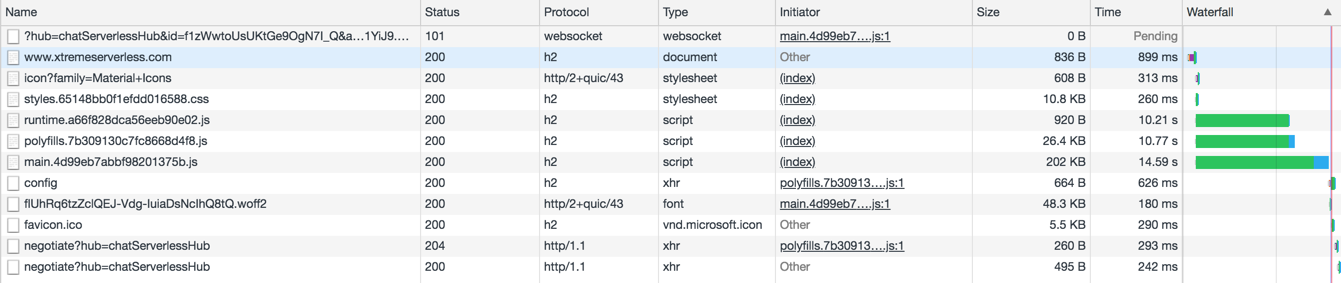
Any idea what could be the issue here?
Thanks.
.cc @alexkarcher-msft @safihamid
 ChristianWeyer
All 10 comments
@ChristianWeyer I looked at all the requests you made to main.4d99eb7abbf98201375b.js in the past 5 days and they were all taking less than 400 ms also it is using Function V1 app. Can you verify the latency you see is not from the client side?
 safihamid
on 18 Jul 2018
safihamid
on 18 Jul 2018
You are right @safihamid. I had several versions of this app, in v1 and v2. Sorry.
However, I cannot see any issues from the client side... hm... Tests show that when using Functions as a proxy produces way slower results as when going straight to Storage (as can be seen in the screenshots).
Weird...
ChristianWeyer
on 18 Jul 2018
@ChristianWeyer if you have a specific url which you still see this weirdness if you try in Fiddler, Curl, ... let me know and I will investigate from our side. One possible issue could be hitting the cold start.
safihamid
on 18 Jul 2018
OK, thanks!
This is a recent screenshot from https://www.xtremeserverless.com/

If I reload now, the numbers look good - so, yes it could be cold start.
But: how to avoid that? Having cold start with proxies is... weird... ;-)
Thanks!
ChristianWeyer
on 18 Jul 2018
@ChristianWeyer yes, I verified the requests which were taking longer were ended up on a new instance and were delayed because of the cold start. Proxies run inside the function run time and in order for them to run the function run time needs to be initialized and up and running. We are constantly working to improve the cold startup time and you can avoid cold startup by moving to App Service plan or add timer triggers, ... to your function app.
more info here: https://blogs.msdn.microsoft.com/appserviceteam/2018/02/07/understanding-serverless-cold-start/
safihamid
on 18 Jul 2018
Hi @safihamid - thanks for the investigation.
Indeed, I already do have a timer trigger, but this does not help if the scaler decides to create a new instance.
Turns out, that as it currently is, proxies are pretty much useless if they do not run on an App Service plan.
Thanks!
ChristianWeyer
on 19 Jul 2018
@ChristianWeyer we are working on improving the cold startup time specially in functions v2 but here are some ideas:
1) If your website doesn't have any burst mode and you don't need aggressive scaling you can try this app setting: WEBSITE_HTTPSCALEV2_ENABLED = 0. This should decrease your number of cold startup times as we scale less aggressively.
2) Try to minimize the number of functions in your function app which has proxies. the less code, the less startup time. Also try precompiled functions and run from zip and see if that helps.
I will keep this thread updated once our V2 function placeholders are enabled in the coming weeks...
safihamid
on 19 Jul 2018
@safihamid do you already have an update on this? Thanks!
ChristianWeyer
on 7 Oct 2018
Placeholders are enabled for functions and proxies in V2. Cold start should generally be less than ~2 seconds now.
safihamid
on 7 Oct 2018
@ChristianWeyer closing this as answered, but please let us know if you continue to see problems here.
 fabiocav
on 6 Dec 2018
fabiocav
on 6 Dec 2018
Related issues
 slim-souissi
·
3Comments
slim-souissi
·
3Comments
 alaatm
·
4Comments
alaatm
·
4Comments
 JasonBSteele
·
3Comments
JasonBSteele
·
3Comments
 mathewc
·
3Comments
mathewc
·
3Comments
 krillehbg
·
3Comments
krillehbg
·
3Comments
Most helpful comment
@ChristianWeyer we are working on improving the cold startup time specially in functions v2 but here are some ideas:
1) If your website doesn't have any burst mode and you don't need aggressive scaling you can try this app setting: WEBSITE_HTTPSCALEV2_ENABLED = 0. This should decrease your number of cold startup times as we scale less aggressively.
2) Try to minimize the number of functions in your function app which has proxies. the less code, the less startup time. Also try precompiled functions and run from zip and see if that helps.
I will keep this thread updated once our V2 function placeholders are enabled in the coming weeks...