Azure-functions-host: 'Function1' can't be invoked from Azure WebJobs SDK. Is it missing Azure WebJobs SDK attributes?
Investigative information
Please provide the following:
- Timestamp:
- Function App version (1.0 or 2.0-beta): 1.0.11469
- Invocation ID: "id": "d2500522-4880-4dac-ac9a-720f635f3bc1",
"requestId": "a116060e-1cfa-4d54-8ddd-6262a5b1e52c", - Region: west europe
Repro steps
Invoke my app in the tester in the portal. Locally in my visual studio it works fine. I used the VS Extension Azure Functions and Web Jobs Tools to create my Function in VS and I used the version 15.0.40108. I used the .net framework standard 2.0 and the nuget packages Microsoft.NET.Sdk.Functions 1.0.7.
I deployed over local git repo
Actual behavior
'Function1' can't be invoked from Azure WebJobs SDK. Is it missing Azure WebJobs SDK attributes?
Related information
Provide any related information
- c#
Source
public static class Function1
    {
        [FunctionName("Function1")]
        public static IActionResult Run([HttpTrigger(AuthorizationLevel.Function, "get", "post", Route = null)]HttpRequest req, TraceWriter log)
        {
            log.Info("C# HTTP trigger function processed a request.");

            string name = req.Query["name"];

            string requestBody = new StreamReader(req.Body).ReadToEnd();
            dynamic data = JsonConvert.DeserializeObject(requestBody);
            name = name ?? data?.name;

            return name != null
                ? (ActionResult)new OkObjectResult($"Hello, {name}")
                : new BadRequestObjectResult("Please pass a name on the query string or in the request body");
        }
    }
 cpiock
All 7 comments
ok found the solution. I have to change the runtime version in your function app settings to beta to work with .Net Standard 2.0. Maybe if for the tooling in visual studio is the default also the default in the azure function should be changed or reversed.
cpiock
on 19 Jan 2018
FYI:
Got the same error even with Microsoft.NET.Sdk.Function 1.0.13. However, once I updated the Azure functions core tools (formerly Cli) the issue is gone.
 svarukala
on 23 Apr 2018
svarukala
on 23 Apr 2018
I think the version 10.0.13 and .12 has a problem because I back the version 10.0.11 and it works, so the version 10.0.13 and .12 has problems.
The error message when you start to debug:
[7/05/2018 10:37:47 p. m.] A ScriptHost error has occurred
[7/05/2018 10:37:47 p. m.] Microsoft.Azure.WebJobs.Host: Error indexing method 'Function1.Run'. Microsoft.Azure.WebJobs.Host: Cannot bind parameter 'log' to type TraceWriter. Make sure the parameter Type is supported by the binding. If you're using binding extensions (e.g. ServiceBus, Timers, etc.) make sure you've called the registration method for the extension(s) in your startup code (e.g. config.UseServiceBus(), config.UseTimers(), etc.).
[7/05/2018 10:37:47 p. m.] Error indexing method 'Function1.Run'
[7/05/2018 10:37:47 p. m.] Microsoft.Azure.WebJobs.Host: Error indexing method 'Function1.Run'. Microsoft.Azure.WebJobs.Host: Cannot bind parameter 'log' to type TraceWriter. Make sure the parameter Type is supported by the binding. If you're using binding extensions (e.g. ServiceBus, Timers, etc.) make sure you've called the registration method for the extension(s) in your startup code (e.g. config.UseServiceBus(), config.UseTimers(), etc.).
[7/05/2018 10:37:47 p. m.] No job functions found. Try making your job classes and methods public. If you're using binding extensions (e.g. ServiceBus, Timers, etc.) make sure you've called the registration method for the extension(s) in your startup code (e.g. config.UseServiceBus(), config.UseTimers(), etc.).
 pccr1975
on 8 May 2018
pccr1975
on 8 May 2018
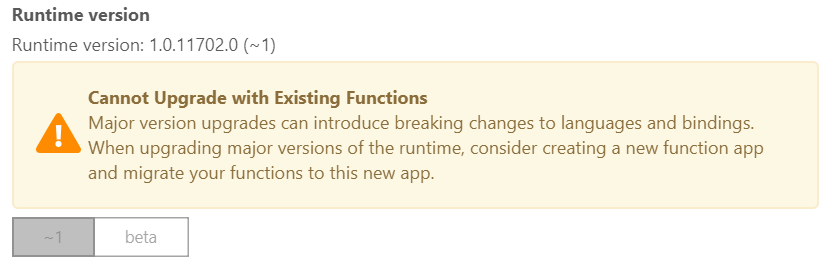
@cpiock , how did you manage to change your Function app to beta? I can't do it through: Platform Features > Function app settings, there's a warning:
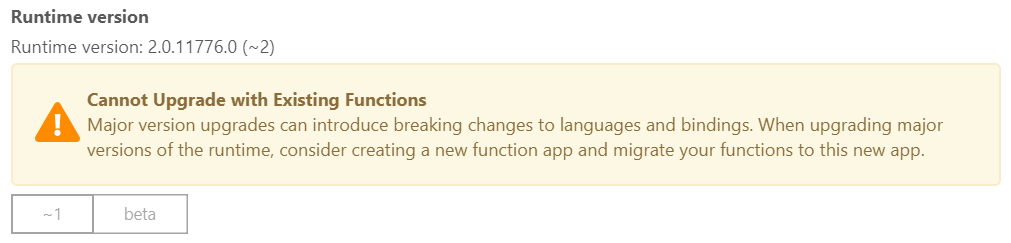
Nevermind, managed to do it through: Platform Features > Application Settings > and under Application Settings changed FUNCTIONS_EXTENSION_VERSION to ~2 as per documentation here. This restarts your app and makes all the underlying changes (e.g. to applicationhost.config) to point to the right runtime, which after the restart will be reflected in the Function app settings screen:
 benmccallum
on 23 May 2018
benmccallum
on 23 May 2018
@benmccallum i think I managed it by creating a new function app. By the way in my I FUNCTIONS_EXTENSION_VERSION have beta.
cpiock
on 23 May 2018
Thanks @cpiock, figured it out and commented above in case anyone else ends up here.
I haven't used AWS lambdas yet to compare but I must admit Azure Functions hasn't got much less difficult since I tried using it ~18 months ago. At least I was able to new up a Function in the portal, new up a .sln using VS and then configure git deployment in the portal and it actually work this time. Woot. Hopefully v2 proper shakes some more cobwebs out.
benmccallum
on 23 May 2018
I encountered a similar issue, to repeat it:
a) take the latest visual studio as 15.8.1
b) create a new function but chose framework 1
 truekonrads
on 27 Aug 2018
truekonrads
on 27 Aug 2018
Related issues
 krillehbg
·
3Comments
krillehbg
·
3Comments
 yvele
·
3Comments
yvele
·
3Comments
 shibayan
·
3Comments
shibayan
·
3Comments
 rati3l
·
3Comments
rati3l
·
3Comments
 mathewc
·
3Comments
mathewc
·
3Comments
Most helpful comment
ok found the solution. I have to change the runtime version in your function app settings to beta to work with .Net Standard 2.0. Maybe if for the tooling in visual studio is the default also the default in the azure function should be changed or reversed.