Azure-functions-host: One or more errors occurred. Microsoft.Azure.WebJobs.Host: Invalid storage account 'devstoreaccount1'
Getting following issue when creating Time Trigger from scratch using development storage
The listener for function 'Function1' was unable to start.
The listener for function 'Function1' was unable to start. mscorlib: One or more errors occurred. Microsoft.Azure.WebJobs.Host: Invalid storage account 'devstoreaccount1'. Please make sure your credentials are correct
more details in attachment

 hakart
All 7 comments
Hi @hakart can you explain exactly what steps you're following? I can't reproduce. Here is what I'm doing.
- Make sure I have the latest VS installed (15.5)
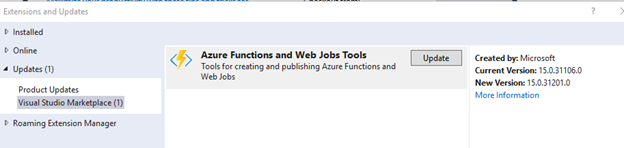
- Make sure I have the latest azure functions tools installed (15.0.31201.0). Here's what the update screen looks like before installing the latest update:
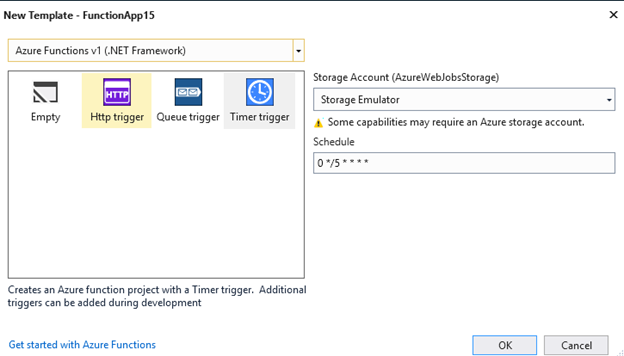
- File -> New project -> Azure Function -> Select v1, timer trigger:
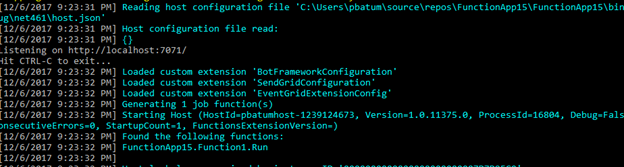
- Hit F5, confirm the host started without errors and found my function:
I would like to note that I do not recognize the string 'devstoreaccount1'. I'm not sure where that error is coming from.
 paulbatum
on 6 Dec 2017
paulbatum
on 6 Dec 2017
I'm having the same problem. Yes, all the latest versions and I have all the screens you have. But after waiting for about 20+ seconds I will get same error message as @hakart .
 mortenengh
on 17 Dec 2017
mortenengh
on 17 Dec 2017
OK, I figured out how to reproduce the error you're getting - simply shutdown the storage emulator. Try starting the storage emulator manually. I had to do this for my first run:
C:\Program Files (x86)\Microsoft SDKs\Azure\Storage Emulator>AzureStorageEmulator.exe start
Windows Azure Storage Emulator 5.2.0.0 command line tool
Autodetect requested. Autodetecting SQL Instance to use.
Looking for a LocalDB Installation.
Probing SQL Instance: '(localdb)\MSSQLLocalDB'.
Found a LocalDB Installation.
Probing SQL Instance: '(localdb)\MSSQLLocalDB'.
Found SQL Instance (localdb)\MSSQLLocalDB.
Creating database AzureStorageEmulatorDb52 on SQL instance '(localdb)\MSSQLLocalDB'.

Granting database access to user REDMOND\pbatum.
Database access for user REDMOND\pbatum was granted.

Initialization successful. The storage emulator is now ready for use.
The storage emulator was successfully started.
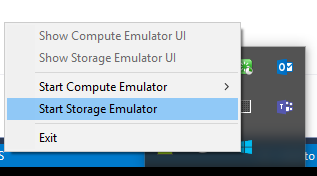
After running the command line tool, it then appears in my quick access bar in the bottom right and I can start it:
I thought VS had some functionality to start the storage emulator automatically when required. I'm going to check up with some folks on that.
paulbatum
on 19 Dec 2017
Even if we can make VS do more here, the error message for this scenario can still be improved so I filed https://github.com/Azure/azure-webjobs-sdk-script/issues/2237.
paulbatum
on 19 Dec 2017
Thx, I can confirm that it's now working.
mortenengh
on 19 Dec 2017
My understanding is that there is indeed a VS bug related to the storage emulator which is why you had to start it manually. I don't have tracking info but I expect this will be resolved in a coming VS update in the next few months.
paulbatum
on 19 Dec 2017
The issue with the emulator not starting automatically is now resolved, see these release notes:
https://github.com/Azure/Azure-Functions/blob/master/VS-AzureTools-ReleaseNotes.md#150403220
paulbatum
on 26 Mar 2018
Related issues
 shibayan
·
3Comments
shibayan
·
3Comments
 slim-souissi
·
3Comments
slim-souissi
·
3Comments
 christopheranderson
·
4Comments
christopheranderson
·
4Comments
 svickers
·
3Comments
svickers
·
3Comments
 silencev
·
3Comments
silencev
·
3Comments
Most helpful comment
OK, I figured out how to reproduce the error you're getting - simply shutdown the storage emulator. Try starting the storage emulator manually. I had to do this for my first run:
After running the command line tool, it then appears in my quick access bar in the bottom right and I can start it:
I thought VS had some functionality to start the storage emulator automatically when required. I'm going to check up with some folks on that.