Azure-functions-host: Can't enable Application Logging (Blob) on an Azure Function app
I'm trying to enable application logging (level = information, storage settings = an application-logs blob container I just created) on my Azure Function app from the portal but I keep getting the following error:
| Key | Value |
|-----------------|-------------------------------------------------------------------------------------------------------------------------------------------|
| DESCRIPTION | Failed to update web app logs settings for ****. There was an error processing your request. Please try again in a few moments. |
| STATUS | Error |
| TIME | Tuesday, February 7, 2017, 7:53:24 AM |
| CORRELATION IDS | 40345302-5727-4f5d-9f28-7bd110a7f976 |
I tried first a few times without specifying storage information. When I realized I had not specified a blob container I thought it would work but it keeps failing.
It looks like this bug already happened in the past: #397
 0xced
0xced
All 30 comments
Possibly related to #688
 davidebbo
on 21 Feb 2017
davidebbo
on 21 Feb 2017
While there are some knowns issues at runtime, it shouldn't fail in the portal at the time you try to enable it. Are you getting that consistently? Is your Web App Consumption mode, or using an App Service Plan?
davidebbo
on 21 Feb 2017
I just tried in both types, and each time I was able to enable the blob logging without errors in the portal. Whether it correctly works at runtime is a separate thing tracked by that other issue, so let's focus on the enablement error here.
davidebbo
on 21 Feb 2017
Yes, I'm getting this error consistently. I just tried again in the portal and here are the details of the error:
{
"authorization": null,
"caller": null,
"channels": null,
"claims": {},
"correlationId": null,
"description": "Failed to update web app logs settings for **************. There was an error processing your request. Please try again in a few moments.",
"eventDataId": null,
"eventName": null,
"eventSource": null,
"category": null,
"eventTimestamp": "Tue Feb 21 2017 14:59:26 GMT+0100 (W. Europe Standard Time)",
"id": "Failed to update web app logs settings._Tue Feb 21 2017 14:59:26 GMT+0100 (W. Europe Standard Time)",
"level": "1",
"operationId": null,
"operationName": {
"value": "Failed to update web app logs settings.",
"localizedValue": "Failed to update web app logs settings."
},
"resourceGroupName": null,
"resourceProviderName": null,
"resourceType": null,
"resourceId": null,
"status": {
"value": "Error",
"localizedValue": "Error"
},
"subStatus": null,
"submissionTimestamp": null,
"subscriptionId": null,
"properties": {
"correlationIds": "f50467f7-1091-48fa-b29b-ebb4d82641c8"
},
"relatedEvents": []
}
I'm using a Consumption plan.
I noticed that after my failed attempts at enabling logs a new app setting appeared: DIAGNOSTICS_AZUREBLOBCONTAINERSASURL. So I deleted it and tried once again to enable blob logs but I got the same error with this correlation id: c69f1f2e-12f6-47d5-b683-96c8c3bf73a8.
I can send you a HAR file privately if this can help you.
0xced
on 21 Feb 2017
@0xced apologies for the delay on this.
Are you still experiencing this problem? If so, could you repro and share a recent instance of the issue (the correlation id) so we can take a closer look?
 fabiocav
on 20 Mar 2017
fabiocav
on 20 Mar 2017
I'm still getting errors. Here's a new correlation id that I got a few seconds ago:
c4eca252-b360-4dcb-a559-7a9a20fda206
Can you share your web app name, either directly or indirectly? This will help us investigate. Thanks!
davidebbo
on 23 Mar 2017
Here's the UTC execution time and execution Id value, as explained in Sharing Your Function App name privately:
2017-03-23T21:47:16.305 Function started (Id=bf63b82b-c18c-4268-ba5f-b53c7bd5bba0)
The region of this Function App is West Europe.
0xced
on 23 Mar 2017
Thanks, that gives us what we need to dive deeper. We'll get back to you.
davidebbo
on 24 Mar 2017
Adding @suwatch who will help investigate.
davidebbo
on 24 Mar 2017
The configuration for the site somehow was corrupted. Were you switching between using and not using AzureFile at some point? I believe we may still have bug and not reset all properties correctly.
At this state, though the AzureFile settings were set (per appSettings), site runtime is not using AzureFile. Below was from Kudu Console (notice the SYMLINKD not using AzureFile).
D:\home>dir d:\local
Directory of d:\local
...
03/24/2017 07:50 AM <SYMLINKD> VirtualDirectory0 [\\100.89.238.161\volume-11-default\106a568dc80dff6c613b\52d70e005e8f416eb03a0c077f3e918e\]
From management plane (when you update the application log settings), it was trying to use AzureFile secret to access non AzureFile share and got denied. I will discuss with product team how to safely advice or migrate your content and switch to use AzureFile. Will ping back once we have more info.
 suwatch
on 24 Mar 2017
suwatch
on 24 Mar 2017
I'm sorry, I don't know what AzureFile is. 😕 I used Visual Studio Tools for Azure Functions to deploy my Function App and followed the steps in the Publishing to Azure paragraph.
0xced
on 24 Mar 2017
Nothing to do with your deployment. Something to do with your webapp configuration (not your fault). Could you let us know the time we could work together to fix up your site configuration?
suwatch
on 24 Mar 2017
What channel do you want to use to discuss this issue further? Twitter DM? Something else? I'm available tomorrow from 8:30 AM (Central European Summer Time).
0xced
on 29 Mar 2017
@suwatch - could you please follow up?
 christopheranderson
on 3 Apr 2017
christopheranderson
on 3 Apr 2017
@0xced these are steps we have to do to your site named riw**et.
- Copy most recent contents from the site to AzureFile.
- Switch the site to use AzureFile.
They should take less than 10 mins. I have done the first step as of (03/04/2017 23:50 UTC). If you made any change to your site content after that time, I will have to copy again.
If not, you can proceed to switch to use Azure File yourself.
- Browse appSettings section of the site on portal.
- Rename the appSettings name WEBSITE_CONTENTAZUREFILECONNECTIONSTRING to WEBSITE_CONTENTAZUREFILECONNECTIONSTRING_ (with ending underscore).
- Rename the appSettings name WEBSITE_CONTENTSHARE to WEBSITE_CONTENTSHARE_ (with ending underscore).
- Click save button
- Verify that your functions are still working.
- Rename those back (remove ending underscore) and Save.
- Verify that your functions are still working.
That's it. Now try changing the Application Log setting again. Let us know if still failing.
suwatch
on 4 Apr 2017
I was able to enable the application logs by following the steps you provided. But now, I can't see my functions anymore! Here's a screenshot of my function app, it's empty! The left pane used to list all my functions with a refresh button at the bottom, now there is neither! This app is used in production and now I can't manage my functions in the portal anymore, this is not acceptable!

Note that my Function App was already empty before I followed your instructions to rename WEBSITE_CONTENTAZUREFILECONNECTIONSTRING and WEBSITE_CONTENTSHARE.
0xced
on 11 Apr 2017
@0xced that is an unrelated issue, tracked by this thread, and a fix is being made now. Please follow up on that thread for any questions about that issue, so we don't mix up the two things here.
davidebbo
on 11 Apr 2017
@davidebbo OK, thanks for pointing me in the right direction. It was unfortunate that both events (resolution of this application logging issue and the Azure portal upgrade) occurred almost at the same time, making it difficult for me to guess which one was the culprit. 😕
0xced
on 11 Apr 2017
Ok, the fix to that issue was just deployed. Please verify, and you should then be able to proceed with the steps.
davidebbo
on 11 Apr 2017
Thanks, I can see my functions now. I have enabled the application logs and I can see them grow in my chosen blob container. I'm a bit confused though, I see only Sending response: 200.0 OK logs. I thought that the application logs were the one produced with the TraceWriter object provided to the functions.
If I manually run this test function, I don't see either the info or the error log in the application logs (they are configured at the Information level):
public static void Run(string input, TraceWriter log)
{
    log.Info($"Hello from a test function with input {input}");
    log.Error("A dummy error occurred");
}
Is this expected or is there still something misconfigured somewhere?
0xced
on 11 Apr 2017
@0xced Perhaps start a new issue with related title to help focus issue at hand. We can close this specific one regarding unable to set application logging.
suwatch
on 13 Apr 2017
Very similar happens to me when I try to update Log setting for the app that was automatically created by Bot Service. I get:
Failed to update web app logs settings for {myapp}. There was an error processing your request. Please try again in a few moments.
Is it fixed?
 ghost
on 28 Apr 2017
ghost
on 28 Apr 2017
I am also experiencing the issue @0xced is experiencing. I don't see the info logs in the application logs.
 ansario
on 22 May 2017
ansario
on 22 May 2017
@SunSeaAndPalms Regarding to unable to set application log, do you sti;; have the issue? If so, do share the time stamp and the web app name (here or indirectly).
@0xced and @ansario please open a new item (if not already) and it will help us focus on issue at hand.
suwatch
on 22 May 2017
@suwatch It was magically auto-fixed without any intervention from my side. The only problem I have now is that my Node's console.log doesn't appear in the log files, however as far as I understand the support team response, "it shouldn't appear and if I need logs I can debug locally".
ghost
on 22 May 2017
Closing this as it appears to be resolved and there has not been any activity in the past month.
 paulbatum
on 12 Jul 2017
paulbatum
on 12 Jul 2017
For the record: I still have no idea where to find the logs emitted through the TraceWriter. As a workaround, I’m writing my application logs to blobs with AppendTextAsync.
0xced
on 15 Sep 2017
@0xced I can't tell whether you're being impacted by a bug or a configuration issue but the way its supposed to work is:
- You should always see those logs as they happen if you have the log view open for that function:

- If you have the webjobs dashboard enabled (i.e. you have an AzureWebJobsDashboard app setting) then your tracewriter logs go into dashboard storage.

You can see them in the monitor tab:
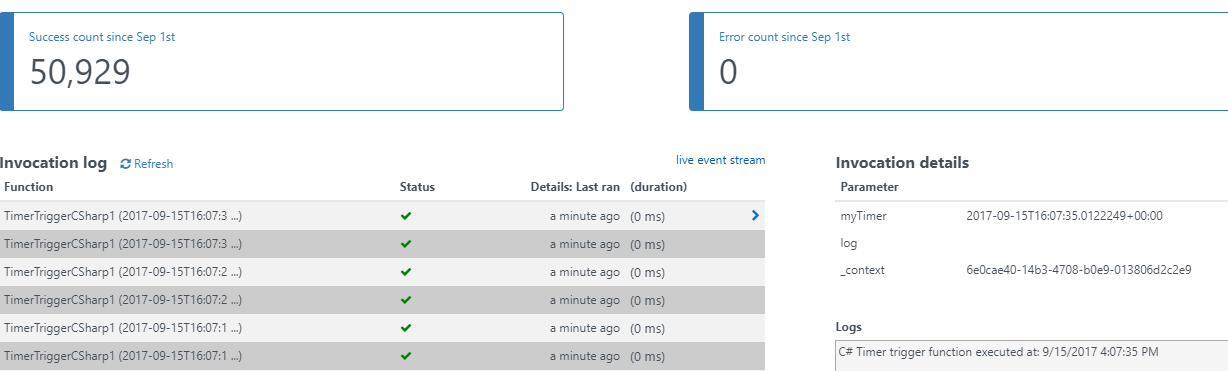
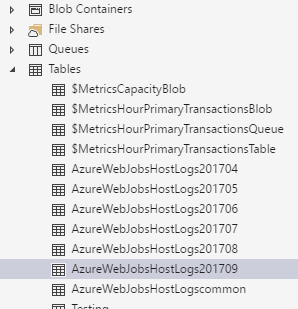
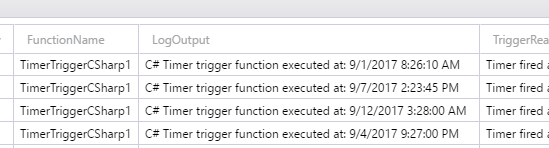
You can see them in AzureWebJobsHostLogs table in your dashboard storage account:
- If you have application insights turned on, the logs will go into the traces table:
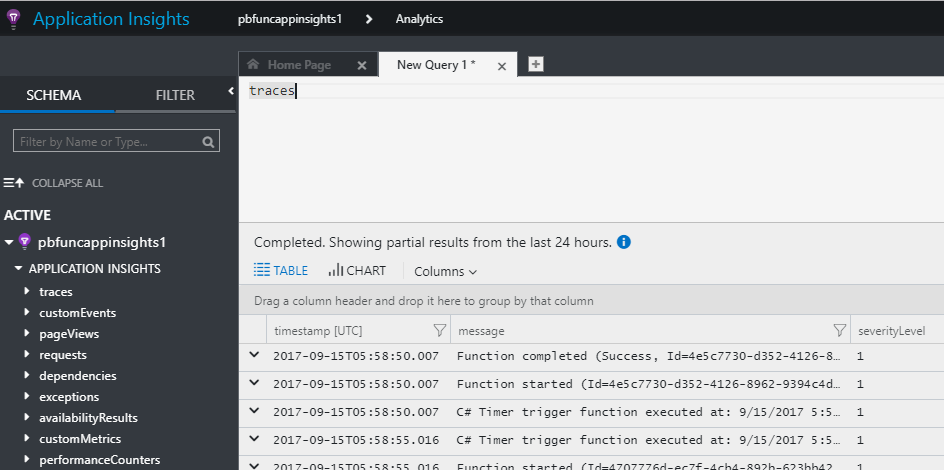
Hope that helps.
paulbatum
on 15 Sep 2017
@0xced you want System.Diagnostics.Trace.TraceError("Message"); from https://stackoverflow.com/questions/35702341/asp-net-web-application-in-azure-how-to-log-errors
 NikolaMandic
on 27 Apr 2018
NikolaMandic
on 27 Apr 2018
Related issues
 horihiro
·
3Comments
horihiro
·
3Comments
 ElvenSpellmaker
·
3Comments
ElvenSpellmaker
·
3Comments
 silencev
·
3Comments
silencev
·
3Comments
 ahmelsayed
·
4Comments
ahmelsayed
·
4Comments
 ladeak
·
3Comments
ladeak
·
3Comments
Most helpful comment
Thanks, I can see my functions now. I have enabled the application logs and I can see them grow in my chosen blob container. I'm a bit confused though, I see only
Sending response: 200.0 OKlogs. I thought that the application logs were the one produced with theTraceWriterobject provided to the functions.If I manually run this test function, I don't see either the info or the error log in the application logs (they are configured at the Information level):
Is this expected or is there still something misconfigured somewhere?