Azure-functions-host: Sporadic C# compilation issue
Over the past few days, a few function apps have run into a compilation failure that seems to be caused by an attempt to queue additional Roslyn compilation events after the compilation is marked as completed, leading to an InvalidOperationException with the message: Cannot enqueue data after PromiseNotToEnqueue.
Opening this for investigation and tracking.
 fabiocav
All 40 comments
Looks like a Roslyn issue, we are following up with them.
 paulbatum
on 20 Dec 2016
paulbatum
on 20 Dec 2016
@fabiocav any updates on this? If we don't have a date for when this is likely to be unblocked I think I should move it out of the January milestone.
paulbatum
on 18 Jan 2017
Still an ongoing discussion with the team. It's not likely to be unblocked in this milestone, but it sounds like there has been some work done to address this issue in 2.0.0 (Roslyn)
fabiocav
on 18 Jan 2017
This is still happening, three different function apps, and different functions within each app are now presenting the same problem as covered here. Just to confirm that restarting the Web Application sorts out the issue for now
 DamianFlynn
on 23 Mar 2017
DamianFlynn
on 23 Mar 2017
@DamianFlynn thank you for reporting. Unfortunately, a restart is indeed the way to address this at the moment, but we understand this is not ideal. We'll be working on updating the compiler references soon, now that 2.0 has been released, both, to address issues like this and bring C# 7.0 support.
fabiocav
on 23 Mar 2017
This issue occurred in a Queue bound function yesterday, nearly ruining a demo we were giving to a customer. The function in question was deployed weeks ago and just suddenly stopped working. As we're using the consumption model, I didn't find an obvious way to restart them as suggested by @DamianFlynn. I just disabled and reenabled the function, which seems to have solved the issue. Do you have an ETA on when this will be resolved?
 tomasmcguinness
on 29 Mar 2017
tomasmcguinness
on 29 Mar 2017
Ran into this here as well: http://stackoverflow.com/questions/43085082/azure-function-with-servicebustrigger-stops-receiving-messages?noredirect=1#comment73298766_43085082
 mamaso
on 30 Mar 2017
mamaso
on 30 Mar 2017
I am currently converting my solution to a class library. Will this approach circumvent the problem until such time as 2.0 is live?
Thanks
Get Outlook for iOShttps://aka.ms/o0ukef
From: Fabio Cavalcante notifications@github.com
Sent: Thursday, March 23, 2017 5:27:53 PM
To: Azure/azure-webjobs-sdk-script
Cc: Damian Flynn; Mention
Subject: Re: [Azure/azure-webjobs-sdk-script] Sporadic C# compilation issue (#999)
@DamianFlynnhttps://github.com/DamianFlynn thank you for reporting. Unfortunately, a restart is indeed the way to address this at the moment, but we understand this is not ideal. We'll be working on updating the compiler references soon, now that 2.0 has been released, both, to address issues like this and bring C# 7.0 support.
—
You are receiving this because you were mentioned.
Reply to this email directly, view it on GitHubhttps://github.com/Azure/azure-webjobs-sdk-script/issues/999#issuecomment-288797527, or mute the threadhttps://github.com/notifications/unsubscribe-auth/AF_zD6I7Ftxj8btjo0yl6yYGTlRI20EOks5roquZgaJpZM4K-Tqm.
DamianFlynn
on 30 Mar 2017
Assigning this back to triage so we can get traction on this - customers are hitting this, and we're also seeing this in our runner from time to time, generating sev 2 incidents.
 mathewc
on 31 Mar 2017
mathewc
on 31 Mar 2017
Just ran in to this issue today as well on an HTTP triggered function. Restarting the app service brought everything back up. Also on consumption plan.
@tomasmcguinness: you can restart the service by going to the function app like normal, then function app settings, and under the "Manage" section click on "Go to App Service Settings" and from there you can stop and start it like a normal app service.
 gibwar
on 3 Apr 2017
gibwar
on 3 Apr 2017
Reopening for triage as this did not get resolved as expected
fabiocav
on 12 May 2017
We need a workaround so the app doesn't end up in a permanently stuck state when this occurs.
paulbatum
on 30 May 2017
@fabiocav added retries and additional logging in attempt to address this, see https://github.com/Azure/azure-webjobs-sdk-script/commit/f24f85cd1c2f0ad4a5f2c1bc12f86faeb8b13d1a
This change should be deployed globally by 7/21. If it reproduces beyond that we should reactivate.
paulbatum
on 12 Jul 2017
Was the change deployed on 7/21? I've got the similar error with my function today
 oshevnin
on 3 Aug 2017
oshevnin
on 3 Aug 2017
I seem to have run in this problem today, while editing a functions app via the Azure portal. It's the first time I've experienced this problem. Like others also mentioned, a restart of the Web application resolved the problem.
 rwaal
on 13 Aug 2017
rwaal
on 13 Aug 2017
I just ran into this for the first time. It appears to have started sometime between Friday afternoon and this morning. Like all the others, the restart worked fine for me, though is obviously not ideal.
Mine was an HttpTrigger and consumption plan. I hope it is obvious how this is problematic - things just stop working without changes by us and without warning.
Any updates on this?
 tlmii
on 21 Aug 2017
tlmii
on 21 Aug 2017
We've reached out to the compiler team as we were still seeing instances of this happening. We've put some mitigation steps that help _some_ scenarios, but as you found, we're not as aggressive with those steps.
We did get an update from the team and there's a fix in the latest compiler version. We'll be deploying that with our next release.
fabiocav
on 22 Aug 2017
I ran into this issue today with an .csx Script Function. Does a precompiled deployment fix this?
 rs38
on 30 Aug 2017
rs38
on 30 Aug 2017
@rs38 yes, it does, as there's no runtime compilation in those scenarios. This is being addressed in this sprint.
fabiocav
on 30 Aug 2017
I can confirm that we are seeing this issue on our eventhub triggered functions.
We saw it last week on our consumption plan function, and again today on another consumption plan function.
 MeshTucker
on 13 Sep 2017
MeshTucker
on 13 Sep 2017
@MeshTucker, fixes to address this are being rolled out and should be fully deployed by Wednesday. You can subscribe to this issue to receive updates: https://github.com/Azure/app-service-announcements/issues/39
fabiocav
on 18 Sep 2017
@fabiocav : I hit this today, when visiting the portal. Function just stopped working without making any changes to it. Restart worked. Waiting on this fix to be deployed fully.
 fashaikh
on 21 Sep 2017
fashaikh
on 21 Sep 2017
FYI I just got this today when editing a function in the portal.
 RocketPop
on 14 Oct 2017
RocketPop
on 14 Oct 2017
I just got this today. Refer to screenshot below. Any fix to improve the stability of azure functions would be greatly appreciated as we are relying on functions in production. This issue caused a reporting system to go down - I've not changed the function in a month or two.
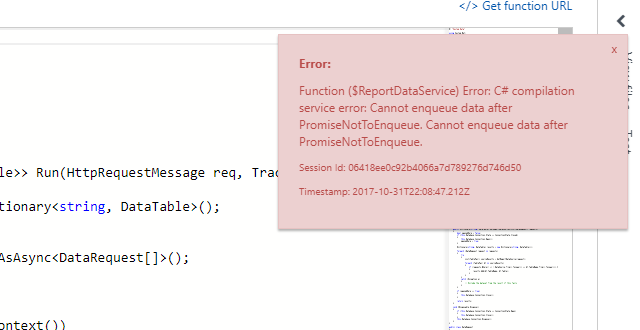
 aronbardsley
on 31 Oct 2017
aronbardsley
on 31 Oct 2017
Error:
Function () Error: C# compilation service error: Cannot enqueue data after PromiseNotToEnqueue. Cannot enqueue data after PromiseNotToEnqueue.
Session Id:
Timestamp: 2018-01-08T05:22:07.897Z
 tangozulu32123
on 9 Jan 2018
tangozulu32123
on 9 Jan 2018
Thank you @tangozulu32123. This is assigned to the current sprint and we hope to have additional fixes and mitigation steps for this issue soon.
fabiocav
on 9 Jan 2018
Updating milestone to better reflect when this will be done.
fabiocav
on 10 Jan 2018
Ran into this issue twice (March and April 2018)with an Function App with a Eventbus trigger twice. Restart fixed it. Problem was it took days to find out it wasnt running...
 bonserem
on 8 May 2018
bonserem
on 8 May 2018
same here, restart was needed
 sisoje
on 29 Jul 2018
sisoje
on 29 Jul 2018
I recently opened https://github.com/Azure/azure-functions-host/issues/3145 for this as well.
mathewc
on 30 Jul 2018
Ran into this issue over the weekend, our function app stopped working on 7/28/18 at 11:51 PM Pacific Time. When I logged into Azure Portal and looked at the app's code, I saw the erorr notification with the message "Cannot enqueue data after PromiseNotToEnqueue." Restarting the app fixed it.
 snbcdev
on 30 Jul 2018
snbcdev
on 30 Jul 2018
Guys - we're looking at this now and will get a fix out for this ASAP.
mathewc
on 30 Jul 2018
Same issue we have started facing with our function that's triggered by an event-hub.
The function executing is critical to our application.
Any workaround until we have a fix ?
Thanks
 Kapster17
on 3 Aug 2018
Kapster17
on 3 Aug 2018
Until the fix is deployed globally, the best workaround is to switch to writing your function as a class library in VS or VS code (e.g. https://docs.microsoft.com/en-us/azure/azure-functions/functions-develop-vs) so that you are deploying .dll files to your function app and no compilation is required on the server side. I understand that moving from csx to cs is not 100% trivial and it might not be viable, but I would say that we are still at least a week away from having this fix be deployed globally so you might want to consider it. Sorry I dont have a better workaround to share right now.
paulbatum
on 4 Aug 2018
This issue still exists!
 IvanovOleg
on 2 Apr 2019
IvanovOleg
on 2 Apr 2019
Hi @paulbatum ,
Is there an update / fix to this issue?
 gridr-ch
on 30 Jul 2019
gridr-ch
on 30 Jul 2019
It seems that despite multiple attempts to address this issue through roslyn updates and other mitigations, this error can still occur. I don't have any updates to share at this time. The same recommendation that I made before still applies - you can completely avoid impact by deploying compiled binaries. Our dev tools in VS and VS Code make this straightforward.
paulbatum
on 1 Aug 2019
We are planning on taking another Roslyn update (see the issue referenced above).
paulbatum
on 6 Dec 2019
Another customer is raising the same issue 183252697.
 Hazhzeng
on 13 Apr 2020
Hazhzeng
on 13 Apr 2020
The Roslyn update when live in May 2020 and as far as I'm aware there have been no further reports of the issue since then, closing.
paulbatum
on 9 Mar 2021
Related issues
 alaatm
·
4Comments
alaatm
·
4Comments
 silencev
·
4Comments
silencev
·
4Comments
 ElvenSpellmaker
·
3Comments
ElvenSpellmaker
·
3Comments
 ladeak
·
3Comments
ladeak
·
3Comments
 horihiro
·
3Comments
horihiro
·
3Comments