Azure-functions-durable-extension: Log filtering possibly not working for "...: Lease renewal with token ... succeeded"
In our Durable Functions, host.json, I have configured:
"logging": {
        "fileLoggingMode": "always",
        "logLevel": {
            "default": "Information",
            "Host": "Warning",
            "Function": "Warning",
            "Host.Aggregator": "Information",
            "Host.Results": "Warning",
            "Host.Triggers.DurableTask": "Warning",
            "DurableTask.AzureStorage": "Warning",
            "DurableTask.Core": "Warning"
        }
[...]
}
But in App Insights, I'm still getting verbose trace messages like:
knowledge-control-06: Lease renewal with token d6ebcda9-9b72-47b5-ad83-c5d0e03f53d4 succeeded
From the docs, DurableTask.AzureStorage looks to be the right log filter, so any help in how to filter these out would be appreciated!
 kirk-marple
All 13 comments
(Moving this to the correct repo)
Is your app running in Azure or are you using the Functions core tools? I ask because an earlier version of the core tools had a problem where filters were not being honored correctly.
 cgillum
on 14 Nov 2020
cgillum
on 14 Nov 2020
Thanks, this is in Azure, and I double-checked and we're using the latest nuget packages for the durable extensions.
kirk-marple
on 14 Nov 2020
@kirk-marple, do your other log level filters appear to be respected?
Also, can you report what version of the Functions Runtime this is in? I want to make sure we can get a repro ourselves and pin down where this bug is happening.
 ConnorMcMahon
on 16 Nov 2020
ConnorMcMahon
on 16 Nov 2020
@ConnorMcMahon This is with the latest, I believe. Using .NET Core 3.1.
    <PackageReference Include="Microsoft.NET.Sdk.Functions" Version="3.0.11" />
    <PackageReference Include="Microsoft.Azure.WebJobs.Extensions.DurableTask" Version="2.3.1" />
    <PackageReference Include="Microsoft.Azure.Functions.Extensions" Version="1.1.0" />
For other log levels (i.e. our own trace/exceptions), those are working correctly, if that's what you meant?
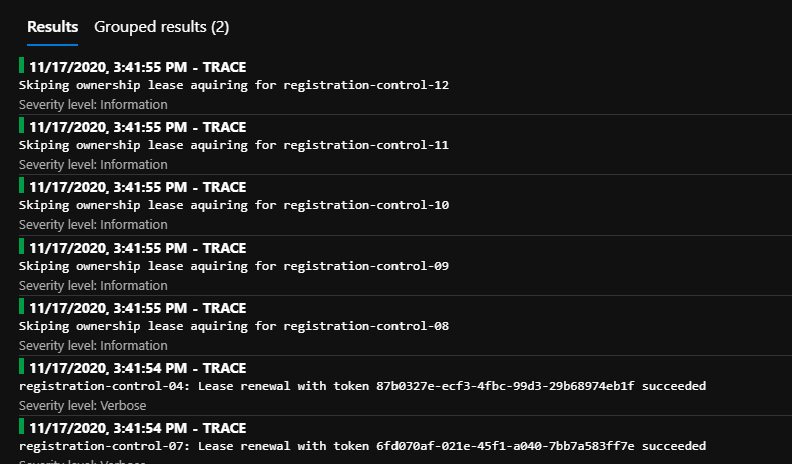
It's just this noise I'd like to get rid of in our App Insights, esp to save on logging data costs:
kirk-marple
on 18 Nov 2020
@kirk-marple, sorry I should have clarified. You should be able to find the function host version on the Azure Portal on the main page for your Function app Resource as "runtime version".

ConnorMcMahon
on 18 Nov 2020
Ah no worries, we're running 3.0.14916.0. (Windows, Plan: EP1)
kirk-marple
on 18 Nov 2020
@bachuv Hi there, I wanted to check on the status of potentially getting this fixed.
Normally I wouldn't care, but it actually ends up costing us money in log data usage in App Insights with all this extra noise.
kirk-marple
on 8 Dec 2020
Hi @kirk-marple, sorry for the delay! I took some time off recently, but I'm prioritizing this issue and you can expect an update by the end of the week.
 bachuv
on 8 Dec 2020
bachuv
on 8 Dec 2020
Hi @kirk-marple, I looked into the issue and couldn't reproduce it. Do you have a Startup.cs file in your project? If you do, can you share the contents of it?
bachuv
on 11 Dec 2020
Hello,
I don't quite have the same issue but it might be of some help:
Runtime version: 3.0.14916.0
When viewing "live metrics" in the Azure Portal I see something like:
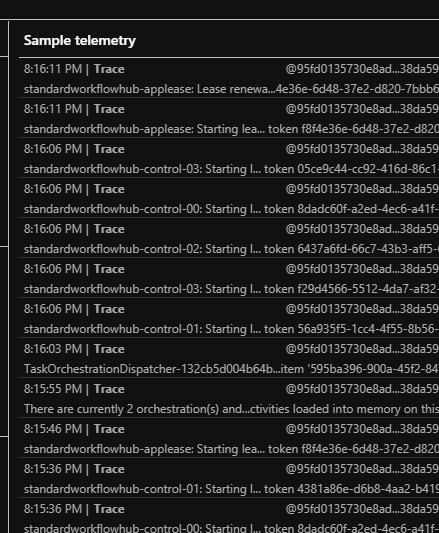
With:
{
  "version": "2.0",
  "logging": {
    "logLevel": {
      "Host.Triggers.DurableTask": "Warning",
      "default": "Warning"
    }
  }
These do not actually get logged to file though. They are annoying when looking at the "live metrics" stream
 Greg-Hitchon
on 11 Dec 2020
Greg-Hitchon
on 11 Dec 2020
Our Startup.cs is refactored into some helper classes, so it's a bit much to send over.
But I think the telemetry client would be the key part, right?
        public static TelemetryClient CreateTelemetryClient()
        {
            string? key = Environment.GetEnvironmentVariable("APPINSIGHTS_INSTRUMENTATIONKEY");
            if (String.IsNullOrWhiteSpace(key))
                throw new ArgumentException("APPINSIGHTS_INSTRUMENTATIONKEY environment variable");

            var config = !String.IsNullOrWhiteSpace(key) ? new TelemetryConfiguration(key) : new TelemetryConfiguration();
            config.TelemetryInitializers.Add(new OperationCorrelationTelemetryInitializer());

            QuickPulseTelemetryProcessor? processor = null;

            config.TelemetryProcessorChainBuilder
                .Use((next) =>
                {
                    processor = new QuickPulseTelemetryProcessor(next);
                    return processor;
                })
                .Build();

            var quickPulse = new QuickPulseTelemetryModule();
            quickPulse.Initialize(config);
            quickPulse.RegisterTelemetryProcessor(processor);

            return new TelemetryClient(config);
        }
Ah yes, that is likely the culprit here. You configuring your own telemetry client is likely why the host.json log category filters are being ignored.
In general, we recommend against doing custom App Insights things inside of your Startup.cs for this reason. We do have some recommendations for doing custom logging if you want support for that.
Note that it may not fully support everything you want to do with your current custom client. If that is the case, we will want to have you file an issue against the azure-functions-host repository to see if they could add support for the customization you need.
ConnorMcMahon
on 14 Dec 2020
This issue has been automatically marked as stale because it has been marked as requiring author feedback but has not had any activity for 4 days. It will be closed if no further activity occurs within 3 days of this comment.
![msftbot[bot] picture](https://avatars2.githubusercontent.com/in/26612?v=4&s=40) msftbot[bot]
on 27 Dec 2020
msftbot[bot]
on 27 Dec 2020
Related issues
 kaftw
·
4Comments
kaftw
·
4Comments
 amdeel
·
3Comments
amdeel
·
3Comments
 mpaul31
·
3Comments
mpaul31
·
3Comments
 mark-szabo
·
3Comments
mark-szabo
·
3Comments
 danielearwicker
·
3Comments
danielearwicker
·
3Comments