Azure-functions-durable-extension: External Event ordering issues
Scenario:
I have an orchestration that is in an event loop that waits to get external event notifications to move from status to status. i.e. New -> InProgress -> Complete. These external events are all the same EventType name. i.e. StatusChangedEvent. The event data has a property that contains the new status. Each time we get this, we process and loop back around to the WaitForExternalEvent unless we get an event that completes the orchestration.
Sometimes I have a situation where multiple of the StatusChangedEvents are raised on the same orchestration in very quick succession. From what I've been reading, it appears as though all three will be put into the in-memory queue. My orchestration is waiting for the event type, so the first one should be grabbed from the queue immediately and processed. Once it loops back around and is waiting for the StatusChangedEvent, my assumption is that it would take the next one off the queue. However, I have a suspicion that there is no ordering on the in-memory queue.
So I would expect it to flow something like this for example:
- 3 StatusChangedEvents come in at roughly the same time. My orchestration is waiting on that event.
- StatusChangedEvent 1 in the queue gets picked up by the orchestration. StatusChangedEvents 2 and 3 are still sitting in the queue.
- My orchestration code does it's work and loops back around and hits the WaitForExternalEvent again. At that time StatusChangedEvent 2 is pulled from the queue and processed. StatusChangedEvent 3 is still in the queue.
- Repeat step 3 for StatusChangedEvent 3.
However, it doesn't appear as though this is occurring. I have been examining the logs and I see where it's dumping events into the queue and where my orchestration is processing those events. But there doesn't appear to be an unique Identifier for each raised event, so it's hard to track the journey of a specific event.
This document section doesn't really describe any of this information: https://docs.microsoft.com/en-us/azure/azure-functions/durable/durable-functions-external-events?tabs=csharp#send-events
Do external events come and get run in parallel? Or do the external events get put on the in-memory queue and get processed in a FIFO manner? I don't want to have to start using my own ServiceBus Queue and have to worry about completing the queue, just so I can guarantee order. I want to make sure my orchestration finishes processing the first external event before moving on to the next one, but I don't want the next one to get lost.
 gdodd1977
All 23 comments
@gdodd1977 are you able to share your orchestration code?
If not, are you using the continueAsNew API?
 olitomlinson
on 17 Jul 2020
olitomlinson
on 17 Jul 2020
@olitomlinson I’m sure we can share some snippets but to answer your other question quickly, no we are not using continueAsNew. I’m personally not familiar with it- will read up on it.
 andrewdmoreno
on 17 Jul 2020
andrewdmoreno
on 17 Jul 2020
@olitomlinson In regards to ContinueAsNew the orchestration is definitely not eternal, this portion is merely in a loop to track status update progression from the external source and accordingly synchronize our internal state. We’ve discovered that users of that 3rd party system have a mechanism to trigger multiple updates to us quickly (I.E if they were behind on updating status of the order while they were working on it and then when done they move it to In Progress, and then immediately to Complete). This triggers multiple webhooks to us almost simultaneously which we have being routed in via APIM -> EventGrid -> Function -> Raise event on orchestration
andrewdmoreno
on 17 Jul 2020
We are using a FIFO queue to save these events, so I would expect the order to be processed correctly assuming the events were received in order.
Sometimes I have a situation where multiple of the StatusChangedEvents are raised on the same orchestration in very quick succession.
How are these events being raised to the orchestration? If they are coming from individual event grid triggers, then it seems to me that the event grid notifications could potentially get processed out-of-order. For example, if Event Grid is delivering these notifications concurrently, then there is no way to guarantee order.
 cgillum
on 17 Jul 2020
cgillum
on 17 Jul 2020
The events are coming in via Event Grid so, agreed, ordering always has the potential to be an issue. Upon further evaluation though I'm not sure ordering was necessarily the concern. The behavior we see seems to indicate that of the two events that came in (in this case), only one of them _appears_ to have been processed from what we can tell in the history.
Thanks for the code reference. Along the lines of the above I noticed an interesting bit here:
// If we're going to raise an event we should remove it from the pending collection
// because otherwise WaitForExternalEventAsync() will always find one with this key and run infinitely.
if (taskCompletionSources.Count == 0)
{
    this.pendingExternalEvents.Remove(name);
}
Not sure if my understanding of the code is correct but does the fact that both raised events have the same name, albeit with different payload values mean they are potentially getting removed the pendingExternalEvents?
andrewdmoreno
on 17 Jul 2020
does the fact that both raised events have the same name, albeit with different payload values mean they are potentially getting removed the
pendingExternalEvents?
I don't believe so. The Remove should only happen when we've already consumed all the events with a particular name.
Question for you - do you have Application Insights enabled? If so, it would be good to check your traces collection for the ExternalEventSaved trace message for this orchestration instance to confirm that all events were received and buffered appropriately. More info on querying Application Insights can be found here: https://docs.microsoft.com/en-us/azure/azure-functions/durable/durable-functions-diagnostics#application-insights
cgillum
on 17 Jul 2020
Question for you - do you have Application Insights enabled? If so, it would be good to check your
tracescollection for the ExternalEventSaved trace message for this orchestration instance to confirm that all events were received and buffered appropriately. More info on querying Application Insights can be found here: https://docs.microsoft.com/en-us/azure/azure-functions/durable/durable-functions-diagnostics#application-insights
We do, I'll check now.
andrewdmoreno
on 17 Jul 2020
@cgillum Were you asking me to check if this message
this.logger.LogInformation(
                    "{instanceId}: Function '{functionName} ({functionType})' saved a '{eventName}' event to an in-memory queue. State: {state}. HubName: {hubName}. AppName: {appName}. SlotName: {slotName}. ExtensionVersion: {extensionVersion}. SequenceNumber: {sequenceNumber}.",
appears specifically for that instance id? If so, then no it does not. Not sure if you were implying that it should or should not have been logged in this scenario.
andrewdmoreno
on 17 Jul 2020
@andrewdmoreno thanks for checking. I'd like to take a look at our internal telemetry as well. Could you reply with the following information to help me investigate?
- Orchestration instance ID
- Azure region where you're observing this event loss behavior
- Approximate timeframe (granularity in days is fine)
- Number and name (
StatusChangedEvents?) of the events you were expecting.
cgillum
on 17 Jul 2020
Instance ID: dbf418d13bad4193886e956428b3c926
US North Central
2020-06-29 15:26:21 UTC
VendorTicketStatusUpdatedEvent - based on our other EventGrid subscription that logs the events as they come in, I would have expected 2 in this case
andrewdmoreno
on 17 Jul 2020
Our orchestration history support interface also seems to indicate 2 was expected correct number:
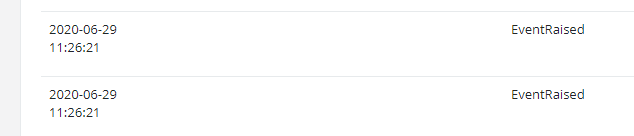
(Times in screen shot are Eastern)
andrewdmoreno
on 17 Jul 2020
Thanks! I found the logs. I see two VendorTicketStatusUpdatedEvent events that arrive at 2020-06-29 15:26:21 within a tenth of a second of each other. The first event appears to result in a call to O_WalkInRepair_V2. The second event, however, doesn't appear to result in any action, and the orchestration goes to sleep. I also don't see the ExternalEventSaved trace. Rather, I see a second ExternalEventRaised which seems odd given that you've only called WaitForExternalEventAsync once up until this point.
I think I'll need to try to reproduce this locally to understand what's going on. Would you be able to share your orchestration code, or some approximation of it? That might help me investigate further.
Thanks for your help so far.
cgillum
on 17 Jul 2020
@cgillum Would it be ok to share any code with you directly? If so, let me know how best to send.
andrewdmoreno
on 17 Jul 2020
@andrewdmoreno Sure - you can send it to my GitHub handle + @ + microsoft.com
cgillum
on 17 Jul 2020
@cgillum Code has been sent to your email as requested.
andrewdmoreno
on 18 Jul 2020
Also, in case it's relevant we are using version 2.1.1 of Microsoft.Azure.WebJobs.Extensions.DurableTask
andrewdmoreno
on 18 Jul 2020
Hi @andrewdmoreno and @gdodd1977. I took a look at the code and it looks like you're probably running into the exact same issue as #1410. Specifically, your implementation of RunStatusUpdateEventAndSlaTimerCheckAsync inside of a while-loop is problematic because of how it creates a new WaitForExternalEventAsync task every loop iteration.
// Wait for vendor status updates and update ticket status accordingly.
while (true)
{
    // ...
    var updatedStatus = await context.RunStatusUpdateEventAndSlaTimerCheckAsync(slaContext);
    if (updatedStatus != null)
    {
        statusUpdateContext = new FulfillmentTicketStatusUpdateContext(updatedStatus, FulfillmentTicketWorkflowContext);

        await HandleErrorResolutionCheckAsync(context, slaContext);

        slaContext.SlaTimerEventRaised = false;
    }
    else
    {
        slaContext.SlaTimerEventRaised = true;
    }
}
And here is the relevant snippet inside RunStatusUpdateEventAndSlaTimerCheckAsync:
public static async Task<FulfillmentTicketStatusUpdateSummary> RunStatusUpdateEventAndSlaTimerCheckAsync(
    this IDurableOrchestrationContext orchestrationContext,
    StatusUpdateAndSlaCheckContext context)
{
    using (var cts = new CancellationTokenSource())
    {
        var events = new List<string>();
        var statusUpdateEvent = orchestrationContext.WaitForExternalEvent<FulfillmentTicketStatusUpdateSummary>("VendorTicketStatusUpdatedEvent");
        events.Add("VendorTicketStatusUpdatedEvent");

        var slaTimer = orchestrationContext.CreateTimer(orchestrationContext.CurrentUtcDateTime.Add(context.SlaDuration),
            cts.Token);
        events.Add("SlaTimer");

        orchestrationContext.SetCustomStatusWithWaitingEvents(events);

        var completedTask = await Task.WhenAny(statusUpdateEvent, slaTimer);
As I describe in the other issue, what's happening is that one of the two VendorTicketStatusUpdatedEvent events are getting routed to the statusUpdateEvent task that was abandoned after a previous slaTimer expiration. Because that task is abandoned, your code is by design not running any logic after it is received by the orchestration. This is an extremely subtle behavior of C# tasks and I had no idea that this pattern was problematic until about an hour ago when I was investigating the other issue.
The way to fix your code is to cache the existing statusUpdateEvent task and reuse it in the next loop iteration if it is "cancelled" due to an SLA timeout. This will require you to refactor your code a bit because of how the while-loop logic is split between your main orchestration file and your extension methods.
cgillum
on 22 Jul 2020
@cgillum Read your reply on both issues and we'll see about getting that changed right away.
Yesterday we what seemed like the same issue when testing a simpler orchestration that did not involve a loop. I had been meaning to find that one in application insights to provide as an example. Given your explanation, it's possible it still may be the same root cause as we do wait for external events at different points and have a timer if I'm not mistaken. We'll look into that one further.
andrewdmoreno
on 22 Jul 2020
Thanks @cgillum for the thorough write-up and explanation! We'll give this a go.
gdodd1977
on 22 Jul 2020
@cgillum We're addressing this today, but as we discussed it internally wanted to get your feedback as to whether this change is one that would require us to version the orchestration due to any of the deterministic checks. We were a little fuzzy as to whether this was or was not a breaking change from a Durable Functions perspective. If you could advise on that it would be greatly appreciated.
andrewdmoreno
on 22 Jul 2020
Good question. The interesting thing about WaitForExternalEventAsync is that it doesn’t actually write anything into the history, so calling it fewer times should not break determinism rules as long as the outcome of the same. However, any orchestrations that were already impacted by this problem _would_ be at risk because a replay of the same history would result in correctly scheduling your activity function whereas in the past the activity execution might have been skipped. So in conclusion, yes, this would be considered a breaking change for some existing instances.
cgillum
on 22 Jul 2020
Got it. We'll version and deprecate the current one.
andrewdmoreno
on 22 Jul 2020
As an update to this issue - the change suggested by @cgillum has been made and we've tested locally. The above pattern appears to have resolved the behavior we were seeing, at least in our multiple attempts to reproduce it locally.
andrewdmoreno
on 30 Jul 2020
Related issues
 SimonLuckenuik
·
3Comments
cgillum
·
3Comments
SimonLuckenuik
·
3Comments
cgillum
·
3Comments
 shibayan
·
4Comments
shibayan
·
4Comments
 pacodelacruz
·
3Comments
pacodelacruz
·
3Comments
 mpaul31
·
3Comments
mpaul31
·
3Comments