Azure-functions-durable-extension: Load hubName issue for slot settings in durable function v 2.2.0
Description
Same as this closed bug https://github.com/Azure/azure-functions-durable-extension/issues/1057
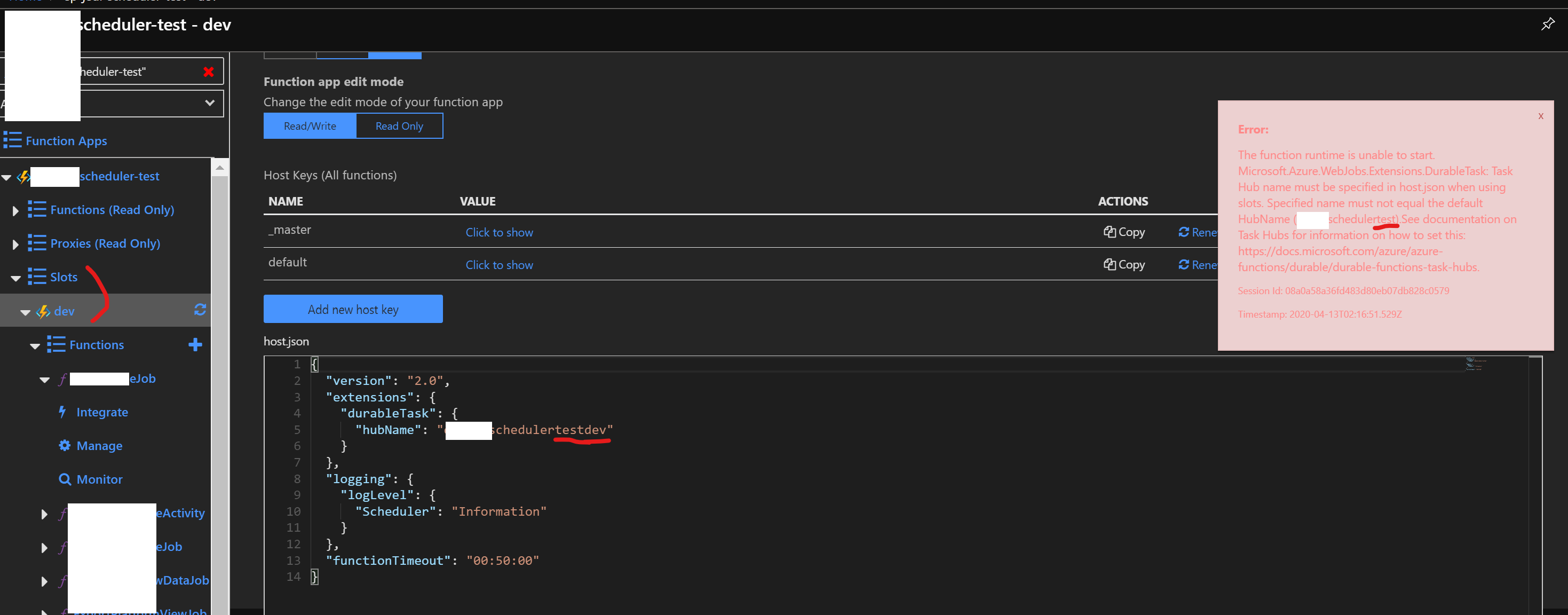
When I deploy a Durable Functions App to Azure slot, it says
The function runtime is unable to start. Microsoft.Azure.WebJobs.Extensions.DurableTask: Task Hub name must be specified in host.json when using slots.
Expected behavior
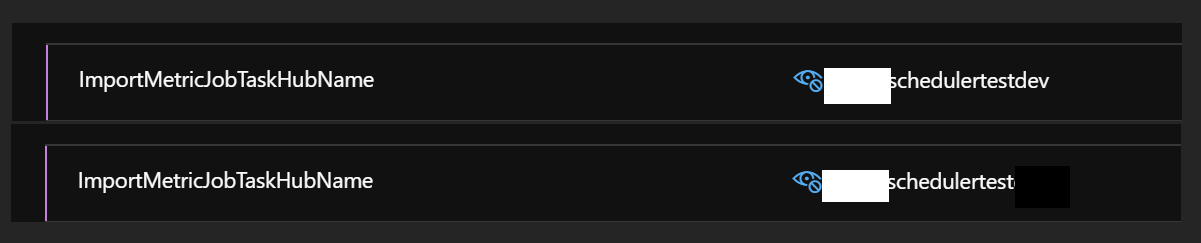
I have provided correct app settings (different hub name) in both 'dev' slot and prod slot & function should load correctly.
Actual behavior
Error:
The function runtime is unable to start. Microsoft.Azure.WebJobs.Extensions.DurableTask: Task Hub name must be specified in host.json when using slots. Specified name must not equal the default HubName (....schedulertest).See documentation on Task Hubs for information on how to set this: https://docs.microsoft.com/azure/azure-functions/durable/durable-functions-task-hubs.
Session Id: 08a0a58a36f.........Timestamp: 2020-04-13T.......Z
Relevant source code snippets
[Singleton]
        [FunctionName(nameof(ImportMetricJob))]
        public async Task ImportMetricJob(
            [TimerTrigger(CronExpressions.EveryHour)]TimerInfo myTimer,
            [DurableClient(TaskHub = "%ImportMetricJobTaskHubName%")] IDurableOrchestrationClient orchestrationClient,
            ExecutionContext fnContext)
{
  "version": "2.0",
  "functionTimeout": "00:50:00",
  "extensions": {
    "durableTask": {
      "hubName": "%ImportMetricJobTaskHubName%"
    }
  },
  "logging": {
    "logLevel": {
      "Scheduler": "Information"
    }
  }
}
Known workarounds
Tried all work around mentioned in previous bugs, like mentioning AzureFunctionsJobHost__extensions__durableTask__hubName but still no luck.
App Details
Durable Functions extension version: 2.2.0
Function App version: 3.0
Programming language used: C#
Screenshots
If applicable, add screenshots to help explain your problem.
Two app settings in 'dev' slot & 'prod' slot
 sanjaydebnath
All 4 comments
Given the error message, for some reason the Functions runtime is not respecting your host.json.
The last time I saw this happen, it was because the customer had a Startup.cs that replace the IConfiguration singleton object with their own configuration sources. When they did this, they prevented the existing IConfiguration object used by the functions runtime from loading. This is where host.json configuration lies, as well as fields like AzureFunctionsJobHost__extensions__durableTask__hubName. Make sure your code is not doing that, otherwise you are in fact using the default task hub for both of your slots, which will cause a conflict.
 ConnorMcMahon
on 13 Apr 2020
ConnorMcMahon
on 13 Apr 2020
Given the error message, for some reason the Functions runtime is not respecting your host.json.
The last time I saw this happen, it was because the customer had a Startup.cs that replace the
IConfigurationsingleton object with their own configuration sources. When they did this, they prevented the existingIConfigurationobject used by the functions runtime from loading. This is wherehost.jsonconfiguration lies, as well as fields likeAzureFunctionsJobHost__extensions__durableTask__hubName. Make sure your code is not doing that, otherwise you are in fact using the default task hub for both of your slots, which will cause a conflict.
Yep we are overriding the IConfiguration like below. Any other way to fix this while keeping the config override? We need to configure a few things (from different appsettings.json file) depending on env & we are doing the same in the override like below. We add the 'Environment' env variable from release pipeline.
`public override void Configure(IFunctionsHostBuilder builder)
{
var environment = Environment.GetEnvironmentVariable("Environment") ?? "Development";
var executioncontextoptions = builder.Services.BuildServiceProvider()
.GetService
var currentDirectory = executioncontextoptions.AppDirectory;
        builder.Services.AddSingleton<IConfiguration>(context =>
        {
            var configurationBuilder = new ConfigurationBuilder()
            .AddInMemoryCollection(new[]
            {
                new KeyValuePair<string, string>("Environment:Name", environment),
            })
           .SetBasePath(currentDirectory)
           .AddJsonFile("appsettings.json", optional: false, reloadOnChange: true)
           .AddJsonFile($"appsettings.{environment}.json", true)
           .AddEnvironmentVariables();
            var config = configurationBuilder.Build();
            var env = config.GetSection("Environment").Get<EnvironmentConfig>();
            var keyVaultOptions = config.GetSection("KeyVault").Get<KeyVaultOptions>();

            var azureServiceTokenProvider = new AzureServiceTokenProvider();
            var keyVaultClient = new Microsoft.Azure.KeyVault.KeyVaultClient(new Microsoft.Azure.KeyVault.KeyVaultClient.AuthenticationCallback(azureServiceTokenProvider.KeyVaultTokenCallback));
            configurationBuilder.AddAzureKeyVault(keyVaultOptions.VaultUrl, keyVaultClient, new DefaultKeyVaultSecretManager());

            if (env.IsDevelopment)
            {
                configurationBuilder.AddUserSecrets(".........", false);
            }

            config = configurationBuilder.Build();
            return config;
        });

        Bootstrap.RegisterServices(builder); // custom file to register other things
        builder.Services.AddOptions();
        builder.Services.AddHttpClient();
        builder.Services.AddAutoMapper(typeof(Startup));
    }`
Guidance for how to properly handle custom configuration in Azure Functions is detailed in this issue. I'm going to close the issue here, as this is more of a Functions runtime concern.
ConnorMcMahon
on 14 Apr 2020
https://github.com/Azure/azure-functions-host/issues/4464
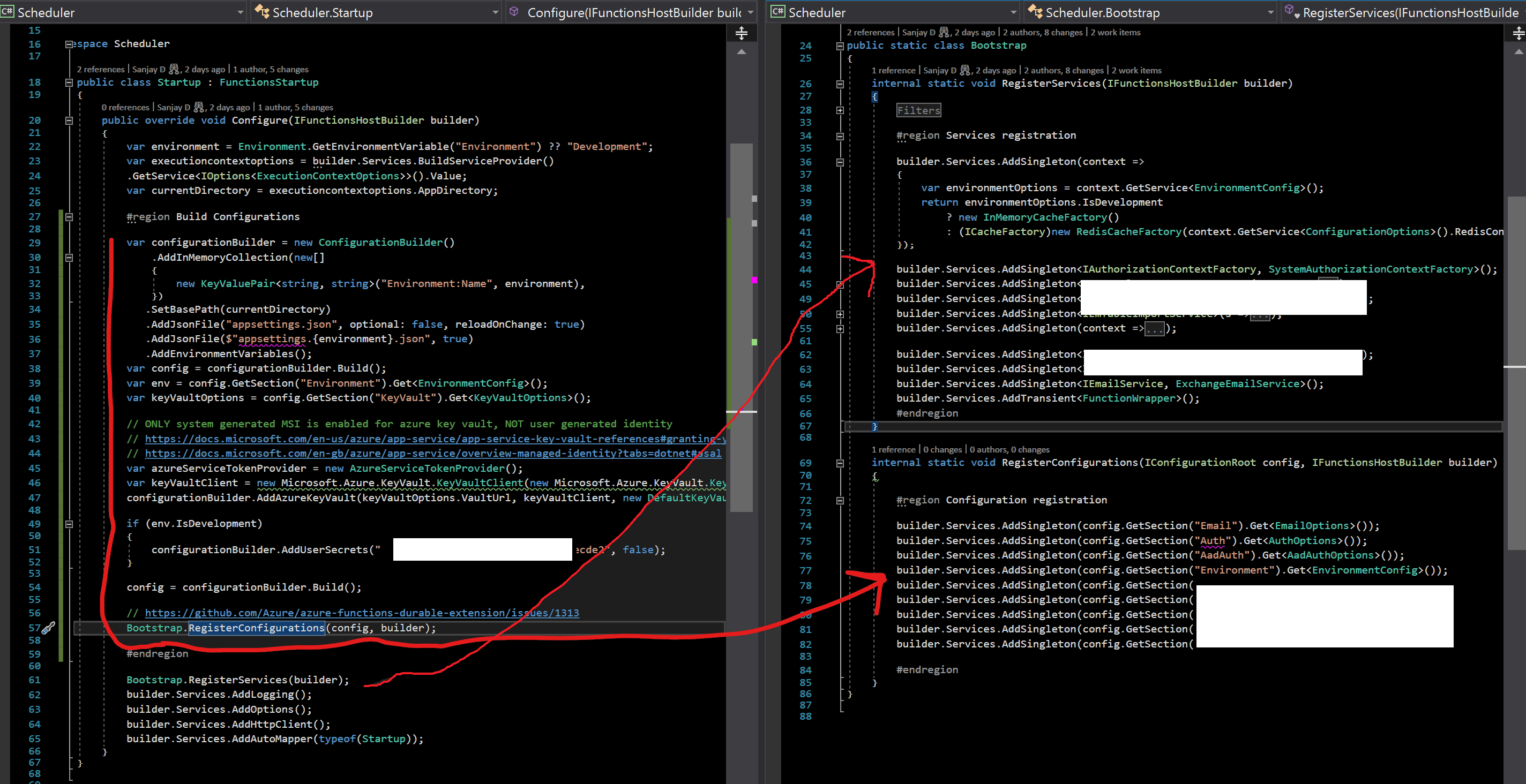
For someone who is stuck with additional configuration load below approach worked for me keeping the default IConfiguration intact. Basically I don't register the custom IConfiguration as suggested by @kijujjav & @martinfletcher in the previous bug anymore (didn't work with the mentioned issue in this bug, below line always returns null for me and so no existing providors are coming).
var existingConfiguration = descriptor.ImplementationInstance as IConfigurationRoot
Build your strongly typed config objects using a different config builder at startup & register as singleton. Then inject those strongly typed config objects directly to your other classes as needed. My functions runs on dedicated app service plan.
sanjaydebnath
on 14 Apr 2020
Related issues
 pacodelacruz
·
3Comments
pacodelacruz
·
3Comments
 jakingmsft
·
4Comments
jakingmsft
·
4Comments
 SayusiAndo
·
3Comments
SayusiAndo
·
3Comments
 shibayan
·
4Comments
shibayan
·
4Comments
 YodasMyDad
·
3Comments
YodasMyDad
·
3Comments
Most helpful comment
Given the error message, for some reason the Functions runtime is not respecting your host.json.
The last time I saw this happen, it was because the customer had a Startup.cs that replace the
IConfigurationsingleton object with their own configuration sources. When they did this, they prevented the existingIConfigurationobject used by the functions runtime from loading. This is wherehost.jsonconfiguration lies, as well as fields likeAzureFunctionsJobHost__extensions__durableTask__hubName. Make sure your code is not doing that, otherwise you are in fact using the default task hub for both of your slots, which will cause a conflict.