Azure-functions-durable-extension: Unable to load hubName from appsettings for durable function
Description
According to the documentation found at https://docs.microsoft.com/en-us/azure/azure-functions/durable/durable-functions-task-hubs#hostjson-functions-20-1, it should be possible to use a value from the appsettings as the hubname in the host.json file. However, after updating Microsoft.Azure.WebJobs.Extensions.DurableTask to v2.1.0, an exception is now thrown during startup.
Expected behavior
When using "%MyTaskHub%" as the value of the "hubName" property in the host.json file, I'm expecting the runtime to look for a key matching "MyTaskHub" in the appsettings and use its value as the hub.
Actual behavior
When the function app starts up, I receive an exception:
System.Private.CoreLib: Exception has been thrown by the target of an invocation. Microsoft.Azure.WebJobs.Extensions.DurableTask: Task hub name '%MyTaskHub%' should contain only alphanumeric characters excluding '-' and have length up to 45. Microsoft.WindowsAzure.Storage: Invalid container name. Check MSDN for more information about valid container naming.
Value cannot be null. (Parameter 'provider')
Relevant source code snippets
Instead of pasting the source code of my actual functions app which is a bit more complex, I've managed to replicate the issue in a simpler form using the Visual Studio functions app template. Below are steps to replicate:
- Open Visual Studio 2019.
- Create a new empty functions app using Azure Functions v3 (.NET Core) and select Storage Emulator as the storage account.
- Once the project has been scaffolded, right-click on the project and add New Azure Function. Select Durable Functions Orchestration as the type.
- Update the Microsoft.NET.Sdk.Functions NuGet package to 3.0.2.
- Update the Microsoft.Azure.WebJobs.Extensions.DurableTask NuGet package to 2.1.0.
- If you try and build the project at this point, you'll get errors since the types have changed. Update the function class with the correct types to resolve the build errors.
- Open host.json and replace the contents with
{
"version": "2.0",
"extensions": {
"durableTask": {
  "hubName": "%MyTaskHub%"
}
}
}
. This snippet is taken directly from the documentation (link at the top of this issue). - Open local.settings.json and add
"MyTaskHub" : "samplehubname"to the "Values" section. Again, this snippet is taken directly from the documentation. - Open the function class and update
[DurableClient]to[DurableClient(TaskHub = "%MyTaskHub%")]. - Debug the functions app and during startup, the exception described above is thrown.
Known workarounds
The only way I've managed to get it working is to manually make sure the host.json "hubName" matches the value of "MyTaskHub" in local.settings.json. You can verify this by changing the value of "hubName" in host.json to "samplehubname" after following the replication steps above. After doing so, debug the project and it should at least run correctly.
This workaround isn't ideal as it means I would need to update the value everytime instead of the value coming from the appsettings.
App Details
- AzureFunctionsVersion: v3
- TargetFramework: netcoreapp3.0
- Microsoft.NET.Sdk.Functions: v3.0.2
- Microsoft.Azure.WebJobs.Extensions.DurableTask: v2.1.0
 krugarmatt
All 22 comments
We've had this issue on AzureFunctionsVersion v2 as well
 bendursley
on 20 Dec 2019
bendursley
on 20 Dec 2019
FYI @ConnorMcMahon and @amdeel in case one of you are available to take a look.
 cgillum
on 20 Dec 2019
cgillum
on 20 Dec 2019
I'll take a look.
 ConnorMcMahon
on 20 Dec 2019
ConnorMcMahon
on 20 Dec 2019
So it looks like this scenario is not working in 2.0.0 either.
When AzureDurabilityProviderFactory is looking at DurableTaskOptions.hubName, the app setting has still not been resolved yet. The only reason this wasn't hitting the exception in 2.0.0 is because of the bug where all hub names were being treated as default. In 2.0.0, instead we would "sanitize" the task hub name because we though it was the site name.
Therefore, in the documentation example, the task hub of %MyTaskHub% would not use the app setting MyTaskHub, but instead "MyTaskHub" the string literal.
Will need to dive into how to actually fix this for 2.1.1.
ConnorMcMahon
on 20 Dec 2019
is it possible to have this prioritized and hot fixed? this is convoluting our entire CI/CD pipeline because we are creating our storage accounts on the fly and injecting the connection strings into the deployparams using ARM expressions. We’ve been waiting two weeks for this fix and things are still broken.
Thanks
 mpaul31
on 21 Dec 2019
mpaul31
on 21 Dec 2019
This is very high in our priority list. I'll see about when we can get a fix released, though it may be tricky due to the holiday schedule.
cgillum
on 21 Dec 2019
I can confirm that the bug #1057 wasn't fixed by #1095, it just returns a different error message.
 salv85
on 30 Dec 2019
salv85
on 30 Dec 2019
@cgillum I developed my own fix, can I make a pull request?
salv85
on 31 Dec 2019
@ConnorMcMahon did you have a fix for this already?
cgillum
on 31 Dec 2019
I have started a fix, but it is still probably another hour or two of dev time from being ready. @salv85 would love to see your PR. I'll work on mine in parallel, and if my PR is up by the time you would post yours, it's up to you whether you want to still post yours, as your PR may take a different approach that could be better than mine.
ConnorMcMahon
on 31 Dec 2019
@cgillum I can't make pull requests, I get a 403 error. I know @ConnorMcMahon has already fixed the bug, but I would like to contribute even though you drop my code :)
salv85
on 2 Jan 2020
Anyone can submit a PR. By chance did you try to push your changes to a local branch you created on this repo? That might explain the 403. The correct way to submit a PR is to fork this repo into your own GitHub account, make changes there, and then submit the PR from your fork. We’d be happy to review your proposed changes. :)
cgillum
on 2 Jan 2020
If anyone is looking for a workaround before this is released, I've had luck setting the hub name using AzureFunctionsJobHost__extensions__durableTask__hubName in my app settings (and removing it entirely from host.json). I haven't tested with local.settings.json yet.
 gpduck
on 3 Jan 2020
gpduck
on 3 Jan 2020
I still see this problem (on Azure, not tested locally) Should I reopen the bug or create a new one?
 patriziobruno
on 10 Feb 2020
patriziobruno
on 10 Feb 2020
@patriziobruno, are you seeing this in 2.1.1? If so, I would love to see if we can get a repro for it.
ConnorMcMahon
on 10 Feb 2020
works for us using 2.1.1
mpaul31
on 10 Feb 2020
@ConnorMcMahon yes, 2.1.1. I put the taskhub name in the slot's app-settings and in an AppConfig service and then used the DurableClientAttribute's TaskHub property and extensions.durableTask.hubName in host.json. I even set AzureFunctionsJobHost__extensions__durableTask__hubName in the slot's app-settings, to no avail. I also tried putting the name itself in the host.json, instead of using a variable (taskhubnameppe, instead of %TaskHubName%)
It works on my local machine, it fails when deployed.
Update:
I checked the deployed version of Microsoft.Azure.WebJobs.Extensions.DurableTask.dll and it is the same 2.1.1 I see on my machine. The stack trace confirms that the function app is loading the right version {"assembly":"Microsoft.Azure.WebJobs.Extensions.DurableTask, Version=2.0.0.0, Culture=neutral, PublicKeyToken=014045d636e89289","fileName":"d:\\a\\r1\\a\\azure-functions-durable-extension\\src\\WebJobs.Extensions.DurableTask\\Options\\DurableTaskOptions.cs","method":"Microsoft.Azure.WebJobs.Extensions.DurableTask.DurableTaskOptions.Validate","level":0,"line":217}
patriziobruno
on 11 Feb 2020
Upgrading to 2.1.1 fixed this issue for me. Thanks guys!
 snesbitt76
on 4 Mar 2020
snesbitt76
on 4 Mar 2020
@ConnorMcMahon yes, 2.1.1. I put the taskhub name in the slot's app-settings and in an AppConfig service and then used the
DurableClientAttribute'sTaskHubproperty andextensions.durableTask.hubNamein host.json. I even setAzureFunctionsJobHost__extensions__durableTask__hubNamein the slot's app-settings, to no avail. I also tried putting the name itself in the host.json, instead of using a variable (taskhubnameppe, instead of%TaskHubName%)It works on my local machine, it fails when deployed.
Update:
I checked the deployed version of Microsoft.Azure.WebJobs.Extensions.DurableTask.dll and it is the same 2.1.1 I see on my machine. The stack trace confirms that the function app is loading the right version{"assembly":"Microsoft.Azure.WebJobs.Extensions.DurableTask, Version=2.0.0.0, Culture=neutral, PublicKeyToken=014045d636e89289","fileName":"d:\\a\\r1\\a\\azure-functions-durable-extension\\src\\WebJobs.Extensions.DurableTask\\Options\\DurableTaskOptions.cs","method":"Microsoft.Azure.WebJobs.Extensions.DurableTask.DurableTaskOptions.Validate","level":0,"line":217}
Didn't fix for me too, I am using 2.2.0. And I have tried all combination of suggested fixes. This fails only when we are using slot, prod slot seems fine.
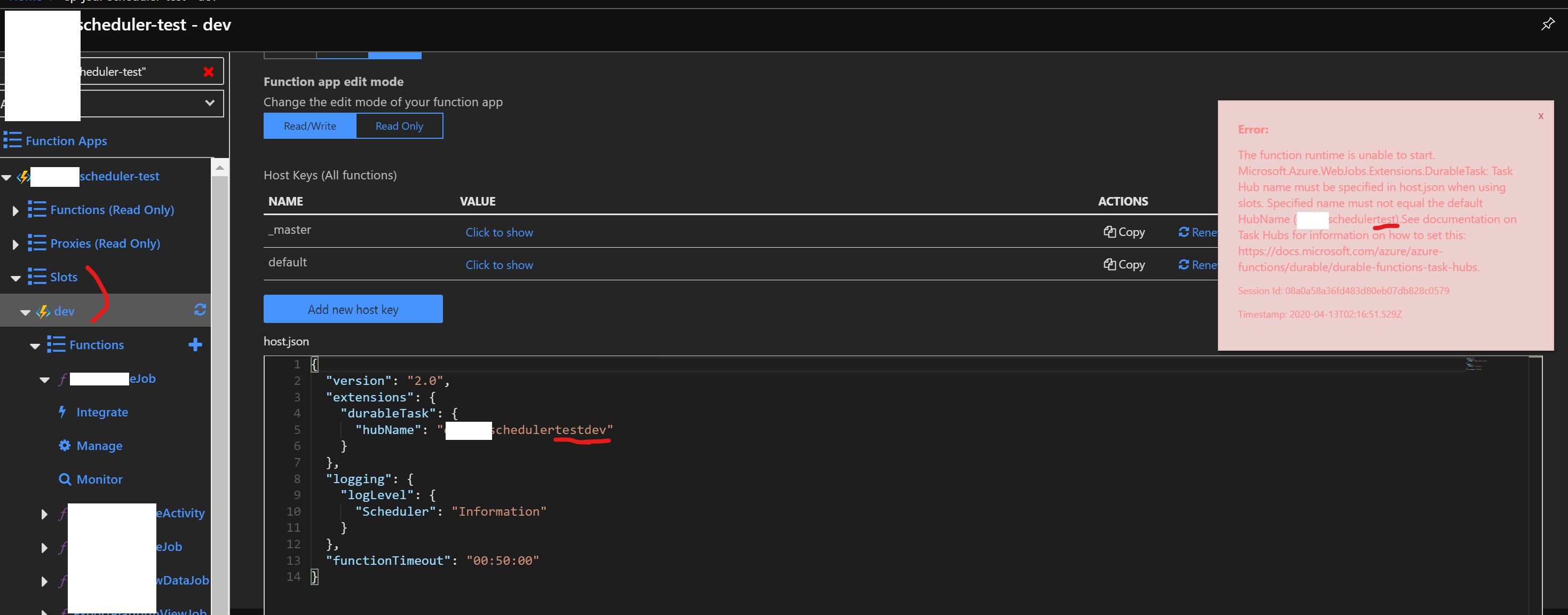
 sanjaydebnath
on 13 Apr 2020
sanjaydebnath
on 13 Apr 2020
@ConnorMcMahon yes, 2.1.1. I put the taskhub name in the slot's app-settings and in an AppConfig service and then used the
DurableClientAttribute'sTaskHubproperty andextensions.durableTask.hubNamein host.json. I even setAzureFunctionsJobHost__extensions__durableTask__hubNamein the slot's app-settings, to no avail. I also tried putting the name itself in the host.json, instead of using a variable (taskhubnameppe, instead of%TaskHubName%)
It works on my local machine, it fails when deployed.
Update:
I checked the deployed version of Microsoft.Azure.WebJobs.Extensions.DurableTask.dll and it is the same 2.1.1 I see on my machine. The stack trace confirms that the function app is loading the right version{"assembly":"Microsoft.Azure.WebJobs.Extensions.DurableTask, Version=2.0.0.0, Culture=neutral, PublicKeyToken=014045d636e89289","fileName":"d:\\a\\r1\\a\\azure-functions-durable-extension\\src\\WebJobs.Extensions.DurableTask\\Options\\DurableTaskOptions.cs","method":"Microsoft.Azure.WebJobs.Extensions.DurableTask.DurableTaskOptions.Validate","level":0,"line":217}Didn't fix for me too, I am using 2.2.0. And I have tried all combination of suggested fixes. This fails only when we are using slot, prod slot seems fine.
Hello friend, any solution with you problem? I have been facing the same as you recently and can't find any solution, prod slot works fine but others just dont't. :C
 Barralex
on 24 Apr 2020
Barralex
on 24 Apr 2020
My recommendation is to make sure you are not injecting your own IConfiguration object in a Startup.cs.
This leads to overwriting our configuration source, including the host.json.
I have yet to see this issue reappear when that is not the case.
ConnorMcMahon
on 24 Apr 2020
My recommendation is to make sure you are not injecting your own
IConfigurationobject in aStartup.cs.This leads to overwriting our configuration source, including the host.json.
I have yet to see this issue reappear when that is not the case.
Thanks for the quick answer! would check that!
Barralex
on 24 Apr 2020
Related issues
 kaftw
·
4Comments
kaftw
·
4Comments
 SimonLuckenuik
·
3Comments
SimonLuckenuik
·
3Comments
 YodasMyDad
·
3Comments
YodasMyDad
·
3Comments
 shibayan
·
4Comments
mpaul31
·
3Comments
shibayan
·
4Comments
mpaul31
·
3Comments
Most helpful comment
is it possible to have this prioritized and hot fixed? this is convoluting our entire CI/CD pipeline because we are creating our storage accounts on the fly and injecting the connection strings into the deployparams using ARM expressions. We’ve been waiting two weeks for this fix and things are still broken.
Thanks