Azure-functions-durable-extension: CreateHttpManagementPayload returns "0.0.0.0" instead of "localhost" when run locally
Describe the bug
Kick off an orchestration and get its status query link via orchestionClient.CreateManagementPayload(instanceId).
Investigative information
- Durable Functions extension version: 1.7.0
- Function App version: 2.0
- Programming language used: C#
- Timeframe issue observed: after updating Functions to v2.0
- Function App name: N/A, running locally
- Function name(s): N/A
- Region: N/A
- Orchestration instance ID(s): N/A
To Reproduce
Steps to reproduce the behavior:
- Locally create new Functions v2 project/solution in Visual studio.
- Use the code below (import nuget package
Microsoft.Azure.WebJobs.Extensions.DurableTaskv1.7.0)
using System.Threading.Tasks;
using Microsoft.Azure.WebJobs;
using Microsoft.Azure.WebJobs.Extensions.Http;
using Microsoft.Extensions.Logging;
using System.Net.Http;
using System.Net;

namespace FunctionApp1
{
    public static class Function1
    {
        [FunctionName("HttpTrigger1")]
        public static async Task<HttpResponseMessage> HttpTrigger1(
            [HttpTrigger(AuthorizationLevel.Anonymous, "post", Route = null)] HttpRequestMessage req,
            [OrchestrationClient] DurableOrchestrationClient orchestrationClient,
            ILogger log,
            ExecutionContext context)
        {
            var instanceId = await orchestrationClient.StartNewAsync("Orchestrator1", null);
            var result = orchestrationClient.CreateHttpManagementPayload(instanceId);  // <== must return http://localhost:7071/...
            return req.CreateResponse(HttpStatusCode.OK, result);
        }

        [FunctionName("Orchestrator1")]
        public static async Task<int> Orchestrator1(
            [OrchestrationTrigger] DurableOrchestrationContext orchestrationContext,
            ILogger log,
            ExecutionContext executionContext)
        {
            return 42;
        }
    }
}
- Start the app locally
- Submit an http request against the HTTP trigger:
[POST] http://localhost:7071/api/HttpTrigger1to start a new orchestration. - Inspect the response body, which contains a field
statusQueryGetUri. - Try to open that link.
Expected behavior
Step 5. must contain a valid url: http//localhost:7071/..., same as in the request.
Actual behavior
Step 5. returns a wrong url to https://0.0.0.0:7071/runtime/.../. Note that the ip and the protocol are wrong.
Screenshots
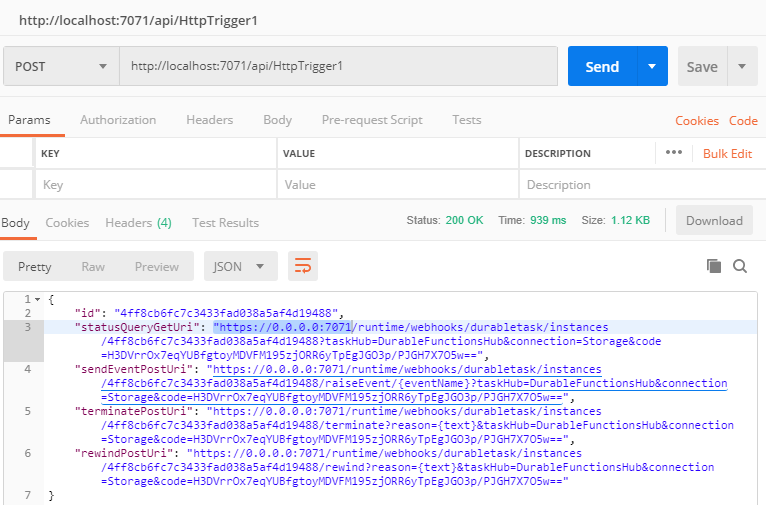
Known workarounds
Before opening the link in Step 6, manually substitute https://0.0.0.0 with http://localhost.
Additional context
Remote works, just locally it's broken.
- Development environment: Visual Studio 2017 latest version
- Links to source: see code above
 thomas-schreiter
All 3 comments
Hi @thomas-schreiter, thank you for reporting this (and for using our new bug issue template!) This is a known issue caused by behavior in Azure Functions Core Tools. I've got a fix for this almost ready to go out.
A less cumbersome workaround is to set the WEBSITE_HOSTNAME environment variable on your machine to localhost:7071.
 kashimiz
on 11 Jan 2019
kashimiz
on 11 Jan 2019
@thomas-schreiter actually the better way to implement your HTTP function is as follows, using the CreateCheckStatusResponse API:
[FunctionName("HttpTrigger1")]
public static async Task<HttpResponseMessage> HttpTrigger1(
    [HttpTrigger(AuthorizationLevel.Anonymous, "post", Route = null)] HttpRequestMessage req,
    [OrchestrationClient] DurableOrchestrationClient orchestrationClient,
    ILogger log,
    ExecutionContext context)
{
    var instanceId = await orchestrationClient.StartNewAsync("Orchestrator1", null);
    return orchestrationClient.CreateCheckStatusResponse(req, instanceId);
}
This does not suffer from the same bug because it has the HttpRequestMessage it can use to learn the actual hostname and port number. So consider that another possible workaround.
 cgillum
on 11 Jan 2019
cgillum
on 11 Jan 2019
That works @cgillum, thanks. I wasn't aware that it existed. It's documented in the HTTP API URL discovery section.
thomas-schreiter
on 12 Jan 2019
Related issues
cgillum
·
3Comments
 shibayan
·
4Comments
shibayan
·
4Comments
 SimonLuckenuik
·
3Comments
SimonLuckenuik
·
3Comments
 mark-szabo
·
3Comments
mark-szabo
·
3Comments
 val-janeiko
·
3Comments
val-janeiko
·
3Comments
Most helpful comment
@thomas-schreiter actually the better way to implement your HTTP function is as follows, using the
CreateCheckStatusResponseAPI:This does not suffer from the same bug because it has the
HttpRequestMessageit can use to learn the actual hostname and port number. So consider that another possible workaround.