Azure-functions-durable-extension: Orchestrator stuck waiting for activity task completion
Compiled C#
Runtime: v1
Microsoft.Azure.WebJobs.Extensions.DurableTask: 1.7.0
To locate the instance in West US:
[2018-12-21T19:23:45.567Z] Function started (Id=81976288-5162-412b-98bb-87d2a41019a0)
Example instance ID: 9f6a5c9b-d0cd-4d80-9a57-f66a33a64542
I have tried running the orchestrator a couple of times and it keeps getting hung up in the middle. Based on my investigation it looks like it is awaiting for an activity to complete that was started. While trying to debug it locally, I was able to see in the control queues that at one point a task completion message was in the queue and had been dequeued at that point 97 times. Eventually the message was invisible (though the storage explorer showed there was one hidden) which led me to believe it was hidden with some delay.
This orchestrator structure is fairly simple in what it is doing, in pseudo-code:
fan out for each image:
    call UploadImageToStorage activity
    call FixImageRotationAndColor activity
fan-in via await Task.WhenAll(tasks) with return values from FixImageRotationAndColor activity
...one other step down here that hasn't been reached
In the case I have been trying the number of images has been 2. From the DurableFunctionsHubHistory I can see that both executions of UploadImageToStorage are scheduled then complete. Then I can see both executions of FixImageRotationAndColor are scheduled but only one completion is listed.
I believe the other execution is being completed as well due to the fact that the output file it creates exists and the aformentioned queue messages in the control queues that contain the result information. Based on the high dequeue count on those messages until they are hidden I am guessing that whatever is handling that queue is failing for whatever reason. I have looked at the message payload to see if anything jumped out as something that would break parsing but I didn't see anything obvious.
Here is a sample of one of the queue items that seemed to be failing to dequeue (NOTE this is from my local running instance where I was seeing the same behavior):
{"$type":"DurableTask.AzureStorage.MessageData","ActivityId":"0fa59e67-34ad-4b50-987a-adaa95bf76bb","TaskMessage":{"$type":"DurableTask.Core.TaskMessage","Event":{"$type":"DurableTask.Core.History.TaskCompletedEvent","EventType":5,"TaskScheduledId":3,"Result":"{\"FullPath\":\"http://127.0.0.1:10000/devstoreaccount1/docs/images/decoded/b6748c6b-3749-4160-9463-86db1509ec28/2-grayscale.jpg\",\"RelativePath\":\"docs/images/decoded/b6748c6b-3749-4160-9463-86db1509ec28/2-grayscale.jpg\"}","EventId":-1,"IsPlayed":false,"Timestamp":"2018-12-21T19:02:03.7511653Z"},"SequenceNumber":0,"OrchestrationInstance":{"$type":"DurableTask.Core.OrchestrationInstance","InstanceId":"b6748c6b-3749-4160-9463-86db1509ec28","ExecutionId":"abcd6c77584343898cf9d302e3f77eae"}},"CompressedBlobName":null,"SequenceNumber":17,"Episode":2}
Any help would be greatly appreciated and I am happy to provide any additional information that would be useful.
 ghills
All 23 comments
Another instance where I saw the same behavior: 0ae05dd1-9482-480c-927f-0774ea61cb30
ghills
on 21 Dec 2018
I was able to catch one of the control queue messages I was talking about for the example instance above when it became visible again:
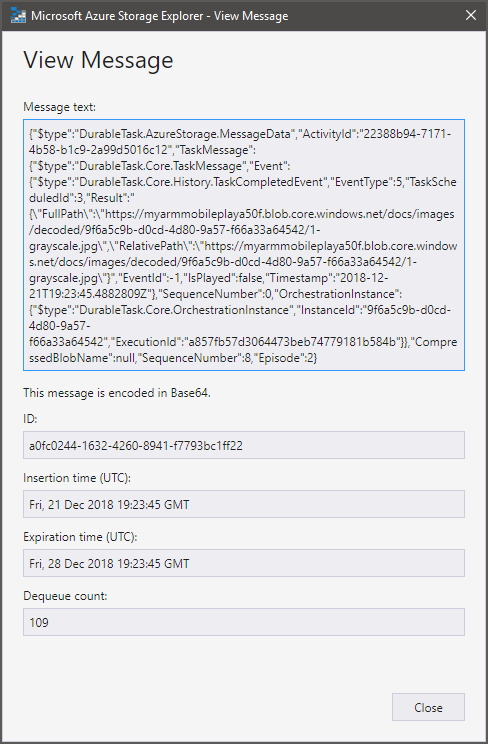
Message contents:
{"$type":"DurableTask.AzureStorage.MessageData","ActivityId":"22388b94-7171-4b58-b1c9-2a99d5016c12","TaskMessage":{"$type":"DurableTask.Core.TaskMessage","Event":{"$type":"DurableTask.Core.History.TaskCompletedEvent","EventType":5,"TaskScheduledId":3,"Result":"{\"FullPath\":\"https://myarmmobileplaya50f.blob.core.windows.net/docs/images/decoded/9f6a5c9b-d0cd-4d80-9a57-f66a33a64542/1-grayscale.jpg\",\"RelativePath\":\"https://myarmmobileplaya50f.blob.core.windows.net/docs/images/decoded/9f6a5c9b-d0cd-4d80-9a57-f66a33a64542/1-grayscale.jpg\"}","EventId":-1,"IsPlayed":false,"Timestamp":"2018-12-21T19:23:45.4882809Z"},"SequenceNumber":0,"OrchestrationInstance":{"$type":"DurableTask.Core.OrchestrationInstance","InstanceId":"9f6a5c9b-d0cd-4d80-9a57-f66a33a64542","ExecutionId":"a857fb57d3064473beb74779181b584b"}},"CompressedBlobName":null,"SequenceNumber":8,"Episode":2}
@ghills Thanks for these details. I found telemetry for the problematic orchestration. I'm going to try and take a closer look to try to understand why it is unable to successfully consume the message.
BTW, I'm not sure if this is related, but I did see this exception in your logs:
EventGridNotificationException: An invalid request URI was provided. The request URI must either be an absolute URI or BaseAddress must be set.
   at System.Net.Http.HttpClient.PrepareRequestMessage(HttpRequestMessage request)
   at System.Net.Http.HttpClient.SendAsync(HttpRequestMessage request, HttpCompletionOption completionOption, CancellationToken cancellationToken)
   at System.Net.Http.HttpClient.SendAsync(HttpRequestMessage request, CancellationToken cancellationToken)
   at System.Net.Http.HttpClient.PostAsync(Uri requestUri, HttpContent content, CancellationToken cancellationToken)
   at Microsoft.Azure.WebJobs.Extensions.DurableTask.LifeCycleNotificationHelper.<SendNotificationAsync>d__15.MoveNext()
It looks like the runtime sees that EventGridTopicEndpoint property (for our Event Grid publishing feature) sees the value as %EventGridTopicEndpoint% - in other words, it's not correctly resolving. Again, I'm not sure if this is related, but you may want to look into this as well.
 cgillum
on 21 Dec 2018
cgillum
on 21 Dec 2018
@cgillum I think that is just because we have dummy values set for EventGridTopicEndpoint and EventGridKey in our non-production environments of this application (like this instance). If I recall correctly we had to set non-empty values for these settings otherwise we would get some sort of failure on startup but we don't have actual event grid topics set up for all of our dev environments.
ghills
on 21 Dec 2018
@ghills Cool thanks - I think we can ignore that.
As I'm looking into this, I'm suspecting that this might be a logic bug in DurableTask.AzureStorage. What I'm observing is that you have scheduled two concurrent activity functions, one of the responses were processed successfully but the other is being rejected as "out of order". The "out of order" check puts the message back on the queue because it assumes that the problem will self correct. But in this case it isn't, so it re-reads it over and over. I'm going to keep looking to see if I can figure out why it isn't being processed.
cgillum
on 21 Dec 2018
@cgillum Sounds good - thanks. I've been testing it more and it certainly feels like a timing issue as I have submitted some through that worked fine but it has been hit or miss (feels like it is about half of the time it gets "stuck").
ghills
on 21 Dec 2018
OK, so I looked at the history for orchestration with ID = 9f6a5c9b-d0cd-4d80-9a57-f66a33a64542. Something looks definitely wrong with the history and is causing this odd behavior. Specifically, if you look at your DurableFunctionsHubHistory table, filter the partition key using this ID, and then sort by RowKey, you'll see an EventId column which has some numbers in it. Ignore the -1 values. Basically, there is a 3 which comes before the 2.
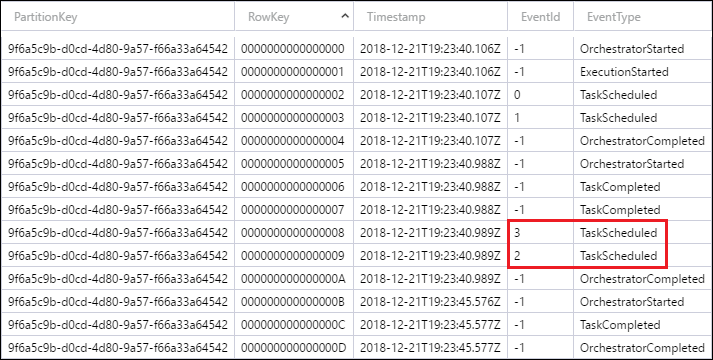
These numbers are supposed to be monotonically increment and stay in order (again, ignoring -1). The fact that these numbers are out of order is confusing DurableTask.AzureStorage in a way that I've never seen before.
Normally this should never happen because of the single-threaded behavior of orchestrator functions. By chance to you have any async logic in your orchestrator function? For example, are you scheduling those two activity functions using background threads? That might explain this behavior.
cgillum
on 21 Dec 2018
Ah I see - we are scheduling those two activity functions from within an async function.
I can post the relevant snippets of the orchestrator here:
[FunctionName(Name)]
public static async Task MergeDocumentsAsync(
    [OrchestrationTrigger]
    DurableOrchestrationContextBase context,

    ILogger log)
{
    var input = context.GetInput<OrchestrationInitParams>();
    if (input?.BlobUrls == null || !input.BlobUrls.Any())
    {
        log.LogError("No blobs specified for merging.");
        return;
    }

    // fan-out/fan-in
    List<Task<BlobPath>> tasks = new List<Task<BlobPath>>();
    for(var i = 0; i < input.BlobUrls.Count(); i++)
    {
        var path = input.BlobUrls.ElementAt(i);
        tasks.Add(UploadAndFixImageAsync(path, i + 1, context));
    }

    var blobs = await Task.WhenAll(tasks);

    // the rest is redacted
}

public static async Task<BlobPath> UploadAndFixImageAsync(
    BlobPath path,
    int pageNumber,
    DurableOrchestrationContextBase ctx)
{
    var uploadInput = new UploadImageToStorage.Input
    {
        Filepath = path,
        PageNumber = pageNumber
    };

    // first, decode/upload the image to our internal container
    var uploadedImage = await ctx.CallActivityAsync<BlobPath>(
        UploadImageToStorage.Name,
        uploadInput);

    // next, rotate/apply grayscale to the image
    var fixInput = new FixImageRotationAndColor.Input
    {
        ImagePath = uploadedImage,
        PageNumber = pageNumber
    };
    var grayscale = await ctx.CallActivityAsync<BlobPath>(
        FixImageRotationAndColor.Name,
        fixInput);

    return grayscale;
}
so conceivably because we are awaiting on UploadAndFixImageAsync together in the Task.WhenAll I suppose the order that the activities are scheduled could be inconsistent.
ghills
on 21 Dec 2018
Oh, this is quite interesting! So you're not actually spinning up background threads, but putting your activity calls into an async method. I'd have to think for a while exactly why that would result in weird ordering behavior, but I don't see anything wrong with what you're doing in terms of the documented code constraints, so I will consider the fact that we don't handle this correctly a bug in DurableTask.AzureStorage.
I'll see if I can reproduce this locally and create a fix. In the meantime, one thing you can try is to make UploadAndFixImageAsync into a sub-orchestration. So your for loop would look like this:
    List<Task<BlobPath>> tasks = new List<Task<BlobPath>>();
    for(var i = 0; i < input.BlobUrls.Count(); i++)
    {
        var path = input.BlobUrls.ElementAt(i);
        tasks.Add(context.CallSubOrchestratorAsync("UploadAndFixImageAsync", (path, i + 1)));
    }

   var blobs = await Task.WhenAll(tasks);
Let me know if that resolves the issue.
cgillum
on 21 Dec 2018
@cgillum I tried it out locally and that _seems_ to resolve the issue. (pushed my test data through 10 times without issue)
One other data point that may be of interest to you. I think this behavior just started in this environment today when I pulled in some updates to our code including the update of Microsoft.Azure.WebJobs.Extensions.DurableTask from 1.5.0 to 1.7.0 (as a result of the other issue we have corresponded on #540 ). This orchestrator code didn't change at all and, to my knowledge, we didn't have any cases of this occuring prior to my update (though I'm not 100% certain as this is just a dev environment we are testing with).
It may be worth considering the changes from 1.5.0 to 1.7.0 at least.
ghills
on 22 Dec 2018
Thanks for that info @ghills. Yes, the out-of-order logic I mentioned is new in 1.7.0 because if fixes an issue where orchestrator functions can hang if certain race conditions are met (see https://github.com/Azure/azure-functions-durable-extension/issues/460). The fact that this was working for you fine when using 1.5.0 further confirms that you have discovered a bug in this newly added logic - which we will need to fix soon.
cgillum
on 22 Dec 2018
A similar phenomenon also occurs in Sub Orchestrator.
Is this the same cause?
Compiled C#
Runtime: v1
Microsoft.Azure.WebJobs.Extensions.DurableTask: 1.7.0
To locate the instance in Japan East:
Instance ID: 00a535a28e5d445f9789a060e0cf0959
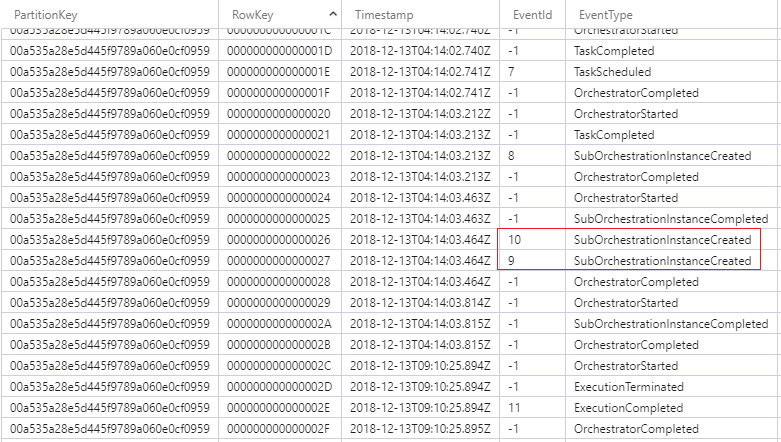
var sendMessageTasks = new List<Task<string>>
{
    context.CallSubOrchestratorAsync<string>("SubOrc_SendLineMessage", (context.InstanceId, messageStatus)),

    context.CallSubOrchestratorAsync<string>("SubOrc_SendFacebookMessage", (context.InstanceId, messageStatus))
};

await Task.WhenAll(sendMessageTasks);
 takuyateraoka
on 26 Dec 2018
takuyateraoka
on 26 Dec 2018
@takuyateraoka yes, this looks like the same problem. It's interesting that your repro is actually simpler.
I'm curious: do you still experience this problem if you change your code like this?
var sendMessageTasks = new List<Task<string>>();
sendMessageTasks.Add(context.CallSubOrchestratorAsync<string>("SubOrc_SendLineMessage", (context.InstanceId, messageStatus)));
sendMessageTasks.Add(context.CallSubOrchestratorAsync<string>("SubOrc_SendFacebookMessage", (context.InstanceId, messageStatus)));

await Task.WhenAll(sendMessageTasks);
I have created a program to confirm this issue.
https://github.com/takuyateraoka/azure-durablefunctions-issue-555
A problem produced the point by the second processing by loop processing.
// for test
var TEST_COUNT = 2;
for (var i = 0; i < TEST_COUNT; i++)
{
    var messageStatus = new MessageStatus();
    messageStatus.MessageId = i.ToString();

    var sendMessageTasks = new List<Task<string>>
    {
        context.CallSubOrchestratorAsync<string>("SubOrc_SendLineMessage", (context.InstanceId, messageStatus)),
        context.CallSubOrchestratorAsync<string>("SubOrc_SendFacebookMessage", (context.InstanceId, messageStatus))
    };

    // wait tasks
    await Task.WhenAll(sendMessageTasks);
}
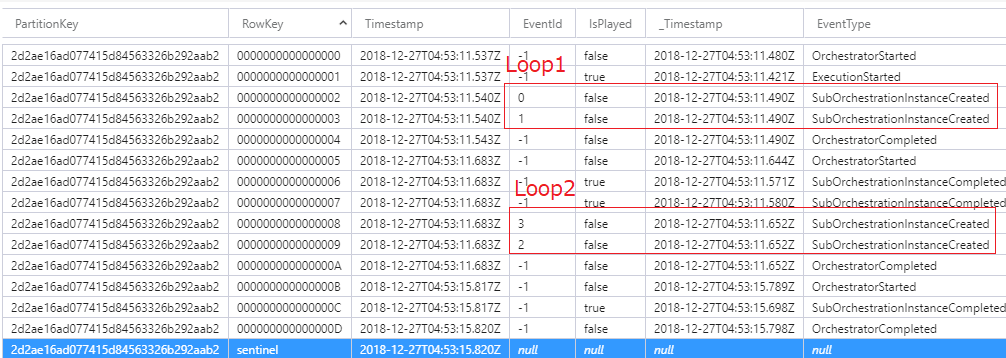
I changed code.
However, the result was the same.
// for test
var TEST_COUNT = 2;
for (var i = 0; i < TEST_COUNT; i++)
{
    var messageStatus = new MessageStatus();
    messageStatus.MessageId = i.ToString();

    var sendMessageTasks = new List<Task<string>>();
    sendMessageTasks.Add(context.CallSubOrchestratorAsync<string>("SubOrc_SendLineMessage", (context.InstanceId, messageStatus)));
    sendMessageTasks.Add(context.CallSubOrchestratorAsync<string>("SubOrc_SendFacebookMessage", (context.InstanceId, messageStatus)));

    // wait tasks
    await Task.WhenAll(sendMessageTasks);
}
https://github.com/takuyateraoka/azure-durablefunctions-issue-555-mod
takuyateraoka
on 27 Dec 2018
Had the same issue, downgraded from 1.7.0 to 1.6.2 an now it works again
 jedjohan
on 30 Dec 2018
jedjohan
on 30 Dec 2018
Hello, I had the same problem. The only difference was that I was using an activitytrigger instead of an orchastrationtrigger:
Here is my code:
        Random r = new Random();
        var tasks = new Task<long>[5];
        for (int i = 0; i < 5; i++)
        {
            int x = r.Next(10000);
            tasks[i] = context.CallActivityAsync<long>("TestActivity1", new Req() { Id = i, Sleep = x });
        }
        await Task.WhenAll(tasks);

        var tasks2 = new Task<long>[5];
        for (int i = 0; i < 5; i++)
        {
            int x = r.Next(10000);
            tasks2[i] = context.CallActivityAsync<long>("TestActivity1", new Req() { Id = i + 10, Sleep = x });
        }
        await Task.WhenAll(tasks2);

Eventid is also in the wrong order for the activities called in the second for-loop.
Downgrading to 1.6.2. solves the issue.
 KKreutzkamp
on 7 Jan 2019
KKreutzkamp
on 7 Jan 2019
Thanks everyone for confirming. Folks (myself included) are back from vacation now and will look at this with priority.
cgillum
on 7 Jan 2019
I was able to reproduce the issue locally in the Durable Task Framework directly. A PR has been opened which includes a fix.
cgillum
on 8 Jan 2019
I have a candidate fix available. Would anyone be willing to verify whether it resolves the issue for them?
The nuget package with the fix can be found on our staging myget feed:
https://www.myget.org/feed/azure-appservice/package/nuget/Microsoft.Azure.WebJobs.Extensions.DurableTask/1.7.1
cgillum
on 11 Jan 2019
I have a candidate fix available. Would anyone be willing to verify whether it resolves the issue for them?
The nuget package with the fix can be found on our staging myget feed:
https://www.myget.org/feed/azure-appservice/package/nuget/Microsoft.Azure.WebJobs.Extensions.DurableTask/1.7.1
I'll try it out - hopefully tomorrow (Friday) - and report back.
ghills
on 11 Jan 2019
@cgillum I have confirmed that with 1.7.1 the fan-out, fan-in scenario that caused the problem for me initially in this issue is resolved. Thanks.
ghills
on 11 Jan 2019
Thanks @ghills for confirming. I've pushed the final version of the release to nuget.org: https://github.com/Azure/azure-functions-durable-extension/releases/tag/v1.7.1
cgillum
on 14 Jan 2019
@cgillum v1.7.1 fixed a similar issue for me. Thanks.
 thomas-schreiter
on 15 Jan 2019
thomas-schreiter
on 15 Jan 2019
Related issues
 jakingmsft
·
4Comments
jakingmsft
·
4Comments
 anhhnguyen206
·
3Comments
anhhnguyen206
·
3Comments
 mark-szabo
·
3Comments
mark-szabo
·
3Comments
 YodasMyDad
·
3Comments
YodasMyDad
·
3Comments
 danielearwicker
·
3Comments
danielearwicker
·
3Comments