Azure-functions-durable-extension: How to delete Task Hub
The CI/CD pipeline my team uses sets the task hub name to the build id*. This creates a new hub on each deployment so that in-flight orchestrations don't clash with the new code. Does Durable Functions framework offer an api to delete stale hubs?
Currently, I just don't touch the stale queues and tables, but I don't like that approach. I'm thinking about writing a simple script determines what the stale hubs are, and then deletes the queues ("myhub-control-00", "myhub-workitems") and tables ("myhubInstances", "myhubHistory") of these hubs. The script can run in a timer trigger and run once a night.
* This is combined with swap deployment. Our orchestrations runs for a minutes in most of the cases, so in-flight orchestrations can finish running on the staging slot after the swap.
 thomas-schreiter
All 9 comments
Apologies for the delayed response to this. The short answer is that we currently don't have this functionality, but I think that we should. Given that one of our recommended versioning strategies for side-by-side deployment is to generate a new task hub, it makes sense to make cleaning up stale task hubs easy for users.
We do have Durable-specific commands for the Functions CLI in the works (see azure-functions-core-tools/607) but they a) haven't yet made it into a release and b) only cover deleting the history and instance tables, not the queues.
 kashimiz
on 3 Oct 2018
kashimiz
on 3 Oct 2018
cc @cgillum
kashimiz
on 11 Oct 2018
You could write code which references the Microsoft.Azure.DurableTask.AzureStorage package directly and calls the appropriate cleanup method there. Something like this:
static async Task DeleteTaskHubAsync()
{
    var settings = new AzureStorageOrchestrationServiceSettings
    {
        StorageConnectionString = "<your connection string>",
        TaskHubName = "<your task hub name>",
    };

    var service = new AzureStorageOrchestrationService(settings);
    await service.DeleteAsync();
}
 cgillum
on 11 Oct 2018
cgillum
on 11 Oct 2018
We also now have CLI support for deleting task hubs using the Azure Functions Core Tools. Details here: https://docs.microsoft.com/en-us/azure/azure-functions/durable/durable-functions-instance-management#deleting-a-task-hub
func durable delete-task-hub --task-hub-name UserTest
Thanks, @cgillum. That command works.
Minor feature request: Let the task hub name default to the one in the host.json file if it exists in the current directory.
thomas-schreiter
on 15 Jan 2019
@thomas-schreiter I'm glad the command worked for you.
Regarding this.
Minor feature request: Let the task hub name default to the one in the host.json file if it exists in the current directory.
I thought that was the default behavior. @glennamanns does the delete-task-hub command use the task hub name in the local host.json if the command-line parameter is not provided?
cgillum
on 15 Jan 2019
@cgillum This is correct. It should do this for all durable commands, including delete-task-hub.
@thomas-schreiter If no hub name is provided on the command line, the functions CLI will attempt to find a hub name in host.json. An example v2 host.json:
{
    "version": "2.0",
    "extensions": {
        "http": {
            "routePrefix": ""
        },
        "durableTask": {
            "HubName": "TestingHub"
        }
    }
}
 glennamanns
on 15 Jan 2019
glennamanns
on 15 Jan 2019
Looks like it's a matter of casing. In my host.json, I use hubName, starting with lowercase. When running the command without params, it tries to delete the default name:
%> head -6 host.json
{
  "version": "2.0",
  "extensions": {
    "durableTask": {
      "hubName": "Hub20181220"
    }

%> func durable delete-task-hub
Task hub 'DurableFunctionsHub' successfully deleted.
When changing it to HubName (starting with uppercase), the command works as you described.
I'm using lowercase, because Visual Studio complains that the uppercase version is not allowed by the schema:
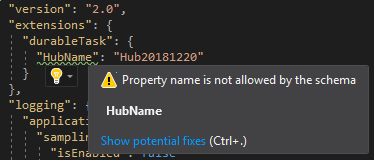
thomas-schreiter
on 16 Jan 2019
You're right, the CLI expects HubName, as per the host.json documentation for Durable Functions. I'm not sure why VS complains about the uppercase.. I'll update the CLI to accept either.
glennamanns
on 16 Jan 2019
Related issues
 SimonLuckenuik
·
3Comments
SimonLuckenuik
·
3Comments
 jakingmsft
·
4Comments
jakingmsft
·
4Comments
 cvanama
·
3Comments
cvanama
·
3Comments
 val-janeiko
·
3Comments
val-janeiko
·
3Comments
 amdeel
·
3Comments
amdeel
·
3Comments
Most helpful comment
We also now have CLI support for deleting task hubs using the Azure Functions Core Tools. Details here: https://docs.microsoft.com/en-us/azure/azure-functions/durable/durable-functions-instance-management#deleting-a-task-hub