Azure-functions-durable-extension: MissingMethodException server side - function app can't start
I just spontaneously started receiving a MissingMethodException in my function app with the following message:
Method not found: 'Microsoft.Azure.WebJobs.Host.TraceWriter Microsoft.Azure.WebJobs.Host.Config.ExtensionConfigContext.get_Trace()'.
Restarting the app does not help, and no deployments have taken place within the last 24 hours. The app is written in CSX and deployed with continuous deployment from VSTS.
As a result of the error, the application is completely down - all requests come back with status 503.
Here is the full stack trace from Application Insights:
{
  "parsedStack": [
    {
      "assembly": "Microsoft.Azure.WebJobs.Extensions.DurableTask, Version=1.2.0.0, Culture=neutral, PublicKeyToken=null",
      "method": "Microsoft.Azure.WebJobs.Extensions.DurableTask.DurableTaskExtension.Microsoft.Azure.WebJobs.Host.Config.IExtensionConfigProvider.Initialize",
      "level": 0,
      "line": 0
    },
    {
      "assembly": "Microsoft.Azure.WebJobs.Host, Version=3.0.0.0, Culture=neutral, PublicKeyToken=null",
      "method": "Microsoft.Azure.WebJobs.Host.Executors.JobHostConfigurationExtensions.InvokeExtensionConfigProviders",
      "level": 1,
      "line": 421,
      "fileName": "C:\\projects\\azure-webjobs-sdk-rqm4t\\src\\Microsoft.Azure.WebJobs.Host\\Executors\\JobHostConfigurationExtensions.cs"
    },
    {
      "assembly": "Microsoft.Azure.WebJobs.Host, Version=3.0.0.0, Culture=neutral, PublicKeyToken=null",
      "method": "Microsoft.Azure.WebJobs.Host.Executors.JobHostConfigurationExtensions.CreateStaticServices",
      "level": 2,
      "line": 112,
      "fileName": "C:\\projects\\azure-webjobs-sdk-rqm4t\\src\\Microsoft.Azure.WebJobs.Host\\Executors\\JobHostConfigurationExtensions.cs"
    },
    {
      "assembly": "Microsoft.Azure.WebJobs.Host, Version=3.0.0.0, Culture=neutral, PublicKeyToken=null",
      "method": "Microsoft.Azure.WebJobs.JobHost.InitializeServices",
      "level": 3,
      "line": 470,
      "fileName": "C:\\projects\\azure-webjobs-sdk-rqm4t\\src\\Microsoft.Azure.WebJobs.Host\\JobHost.cs"
    },
    {
      "assembly": "Microsoft.Azure.WebJobs.Host, Version=3.0.0.0, Culture=neutral, PublicKeyToken=null",
      "method": "Microsoft.Azure.WebJobs.JobHost.get_Services",
      "level": 4,
      "line": 482,
      "fileName": "C:\\projects\\azure-webjobs-sdk-rqm4t\\src\\Microsoft.Azure.WebJobs.Host\\JobHost.cs"
    },
    {
      "assembly": "Microsoft.Azure.WebJobs.Script, Version=2.0.0.0, Culture=neutral, PublicKeyToken=null",
      "method": "Microsoft.Azure.WebJobs.Script.Utility.CreateMetadataProvider",
      "level": 5,
      "line": 372,
      "fileName": "C:\\azure-webjobs-sdk-script\\src\\WebJobs.Script\\Utility.cs"
    },
    {
      "assembly": "Microsoft.Azure.WebJobs.Script, Version=2.0.0.0, Culture=neutral, PublicKeyToken=null",
      "method": "Microsoft.Azure.WebJobs.Script.ScriptHost.LoadBindingExtensions",
      "level": 6,
      "line": 849,
      "fileName": "C:\\azure-webjobs-sdk-script\\src\\WebJobs.Script\\Host\\ScriptHost.cs"
    },
    {
      "assembly": "Microsoft.Azure.WebJobs.Script, Version=2.0.0.0, Culture=neutral, PublicKeyToken=null",
      "method": "Microsoft.Azure.WebJobs.Script.ScriptHost.Initialize",
      "level": 7,
      "line": 303,
      "fileName": "C:\\azure-webjobs-sdk-script\\src\\WebJobs.Script\\Host\\ScriptHost.cs"
    },
    {
      "assembly": "Microsoft.Azure.WebJobs.Script, Version=2.0.0.0, Culture=neutral, PublicKeyToken=null",
      "method": "Microsoft.Azure.WebJobs.Script.ScriptHostManager.RunAndBlock",
      "level": 8,
      "line": 194,
      "fileName": "C:\\azure-webjobs-sdk-script\\src\\WebJobs.Script\\Host\\ScriptHostManager.cs"
    }
  ],
  "message": "Method not found: 'Microsoft.Azure.WebJobs.Host.TraceWriter Microsoft.Azure.WebJobs.Host.Config.ExtensionConfigContext.get_Trace()'.",
  "type": "System.MissingMethodException",
  "id": 10373162,
  "severityLevel": "Error"
}
 ethanroday
All 14 comments
I receive the same error
Method not found: 'Microsoft.Azure.WebJobs.Host.TraceWriter Microsoft.Azure.WebJobs.Host.Config.ExtensionConfigContext.get_Trace()'.
for my existed function which works yesterday. As far as I understood there is a new build v1.2.1-beta3 which was published Thursday, March 29, 2018 (3/29/2018).
Could you fix it as soon as possible
 bastyuchenko
on 30 Mar 2018
bastyuchenko
on 30 Mar 2018
This was caused by a recent update to the Functions v2 runtime in Azure (note that Functions v1 apps were not affected). A fix was published a few minutes ago. See this announcement for details: https://github.com/Azure/app-service-announcements/issues/94
 cgillum
on 30 Mar 2018
cgillum
on 30 Mar 2018
I just created a new function app after your message, switch version to beta and created Orchestration Start function - but received the same error
bastyuchenko
on 30 Mar 2018
Are you talking about the Azure Portal? The portal templates haven't been updated yet. I mentioned this in the release notes, but the portal templates are being updated tomorrow morning (PDT). Sorry for not making that more clear.
cgillum
on 30 Mar 2018
@cgillum I still have the same error on Azure Portal. When are you going to fix it?
bastyuchenko
on 30 Mar 2018
@soninaren can you comment?
cgillum
on 30 Mar 2018
@bastyuchenko The portal should be fixed now. A new function app should work in portal.
Also follow the steps here to fix your existing app.
https://github.com/Azure/app-service-announcements/issues/94#issuecomment-376647094
 soninaren
on 30 Mar 2018
soninaren
on 30 Mar 2018
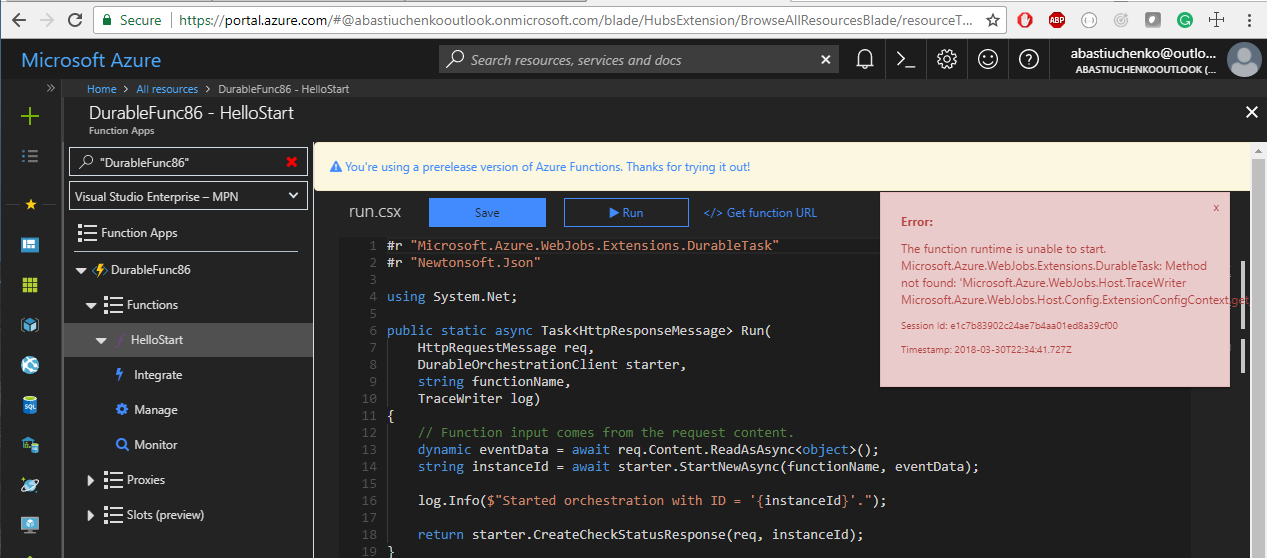
@soninaren @cgillum I've just created new function app and created a Durable Function Http Started. And what can I see?
bastyuchenko
on 31 Mar 2018
@bastyuchenko, I just checked. Looks like the portal update will go out on Monday. Apologize for the mix up.
The following steps should still fix the issue, and bring your app to the latest version
- Stop the function app.
- Access kudu console through Platform Features -> Advanced Tools -> Debug Console (cmd)
- Navigate to d:homesitewwwroot
- Delete the bin directory
- Edit extensions.csproj
- Update Microsoft.Azure.WebJobs.Extensions.DurableTask version to 1.2.1-beta3
- Run
dotnet.exe build "extensions.csproj" -o bin --no-incremental --packages "D:\home\.nuget" - Start the function app
soninaren
on 31 Mar 2018
@soninaren I followed those steps and it still doesn't work - I receive a new exception:
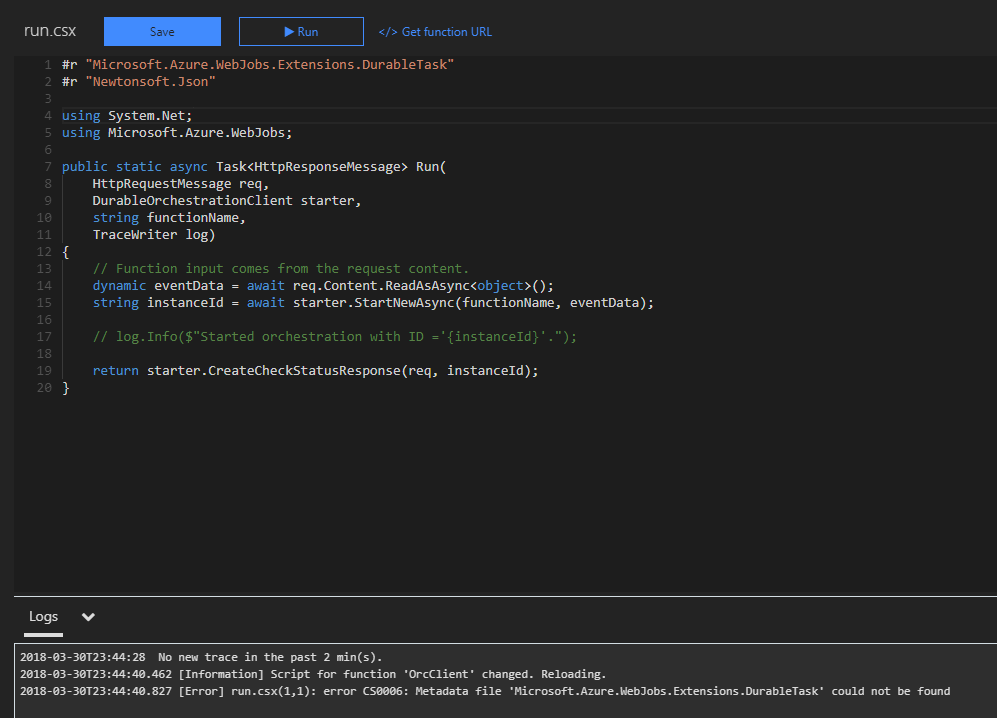
this is my extensions.csproj file
<Project Sdk="Microsoft.NET.Sdk">
  <PropertyGroup>
    <TargetFramework>netstandard2.0</TargetFramework>
    <WarningsAsErrors />
  </PropertyGroup>
  <ItemGroup>
    <PackageReference Include="Microsoft.Azure.WebJobs.Extensions.DurableTask" Version="1.2.1-beta3" />
    <PackageReference Include="Microsoft.Azure.WebJobs.Script.ExtensionsMetadataGenerator" Version="1.0.0-beta2" />
  </ItemGroup>
</Project>
I checked and I have file D:homesitewwwrootbinDebugnetstandard2.0Microsoft.Azure.WebJobs.Extensions.DurableTask.dll
bastyuchenko
on 31 Mar 2018
@cgillum @soninaren It's very weird. I had a workable version a few days ago. Once I tried to run my well-working function again - it was already broken. How is it possible if I haven't changed anything and still had v1.2.0-beta3? Do you just replace the library without any testing and without any version increasing? And finally v1.2.0-beta3 and v1.2.1-beta3 - both don't work and I lost a couple of days to found out what was broken? - still no result.
bastyuchenko
on 31 Mar 2018
The issue is that a functions v2 runtime update was deployed to production that contained breaking changes for all extensions, including this one. Functions v2 is still in an unstable preview, so breaking changes should be expected from time to time until things stabilize.
There are a few ways you can work around this:
- Don't use Functions v2. Use Functions v1.x instead, which is very stable. Durable Functions works great on v1.
- Continue using Functions v2.0, but develop locally using VS Code and then deploy to Azure. You can choose which version of the extension you want using our CLI tools and then do a publish.
- Revert to an older version of the Functions v2.0 runtime. You can do so by adding this app setting: One more note: if you are stuck and need to get a v2 app back up and running asap, , you can set
FUNCTIONS_EXTENSION_VERSION=2.0.11587-alpha. - Wait until Monday, when the Azure Portal templates will be fixed to install the latest version.
If you're interested in option 1 or option 2, then see the installation instructions for more information.
cgillum
on 31 Mar 2018
Looks like the publish command wasn't creating the extensions.json. I have fixed the instructions. Run the following command for step 7.
dotnet.exe build "extensions.csproj" -o bin --no-incremental --packages "D:\home\.nuget"
soninaren
on 31 Mar 2018
@soninaren Thank you a lot! After this command, my function app works well. Thank you for the help and the fast answer.
bastyuchenko
on 31 Mar 2018
Related issues
 SimonLuckenuik
·
3Comments
SimonLuckenuik
·
3Comments
 anhhnguyen206
·
3Comments
anhhnguyen206
·
3Comments
 shibayan
·
4Comments
shibayan
·
4Comments
 SayusiAndo
·
3Comments
ethanroday
·
4Comments
SayusiAndo
·
3Comments
ethanroday
·
4Comments