Azure-functions-durable-extension: Timeout exception using beta3
We seem to have long durations and sometimes a timeout exception when creating an instance of an orchestration.
Is this a know issue?
We upgraded from beta2 as we were experiencing issues with synchronisation of state using a singleton instance.
We are hosting using a service plan.
Any tips you can provide?
 hoffmanic
All 31 comments
Hi @hoffmanic, the beta3 StartNewAsync implementation will block until the first await call in your orchestrator function. The timeout is 30 seconds. Can you tell me more about what the first part of your orchestrator is doing? Even better if you can share some code.
 cgillum
on 6 Mar 2018
cgillum
on 6 Mar 2018
I have exactly the same problem, the StartNewAsync is started from another QueueTrigger function so it will retry again. The second time (after an iisreset) it works.
The contents of my orchestrator functions is:
var retryPolicy = new RetryOptions(TimeSpan.FromSeconds(5), 10) { BackoffCoefficient = 1.5 };`
var message = refinementContext.GetInput<RefinementMessage>();`
await refinementContext.CallActivityWithRetryAsync(nameof(UpdateFileStatus), retryPolicy, new UpdateStatusMessage(){ FileId= message.FileId, Status = FileStatus.Refining, InstanceId = refinementContext.InstanceId });
So nothing that should take more than 30 seconds before the first await
 mlankamp
on 6 Mar 2018
mlankamp
on 6 Mar 2018
Thanks for this additional info. That's interesting that it the problem only happened on the first run but the second one succeeded. I'll try and see if I can reproduce this using a similar orchestration.
_BTW, I edited your response to improve the code formatting._
@gled4er You may want to take a look at this as well.
cgillum
on 6 Mar 2018
@cgillum Yes, I will and I will share here.
 gled4er
on 7 Mar 2018
gled4er
on 7 Mar 2018
@mlankamp Thank you for the additional information.
@hoffmanic @mlankamp Do you get the exceptions when you run the code in Azure or locally?
@mlankamp May I ask you to review the code snippet below and compare with your Orchestration Client, Orchestrator and Activity function. The following code works without any issues for me locally but I guess I am missing something.
Update: I tested the code in Azure as well and it works without any issues.
Update 2: I tested the following code on Azure once more this time on dedicated Service plan as @hoffmanic suggested and I didn't find any issue. I will look into the code @hoffmanic 's orchestrator next.
@mlankamp Please let me know what can be the difference with your solution and the code below and I will reproduce it:
using System;
using System.Threading.Tasks;
using Microsoft.Azure.WebJobs;
using Microsoft.Azure.WebJobs.Host;

namespace VSSample
{
    public static class QueueProcessorStart
    {
        [FunctionName("QueueTrigger")]
        public static async Task Run(
            [QueueTrigger("myqueue-items", Connection = "AzureWebJobsStorage")] RefinementMessage myQueueItem,
            [OrchestrationClient] DurableOrchestrationClient starter,
            TraceWriter log)
        {
            string instanceId = await starter.StartNewAsync("E7_QueueProcessor", myQueueItem);
            log.Info($"Started orchestration with ID = '{instanceId}'.");
        }
    }

    public static class QueueProcessor
    {
        public const string UpdateFileStatus = "UpdateFileStatus";

        [FunctionName("E7_QueueProcessor")]
        public static async Task<string> Run(
            [OrchestrationTrigger] DurableOrchestrationContextBase context, TraceWriter log)
        {
            var retryPolicy = new RetryOptions(TimeSpan.FromSeconds(5), 10) { BackoffCoefficient = 1.5 };
            var message = context.GetInput<RefinementMessage>();
            var result = await context.CallActivityWithRetryAsync<string>(nameof(UpdateFileStatus), retryPolicy, new UpdateStatusMessage() { FileId = message.FileId, Status = FileStatus.Refining, InstanceId = context.InstanceId });
            log.Info($"The result is {result}");
            return result;
        }

        [FunctionName("UpdateFileStatus")]
        public static async Task<string> UpdateFileStatusFunc([ActivityTrigger] UpdateStatusMessage updateStatusMessage)
        {
            await Task.Delay(500);
            return $"File Id {updateStatusMessage.FileId} processed.";
        }
    }

    public class RefinementMessage
    {
        public string FileId { get; set; }
    }

    public enum FileStatus
    {
        Refining
    }

    public class UpdateStatusMessage
    {
        public string FileId { get; set; }
        public FileStatus Status { get; set; }
        public string InstanceId { get; set; }
    }
}
Thank you!
gled4er
on 7 Mar 2018
@cgillum are you using a consumption plan? we are using a service plan.
Below is out orchestrator:
Lead leadData = context.GetInput<Lead>();

            DateTime deadline = context.CurrentUtcDateTime.Add(TimeSpan.FromMinutes(AppSettings.TimeoutInMinutes));

            using (var cts = new CancellationTokenSource())
            {
                Task timeoutTask = context.CreateTimer(deadline, cts.Token);
                Task<Lead> updatedLeadTask = context.WaitForExternalEvent<Lead>(EventNames.LeadUpdated);

                Task winner = await Task.WhenAny(updatedLeadTask, timeoutTask);

                // New portion of lead information arrived
                if (winner == updatedLeadTask)
                {
                    // Retain tracking code
                    var updatedLeadData = await updatedLeadTask;

                    leadData = updatedLeadData;

                    cts.Cancel();

                    // We received all needed lead information before timeout
                    if (leadData.IsComplete())
                    {
                        log.Info($"Lead is complete.");

                        await context.CallActivityAsync(FunctionNames.Process, leadData);


                        User user = User.WithKey(leadData.CorrelationId);

                        if (Flags.Client.BoolVariation("lead-conversion", user))
                        {
                            await context.WaitForExternalEvent<string>(EventNames.Foo);
                            await context.CallActivityAsync(FunctionNames.Bar, leadData.CorrelationId);
                        }

                        if (Flags.Client.BoolVariation("do-stuff", user))
                        {
                            await context.WaitForExternalEvent<bool>(EventNames.Tom);
                            await context.CallActivityAsync(FunctionNames.Harry, leadData.CorrelationId);

                            await context.CallActivityAsync(FunctionNames.NotifyUI, new Workflow { CorrelationId = leadData.CorrelationId, Approval = "Approve" });
                        }
                    }
                    else
                    {
                        context.ContinueAsNew(leadData);
                    }
                }
                else
                {
                    // Timeout case
                    cts.Cancel();

                    await context.CallActivityAsync(FunctionNames.SendToMe, leadData);
                }
            }
@hoffmanic Thank you very much for the code.
I will try it and let you know about my experience.
If you are asking about the code snippet I provided above, yes, I was using Consumption plan for the tests in Azure.
I will perform my tests on Service plan as well and I will share here.
Thank you!
Kanio
gled4er
on 7 Mar 2018
@hoffmanic Can you share the configuration of your service plan as well so I can have similar environment to yours?
gled4er
on 7 Mar 2018
Hello @hoffmanic ,
I created the sample code below that add very basic implementations for the objects and functions you shared in your snippet. I run it locally and in Azure on Service Plan, S1 tier and I don't see any issues for now. My assumption is that my basic implementation is picking a happy path and probably your problem is occuring in another path.
However, if I understand correctly your problem is with the start of the orchestration. I wasn't able to reproduce the timeout you are getting. Please let me know if you see some major difference in my implementation and your code and I will work on reproducing the error.
For Orchestrator client I am using the following code:
[FunctionName("HttpStart")]
        public static async Task<HttpResponseMessage> Run(
            [HttpTrigger(AuthorizationLevel.Function, methods: "post", Route = "orchestrators/{functionName}")] HttpRequestMessage req,
            [OrchestrationClient] DurableOrchestrationClient starter,
            string functionName,
            TraceWriter log)
        {
            // Function input comes from the request content.
            dynamic eventData = await req.Content.ReadAsAsync<object>();
            string instanceId = await starter.StartNewAsync(functionName, eventData);

            log.Info($"Started orchestration with ID = '{instanceId}'.");

            var res = starter.CreateCheckStatusResponse(req, instanceId);
            res.Headers.RetryAfter = new RetryConditionHeaderValue(TimeSpan.FromSeconds(10));
            return res;
        }
And the Orchestrator, Activity and helper classes code is:
using System;
using System.Threading;
using System.Threading.Tasks;
using Microsoft.Azure.WebJobs;
using Microsoft.Azure.WebJobs.Host;

namespace VSSample
{
    public static class LeadOrechestrator
    {
        private const int TimeoutInMinutes = 5;
        private const string LeadUpdated = "LeadUpdated";

        [FunctionName("LeadOrechestrator")]
        public static async Task Run(
            [OrchestrationTrigger] DurableOrchestrationContextBase context,
            TraceWriter log)
        {
            Lead leadData = context.GetInput<Lead>();

            DateTime deadline = context.CurrentUtcDateTime.Add(TimeSpan.FromMinutes(TimeoutInMinutes));

            using (var cts = new CancellationTokenSource())
            {
                Task timeoutTask = context.CreateTimer(deadline, cts.Token);
                Task<Lead> updatedLeadTask = context.WaitForExternalEvent<Lead>(LeadUpdated);

                Task winner = await Task.WhenAny(updatedLeadTask, timeoutTask);

                // New portion of lead information arrived
                if (winner == updatedLeadTask)
                {
                    // Retain tracking code
                    var updatedLeadData = await updatedLeadTask;

                    leadData = updatedLeadData;

                    cts.Cancel();

                    // We received all needed lead information before timeout
                    if (leadData.IsComplete())
                    {
                        log.Info($"Lead is complete.");

                        await context.CallActivityAsync("Process", leadData);
                        User user = User.WithKey(leadData.CorrelationId);

                        if (Client.BoolVariation("lead-conversion", user))
                        {
                            log.Info("lead-conversion");
                            await context.WaitForExternalEvent<string>("Foo");
                            log.Info("foo event");
                            await context.CallActivityAsync("Bar", leadData.CorrelationId);
                            log.Info("bar activity");
                        }

                        if (Client.BoolVariation("do-stuff", user))
                        {
                            log.Info("do-stuff");
                            await context.WaitForExternalEvent<bool>("Tom");
                            log.Info("tom event");
                            await context.CallActivityAsync("Harry", leadData.CorrelationId);
                            log.Info("Harry activity");

                            await context.CallActivityAsync(
                                "NotifyUI",
                                new Workflow {CorrelationId = leadData.CorrelationId, Approval = "Approve"} );
                            log.Info("NotifyUI activity");
                        }
                    }
                    else
                    {
                        log.Info("ContinueAsNew");
                        context.ContinueAsNew(leadData);
                    }
                }
                else
                {
                    // Timeout case
                    cts.Cancel();
                    log.Info("cts.Cance");
                    await context.CallActivityAsync("SendToMe", leadData);
                    log.Info("SendToMe");
                }
            }
        }

        [FunctionName("Process")]
        public static async Task ProcessFunc([ActivityTrigger]Lead lead)
        {
            await Task.Delay(500);
        }

        [FunctionName("Bar")]
        public static async Task BarFunc([ActivityTrigger] string correlationId)
        {
            await Task.Delay(500);
        }

        [FunctionName("Harry")]
        public static async Task HarryFunc([ActivityTrigger] string correlationId)
        {
            await Task.Delay(500);
        }

        [FunctionName("SendToMe")]
        public static async Task SendToMeFunc([ActivityTrigger] Lead lead)
        {
            await Task.Delay(500);
        }

        [FunctionName("NotifyUI")]
        public static async Task NotifyUIFunc([ActivityTrigger] Workflow workflow)
        {
            await Task.Delay(500);
        }
    }

    public class Lead
    {
        public string CorrelationId { get; set; }

        public bool IsComplete()
        {
            return true;
        }
    }

    public class User
    {
        public static User WithKey(string correlationId)
        {
            return new User();
        }
    }

    public class Workflow
    {
        public string CorrelationId { get; set; }
        public string Approval { get; set; }
    }

    public class Client
    {
        public static bool BoolVariation(string marker, User user)
        {
            return true;
        }
    }
}
When executing in Azure on Service Plan I get relatively quickly the standard HTTP output containing the sendEventPostUri and statusQueryGetUri endpoints. Then, the final history after calling the status endpoint with showHistory set to true is:
{
    "runtimeStatus": "Completed",
    "input": null,
    "output": null,
    "createdTime": "2018-03-07T10:59:07Z",
    "lastUpdatedTime": "2018-03-07T11:02:36Z",
    "historyEvents": [
        {
            "EventType": "ExecutionStarted",
            "Timestamp": "2018-03-07T10:59:07.6421364Z",
            "FunctionName": "LeadOrechestrator"
        },
        {
            "EventType": "TimerCreated",
            "FireAt": "2018-03-07T11:04:14.0072629Z",
            "Timestamp": "2018-03-07T10:59:14.0234843Z"
        },
        {
            "EventType": "EventRaised",
            "Name": "LeadUpdated",
            "Timestamp": "2018-03-07T11:00:42.7176579Z"
        },
        {
            "EventType": "TaskCompleted",
            "Timestamp": "2018-03-07T11:00:46.020047Z",
            "ScheduledTime": "2018-03-07T11:00:45.4594207Z",
            "FunctionName": "Process"
        },
        {
            "EventType": "EventRaised",
            "Name": "Foo",
            "Timestamp": "2018-03-07T11:01:59.7625757Z"
        },
        {
            "EventType": "TaskCompleted",
            "Timestamp": "2018-03-07T11:02:02.0920919Z",
            "ScheduledTime": "2018-03-07T11:02:01.5452023Z",
            "FunctionName": "Bar"
        },
        {
            "EventType": "EventRaised",
            "Name": "Tom",
            "Timestamp": "2018-03-07T11:02:34.4340982Z"
        },
        {
            "EventType": "TaskCompleted",
            "Timestamp": "2018-03-07T11:02:35.3783327Z",
            "ScheduledTime": "2018-03-07T11:02:34.8434402Z",
            "FunctionName": "Harry"
        },
        {
            "EventType": "TaskCompleted",
            "Timestamp": "2018-03-07T11:02:35.9807502Z",
            "ScheduledTime": "2018-03-07T11:02:35.4408281Z",
            "FunctionName": "NotifyUI"
        },
        {
            "EventType": "ExecutionCompleted",
            "OrchestrationStatus": "Completed",
            "Timestamp": "2018-03-07T11:02:36.0283187Z"
        }
    ]
}
When you said in the beginning that you have long durations, what did you mean exactly? Are these duration between calling the Durable Function? If so, can you share the usual time between the executions of the Durable Functions?
Will you be able to provide me with sample steps in order to reproduce on my side the issue?
Thank you!
gled4er
on 7 Mar 2018
@gled4er we are using an S1 plan too.
hoffmanic
on 7 Mar 2018
@gled4er I’ll have a look at our application insights this morning and post some results here. Not sure if this is directly tied to the start or if this is just an issue the progresses over the course of a day.
We deploy a lot to these environments? Would that have an impact?
@gled4er and @cgillum do you have access to logs or able to access our dev/test subscription through a support channel?
hoffmanic
on 7 Mar 2018
@gled4er will post the start code soon
hoffmanic
on 7 Mar 2018
@hoffmanic Thank you for your updates. I don't have the rights to access your logs or dev/test subscriptions. So I will be focusing on the code you are providing here.
gled4er
on 8 Mar 2018
@gled4er the start code.
When we breakpoint the code we can see the delay is in the starter.StartNewAsync call.
log.Info($"{FunctionNames.CreateLead} function was triggered");

            // Get request body
            var data = await req.Content.ReadAsStringAsync();
            TrackingCode trackingCode = JsonConvert.DeserializeObject<TrackingCode>(data);

            // Start new instance of e2e lead generation
            var correlationId = Guid.NewGuid().ToString();
            await starter.StartNewAsync(FunctionNames.Orchestration, correlationId, new Lead { CorrelationId = correlationId, TrackingCode = trackingCode });

            log.Info($"Started lead orchestration with correlation ID = '{correlationId}'.");

            return req.CreateResponse(HttpStatusCode.OK, correlationId);
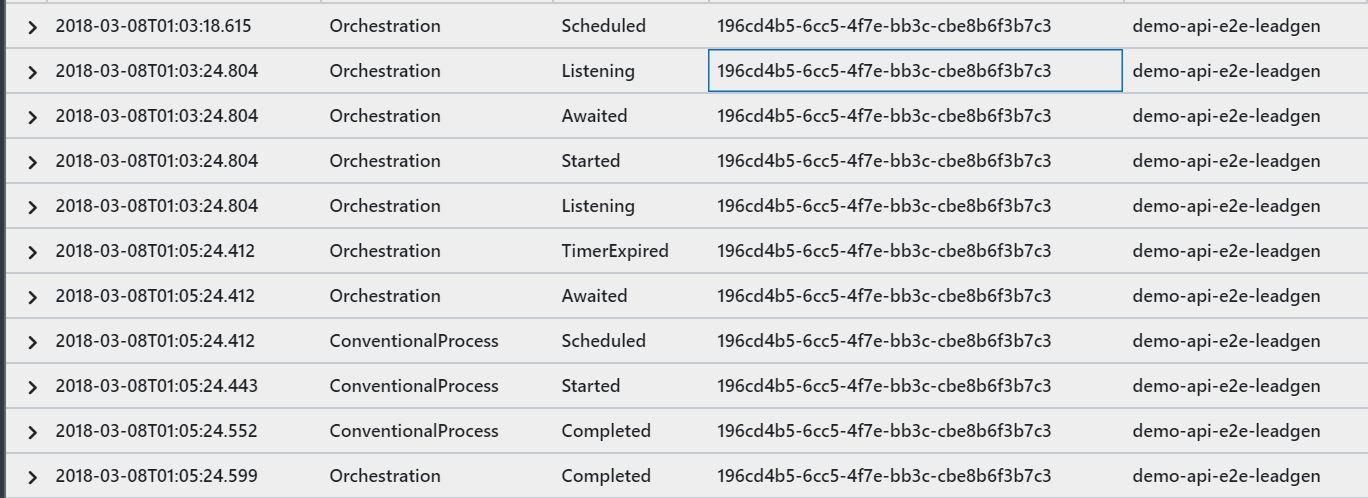
This is once of the stuck orchestrations (not a timeout) but a delay.
hoffmanic
on 8 Mar 2018
it's released after the Awaited call.
hoffmanic
on 8 Mar 2018
Hello @hoffmanic ,
Thank you for the new code.
I will look into it.
May I ask you why are you creating the GUID instead waiting for StartNewAsync to provide it to you?
This is the only difference I see compare to my code.
Thank you!
gled4er
on 8 Mar 2018
@hoffmanic Can you share more about the delay? It is expected to have a delay because we are waiting actually the orchestration to start compared with the previous behavior when the method was returning a lot faster but without any guarantee that the orchestration is running.
I tested on Azure with S1 Service Plan with a slightly modified version of the Orchestration client and the same Orchestrator code I shared above but I am not able to reproduce the issue.
This is the Orchestration client I am using:
public static class HttpStart
    {
        [FunctionName("HttpStart")]
        public static async Task<HttpResponseMessage> Run(
            [HttpTrigger(AuthorizationLevel.Function, methods: "post", Route = "orchestrators/{functionName}")] HttpRequestMessage req,
            [OrchestrationClient] DurableOrchestrationClient starter,
            string functionName,
            TraceWriter log)
        {
            var instanceId = Guid.NewGuid().ToString();
            await starter.StartNewAsync(functionName, instanceId, new Lead { CorrelationId = instanceId} );

            log.Info($"Started orchestration with ID = '{instanceId}'.");

            var res = starter.CreateCheckStatusResponse(req, instanceId);
            res.Headers.RetryAfter = new RetryConditionHeaderValue(TimeSpan.FromSeconds(10));
            return res;
        }
    }
During my testing on Azure I can see the delay going up to maximum 5 seconds if the functions hasn't be called recently and 450 ms otherwise.
From the screenshot you shared I see the expected behavior. You are facing 6 seconds delay which is below the 30 seconds we set as maximum.
How often do you get the timeout exceptions?
Do you get an exception with this exception message - "Timeout expired while waiting for the new instance to start. This can happen if the task hub is overloaded or if the orchestration host failed to process the start message. Please check the orchestration logs to see whether an internal failure may have occurred. Instance ID: {instance.InstanceId}"?
Thank you!
gled4er
on 8 Mar 2018
Hello @hoffmanic and @mlankamp ,
Thank you very much for providing a lot additional information during the research for this issue.
I wanted to follow up with you and get your opinion and current status based on the information I provided.
Do you still think that issues you are having are caused by the new implementation of StartNewAsync ?
If so, let's continue to trace the problem together.
Thank you!
gled4er
on 12 Mar 2018
@gled4er I'm thinking we will need an opt-out for this behavior. I'm doing some perf/scale testing and I'm hitting this timeout exception quite frequently because my control queue is getting really backed up (which is expected). That results in a lot of failures.
cgillum
on 12 Mar 2018
@cgillum Great! I will work on that. Thank you!
gled4er
on 13 Mar 2018
@gled4er I already have a fix ready to unblock my scenario, so I'll go ahead and take this work item.
cgillum
on 13 Mar 2018
Hi @hoffmanic and @mlankamp. I've published an updated beta3 package which allows you to disable the timeout behavior. Can you give it a try?
You can find the updated nuget package in our development feed here: https://www.myget.org/feed/azure-appservice/package/nuget/Microsoft.Azure.WebJobs.Extensions.DurableTask/1.2.1-beta3
With this package, you can disable the timeouts by updating your host.json as follows:
{
  "durableTask": {
    "disableStartInstancePolling": true
  }
}
Give it a try and let me know if this resolves your issue.
cgillum
on 16 Mar 2018
Just noting that this will be fixed by default with this work item, currently assigned to @gled4er: https://github.com/Azure/azure-functions-durable-extension/issues/183
cgillum
on 22 Mar 2018
I'll give it a try. I could reproduce this issue when using a httptrigger and a clean storage account (second attempt is always succesfull).
mlankamp
on 23 Mar 2018
A workaround for this issue has been included in the Beta 3.1 release (v1.2.1-beta3). A full fix will come in the RC release, which is scheduled for the end of next week.
cgillum
on 30 Mar 2018
Thanks for all the useful information in this thread.
I'm on v1.2.2-beta3 and am getting this error almost constantly. Is there further work that needs to be done on the issue?
 michaeldaw
on 15 Apr 2018
michaeldaw
on 15 Apr 2018
We're releasing an update tomorrow which should fix this problem without the need for any workarounds. Stay tuned.
cgillum
on 16 Apr 2018
That will be great. Thank you for the update.
michaeldaw
on 16 Apr 2018
The latest release is out. Let us know if it resolves the issue: https://github.com/Azure/azure-functions-durable-extension/releases/tag/v1.3.0-rc
cgillum
on 16 Apr 2018
Thanks for the update, Chris.
I re-introduced durable functions into the app I'd been working on. With this update, it's working much, much better. In fact I'm astonished with how well it works.
Thanks again and great work to the team.
michaeldaw
on 16 Apr 2018
Related issues
cgillum
·
3Comments
 SimonLuckenuik
·
3Comments
SimonLuckenuik
·
3Comments
 YodasMyDad
·
3Comments
YodasMyDad
·
3Comments
 SayusiAndo
·
3Comments
SayusiAndo
·
3Comments
 cvanama
·
3Comments
cvanama
·
3Comments
Most helpful comment
Thanks for the update, Chris.
I re-introduced durable functions into the app I'd been working on. With this update, it's working much, much better. In fact I'm astonished with how well it works.
Thanks again and great work to the team.